camfx
What camfx is
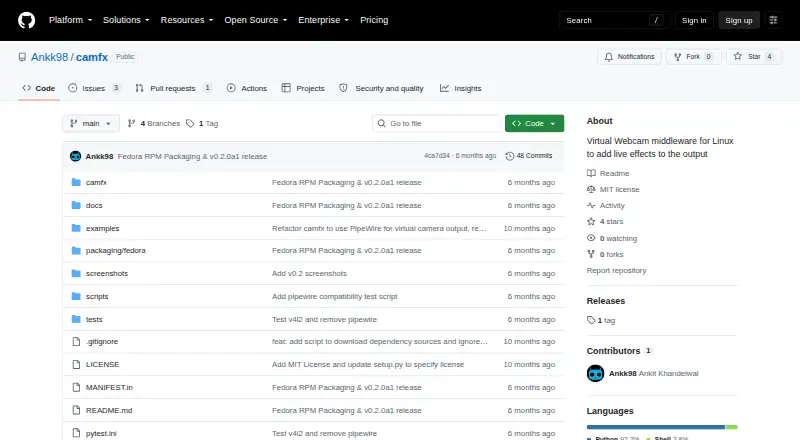
camfx is free Linux software that applies live effects to camera output and sends the result to a V4L2 virtual camera through v4l2loopback and FFmpeg. Effects include background blur or replacement, brightness adjustment, skin smoothing, face-centered framing and experimental eye warping. Users can manage effects through a command-line interface or GTK GUI, combine them, and switch them live through D-Bus.
MediaPipe Tasks supplies segmentation and landmark models; camfx initializes them when needed and caches them locally. Setup requires FFmpeg, the v4l2loopback kernel module, Python 3.12 and a camera exposed as /dev/video*. The project provides installation instructions for a Python virtual environment and a Fedora-focused alpha RPM. That alpha release requires manual v4l2loopback configuration, with packaging automation and split packages deferred. Performance varies with webcam formats, USB bandwidth and the use of machine-learning effects; some webcams cannot maintain 30 FPS at 1080p. camfx is MIT-licensed and intended for Linux users seeking effects through virtual webcam output.
Who it suits
camfx suits Linux users who want to add effects to a camera feed and route it through a virtual webcam. It may fit users comfortable with its listed system prerequisites and, for the alpha RPM, manual v4l2loopback configuration.
What it does well
- Free software under the MIT License
- Offers background blur and replacement
- Manage effects with a CLI or GTK GUI
- Switch chained effects live through D-Bus
- Caches MediaPipe models locally
What to know first
- Requires Python 3.12, FFmpeg and v4l2loopback
- Alpha RPM requires manual v4l2loopback configuration
- Some webcams cannot sustain 30 FPS at 1080p
Limits
The Fedora-focused alpha RPM requires manual v4l2loopback configuration; packaging automation and split packages are deferred. Performance depends on webcam formats, USB bandwidth and machine-learning effects, and some webcams cannot sustain 30 FPS at 1080p.
Plans
| Plan | Billed and limits | Price |
|---|---|---|
| camfx | MIT-licensed software · Linux virtual webcam middleware | Free |
As github.com lists them, read 9 Oct 2026. The maker's own page has the final word.
Getting started
- Open the camfx GitHub project page
- Install FFmpeg, the v4l2loopback kernel module and Python 3.12
- Connect a camera exposed as /dev/video*
- Follow the project's Python virtual environment installation instructions or use its Fedora-focused alpha RPM
- Configure v4l2loopback manually if using the alpha release
Verdict
Choose camfx if you use Linux and want effects routed through a virtual camera, with both command-line and GTK controls. Its free MIT license and live effect switching are useful; look elsewhere if you need an installation without the listed prerequisites or manual alpha-release configuration.
Questions
How much does camfx cost?
The listed plan is free.
Which operating system does it support?
camfx is for Linux.
What effects does it offer?
Listed effects include background blur and replacement, brightness, skin smoothing, face-centered framing and experimental eye warping.
How can I control effects?
The project includes a command-line interface and a GTK GUI. Effects can be chained and switched live through D-Bus.
What are the installation options?
The project documents installation from a Python virtual environment and offers a Fedora-focused alpha RPM release.
What license does camfx use?
The software is provided under the MIT License.
Facts from camfx's own pages
- Audience
- The project is for Linux users who want to apply camera effects through a virtual webcam output. · github.com, 9 Oct 2026
- Computer vision
- MediaPipe Tasks provides segmentation and landmark models, which are initialized lazily and cached locally. · github.com, 9 Oct 2026
- Controls
- The project includes a command-line interface and a GTK GUI for managing effects. · github.com, 9 Oct 2026
- Dependencies
- The README lists FFmpeg, the v4l2loopback kernel module, Python 3.12, and a camera exposed as /dev/video* as prerequisites. · github.com, 9 Oct 2026
- Distribution
- The project offers a Fedora-focused alpha RPM release, and its README also documents installation from a Python virtual environment. · github.com, 9 Oct 2026
- Effect control
- Effects can be chained and switched live through D-Bus. · github.com, 9 Oct 2026
- Effects
- Listed effects include background blur and replacement, brightness, skin smoothing, face-centered framing, and experimental eye warping. · github.com, 9 Oct 2026
- License
- The repository provides the software under the MIT License. · github.com, 9 Oct 2026
- Output
- It outputs to a V4L2 virtual camera using v4l2loopback and FFmpeg. · github.com, 9 Oct 2026
- Performance
- Achievable frame rate depends on webcam formats, USB bandwidth, and whether machine-learning effects are enabled; some webcams cannot sustain 30 FPS at 1080p. · github.com, 9 Oct 2026
- Purpose
- camfx is virtual webcam middleware for Linux that adds live effects to camera output. · github.com, 9 Oct 2026
- Release limitation
- The alpha release requires users to configure v4l2loopback manually, and the release notes say packaging automation and split packages are deferred. · github.com, 9 Oct 2026
Where camfx stands on Freedom251
- Webcam Software#10 of 41
- Virtual Camera Software#10 of 34
- JSON Tools#9 of 29