Freedom251 › Live TV streaming services
Shed
What Shed is
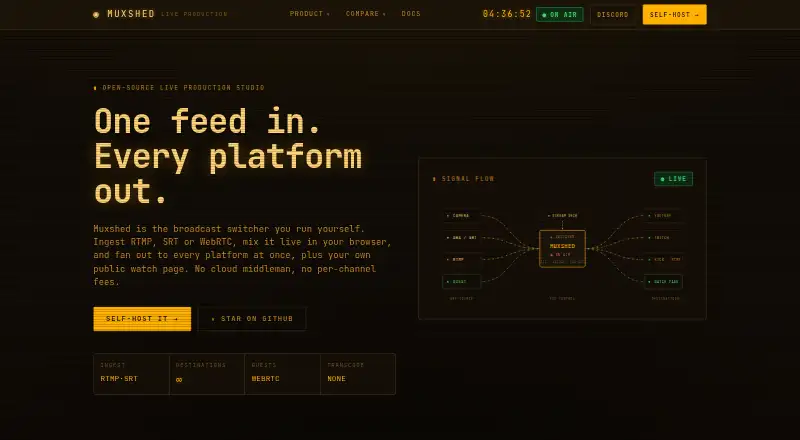
Shed, also known as Muxshed, is a self-hosted live production studio for mixing video and sending a program to multiple destinations. It accepts RTMP, SRT, or WebRTC input and provides a browser-based switcher with scenes, multiple composited layers, cuts, and frame-accurate stinger transitions. Remote guests can join through a browser invite link over WebRTC without an app or account. The compositor supports image overlays and lower thirds, while scheduled premieres, sequential video playlists, and 24/7 channel loops cover broadcast scheduling. Streams can go simultaneously to YouTube, Twitch, Kick, Facebook, and custom RTMP or RTMPS endpoints. Each instance can also provide an unlisted HLS watch page with custom branding and an optional viewer password. The switcher can be controlled with Stream Deck or Bitfocus Companion. Shed is open source under AGPL-3.0 and runs as a Rust binary with ffmpeg on Docker, Podman, Unraid, Proxmox, or Linux. Self-hosting is free, with unlimited destinations and no per-channel fees. The maker says it works offline without accounts or telemetry.
Who it suits
Shed suits broadcasters who want to run a live production studio on their own Docker, Podman, Unraid, Proxmox, or Linux system and distribute to several destinations. It also fits productions that need browser-based remote guests, scheduled video playback, or a branded unlisted watch page.
What it does well
- Free self-hosting includes unlimited destinations and no per-channel fees.
- Accepts RTMP, SRT, and WebRTC input.
- Browser-based remote guests need no app or account.
- Can stream to multiple named and custom endpoints at once.
- Open source under the AGPL-3.0 license.
- Maker says it works offline without accounts or telemetry.
What to know first
- Self-hosting requires ffmpeg.
- Source builds specify Rust 1.88+ and Node.js 20+.
- Managed hosting is described as coming soon.
- Support package pricing is custom.
Limits
The self-hosted plan is free and includes unlimited destinations with no per-channel fees. Running it requires ffmpeg; source builds specify Rust 1.88+ and Node.js 20+.
Plans
| Plan | Billed and limits | Price |
|---|---|---|
| Self-hosted | Free to self-host · unlimited destinations · no per-channel fees | Free |
As muxshed.com lists them, read 9 Oct 2026. The maker's own page has the final word.
Getting started
- Visit https://muxshed.com/ for the project and documentation.
- Choose a supported deployment route: Docker, Podman, Unraid, Proxmox, or a Linux box.
- Install ffmpeg as required.
- For a source build, use Rust 1.88+ and Node.js 20+.
- Configure destinations, scenes, and any guest or watch-page options for the production.
Verdict
Pick Shed if you want a free, self-hosted studio with browser mixing, remote guests, and simultaneous multi-destination streaming. Look elsewhere if you need managed hosting now or prefer not to run the software and ffmpeg yourself.
Questions
How much does Shed cost?
The self-hosted plan is free. It includes unlimited destinations and no per-channel fees.
Is Shed open source?
Yes. The site identifies it as open source under the AGPL-3.0 license.
Which platforms does Shed support?
It is listed for API, Linux, self-hosted, and web use. Deployment options include Docker, Podman, Unraid, Proxmox, or a Linux box.
Which streaming destinations can it use?
It can stream to YouTube, Twitch, Kick, Facebook, and custom RTMP or RTMPS endpoints at once.
Can remote guests join without an account?
Yes. Guests can join from a browser over WebRTC using an invite link, without an app or account.
What integrations can control the switcher?
Shed lists Stream Deck and Bitfocus Companion as control options.
Facts from Shed's own pages
- Custom RTMP destinations
- Yes · github.com, 20 Sept 2026
- Deployment
- Muxshed is a Rust binary plus ffmpeg and runs on Docker, Podman, Unraid, Proxmox, or a Linux box. · muxshed.com, 9 Oct 2026
- Free plan
- Yes · github.com, 20 Sept 2026
- Integrations
- Muxshed lists Stream Deck and Bitfocus Companion as ways to control the production switcher. · muxshed.com, 9 Oct 2026
- License
- The site identifies Muxshed as open source under the AGPL-3.0 license. · muxshed.com, 9 Oct 2026
- Managed hosting
- The fully managed hosting version is described as coming soon. · muxshed.com, 9 Oct 2026
- Offline and telemetry
- The maker says Muxshed works fully offline and has no accounts or telemetry. · muxshed.com, 9 Oct 2026
- Overlays
- The compositor supports image overlays and lower thirds. · muxshed.com, 9 Oct 2026
- Purpose
- Muxshed is a self-hosted live production studio that ingests RTMP, SRT, or WebRTC, mixes video in a browser, and sends the program to multiple destinations. · muxshed.com, 9 Oct 2026
- Remote guests
- Guests can join from a browser over WebRTC using an invite link, without an app or account. · muxshed.com, 9 Oct 2026
- Scheduled broadcasts
- It can schedule premieres, play video playlists back-to-back, and loop a 24/7 channel. · muxshed.com, 9 Oct 2026
- Setup requirements
- The docs list ffmpeg as a requirement and specify Rust 1.88+ and Node.js 20+ for source builds. · muxshed.com, 9 Oct 2026
- Streaming destinations
- It can stream to YouTube, Twitch, Kick, Facebook, and any RTMP or RTMPS endpoint at once. · muxshed.com, 9 Oct 2026
- Support
- Support packages offer email support, with Slack and video support varying by package; package pricing is custom. · muxshed.com, 9 Oct 2026
- Switcher
- The browser-based switcher supports scenes, multi-layer compositing, cuts, and frame-accurate stinger transitions. · muxshed.com, 9 Oct 2026
- Watch page
- Each instance can provide an unlisted HLS watch page with custom branding and an optional viewer password. · muxshed.com, 9 Oct 2026
Where Shed stands on Freedom251
- Live TV streaming services#13 of 169
- Pre-Recorded Live Stream Software#3 of 31
- Live Stream Scheduling Software#3 of 28
- Live Streaming Software#15 of 137
- Live streaming software#15 of 134
- RTMP Streaming Services#6 of 32
- Multistreaming Software#9 of 43
- Game Streaming Software#13 of 45
- Cloud Live Streaming Studios#8 of 22
- MS-DOS Emulators#12 of 26