Freedom251 › Disk Wiping Software
DriveWipe
What DriveWipe is
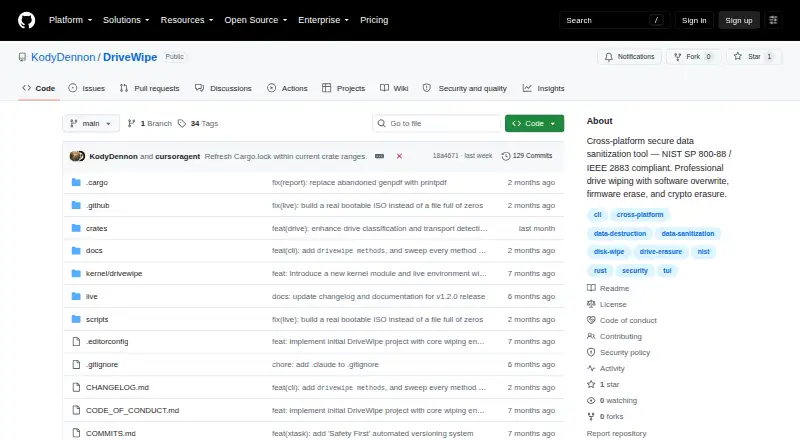
DriveWipe is a free drive sanitization and management tool for Linux, macOS, and Windows. It lists 27 wipe methods across software, firmware, and hybrid approaches, with full read-back verification and saved state for resuming interrupted sessions. A single binary provides command-line, terminal UI, and desktop GUI interfaces. Beyond sanitization, the project lists drive health monitoring, cloning, partition management, and forensic analysis. DriveWipe can run from bootable USB or ISO media and supports PXE network boot. It provides JSONL audit logging and JSON or PDF report generation. Safety measures include boot-drive detection, multi-step wipe confirmation, interruption-state saving, and warnings about software wiping SSDs and USB bridges. Raw device access requires root or Administrator privileges, though installation does not. ATA Secure Erase and TCG Opal crypto erase are not supported on macOS; TCG Opal crypto erase is not yet supported on Windows. The listed price is free for personal, hobby, and commercial use; government, intelligence, forensics, and security organizations are expected to support or contribute to development.
Who it suits
DriveWipe suits people or organizations that need drive erasure and management across Linux, macOS, or Windows. Raw device operations require root or Administrator privileges.
What it does well
- Lists 27 sanitization methods.
- Can verify read-back and resume interrupted sessions.
- Offers command-line, terminal, and desktop interfaces.
- Generates JSON or PDF reports.
What to know first
- Raw device access requires elevated privileges.
- Some erasure methods are unavailable on macOS.
- TCG Opal crypto erase is not yet supported on Windows.
Limits
DriveWipe is free for personal, hobby, and commercial use. ATA Secure Erase and TCG Opal crypto erase are unavailable on macOS, and TCG Opal crypto erase is not yet supported on Windows. Raw device access requires root or Administrator privileges.
Plans
| Plan | Billed and limits | Price |
|---|---|---|
| DriveWipe | Free for personal, hobby, and commercial use; government, intelligence, forensics, and security organizations are expected to support or contribute to development | Free |
| Free | personal use · hobby use · commercial use · government, intelligence, forensic and security organizations encouraged to support development | Free |
As github.com lists them, read 30 Sept 2026. The maker's own page has the final word.
Getting started
- Open the DriveWipe project website.
- Choose the release archive for Linux, macOS, or Windows and your x86_64 or ARM64 architecture.
- Install DriveWipe; raw device access requires root or Administrator privileges.
- Use the command-line, terminal UI, or desktop GUI to manage drives or start sanitization.
- For a live environment, use bootable USB/ISO media or PXE network boot.
Overview
DriveWipe is a free drive-sanitization and management tool for people who need more than a basic overwrite utility. It suits users handling whole disks across operating systems, especially those who need verification, resumable jobs, or audit reports; its broad toolkit is balanced by platform-specific erase limits and the care raw-device work demands.
One binary offers command-line, terminal UI, and desktop GUI interfaces on Linux, macOS, and Windows. That flexibility makes it useful across different workflows, while the combination of wiping and drive-management tools is more than a reader seeking only to shred a few files needs.
Key features
- Multiple erase methods: DriveWipe lists 27 software, firmware, and hybrid methods, including firmware erase and cryptographic erasure. That range gives experienced operators options beyond software overwrites, but the most appropriate method depends on device and platform support.
- Verification and resume: Full read-back verification and saved session state help address whether a job completed and what happens if it is interrupted. The product entry classifies its verification mode as basic, so readers needing a particular verification assurance should assess whether it meets their requirements.
- Drive utilities: Health monitoring, cloning, partition management, and forensic analysis make the software relevant to broader drive workflows. Those tools add scope, but sanitization remains the clearest reason to choose it.
- Boot and network operation: Bootable USB/ISO media and PXE network boot support sanitization outside a normal desktop session, useful when working directly on drives.
- Records and controls: JSONL audit logging and JSON or PDF reports support record keeping. Boot-drive detection, multi-step confirmation, saved interruption state, and warnings about SSD software wiping and USB bridges are sensible safeguards, though they do not remove the need for care.
The repository describes DriveWipe as compliant with NIST SP 800-88 Rev. 2 and IEEE 2883:2022. That claim does not by itself establish that a particular device, erase method, or organizational workflow satisfies a reader’s requirements.
Pricing
DriveWipe — free. The free plan covers personal, hobby, and commercial use, with disk wiping, bootable media, SSD and removable-media support, erasure reports, and basic verification. There is no free trial because the product is free. Government, intelligence, forensics, and security organizations are expected to support or contribute to development; those organizations should weigh that expectation when considering adoption.
There are no cheaper tiers that trade away features: the stated plan is free for its covered users. Root or Administrator privileges are required for raw device access, although installation does not require them.
Platforms
DriveWipe supports Linux, macOS, and Windows, with release archives for x86_64 and ARM64. Erase capabilities are not identical across them: ATA Secure Erase and TCG Opal crypto erase are unsupported on macOS, and TCG Opal crypto erase is not yet supported on Windows. Readers choosing a method for a particular machine should account for those gaps before relying on it.
Who it's for
DriveWipe is a strong fit for technically capable users and organizations that need disk-level sanitization, more than one interface, resumable work, or exportable records without a software fee. Its bootable and PXE options broaden its use beyond ordinary desktop sessions. It is a poor match for someone who only needs file-and-folder shredding, or for anyone unable to obtain elevated privileges for raw-device access.
Pros and cons
- Pro: Twenty-seven methods span software, firmware, and hybrid approaches, giving operators a wider choice than an overwrite-only workflow.
- Pro: Verification, saved state, audit logs, and JSON or PDF reports serve long-running jobs and record-keeping needs.
- Pro: Linux, macOS, and Windows support, plus bootable and PXE environments, accommodate varied deployment contexts.
- Con: Secure erase options vary by platform, including the stated ATA and TCG Opal limitations, which can rule out a desired workflow on some systems.
- Con: Raw-device operations require root or Administrator access, and SSD software wiping and USB bridges carry explicit warnings that users must take seriously.
Alternatives
For more choices, browse Data Erasure Software or Disk Wiping Software.
- Active@ KillDisk is worth considering for readers seeking a freemium option with a paid Personal Professional license at $64.95, paid once or a Personal Suite at $79.95, paid once.
- File Shredder is a Windows-only alternative for file and folder shredding, with five algorithms and free-space wiping.
- CBL Data Shredder is a Windows-only free option for low-level hard-drive formatting and customizable sector-wipe methods.
- Strix Disk Cleaner may suit readers wanting a free, offline Windows or Linux option.
- nwipe is a free Linux alternative.
- ASCOMP Secure Eraser is a Windows alternative with a free Standard Edition for personal use and paid professional options.
- BCWipe Total WipeOut is a paid alternative with a free trial for readers evaluating a different cross-platform product.
- Autoruns is another free option.
Verdict
Choose DriveWipe if you need free, cross-platform disk sanitization with multiple erase approaches, resumable jobs, and reporting in one tool. Its breadth and boot options are compelling, but users who depend on a particular firmware or crypto erase method should first confirm platform support; those seeking only file shredding should choose a narrower utility.
Verdict
DriveWipe combines multiple sanitization methods with verification, reporting, and drive-management features. Check platform-specific erase limitations and ensure elevated privileges are available before raw device work.
Questions
How much does DriveWipe cost?
The DriveWipe plan is free. Personal, hobby, and commercial use is free; government, intelligence, forensics, and security organizations are expected to support or contribute to development.
Which operating systems does it support?
DriveWipe lists Linux, macOS, and Windows, with release archives for x86_64 and ARM64.
Does DriveWipe have a free trial?
No. The listed pricing model is free, and the free trial is listed as no.
Does it create erasure reports?
Yes. It supports JSON and PDF reports, as well as JSONL audit logging.
Does DriveWipe support SSDs and removable media?
Yes, both SSD support and removable media are listed. The project also warns about software wiping SSDs and USB bridges.
What access is needed to erase a drive?
Raw device access requires root or Administrator privileges. Installation does not require those privileges.
Facts from DriveWipe's own pages
- Administrator access
- Root or Administrator privileges are required for raw device access, though not for installation. · github.com, 30 Sept 2026
- Cloning
- Drive cloning supports block and partition-aware copying plus compressed and AES-256-encrypted images. · github.com, 15 Oct 2026
- Developer architecture
- The repository is organized into Rust crates for core logic, CLI, TUI, GUI, live mode and build automation, plus a Linux kernel module. · github.com, 15 Oct 2026
- Documentation depth
- Documentation includes user, developer and security directories, README build instructions, architecture notes, configuration examples and live-environment plans. · github.com, 15 Oct 2026
- Downloads
- The repository says release archives are available for Linux, macOS, and Windows on x86_64 and ARM64. · github.com, 30 Sept 2026
- Drive management
- Features include drive health monitoring, cloning, partition management, and forensic analysis. · github.com, 30 Sept 2026
- DriveWipe Secure
- Four hybrid methods target HDD, SATA SSD, NVMe and USB media with device-specific phases. · github.com, 15 Oct 2026
- External categorization
- GitHub's disk-wipe topic lists DriveWipe as a Rust repository updated on 9 August 2026. · github.com, 15 Oct 2026
- External repository status
- The public GitHub issues page shows zero issues and says issue creation is restricted. · github.com, 15 Oct 2026
- Firmware wiping
- Firmware methods cover ATA Secure Erase, NVMe Format and Sanitize modes, and TCG Opal cryptographic erase. · github.com, 15 Oct 2026
- Forensics
- Forensic functions include entropy analysis, signature scanning, statistical sampling, hidden-area detection and chain-of-custody reports. · github.com, 15 Oct 2026
- Health monitoring
- SMART/NVMe parsing, pre- and post-wipe snapshots, benchmarks and temperature monitoring are included. · github.com, 15 Oct 2026
- Installation
- Linux and macOS have a shell installer that detects platform, verifies SHA-256 checksums, installs a binary and supports uninstall, version pinning and custom prefixes. · github.com, 15 Oct 2026
- Intended users
- The license describes personal, hobby, and commercial use as free, and says government, intelligence, forensics, and security organizations are expected to support or contribute to development. · github.com, 30 Sept 2026
- Interfaces
- One binary provides CLI, ratatui TUI and iced GUI modes, with aliases for the TUI and GUI. · github.com, 15 Oct 2026
- Kernel access
- The Linux live stack includes a custom kernel module for ATA and NVMe passthrough, HPA/DCO operations and DMA I/O. · github.com, 15 Oct 2026
- Kernel ioctl API
- The live plan documents ioctl calls for ATA/NVMe commands, HPA/DCO operations, DMA, ATA security state and module capabilities. · github.com, 15 Oct 2026
- Licence
- The project uses a custom permissive licence allowing free personal, hobby and commercial use, with an encouragement for security-related organizations to contribute or sponsor development. · github.com, 15 Oct 2026
- Licence limitation
- The licence disclaims warranties and liability and warns that wiping is irreversible and users are responsible for selecting the correct drive. · github.com, 15 Oct 2026
- Live environment
- An Alpine Linux live image of about 200 MB can boot DriveWipe directly from USB. · github.com, 15 Oct 2026
- Maker identity
- LinkedIn identifies Kody Dennon with Honest Tech Services LLC and places the profile in Fortuna, California, United States. · linkedin.com, 15 Oct 2026
- Parallel wiping
- A live queue allows multiple drives to be wiped in parallel and permits drives to be added during an active run. · github.com, 15 Oct 2026
- Partition management
- GPT and MBR parsing, partition creation, deletion, resizing, moving, filesystem detection and dry-run previews are documented. · github.com, 15 Oct 2026
- Platform limitation
- The README marks ATA Secure Erase and TCG Opal crypto erase as unsupported on macOS, and TCG Opal as not yet supported on Windows. · github.com, 15 Oct 2026
Where DriveWipe stands on Freedom251
- Disk Wiping Software#1 of 28
- Data Erasure Software#1 of 17