Freedom251 › Disk Wiping Software
Strix Disk Cleaner
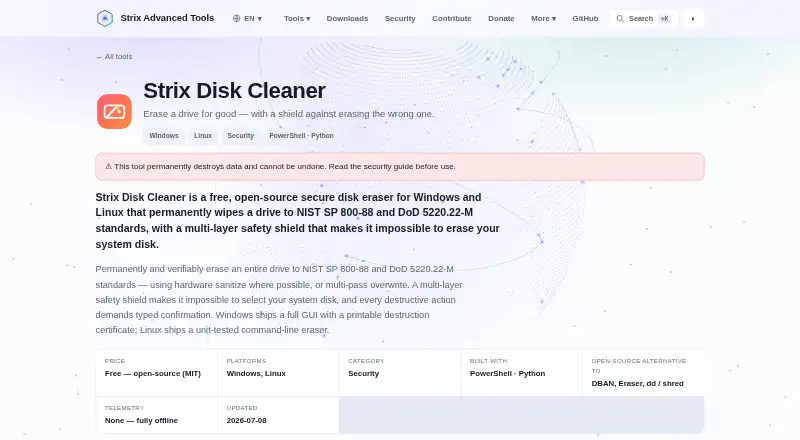
What Strix Disk Cleaner is
Strix Disk Cleaner is a free disk-wiping tool for Windows and Linux. It operates offline and supports erasing disks, including SSDs. The listed verification mode is certificate-based, and the tool can produce erasure reports. Its Free plan costs nothing and is released under the open-source MIT license. The listed wipe scope is disks, rather than a broader set of cleanup targets. Windows and Linux are the only supported platforms named in the facts. Offline operation means its stated workflow does not require an online service, while certificate verification provides a record related to the erasure. These listed capabilities describe the main scope of the tool: disk erasure, SSD support, reporting, and verification. Readers considering it should note that the entry does not list mobile or macOS support, or describe file-by-file cleanup capabilities.
Who it suits
It suits Windows or Linux users who need offline disk erasure and want a certificate verification record. It is focused on disks rather than general file cleanup.
What it does well
- Free under the open-source MIT license.
- Operates offline.
- Supports Windows and Linux.
- Supports SSD erasure.
- Provides erasure reports and certificate verification.
What to know first
- Supports only Windows and Linux.
- Listed wipe scope is disk erasure.
- No file-level cleanup function is listed.
Plans
| Plan | Billed and limits | Price |
|---|---|---|
| Free | Free — open-source (MIT) · Windows and Linux · offline operation · whole-drive erasure | Free |
As strix-tool.github.io lists them, read 15 Oct 2026. The maker's own page has the final word.
Getting started
- Visit the Strix Disk Cleaner website.
- Use a Windows or Linux system.
- Get started with the free plan.
Strix Disk Cleaner is a free, open-source utility for permanently erasing complete drives. It is best suited to privacy-minded individuals or organizations preparing disks for disposal or reassignment. Its strongest case is hardware-aware wiping with verifiable documentation; its decisive limitation is that it cannot target individual files.
Overview
Strix uses hardware sanitize when a drive supports it, or multi-pass overwriting otherwise. These methods are intended to meet NIST SP 800-88 and DoD 5220.22-M requirements, making the program appropriate for end-of-life drive handling and other situations where a full device must be cleared. It is not a routine junk cleaner or a secure-delete tool for selected documents.
The application works offline, makes no network calls, and requires no account. Release downloads come with SHA-256 checksums, allowing a careful operator to verify file integrity before running a destructive utility. Windows builds are not code-signed, so SmartScreen warnings on first launch are a practical trade-off.
Key features
- SSD-aware method selection: Strix identifies SSDs and recommends hardware sanitize because wear-levelling can leave software-overwritten data behind. That guidance is valuable for modern storage, although successful sanitization still depends on the drive supporting the hardware operation.
- Whole-drive wiping: The scope is deliberately unambiguous: an entire disk is erased. This suits resale, recycling, or redeployment workflows, but makes Strix the wrong choice when a user needs to preserve an operating system, partition, or other files.
- Safety barriers: The system disk and mounted disks cannot be selected, and destructive actions require typed confirmation. Those controls lower the chance of choosing an active or critical disk, while the confirmation step forces an explicit decision before an irreversible operation.
- Platform-specific tools: Windows provides a graphical interface and a printable destruction certificate, useful when a physical record is needed. Linux uses a unit-tested command-line eraser, which fits scripted or administration-focused work but requires comfort with terminal workflows.
- Verifiable output: Erasure reports are supported through certificate verification, with the Windows edition producing a printable certificate. This is more useful for asset-disposal records than a wipe that offers no evidence of completion.
- Open-source support material: The product page links to source code, documentation, and a security guide. That gives technically capable users material for reviewing the implementation and operating it responsibly.
Pricing
Strix is free, under an MIT open-source license, for Windows and Linux. There is no trial period because the product is offered as a free plan. The absence of a paid tier keeps deployment simple for personal use, internal IT work, and privacy projects, while users who need a different platform or selective-file features must look elsewhere.
Platforms
Strix runs on Linux and Windows. Windows users get the GUI and printable certificate; Linux users get the command-line eraser. macOS is not supported, so Mac owners need another utility.
Who it's for
This is a strong fit for privacy-conscious users who need to sanitize an entire disk before disposal, resale, or reuse and who value offline operation, open-source licensing, and a certificate trail. SSD owners benefit from the explicit hardware-sanitize recommendation. It also suits Linux administrators who prefer a command-line tool.
Choose something else if you need file-level wiping, macOS support, a signed Windows executable, or a workflow that leaves the system disk mounted and usable during cleaning. The safety restrictions are appropriate for destructive work, but they also prevent the tool from acting as an in-place cleanup utility.
Pros and cons
Pros
- Free MIT-licensed software for both Linux and Windows.
- Hardware-sanitize guidance addresses SSD wear-levelling risks.
- Offline, account-free operation limits exposure of the wiping workflow.
- Typed confirmation and blocked system or mounted disks reduce selection mistakes.
- SHA-256 release checksums and Windows destruction certificates support verification and record keeping.
Cons
- Only whole disks can be erased; individual files and selective cleanup are unavailable.
- Unsigned Windows builds can trigger SmartScreen warnings.
- Linux use is command-line based, while Windows and Linux interfaces differ substantially.
- Hardware sanitize depends on drive support, and overwrite is not equally dependable on every SSD.
Alternatives
Disk Wiping Software is a useful broader list when you want to compare multiple drive-wiping tools. For a wider category view, see Data Erasure Software.
- Active@ KillDisk is the better fit when you want macOS support or a paid personal license, with Personal Professional at $64.95, paid once and Personal Suite at $79.95, paid once.
- DriveWipe suits users seeking free personal, hobby, or commercial use across Linux, macOS, and Windows.
- HDShredder is worth considering for private Windows or Linux use, with a free edition and paid partition-focused features.
- Lethe is another free cross-platform drive-wiping utility, though real-drive use requires root or administrator access and it has SSD and RAID limitations.
- nwipe is a free Linux-only alternative offering command-line and ncurses interfaces.
- Overwrite is for macOS users; its free Preview plan does not perform secure wiping or issue certificates.
- Blackwire Drive Eraser & Sanitizer targets Windows users who need a free personal, noncommercial option with a two-drive-at-once limit and no certificates.
- Disk Wipe is a free Windows freeware option for personal or commercial use.
Verdict
Choose Strix Disk Cleaner when you need a free, offline, whole-drive wipe with SSD guidance and certificate-backed verification on Linux or Windows. Look elsewhere when selective file deletion, macOS support, signed Windows software, or a less destructive in-place cleanup workflow matters more than open-source, hardware-aware sanitization.
Verdict
Strix Disk Cleaner focuses on offline disk wiping, with SSD support and certificate verification. Its stated platform support is limited to Windows and Linux.
Questions
How much does Strix Disk Cleaner cost?
The Free plan costs nothing.
Is Strix Disk Cleaner free?
Yes. It has a Free plan and is released under the open-source MIT license.
Which platforms does it support?
It supports Windows and Linux.
Can it erase SSDs?
Yes. SSD support is listed.
Does it work offline?
Yes. Offline operation is listed.
Does it provide an erasure record?
It can produce erasure reports, and verification uses a certificate.
Facts from Strix Disk Cleaner's own pages
- Build provenance
- The maker reports GitHub SLSA Build L2 provenance attestations alongside release checksums. · strix-tool.github.io, 15 Oct 2026
- Code signing
- The builds are not yet code-signed, so Windows SmartScreen may warn on first run. · strix-tool.github.io, 8 Oct 2026
- Code-signing limit
- Windows binaries are not yet code-signed and may trigger SmartScreen warnings. · strix-tool.github.io, 15 Oct 2026
- Documentation
- The repository includes README, Linux usage, Windows installation, security, signing, changelog and contribution documents. · github.com, 15 Oct 2026
- Download verification
- Each release publishes SHA-256 checksums for verifying downloaded files. · strix-tool.github.io, 15 Oct 2026
- Erase methods
- It uses hardware sanitize where possible or multi-pass overwrite. · strix-tool.github.io, 8 Oct 2026
- Erasure limitation
- Overwrite is described as reliable for HDD Clear-level erasure, while remapped or hidden flash areas may remain unreachable without hardware sanitize. · github.com, 15 Oct 2026
- Hardware methods
- Supported hardware paths include blkdiscard, nvme sanitize and ATA Secure Erase through hdparm. · strix-tool.github.io, 15 Oct 2026
- Independent mirror hardening detail
- The mirror documents absolute-path PowerShell elevation and offline SHA-256 verification as hardening measures. · github.laiyagushi.com, 15 Oct 2026
- Independent mirror security detail
- A GitHub mirror's security page states that Windows protection checks boot/system flags, disk number, serial and size before every destructive step. · github.laiyagushi.com, 15 Oct 2026
- Independent mirror testing detail
- The same mirror reports unit tests covering refusal of root, mounted and mounted-partition disks while allowing unmounted data or loopback devices. · github.laiyagushi.com, 15 Oct 2026
- Installation Linux
- Ubuntu and Debian users install the supplied .deb package and run strixwipe from a terminal. · strix-tool.github.io, 15 Oct 2026
- Installation Windows
- Windows installation uses a setup wizard that creates Start-menu shortcuts and an uninstaller. · strix-tool.github.io, 15 Oct 2026
- Intended users
- The maker describes Strix Advanced Tools as open-source privacy and security tools made for people who care about privacy. · strix-tool.github.io, 8 Oct 2026
- License
- Source code is released under the MIT license. · github.com, 15 Oct 2026
- Linux edition
- The Linux version is a unit-tested command-line eraser. · strix-tool.github.io, 8 Oct 2026
- Linux interface
- Linux ships strixwipe as a command-line eraser with unit-tested safety logic. · github.com, 15 Oct 2026
- Maker funding
- The about page describes a spare-time, zero-budget project with no paid tiers, subscriptions or advertising. · strix-tool.github.io, 15 Oct 2026
- Maker identity
- Strix Advanced Tools is described as an independent side project run by four computer-science students in Germany, with no company behind it. · strix-tool.github.io, 15 Oct 2026
- Mounted-disk protection
- Linux refuses disks with mounted partitions, including disks backing the root filesystem. · github.com, 15 Oct 2026
- Offline operation
- The maker states that the desktop tools make no network calls, use no telemetry and require no account. · strix-tool.github.io, 15 Oct 2026
- Post-wipe actions
- The Windows implementation can repartition, format and issue TRIM after erasure. · github.com, 15 Oct 2026
- Privileges
- Windows raw-disk access requires a UAC elevation, while Linux erase commands require root privileges. · github.com, 15 Oct 2026
- Purpose
- Strix Disk Cleaner permanently wipes entire drives to NIST SP 800-88 and DoD 5220.22-M standards. · strix-tool.github.io, 8 Oct 2026
Where Strix Disk Cleaner stands on Freedom251
- Disk Wiping Software#3 of 28
- Data Erasure Software#2 of 17