Freedom251 › Disk Wiping Software
Overwrite
What Overwrite is
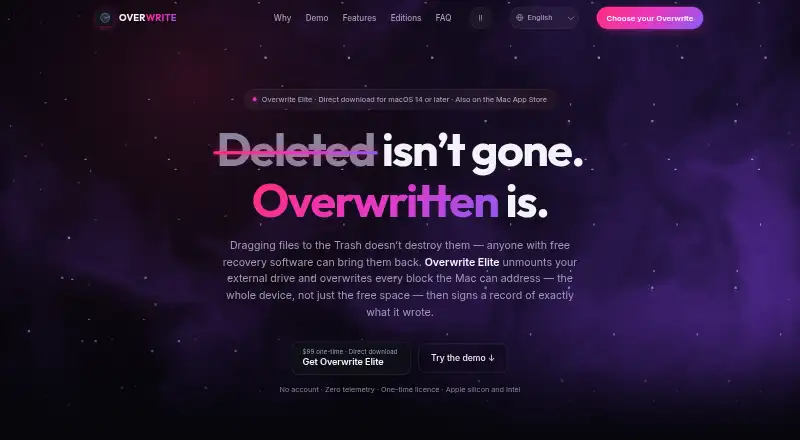
Overwrite is a macOS utility for sanitizing external drives, USB sticks, and SD cards. Its Mac App Store edition removes files and overwrites the drive’s free space through the file system. Overwrite Elite can overwrite every block the Mac can address on an external drive, using 1-, 3-, 7-, or 35-pass protocols. Completed wipes produce a locally signed Certificate of Data Erasure; Elite certificates can also be checked with a free standalone verifier. Elite optionally reads a drive back after a multi-pass Full Disk wipe and records measured coverage on the certificate. The Preview plan costs $0 and lets users explore drives and app screens, but does not include secure wiping or certificates. Annual Pro is $12.99 per year, Lifetime Pro is $24.99 once, and Elite is $99 once. Both editions have no accounts, analytics, or crash reporting. Overwrite is designed for external and removable media and cannot erase the internal boot drive.
Who it suits
Overwrite suits Mac users who need to erase external or removable media and want a signed erasure certificate. Elite is relevant when whole-device overwriting or optional read-back verification is needed.
What it does well
- Elite offers four overwrite-pass protocols.
- Completed wipes produce a signed certificate.
- Elite certificates have a free standalone verifier.
- No accounts, analytics, or crash reporting.
What to know first
- Cannot erase the internal boot drive.
- Preview has no secure wiping or certificates.
- App Store edition lacks read-back verification.
Limits
Preview provides drive and screen exploration only, with no secure wiping or erasure certificates. The App Store edition overwrites free space and provides a signed certificate, but has no read-back verification. Elite is for external and removable media and requires macOS 14 or later.
Plans
| Plan | Billed and limits | Price |
|---|---|---|
| Preview | $0 · Explore drives and app screens · no secure wiping or erasure certificates | Free |
| Annual Pro | $12.99/ year · Unlimited secure wipes · all 4 protocols · signed certificates · wipe history and CSV export | $12.99 a year |
| Lifetime Pro | $24.99one-time · Everything in Annual Pro · usable on every Mac signed in with your Apple ID | $24.99, paid once |
| Site License | from $2,999 · Site-wide licensing | $2,999 |
| Lab Pack | $399 · 5 users | $399, paid once |
| Enterprise | from $7,500 · Site-wide licensing · quoted to requirements | $7,500 |
| Overwrite Elite | $99 one-time; 1 user, 2 Macs · External and removable media · macOS 14 or later · direct download | $99, paid once |
As getoverwrite.com lists them, read 7 Oct 2026. The maker's own page has the final word.
Getting started
- Visit https://getoverwrite.com/.
- Choose the Mac App Store edition or the direct-download Elite plan.
- For Elite, use a Mac running macOS 14 or later.
- Start with Preview to explore drives and app screens, or choose a paid plan for secure wiping.
- Connect the external or removable drive you want to erase.
Overwrite is a macOS disk-sanitization utility for external drives, USB sticks, and SD cards. It is aimed at Mac users who need a documented removable-media wipe, from a file-system cleanup to a whole-device overwrite. The choice comes down to how much coverage and verification your workflow requires, and whether the inability to erase a boot drive is acceptable.
Overview
Overwrite keeps its remit deliberately narrow: it works on external and removable media and cannot touch the Mac’s internal boot drive. That makes it suitable for retiring USB storage, SD cards, and external disks, but not for wiping the computer you are currently using. SSD support is included, and completed operations produce a locally signed Certificate of Data Erasure.
There are two distinct approaches. The Mac App Store edition works through the file system, while Overwrite Elite addresses every block the Mac can address on an external drive. The distinction matters when a record of the operation is more important than maximum physical coverage, or when a whole-device procedure is required.
Key features
File-system and full-disk scopes
The Pro App Store edition deletes a drive’s files and overwrites its free space through the file system. It then issues a signed certificate, making it a practical fit for routine handoffs where accessible data must be cleared and documented. It does not perform read-back verification, so the certificate does not include a measured post-wipe coverage check.
Elite overwrites every addressable block on an external drive and offers 1-, 3-, 7-, or 35-pass protocols. More passes provide selectable overwrite depth, although the heavier options are better suited to processes that prioritize procedure over speed. After a multi-pass Full Disk wipe, optional read-back can measure coverage and print that result on the certificate. A free standalone verifier can check Elite certificates, which is useful when an auditor or recipient needs to validate the document independently.
Privacy and organizational records
Neither edition requires accounts, analytics, or crash reporting. Elite makes three disclosed connections, while the App Store edition uses Apple’s StoreKit. Organization licensing adds organization names to certificates, a consolidated CSV audit log, purchase orders, W-9, and invoices. Those additions address chain-of-custody and procurement needs that individual plans do not.
Pricing
Preview costs nothing and only lets you explore drives and app screens. It provides no secure wiping or erasure certificates, so it is an inspection mode rather than a usable sanitization plan.
Annual Pro costs $12.99 a year and includes unlimited secure wipes, all four protocols, signed certificates, wipe history, and CSV export. It is the sensible choice for recurring use when an annual renewal is acceptable. Lifetime Pro costs $24.99, paid once, includes the same Pro features, and works on every Mac signed in with your Apple ID; it suits owners who expect to keep using the utility across Macs.
Overwrite Elite costs $99, paid once for one user and two Macs. It covers external and removable media, requires macOS 14 or later, and is delivered by direct download. This is the plan for whole-device protocols, optional read-back coverage, and independently checkable Elite certificates.
For teams, Lab Pack is $399, paid once for five users. Site License on request for site-wide licensing, while Enterprise on request, with requirements quoted. Organization features and purchasing documents make those tiers more relevant to formal operations than to occasional personal wipes. There is no free trial.
Platforms
Overwrite runs on macOS. Elite requires macOS 14 or later; both editions support SSDs and removable media. There is no bootable-media mode, and the internal boot drive is outside the product’s scope.
Who it's for
Choose Overwrite if your work centers on removable Mac media and you need certificates rather than an undocumented deletion. Annual or Lifetime Pro fits individuals who need file-system cleanup with records; Elite fits organizations or technicians that require addressable-block coverage, selectable pass counts, and optional measured verification. It is a poor match for someone who must sanitize an internal system disk or needs a cross-platform tool.
Pros and cons
- Pro: Elite covers every addressable external-drive block and offers four pass protocols.
- Pro: Signed certificates, CSV history, and Elite’s standalone verifier support auditable workflows.
- Pro: No accounts, analytics, or crash reporting in either edition.
- Con: Neither edition can wipe the internal boot drive, and there is no bootable-media option.
- Con: The App Store edition has no read-back verification, limiting evidence to its signed certificate.
- Con: Elite costs substantially more and requires macOS 14 or later.
Alternatives
Active@ KillDisk is the better fit when you need Linux, macOS, and Windows support or a perpetual personal license at 64.95 USD or 79.95 USD. DriveWipe is a free cross-platform option for users who do not need Overwrite’s paid certificate-focused tiers. HDShredder suits Windows- or Linux-based workflows, with a free private-use edition and paid partition features. Lethe is free across Linux, macOS, and Windows, but requires root or administrator access and has SSD and RAID limitations. nwipe is a free Linux-only, command-line and ncurses choice. Strix Disk Cleaner is a free MIT-licensed Windows/Linux alternative. Blackwire Drive Eraser & Sanitizer is a Windows free tier for up to two drives at once, without certificates. Disk Wipe is free Windows freeware with no stated restrictions.
For a broader category comparison, see Disk Wiping Software.
Verdict
Overwrite is a strong choice for Mac users sanitizing external or removable media who need signed, exportable records, with Elite adding whole-device passes and measurable read-back coverage. Look elsewhere if you need to erase an internal boot drive, run on Linux or Windows, or avoid a paid plan for documented verification.
Verdict
Overwrite offers distinct file-system and whole-device wipe scopes, with signed certificates for completed wipes. Check that the external-drive focus and edition-specific verification limits fit your needs.
Questions
Is Overwrite free?
Yes. The free Preview plan is for exploring drives and app screens; secure wiping and erasure certificates are not included.
How much do the paid plans cost?
Annual Pro is $12.99 per year, Lifetime Pro is $24.99 once, and Overwrite Elite is $99 once. Lab Pack is $399 once; Site License starts at $2,999, and Enterprise starts at $7,500.
Which Macs and drives does it support?
Overwrite is for macOS and external or removable media, including drives, USB sticks, and SD cards. Elite requires macOS 14 or later; the utility cannot erase the internal boot drive.
How do the two editions erase a drive?
The Mac App Store edition deletes files and overwrites free space through the file system. Elite can overwrite every block the Mac can address using 1-, 3-, 7-, or 35-pass protocols.
Does Overwrite verify completed wipes?
Both editions produce a locally signed Certificate of Data Erasure. Elite can optionally read back a drive after a multi-pass Full Disk wipe and record measured coverage on the certificate; Elite certificates can also be checked with a free standalone verifier.
Who makes Overwrite?
Overwrite is made by ProfWorkBench, LLC, headquartered in New York, New York.
Facts from Overwrite's own pages
- Certificates
- Completed wipes produce a locally signed Certificate of Data Erasure; Elite certificates can be checked with a free standalone verifier. · getoverwrite.com, 7 Oct 2026
- Drive restriction
- Overwrite is designed for external and removable media and cannot touch the internal boot drive. · getoverwrite.com, 7 Oct 2026
- Elite whole-device wipe
- Overwrite Elite overwrites every block the Mac can address on an external drive using 1-, 3-, 7-, or 35-pass protocols. · getoverwrite.com, 7 Oct 2026
- Headquarters
- New York, New York, United States · getoverwrite.com, 28 Sept 2026
- Maker and launch
- The maker is ProfWorkBench, LLC; its press kit says the App Store edition launched with version 1.0 and Elite launched in August 2026. · getoverwrite.com, 7 Oct 2026
- Organization features
- Enterprise licensing includes organization names on certificates, a consolidated CSV audit log, purchase orders, W-9, and invoices. · getoverwrite.com, 7 Oct 2026
- Platforms
- Elite is a universal app for Apple silicon and Intel on macOS 14 or later; the App Store edition supports Apple silicon on macOS 26 or later. · getoverwrite.com, 7 Oct 2026
- Privacy
- Both editions have no accounts, analytics, or crash reporting; the site says Elite makes three disclosed connections and the App Store edition uses Apple’s StoreKit. · getoverwrite.com, 7 Oct 2026
- Pro limits
- The App Store edition overwrites free space and issues a signed certificate without read-back verification. · getoverwrite.com, 7 Oct 2026
- Pro wipe scope
- The Mac App Store edition deletes a drive’s files and overwrites its free space through the file system. · getoverwrite.com, 7 Oct 2026
- Purpose
- Overwrite is a disk-sanitization utility for macOS that erases external drives, USB sticks, and SD cards. · getoverwrite.com, 7 Oct 2026
- Read-back verification
- Elite can optionally read the drive back after a multi-pass Full Disk wipe and print measured coverage on the certificate. · getoverwrite.com, 7 Oct 2026
- Support
- The press kit directs interview and review-copy inquiries to the ProfWorkBench support and press desk. · getoverwrite.com, 7 Oct 2026
Where Overwrite stands on Freedom251
- Disk Wiping Software#11 of 28