Freedom251 › Data Destruction Software
ShredOS
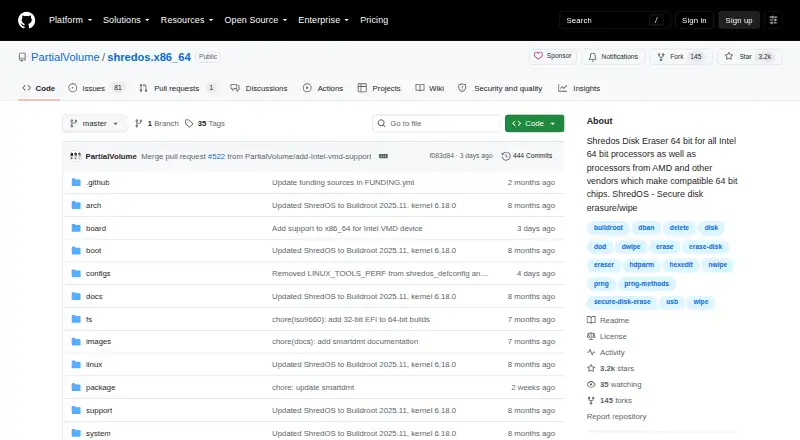
What ShredOS is
ShredOS is a free, open-source bootable operating system for erasing disks with nwipe. Its .img and .iso images can be used with USB drives, CD/DVD, Ventoy, and virtual machines. The project supports x86 PCs and servers, plus Intel-based Macs, with BIOS or UEFI booting. Nwipe offers multiple erasure methods and pseudo-random generators, configurable rounds, verification, and a final blanking pass. ShredOS can create PDF erasure certificates and log files, including reports focused on an individual drive or the system. The image includes disk utilities such as smartmontools, hdparm, nvme-cli, sg3_utils, hexedit, and parallel. The project documents unattended autonuke workflows, PXE booting, persistent configuration, custom scripts, and headless operation; it also describes a user-enabled Telnet server for systems with faulty or missing display hardware. Logs and PDFs can be sent to FTP or TFTP servers, though the documentation warns FTP does not encrypt data. ShredOS provides 32-bit and 64-bit builds. Erasure is irreversible, and writing an image to a USB flash drive overwrites that drive’s existing contents.
Who it suits
ShredOS suits people who need bootable disk-erasure tools for supported PCs, servers, or Intel-based Macs. Its documented automation and reporting options may also suit unattended or headless workflows.
What it does well
- Free, open-source bootable disk-erasure image
- Supports BIOS and UEFI booting
- Offers configurable erasure methods and verification
- Creates PDF certificates and log files
- Documents unattended and headless workflows
What to know first
- Wiping irreversibly erases selected data
- Writing an image overwrites USB contents
- FTP transfers do not encrypt data
- Running fetched scripts as root carries risk
Limits
Wiping irreversibly erases the selected data, and writing an image to a USB flash drive overwrites its contents. The documentation warns that FTP does not encrypt transferred logs or PDFs.
Plans
| Plan | Billed and limits | Price |
|---|---|---|
| ShredOS | Bootable disk erasure image · 32-bit and 64-bit builds | Free |
As github.com lists them, read 9 Oct 2026. The maker's own page has the final word.
Getting started
- Open the ShredOS project at https://github.com/PartialVolume/shredos.x86_64.
- Choose the .img or .iso image for USB, CD/DVD, Ventoy, or a virtual machine.
- Verify the image checksum listed in the release notes.
- If using a USB flash drive, write the image knowing this overwrites its existing contents.
- Boot a supported x86 PC, server, or Intel-based Mac using BIOS or UEFI.
- Use nwipe's erasure options, and check the selected drives before starting.
ShredOS is a compact, bootable Linux environment dedicated to erasing complete disks with nwipe. It is best suited to technicians, refurbishers, and administrators who need a repeatable wipe process independent of an installed operating system. Its strongest case is controlled, reportable disk disposal; readers wanting a conventional desktop file-shredding app should look elsewhere.
Overview
ShredOS starts from an image rather than from the computer's existing installation. The project supplies IMG and ISO files for USB media, optical discs, Ventoy, and virtual machines, so it can be deployed on a service bench, a server, or a virtual test environment. It supports x86 PCs and servers and Intel-based Macs, with both BIOS and UEFI boot paths.
The design keeps the wipe environment separate from the disk being processed, which is valuable when an installed system must not remain active. It also demands care: erasure cannot be undone, and writing an image to a USB flash drive destroys the data already on that flash drive. The download instructions call for checking the release checksum before booting.
Key features
Flexible disk wiping
nwipe offers several erase methods, pseudo-random generators, adjustable pass counts, verification, and an optional final pass that writes blanks. That range lets an operator match a procedure to internal policy or equipment, rather than accepting one fixed algorithm. ShredOS records basic verification support, so it is a practical choice for routine media turnover, while teams needing a particular audited verification standard should confirm that the available mode meets it.
Certificates and logs
Completed jobs can produce PDF erasure certificates and log files. Certificates may be organised per drive or around the whole system, giving refurbishers and administrators a record to attach to an asset or disposal ticket. This is a meaningful advantage over a wipe utility that leaves only an on-screen status.
Supporting utilities
The image includes smartmontools, hdparm, nvme-cli, sg3_utils, hexedit, and parallel. These tools help inspect drive health, query ATA or NVMe devices, work with SCSI-related hardware, examine sectors, and run parallel operations before or alongside a wipe. They make the image more useful for diagnosis and preparation, but the environment remains a specialist utility rather than a general Linux workstation.
Automation and remote operation
Documentation covers unattended autonuke procedures, PXE booting, persistent settings, and custom scripts. Headless operation is also documented, including a Telnet server that the user enables for machines with broken or absent displays. Logs and PDF certificates can be sent to FTP or TFTP servers; FTP transfers are explicitly unencrypted, so that route belongs only on a protected network. Scripts fetched and executed as root carry the same risk and should be used only across a secure private network.
Build control
Buildroot is used to create ShredOS, and the repository explains how to build images from source. That is useful for organisations that need a reproducible image pipeline or want to review and customise their build, though it adds responsibility beyond downloading a release.
Pricing
| Plan | Price | Includes |
|---|---|---|
| ShredOS | free | Bootable disk-erasure image; 32-bit and 64-bit builds |
The open-source plan costs nothing, has no trial period, and is aimed at personal users and organisations able to prepare and operate their own boot media. There are no paid tiers or seat terms to weigh, but support and deployment work remain with the user.
Platforms
ShredOS is classified for Linux and runs as a bootable image on x86 hardware, including servers and Intel Macs. BIOS and UEFI are supported. It can address disks, SSDs, and removable media, but it is not a native Windows or macOS application launched inside those systems.
Who it's for
Choose ShredOS for IT departments, repair shops, refurbishers, and data-disposal teams that need whole-disk wiping, repeatable boot procedures, and certificates. PXE and unattended workflows make it more suitable for managed fleets than a one-off graphical cleaner. It is a poor fit for deleting a handful of files while keeping the operating system intact, or for anyone uncomfortable identifying physical drives and handling boot media.
Pros and cons
- Pro: Bootable IMG and ISO media work with USB, optical discs, Ventoy, and virtual machines, giving operators several deployment routes.
- Pro: nwipe combines selectable methods, pass counts, verification, and blanking so procedures can be tailored.
- Pro: PDF certificates and logs provide usable evidence for asset-disposal records.
- Pro: PXE, autonuke documentation, persistent configuration, and headless guidance support repeat operations.
- Con: A mistaken target selection permanently destroys data, so the workflow requires deliberate drive verification.
- Con: Creating boot media overwrites the contents of the USB drive used for the image.
- Con: Remote transfer options include unencrypted FTP, and root-run scripts create avoidable security exposure if used outside a private network.
- Con: The basic verification mode may not satisfy every organisation's evidentiary or compliance requirements.
Alternatives
For a broader shortlist, see Data Erasure Software and Disk Wiping Software; File Shredder Software is the more relevant list when individual files, rather than entire disks, are the target.
- Active@ KillDisk is the better route for a cross-platform desktop product with paid personal licenses and a freemium model.
- DriveWipe suits readers seeking free disk wiping on Linux, macOS, or Windows without a boot-image workflow.
- Autoruns is a Windows-only free utility for startup management, not a disk-erasure replacement.
- CBL Data Shredder is a Windows alternative offering low-level formatting and customizable wipe methods.
- File Shredder is preferable when the requirement is file, folder, or free-space shredding on Windows.
- nwipe is the direct choice for Linux users who want the underlying command-line and ncurses tool without the ShredOS image.
- Strix Disk Cleaner provides an open-source option for Linux and Windows.
- SecureWipe is another free option for Linux and Windows.
Verdict
ShredOS is a strong choice for professionals who need bootable, configurable whole-disk erasure with certificates, logs, and documented automation at no software cost. Its main reason to look elsewhere is the operational burden: selecting the wrong drive is irreversible, media preparation is destructive, and secure remote workflows require discipline.
Verdict
ShredOS combines nwipe disk-erasure options with bootable images, reporting, and documented automation. Users should verify selected drives before wiping and check image checksums before use.
Questions
Is ShredOS free and open source?
Its pricing model is free, and its pricing note says Open source.
Which systems can boot ShredOS?
It supports x86 PCs and servers, plus Intel-based Macs, with BIOS or UEFI booting.
What media can I use?
The project provides .img and .iso images for USB drives, CD/DVD, Ventoy, and virtual machines.
Can ShredOS create erasure reports?
Yes. It can generate PDF erasure certificates and log files, including per-drive or system-focused certificates.
Can I automate erasure workflows?
The project documents unattended autonuke workflows, PXE booting, persistent configuration, and custom scripts.
How much does the ShredOS plan cost?
The ShredOS plan is free and includes a bootable disk erasure image.
Facts from ShredOS's own pages
- Automation
- The project documents unattended autonuke workflows, PXE booting, persistent configuration, and custom scripts. · github.com, 9 Oct 2026
- Boot media
- The project provides .img and .iso images for USB drives, CD/DVD, Ventoy, and virtual machines. · github.com, 9 Oct 2026
- Build
- ShredOS is built with Buildroot, and the repository documents building images from source. · github.com, 9 Oct 2026
- Download verification
- The quick-start instructions tell users to verify the image checksum listed in the release notes. · github.com, 9 Oct 2026
- Erasure options
- nwipe offers multiple erasure methods, pseudo-random generators, configurable rounds, verification, and a final blanking pass. · github.com, 9 Oct 2026
- Hardware
- ShredOS supports x86 PCs and servers, plus Intel-based Macs, with BIOS or UEFI booting. · github.com, 9 Oct 2026
- Headless use
- ShredOS documents headless operation and a user-enabled Telnet server for systems with faulty or missing display hardware. · github.com, 9 Oct 2026
- Included tools
- The image includes disk utilities such as smartmontools, hdparm, nvme-cli, sg3_utils, hexedit, and parallel. · github.com, 9 Oct 2026
- Limit
- Writing an image to a USB flash drive overwrites its existing contents. · github.com, 9 Oct 2026
- Network transfer
- The documentation describes sending logs and PDF files to FTP or TFTP servers, and warns that FTP does not encrypt data. · github.com, 9 Oct 2026
- Purpose
- ShredOS is a small bootable operating system for securely erasing disks with nwipe. · github.com, 9 Oct 2026
- Reports
- ShredOS can generate PDF erasure certificates and log files, including per-drive or system-focused certificates. · github.com, 9 Oct 2026
- Script security
- The project warns that fetching and running scripts as root is risky and should only be done over a secure private network. · github.com, 9 Oct 2026
- Security warning
- ShredOS warns that wiping irreversibly erases data and advises checking selected drives before starting. · github.com, 9 Oct 2026
Where ShredOS stands on Freedom251
- Data Destruction Software#7 of 19
- Disk Wiping Software#12 of 28
- Data Erasure Software#9 of 17
- File Shredder Software#17 of 27