Freedom251 › Menu Bar Customization Software
Dozer
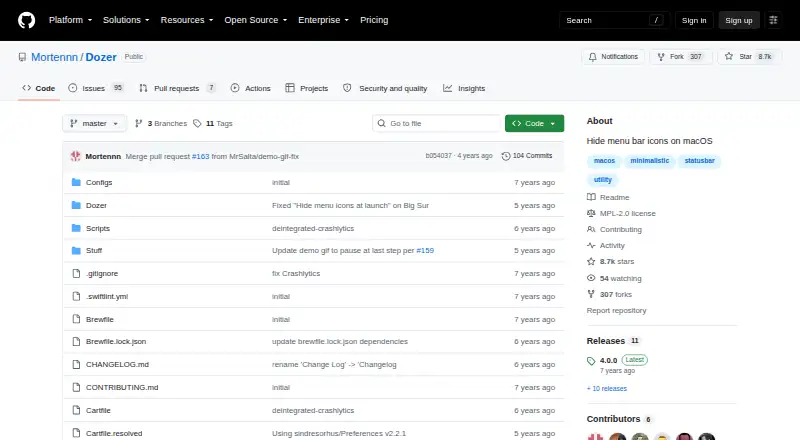
What Dozer is
Dozer is a free, open-source macOS utility for hiding menu bar icons. A click toggles one group of icons, while option-click can control a second optional group. It can also hide status bar icons automatically, including when it launches. The project's release notes describe a mode that hides and shows icons using only a keyboard shortcut. Users can adjust the delay before icons hide, as well as their size and padding. Right-click opens settings. The README provides Homebrew Cask and manual installation instructions, and lists macOS 10.13 or later as a requirement. The repository identifies the Mozilla Public License 2.0. Dozer is intended for Mac users who want to reduce visible menu bar items; its listed functions focus on hiding and grouping icons rather than adding custom menu items. The project directs bug reports and feature requests to GitHub issues, and asks people reporting bugs to include the app version.
Who it suits
Dozer suits Mac users who want to hide or group menu bar icons, manually or automatically. It requires macOS 10.13 or later.
What it does well
- Can automatically hide icons at launch.
- Optional second icon group responds to option-click.
- Offers keyboard-shortcut-only hiding mode.
- Installation instructions cover Homebrew Cask and manual setup.
What to know first
- Requires macOS 10.13 or later.
- Custom menu items are not supported.
Plans
| Plan | Billed and limits | Price |
|---|---|---|
| Dozer | macOS 10.13+ | Free |
As github.com lists them, read 9 Oct 2026. The maker's own page has the final word.
Getting started
- Open the Dozer GitHub repository.
- Install Dozer using Homebrew Cask or follow the manual installation instructions.
- Use left-click to toggle the first icon group.
- Use option-left-click to toggle the optional second group.
- Right-click Dozer to open settings and adjust its controls.
Dozer is a free, open-source macOS utility for hiding menu bar icons. It suits Mac users who want a less crowded bar without adding custom menu items. Its appeal is focused control: group icons, automate hiding, and adjust how the bar behaves.
Overview
Dozer addresses one narrow task: keeping selected status icons out of sight until needed. A click toggles the first group, while Option-click controls an optional second group. That separation is useful when some icons should remain accessible independently of others.
Automatic hiding, including at launch, reduces the need to tidy the bar manually. Dozer also offers a keyboard-only mode for hiding and showing icons, plus controls for the delay before hiding, icon size, and padding. These settings give the utility more flexibility than a simple show-and-hide switch, but its purpose remains icon management rather than broader menu bar customization.
Key features
Icon visibility and controls
- Two icon groups: Click to toggle one group and Option-click to toggle an optional second group. This gives users a way to separate icons by when they need them.
- Automatic hiding: Dozer can hide status bar icons automatically, including when the app launches, which helps keep the bar tidy without repeated manual actions.
- No Icon mode: A keyboard shortcut can hide and show icons without relying on a visible control.
- Display adjustments: Users can set how many seconds pass before icons hide and adjust icon size and padding, allowing the behavior and spacing to be tuned.
- Mouse controls: Left-click toggles the first group, Option-left-click toggles the second, and right-click opens settings.
Dozer supports hiding, rearranging, and grouping menu items, as well as keyboard shortcuts. It does not support custom menu items, so it is a poor fit for anyone looking to add new controls or content to the menu bar.
Pricing
Dozer costs free and is open source under the Mozilla Public License 2.0. The free plan is the only plan described: it supports macOS 10.13 or later and includes the app’s menu item hiding, rearranging, grouping, and keyboard shortcut capabilities. There is no paid tier or trial to weigh against the free version.
That makes Dozer straightforward for users who want its focused tool at no cost. The trade-off is scope, not a lower plan’s quota: custom menu items are not supported. The project directs users to GitHub issues for bug reports and feature requests, and asks bug reporters to include the app version.
Platforms
Dozer is for macOS, with macOS 10.13 or later listed as the system requirement. Installation instructions cover both Homebrew Cask and manual installation, giving users a choice of setup method.
Who it's for
Choose Dozer if you want to hide and organize existing Mac menu bar icons, especially if you value automatic hiding, two separately controlled groups, or keyboard access. It is less suitable if you need custom menu bar items or a utility with a broader purpose than hiding icons.
Pros and cons
Pros
- Flexible visibility controls: Separate click and Option-click groups let users reveal different sets of icons as needed.
- Less manual upkeep: Automatic hiding, including at launch, can keep the bar clear without a routine of repeated clicks.
- Tunable behavior: Hide delay, icon size, and padding adjustments provide control over timing and spacing.
- No-cost, open-source offering: The free plan has no paid tier required for the described icon management features.
Cons
- No custom menu items: Dozer hides and organizes existing items rather than letting users add new ones.
- Mac-only scope: The stated platform and system requirement limit its use to macOS 10.13 or later.
Alternatives
For a wider comparison, browse Menu Bar Customization Software. These alternatives are also free macOS options, but their system requirements and terms differ.
- Cornice is another free choice if your Mac runs macOS 26 (Tahoe) or later on Apple Silicon.
- GreatBar is free for now while it is new and requires macOS 14.0 or later; consider it if that stated platform range fits your Mac.
- Hidden Bar is an open-source app provided at no cost. Its stated support covers macOS 13 Ventura or later, with macOS 10.13–12.x also supported.
- iBar-Menubar is a freemium alternative with a free download and in-app purchases; consider it if that pricing model suits you.
- Ice 2 is free and open source, with its full source published on GitHub.
- JellyBar is free for macOS 15 Sequoia and later on Apple Silicon.
- Lloyd is a free, MIT-licensed macOS menu-bar utility.
- MenuBarDockX is free with no subscription and supports macOS 14 or later on Apple Silicon and Intel.
Verdict
Dozer is a strong fit for Mac users who want a free, focused way to hide existing menu bar icons, with automatic behavior and useful control over groups and spacing. Choose it for icon visibility rather than expansion: users seeking custom menu items should look elsewhere.
Verdict
Dozer focuses on controlling which menu bar icons remain visible, with automatic hiding and adjustable display behavior. Its scope is best suited to Mac users seeking icon hiding rather than custom menu items.
Questions
How much does Dozer cost?
The Dozer plan costs nothing.
Which operating systems does Dozer support?
Dozer supports macOS and requires macOS 10.13 or later.
How can I install Dozer?
The README gives Homebrew Cask and manual installation instructions.
Can Dozer use keyboard shortcuts?
Yes. Release notes describe a mode that hides and shows icons using only a keyboard shortcut.
Does Dozer support custom menu items?
No. Custom menu items are not supported.
What license does Dozer use?
The repository lists the Mozilla Public License 2.0.
Facts from Dozer's own pages
- Adjustments
- The changelog says users can configure how many seconds pass before icons hide and adjust icon size and padding. · github.com, 9 Oct 2026
- Auto-hide
- Dozer can automatically hide status bar icons, including at launch. · github.com, 9 Oct 2026
- Controls
- Left-click toggles the first icon group, option-left-click toggles the optional second group, and right-click opens settings. · github.com, 9 Oct 2026
- Icon groups
- Users can hide one group of menu bar icons with a click and an optional second group with option-click. · github.com, 9 Oct 2026
- Installation
- The README gives Homebrew Cask and manual installation instructions. · github.com, 9 Oct 2026
- Intended users
- The project describes a utility for Mac users who want to hide menu bar icons. · github.com, 9 Oct 2026
- No Icon mode
- The release notes describe a mode that hides and shows icons using only a keyboard shortcut. · github.com, 9 Oct 2026
- Open source license
- The repository lists the Mozilla Public License 2.0. · github.com, 9 Oct 2026
- Purpose
- Dozer hides menu bar icons to give a Mac a cleaner look. · github.com, 9 Oct 2026
- Support
- The contribution guide directs users to open GitHub issues for bug reports and feature requests, and asks them to include the app version in bug reports. · github.com, 9 Oct 2026
- System requirement
- The README lists macOS 10.13 or later as a requirement. · github.com, 9 Oct 2026
Where Dozer stands on Freedom251
- Menu Bar Customization Software#3 of 25
- Pull Request Automation Tools#10 of 29