Freedom251 › Menu Bar Customization Software
GreatBar
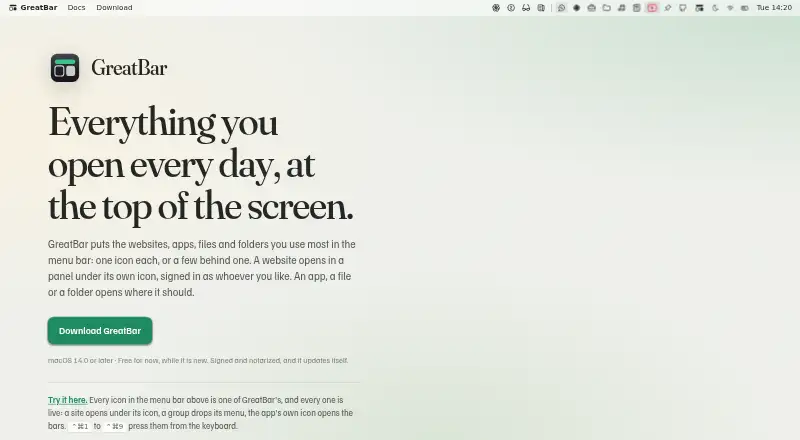
What GreatBar is
GreatBar is a free macOS app that keeps shortcuts to websites, apps, files and folders in the menu bar, as individual items or grouped menus. Websites can open in panels that remember their size and page state, or in standalone windows that can stay above other windows and continue playing audio or video after closing. Separate browsing sessions let the same site use different logins; private browsing retains no cookies or history. You can create distinct menu bars, such as for work and personal use, and add shortcuts to named macOS System Settings panes. Links for WhatsApp, Slack, Figma, Notion, Zoom, Microsoft Teams, Discord, Telegram and Spotify can open in those apps when installed. An optional built-in MCP server lets an assistant inspect bars and suggest changes for your review. GreatBar runs in the Mac sandbox and stores files and folders as security-scoped bookmarks. It has no backend, account system or telemetry, but its daily update check shares your IP address and app user agent with the hosting provider. Website views block ads and trackers by default, with a link-level opt-out. It requires macOS 14.0 or later.
Who it suits
GreatBar suits Mac users who want frequent websites, apps and files available from the menu bar. It may also suit people who separate work and personal shortcuts or want an MCP-speaking assistant to propose menu changes for review.
What it does well
- Shortcuts can be grouped into distinct menu bars.
- Website panels remember size and page state.
- Private browsing keeps no cookies or history.
- Website views block ads and trackers by default.
What to know first
- Requires macOS 14.0 or later.
- Daily update checks share IP address and app user agent.
- App links open in their apps only when installed.
Plans
| Plan | Billed and limits | Price |
|---|---|---|
| GreatBar | Free for now while it is new · macOS 14.0 or later | Free |
As greatbar.greatpixels.com lists them, read 3 Oct 2026. The maker's own page has the final word.
Getting started
- Open greatbar.greatpixels.com to get GreatBar.
- Use a Mac running macOS 14.0 or later.
- Add shortcuts for websites, apps, files, or folders to the menu bar.
- Create separate menu bars if you want distinct sets of shortcuts.
GreatBar is a macOS utility that gathers websites, apps, files and folders into menu-bar shortcuts and grouped menus. It suits people who want a compact launch point for both web tools and Mac resources, rather than only a way to hide icons. Its broad set of shortcut and browsing options comes with a macOS 14.0-or-later requirement.
Overview
GreatBar makes the menu bar more than an icon organizer: shortcuts can open websites, launch installed apps, reach named System Settings panes, or open files and folders. Grouping and separate bars for contexts such as work and personal use help keep those destinations organized. For someone who only wants to hide menu-bar items, that wider toolkit may be more than needed.
Website panels open beneath their menu-bar icons and retain their size and page state between opens. Separate browsing sessions can keep different logins for the same site, while private browsing retains no cookies or history. These options are useful for juggling accounts or revisiting a compact web workspace, though they are features of GreatBar's website views rather than a substitute for a full browser.
Key features
- Shortcut organization: Hide and rearrange items, create custom shortcuts, group menu items and assign keyboard shortcuts. Distinct menu bars provide a way to separate different contexts instead of putting every destination in one menu.
- Panels and windows: Website shortcuts can open in remembered panels or standalone windows. Windows can stay above others and continue playing audio or video after closing, which suits persistent media or web tasks.
- App and settings links: Links for WhatsApp, Slack, Figma, Notion, Zoom, Microsoft Teams, Discord, Telegram and Spotify can open in their respective apps when installed. Named shortcuts can also open macOS System Settings panes such as Wi-Fi, Bluetooth, Displays and Privacy & Security.
- Assistant support: An optional built-in MCP server lets Claude, Codex, Cursor or another MCP-speaking assistant inspect menu bars and propose changes for the user to review. The review step keeps changes under user control.
- Local files and privacy: GreatBar runs in the Mac sandbox and stores added files and folders as security-scoped bookmarks. It has no backend, account system or telemetry, and shortcut and website data stay on the Mac. Daily update checks do disclose the user's IP address and app user agent to the hosting provider; automatic checks can be disabled in Settings.
- Website blocking: Ads and trackers are blocked by default in GreatBar website views using lists bundled with the app, with a link-level option to opt out.
Pricing
GreatBar is free: the GreatBar plan costs nothing, and the maker describes it as free for now while the app is new. There is no free trial because the plan is already free, and no paid plan or quota is given. The free plan includes hiding, rearranging and grouping menu items, custom items and keyboard shortcuts, so its core organization tools are not reserved for a paid tier. The qualification “for now” leaves the longer-term price uncertain.
Platforms
GreatBar is for macOS 14.0 or later. It is signed and notarized by Apple, but it is not an option for older macOS releases or other platforms.
Who it's for
GreatBar is a good fit for Mac users who want web panels, app and file shortcuts, separate account sessions and multiple menu bars in one utility. Its privacy approach will also appeal to people who prefer local shortcut and website data, provided they are comfortable with update checks sharing an IP address and app user agent. Those seeking only basic icon hiding, or using a Mac below macOS 14.0, should look elsewhere.
Pros and cons
- Pro: Combines web, app, file, folder and System Settings shortcuts, with grouping and distinct bars to separate destinations.
- Pro: Remembered website panels and separate browsing sessions make repeat visits and multiple logins more manageable.
- Pro: The free plan includes custom items, grouping, rearranging, hiding and keyboard shortcuts.
- Con: Requires macOS 14.0 or later, ruling out older Macs that cannot meet that requirement.
- Con: Daily update checks disclose the user's IP address and app user agent to the hosting provider, despite the app's otherwise local-data approach.
- Con: The free price is qualified as temporary while the product is new, so users cannot assume it will remain free indefinitely.
Alternatives
Menu Bar Customization Software is a category page for comparing this type of tool.
- Hidden Bar is a free, open-source macOS app at no cost; choose it if open-source availability and basic menu-bar customization matter more than GreatBar's website panels and broader shortcut set.
- iBar-Menubar is a freemium macOS alternative with a free download and in-app purchases; consider it if that pricing model suits you better.
- Ice 2 is a free, open-source macOS app; choose it if open-source software is the priority.
- SaneBar is a free macOS app released under the MIT License; it is a fit for readers specifically seeking an open-source menu-bar option.
- Thaw is free, with no purchase, subscription or upgrade fee for new macOS versions; consider it if those cost terms are the priority.
- Vanilla has a free tier for hiding menu-bar icons; choose it for that narrower task rather than GreatBar's wider shortcut and website features.
- Overhang is another free macOS alternative.
- Bark is a free alternative listed for API platforms.
Verdict
Choose GreatBar if you want a free Mac menu-bar hub for websites, apps and local resources, especially when separate website sessions and multiple bars would simplify your routine. Its breadth is the main reason to prefer it over a basic icon hider. Look elsewhere if you need older macOS support, only want simple icon control, or do not want daily update checks to disclose your IP address and app user agent.
Verdict
GreatBar combines menu-bar shortcuts with website panels, separate browsing sessions and distinct bars. Its local-data approach has a stated exception: daily update checks disclose the user's IP address and app user agent to the hosting provider.
Questions
How much does GreatBar cost?
GreatBar is free for now while it is new.
Which platform does GreatBar support?
GreatBar runs on macOS 14.0 or later.
Does GreatBar have an account system or backend?
No. GreatBar has no backend or account system, and it has no telemetry.
Does GreatBar support private browsing?
Yes. Private browsing keeps no cookies or history.
Can shortcuts open other apps?
Links for WhatsApp, Slack, Figma, Notion, Zoom, Microsoft Teams, Discord, Telegram, and Spotify can open in those apps when installed.
What does the optional assistant server do?
The optional built-in MCP server lets an MCP-speaking assistant inspect menu bars and propose changes for the user to review.
Facts from GreatBar's own pages
- App integrations
- GreatBar can turn links for WhatsApp, Slack, Figma, Notion, Zoom, Microsoft Teams, Discord, Telegram and Spotify into shortcuts that open in those apps when installed. · greatbar.greatpixels.com, 3 Oct 2026
- Assistant support
- An optional built-in MCP server lets Claude, Codex, Cursor or another MCP-speaking assistant inspect bars and propose changes for the user to review. · greatbar.greatpixels.com, 3 Oct 2026
- Content blocking
- Ads and trackers are blocked by default in GreatBar website views using lists bundled with the app, and a link can opt out of blocking. · greatbar.greatpixels.com, 3 Oct 2026
- File access
- GreatBar runs in the Mac sandbox and stores added files and folders as security-scoped bookmarks. · greatbar.greatpixels.com, 3 Oct 2026
- Multiple accounts
- Separate browsing sessions let shortcuts to the same website use different logins, and private browsing keeps no cookies or history. · greatbar.greatpixels.com, 3 Oct 2026
- Multiple bars
- Users can create and switch between distinct menu bars, such as work and personal bars. · greatbar.greatpixels.com, 3 Oct 2026
- Platform requirement
- GreatBar requires macOS 14.0 or later and is signed and notarized by Apple. · greatbar.greatpixels.com, 3 Oct 2026
- Privacy
- The app has no backend, its own account system, or telemetry; its shortcuts and website data remain on the Mac, while daily update checks disclose the user's IP address and app user agent to the hosting provider. · greatbar.greatpixels.com, 3 Oct 2026
- Purpose
- GreatBar puts frequently used websites, apps, files and folders in the Mac menu bar as individual shortcuts or grouped menus. · greatbar.greatpixels.com, 3 Oct 2026
- Support
- The maker directs users to a feedback form and lists [email protected] for support and privacy questions. · greatbar.greatpixels.com, 3 Oct 2026
- System Settings
- Shortcuts can open macOS System Settings panes by name, including Wi-Fi, Bluetooth, Displays and Privacy & Security. · greatbar.greatpixels.com, 3 Oct 2026
- Updates
- GreatBar checks for updates once a day and updates itself; automatic checks can be turned off in Settings. · greatbar.greatpixels.com, 3 Oct 2026
- Website panels
- Websites can open in panels beneath their menu bar icons, with panel size and page state remembered between opens. · greatbar.greatpixels.com, 3 Oct 2026
- Windows
- Website shortcuts can open in standalone windows, stay above other windows, and continue playing audio or video after closing. · greatbar.greatpixels.com, 3 Oct 2026
Where GreatBar stands on Freedom251
- Menu Bar Customization Software#4 of 25