Freedom251 › Menu Bar Customization Software
Bark
by Bark
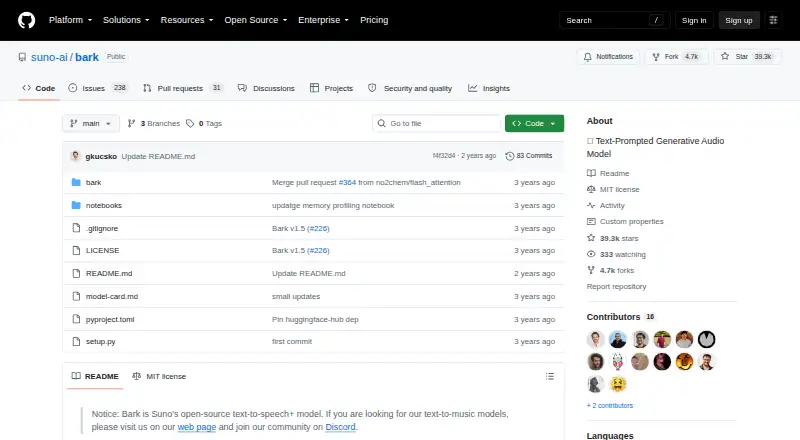
What Bark is
Bark is an open-source, transformer-based model from Suno that generates audio from text. It can produce multilingual speech, music, background noise, sound effects and nonverbal sounds such as laughter, sighs and crying. It supports 13 languages and exports WAV audio. For voices, Bark offers more than 100 speaker presets and can also generate random voices, but it does not clone custom voices.
Bark is available as an API or for self-hosting. The project documents Python installation from GitHub, command-line use and access through Hugging Face Transformers, where models are downloaded and stored. It runs on CPU and GPU; the full version needs around 12 GB of GPU VRAM, while smaller models are described as fitting 8 GB. Its MIT license permits commercial use, including use of pretrained checkpoints.
The project is intended for research and demonstration. Generated audio may depart unexpectedly from prompts, and typical spoken outputs are around 13–14 seconds. Bark’s project community is on Discord, where users can discuss the model and share prompts and presets.
Who it suits
Bark suits developers and researchers who want to generate speech or other audio from text and can work with an API or self-hosted model. Its multilingual output, voice presets and commercial-use permission may also suit projects that need generated WAV audio without custom voice cloning.
What it does well
- Generates speech, music, effects and nonverbal sounds from text.
- Supports 13 languages and exports WAV.
- Offers more than 100 speaker presets and random voices.
- MIT license and pretrained checkpoints permit commercial use.
- Works on CPU and GPU.
- Available through Hugging Face Transformers.
What to know first
- Typical spoken outputs are around 13–14 seconds.
- Custom voice cloning is not supported.
- Full version needs around 12 GB of GPU VRAM.
- Generated audio may depart unexpectedly from prompts.
Limits
Typical spoken generation works well with about 13 seconds of text, with outputs described as roughly 13–14 seconds. The full version needs around 12 GB of GPU VRAM; smaller models are described as fitting 8 GB.
Getting started
- Open the Bark project on GitHub.
- Choose API access or a self-hosted setup.
- For local installation, follow the project’s Python and pip instructions using GitHub.
- Use Bark through its command-line instructions or Hugging Face Transformers.
- Allow Hugging Face to download and store the models.
Verdict
Choose Bark if you need an open-source model for generating multilingual speech or other audio, with API and self-hosted options and commercial-use permission. Look elsewhere if you need custom voice cloning, longer typical spoken outputs or audio that reliably follows every prompt.
Questions
Is Bark free?
Yes. Bark is listed as free and open source.
Can Bark be used commercially?
Yes. Bark is licensed under MIT, and its pretrained checkpoints are available for commercial use.
Which platforms does Bark support?
Bark is available through an API and can be self-hosted. The project also documents Python, command-line and Hugging Face Transformers use.
Does Bark clone voices?
No. It supports more than 100 speaker presets and random voices, but not custom voice cloning.
What audio can Bark generate, and what does it export?
It can generate multilingual speech, music, background noise, sound effects and nonverbal sounds. WAV is the listed export format.
Who makes Bark, and where can users find community support?
Bark was created by Suno, founded in 2022 and based in Charlotte, North Carolina. The project points users to Discord for discussion and shared prompts.
Facts from Bark's own pages
- API access
- Yes · github.com, 20 Sept 2026
- Audio generation
- It can generate multilingual speech, music, background noise, sound effects, and nonverbal sounds such as laughter, sighs, and crying. · github.com, 10 Oct 2026
- Commercial use
- Yes · github.com, 20 Sept 2026
- Export formats
- WAV · github.com, 20 Sept 2026
- Founded
- 2022 · github.com, 28 Sept 2026
- Hardware
- Bark has been tested on CPU and GPU; the full version needs around 12 GB of GPU VRAM, while smaller models can fit in 8 GB. · github.com, 10 Oct 2026
- Installation
- The README provides Python installation instructions using pip and GitHub, plus usage through the Hugging Face Transformers library. · github.com, 9 Oct 2026
- Installation and use
- The project documents Python and command-line usage and installation from its GitHub repository. · github.com, 10 Oct 2026
- Integration
- Bark is available through the Hugging Face Transformers library from version 4.31.0 onward. · github.com, 10 Oct 2026
- Integrations
- The README documents use with Hugging Face Transformers and says Bark uses Hugging Face to download and store models. · github.com, 9 Oct 2026
- Languages
- 13 · github.com, 20 Sept 2026
- Languages
- The README lists 13 supported languages and says English quality is best for the time being. · github.com, 10 Oct 2026
- License
- The repository licenses Bark under MIT and says the pretrained checkpoints are available for commercial use. · github.com, 10 Oct 2026
- Maker
- The model card identifies Suno.ai as the source of the official codebase. · github.com, 10 Oct 2026
- Model downloads
- The FAQ says Bark uses Hugging Face to download and store models. · github.com, 10 Oct 2026
- Platforms
- api,self_hosted · github.com, 20 Sept 2026
- Product
- Bark is a transformer-based, fully generative text-to-audio model created by Suno. · github.com, 9 Oct 2026
- Research status
- Suno says Bark was developed for research purposes and warns that generated audio can deviate unexpectedly from prompts. · github.com, 9 Oct 2026
- Research use
- Suno says Bark was developed for research and demo purposes and may deviate unexpectedly from prompts. · github.com, 10 Oct 2026
- Safety research
- The model card notes potential dual use and says the release includes a classifier intended to detect Bark-generated audio. · github.com, 10 Oct 2026
- Support
- The project directs users to its Discord community for discussion and shared prompts. · github.com, 9 Oct 2026
- Support and community
- The README points users to Discord for community support and shared prompts and presets. · github.com, 10 Oct 2026
- Typical generation length
- The README says generation works well with about 13 seconds of spoken text and describes typical output as roughly 13–14 seconds. · github.com, 10 Oct 2026
- Typical output length
- The README says generation works well with around 13 seconds of spoken text and describes outputs of roughly 13–14 seconds as an architectural limit. · github.com, 9 Oct 2026
Where Bark stands on Freedom251
- Menu Bar Customization Software#2 of 25
- Text-to-Speech Software#94 of 223
- Game Voice Generators#21 of 45
- Text-to-speech tools#157 of 232