Freedom251 › Menu Bar Customization Software

iBar-Menubar
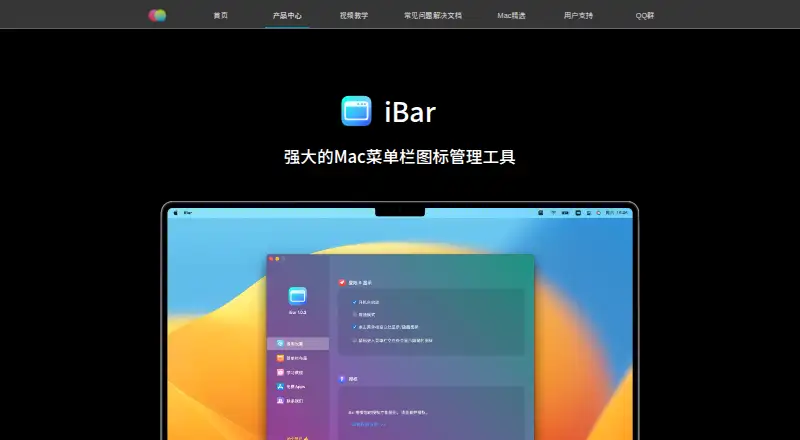
What iBar-Menubar is
iBar-Menubar helps Mac users manage menu bar icons by hiding items and bringing them back when needed. Its standard mode folds hidden icons, while aggregation mode displays them in a panel below the menu bar. The maker says the panel can reveal icons obscured by a MacBook notch. In aggregation mode, a hidden icon can be temporarily placed in the menu bar so you can use its app menu, then hidden again after an optional delay. You can adjust icon spacing and reorder items in the app’s menu bar layout settings. iBar supports Apple M-series and Intel Macs; the App Store listing requires macOS 10.12 or later and identifies it as Mac only. The free plan is free to download, with in-app purchases available. A one-year subscription is listed at 18 CNY a year. The developer reports collecting no data, though Apple says this developer-provided privacy information has not been verified.
Who it suits
iBar-Menubar suits Mac users who want to hide, reveal, and rearrange menu bar icons. Its aggregation mode may help users whose icons are obscured by a MacBook notch.
What it does well
- Offers standard and aggregation display modes.
- Can temporarily reveal hidden icons for app-menu use.
- Lets users adjust icon spacing and reorder items.
- Supports Apple M-series and Intel Macs.
- Free to download, with a free plan.
What to know first
- Available for Mac only.
- Requires macOS 10.12 or later.
- Annual subscription is 18 CNY a year.
- Apple has not verified the developer's no-data-collection disclosure.
Plans
| Plan | Billed and limits | Price |
|---|---|---|
| Free | Menu-bar icon hiding and folding · basic icon management | Free |
| iBar年度订阅(一年) | 一年 · In-app subscription; advanced functions described in the app listing | 18 CNY a year |
As better365.cn lists them, read 15 Oct 2026. The maker's own page has the final word.
Getting started
- Visit https://www.better365.cn/ibar.html.
- Download iBar free; in-app purchases are available.
- Install it on a Mac running macOS 10.12 or later.
- Choose standard mode to fold hidden icons or aggregation mode to display them in a panel.
- Adjust icon spacing or reorder icons in the app’s menu bar layout settings.
- Send support requests through the maker’s website for an email reply.
Overview
iBar-Menubar is a Mac utility for hiding, revealing and arranging menu bar icons. It is best for Mac users who want to reduce clutter or reach icons obscured by a notch. Its two display modes and layout controls make it more flexible than a simple hide-and-show tool, but the annual subscription may not suit someone seeking a no-cost option.
Key features
Standard mode folds hidden icons away; aggregation mode collects them in a panel below the menu bar. That second option is particularly useful when a MacBook notch blocks icons, while the standard mode is the more direct fit for users concerned mainly with clutter.
Aggregation mode also lets users temporarily return a hidden icon to the menu bar to operate its app menu, then hide it again after an optional delay. Spacing adjustments and icon reordering provide further control over the layout. iBar supports hiding, grouping and rearranging menu items, along with keyboard shortcuts, so it offers several ways to organize a crowded row without replacing the apps those icons represent.
The maker says the app supports both Apple M-series and Intel Macs. The App Store listing requires macOS 10.12 or later and identifies it as Mac-only. The developer reports collecting no data; Apple says the developer-provided privacy information has not been verified by Apple.
Pricing
The Free plan costs nothing and is free to download, with in-app purchases available. A 10-day trial is also offered. The paid iBar年度订阅(一年) plan costs 18 CNY a year, billed 一年. The free option is the sensible starting point for users who only need what it provides; the subscription is for those who want to continue with paid features. No seat or usage quotas are stated.
Platforms
iBar is for Mac only, with macOS 10.12 or later required by the App Store listing. The maker says it runs on both Apple silicon M-series and Intel Macs, so it is not limited to one processor family.
Who it's for
Choose iBar if your menu bar is crowded, you want to group or reorder items, or a MacBook notch makes some icons hard to reach. It is less suitable if you need software beyond macOS or want a strictly free option without in-app purchases.
Pros and cons
- Pros: Two display modes address both hidden-icon clutter and notch-obscured icons.
- Pros: Temporary icon restoration, optional hiding delay, spacing and ordering controls allow a tailored menu bar.
- Cons: Mac-only support excludes users on other platforms.
- Cons: Continued paid use involves an annual subscription, rather than a one-time purchase.
Alternatives
For a broader comparison, see the Menu Bar Customization Software list.
- Cornice is free and requires macOS 26 (Tahoe) or later on Apple silicon, making it an option for users on that newer setup.
- GreatBar is free for now and requires macOS 14.0 or later; consider it if those terms fit your Mac.
- Hidden Bar is a no-cost open source alternative for users on macOS 13 Ventura or later, with support also stated for macOS 10.13–12.x.
- Ice 2 is free and open source for Mac users who prefer software with its source published on GitHub.
- JellyBar is free for macOS 15 Sequoia and later on Apple silicon.
- MenuBarDockX is free with no subscription and supports macOS 14 or later on Apple silicon and Intel.
- Octobar offers a free plan with up to five active modules and a paid one-time Pro plan for unlimited active modules and submenu groups; choose it if module limits and groups are the relevant distinction.
- Overhang is free for macOS 14 Sonoma or later and supports Apple silicon and Intel.
Verdict
iBar is a strong fit for Mac users who need a more orderly menu bar and especially for MacBook owners whose notch hides icons. Its aggregation panel and temporary icon controls are the main reasons to choose it; look elsewhere if you need cross-platform support or want to avoid an annual subscription.
Verdict
iBar-Menubar offers two ways to manage hidden icons, plus spacing and ordering controls. It is limited to Mac, and the listed annual subscription costs 18 CNY a year.
Questions
Is iBar-Menubar free?
It is free to download, with in-app purchases available.
How much is the annual subscription?
The listed one-year subscription costs 18 CNY a year.
Which Macs does it support?
The maker says it natively supports Apple M-series and Intel Macs. The App Store listing requires macOS 10.12 or later and says it is for Mac only.
What can iBar-Menubar do with menu bar icons?
It can hide and show icons, fold hidden icons or gather them in a panel, change spacing and rearrange items.
Who makes iBar-Menubar?
Better365 describes itself as the team of Ningbo Shangguan Technology Co., Ltd., which develops macOS apps.
What does the developer say about data collection?
The developer reports that the app collects no data. Apple says this developer-provided privacy information has not been verified by Apple.
Facts from iBar-Menubar's own pages
- Always-hide option
- Icons can be configured to remain hidden in both normal and aggregation modes. · apps.apple.com, 15 Oct 2026
- API and SDK
- The official product and support pages describe App Store software and troubleshooting but provide no public API or SDK information. · better365.cn, 15 Oct 2026
- Chip support
- The maker says iBar natively supports both Apple M-series and Intel Macs. · better365.cn, 30 Sept 2026
- Company headquarters
- The Geeks Club lists the maker headquarters as Cixi, Zhejiang, China. · thegeeksclub.com, 15 Oct 2026
- Compatibility
- The App Store listing requires macOS 10.12 or later and says the app is for Mac only. · apps.apple.com, 30 Sept 2026
- Customization
- Users can change menu bar icon spacing and reorder icons in the app’s menu bar layout settings. · apps.apple.com, 30 Sept 2026
- Display modes
- It provides a normal folding mode and an aggregation-window mode below the menu bar. · better365.cn, 15 Oct 2026
- Documentation link
- The official navigation links to a Yuque FAQ and troubleshooting documentation resource. · better365.cn, 15 Oct 2026
- Download method
- The product page directs users to install the latest version from the Mac App Store. · better365.cn, 15 Oct 2026
- Headquarters
- Cixi, Zhejiang, China · better365.cn, 28 Sept 2026
- Icon controls
- In aggregation mode, users can temporarily add a hidden icon to the menu bar to operate its app menu, then hide it again with an optional delay. · apps.apple.com, 30 Sept 2026
- Icon ordering
- Its layout preferences let users drag icons to change their order. · apps.apple.com, 15 Oct 2026
- Icon spacing
- The app offers default, smaller, small, and zero menu-bar icon spacing options. · apps.apple.com, 15 Oct 2026
- Keyboard shortcuts
- Version 2.1.0 added shortcuts for displaying and clicking specific menu-bar icons. · apps.apple.com, 15 Oct 2026
- Licence
- The opened official and App Store pages do not state an open-source licence. · apps.apple.com, 15 Oct 2026
- Limit: interaction bugs
- Reviewers report occasional missed clicks, delayed aggregation-panel opening, and icons disappearing until restart. · apps.apple.com, 15 Oct 2026
- Limit: language coverage
- A reviewer said linked support pages were Chinese-only and lacked clear English guidance. · apps.apple.com, 15 Oct 2026
- Limit: paid conversion
- A reviewer complained that a formerly free workflow became unusable behind a purchase prompt after the pricing change. · apps.apple.com, 15 Oct 2026
- Limit: permissions
- A reviewer objected that iBar requests screen-recording authorization and questioned why it cannot be disabled. · apps.apple.com, 15 Oct 2026
- Maker
- The maker describes Better365 as the team of Ningbo Shangguan Technology Co., Ltd., which develops macOS apps. · better365.cn, 30 Sept 2026
- Maker legal name
- The about page identifies Ningbo Shangguan Technology Co., Ltd. as the Better365 team behind iBar and other macOS apps. · better365.cn, 15 Oct 2026
- Maker product portfolio
- Better365 says it develops BetterAndBetter, automatic input switching, Super Right, iShot, FastZip, iBar and other macOS applications. · better365.cn, 15 Oct 2026
- News: version 2.1.0
- The App Store version history dated April 11 records shortcut support for showing and clicking specific menu-bar icons plus bug fixes. · apps.apple.com, 15 Oct 2026
- Notch handling
- The aggregation window is designed to expose icons obscured by a MacBook display notch. · better365.cn, 15 Oct 2026
Where iBar-Menubar stands on Freedom251
- Menu Bar Customization Software#6 of 25