Freedom251 › Event Scheduling Software
ConfTool
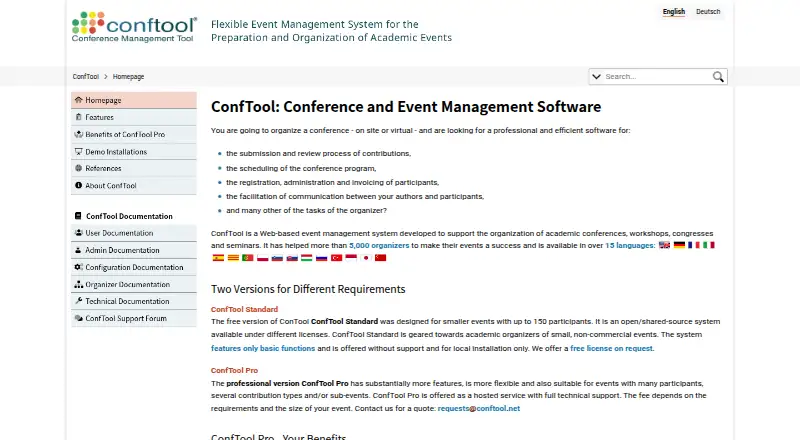
What ConfTool is
ConfTool helps organizers manage academic conferences, congresses, workshops, and seminars, including on-site and virtual events. It covers submissions and reviews, program scheduling, participant registration, administration, and invoicing. ConfTool Pro supports configurable review processes, including open or blind review, and an optional multi-track feature. Organizers can schedule sessions and accepted submissions, check presenter conflicts, and let participants create personal agendas. Its registration module handles participant groups, time discounts, event options, conditional choices, and admission limits. Payment support includes bank transfer, PayPal, Stripe, and connections to more than 45 online credit card payment systems. Pro can link agenda sessions and presentations to external virtual-event resources and export data in Excel, Word, CSV, JSON, and XML. Listed safeguards include HTTPS, automatic backups, and role-based access control. The maker says servers are in Germany, each conference has its own database, and project data is deleted at the end. Standard is free on request for smaller non-commercial events up to 150 participants, with local installation only and no support. Pro is hosted and billed per conference; fees depend on event requirements and size, and optional modules may cost extra.
Who it suits
ConfTool is intended for organizers of academic conferences, congresses, workshops, and seminars, including virtual and on-site events. Standard is limited to smaller non-commercial events of up to 150 participants.
What it does well
- Supports configurable open or blind review.
- Checks presenter scheduling conflicts.
- Participants can create personal agendas.
- Exports data in five listed formats.
- Supports bank transfer, PayPal, and Stripe.
What to know first
- Standard is limited to 150 participants.
- Standard is local-installation only and has no support.
- Pro pricing depends on event requirements and size.
- ConfTool does not provide email marketing services.
Limits
ConfTool Standard is available free on request for smaller non-commercial events of up to 150 participants, requires local installation, and includes no support. Pro is billed per conference; fees depend on event requirements and size, and optional multi-track functionality and other modules may incur extra fees.
Plans
| Plan | Billed and limits | Price |
|---|---|---|
| ConfTool Standard | Free license on request · smaller non-commercial events · up to 150 participants · local installation only · no support | Free |
| ConfTool Pro | Per conference · Hosted service · fee depends on event requirements and size · optional multi-track feature and other modules may incur extra fees | On request |
As conftool.net lists them, read 29 Sept 2026. The maker's own page has the final word.
Getting started
- Visit the ConfTool website.
- Request a free Standard license for an eligible smaller non-commercial event.
- Install Standard locally, or choose the hosted ConfTool Pro service.
- Configure submission and review processes in Pro if using that edition.
- Set up scheduling and registration modules according to event needs.
ConfTool is an event-management system for academic conferences, congresses, workshops and seminars, including virtual and on-site events. It suits organizers who need submissions, reviewing, schedules and participant administration in one workflow. Its main trade-off is clear: Standard is free but narrowly scoped, while Pro is hosted and priced per conference.
Overview
ConfTool covers the work from collecting submissions and managing reviews to building a program, registering participants and invoicing them. Organizers can configure open or blind reviews, schedule accepted work, check presenter conflicts and let attendees build personal agendas. That breadth makes it a practical fit for events with a formal academic program; it is not a substitute for email marketing, which ConfTool does not provide.
Pro also supports linking sessions and presentations to external virtual-event resources, a useful bridge for online or hybrid programs. Its payment options include bank transfer, PayPal, Stripe and connections to more than 45 online credit-card payment systems. Data exports in Excel, Word, CSV, JSON and XML give organizers ways to work with event records outside the system.
Key features
- Submission and review: Configurable review processes, open or blind reviewing, and an optional multi-track feature suit conferences with different evaluation needs. The optional status of multi-track matters for budgets: it may add fees.
- Program scheduling: Session and submission scheduling, room scheduling, presenter-conflict checks and participant agendas address the coordination problems of multi-session events.
- Registration: Pro can handle participant groups, time-based discounts, event and item choices, conditional options and admission limits. That makes it better suited to structured registration than a simple attendee list.
- Security and privacy: ConfTool lists HTTPS access, automatic backups and role-based access control. Its servers are in Germany, each conference has a separate database, and project data is deleted when the project ends.
- Support: Pro includes professional help with configuration and use. Standard comes without support, a meaningful constraint for organizers who need assistance setting up an event.
Pricing
ConfTool Standard costs nothing. It is a free license on request for smaller non-commercial events, capped at 150 participants and restricted to local installation. With no support, it suits technically capable organizers whose event fits those limits; it is not the free route to a hosted service.
ConfTool Pro has custom pricing and is billed per conference as a hosted service. The fee depends on event requirements and size, and the optional multi-track feature and other modules may incur extra fees. Pro is the more suitable choice for organizers who need hosted operation, registration and configuration support, but the per-event price and possible module charges make the total cost important to establish before committing.
Platforms
ConfTool supports Android, iOS, web and self-hosted use. Standard is local-installation only; Pro is hosted. The listed attendee mobile app complements the personal-agenda feature, while the platform range supports organizers and participants using different access modes.
Who it's for
ConfTool is strongest for academic and professional event teams managing submissions, peer review, tracks, rooms and registrations together. Its support for on-site, virtual and hybrid events broadens that fit. Small non-commercial events can consider Standard if they stay within 150 participants and can manage a local installation without support. Organizers who chiefly need marketing campaigns, or who require a free hosted service with assistance, should look elsewhere.
Pros and cons
- Pro: Submission, review, scheduling and registration sit in one event workflow, reducing the need to assemble separate tools for core conference administration.
- Pro: Payment choices, registration rules and multiple export formats give organizers useful control over attendee administration and downstream data handling.
- Pro: Separate conference databases, Germany-based servers and end-of-project data deletion are concrete privacy measures.
- Con: Standard's 150-person cap, local-only installation and lack of support rule it out for many organizers seeking a straightforward hosted free plan.
- Con: Pro's custom per-conference fee and possible module charges make cost harder to predict, especially when multi-track functionality is needed.
- Con: There is no email marketing service, so teams needing campaign tools must handle that work separately.
Alternatives
For a broader comparison of event abstract management software, call for papers software, speaker management software and event scheduling software, the right category depends on which part of conference administration matters most.
- Fourwaves is worth considering for teams comparing event and abstract workflows with a free annual tier: its Starter plan is free, includes 25 abstract submissions per year and unlimited registrations and events, but charges a 3% service fee.
- HotCRP may suit conferences or journals sponsored by ACM or USENIX, with free sponsored plans and self-hosted and Linux platform options.
- Congressio is an option for a small event team wanting a defined free allowance: its Free plan covers one active event, 100 submissions and three team seats.
- EasyChair may fit a modest submission workflow: its free plan caps submissions at 20 and provides no technical support.
- Oxford Abstracts is an alternative when unlimited submissions and abstract collection, review and decisions are the priority; its Basic plan also includes event ticketing and reviewer-progress tracking.
- Sciencesconf may suit scientific events whose organizers want a free service, with event-creation requests subject to validation.
- SimplyConf offers a free self-hosted Core plan with unlimited events, submissions and users, making it a contrasting option for teams prepared to self-host.
- Indico is another free option for teams considering a self-hosted event platform.
Verdict
Choose ConfTool if an academic or professional event needs a connected system for reviewing, scheduling and participant registration, and the organizer can budget for a hosted Pro conference. Its central advantage is the breadth of the event workflow, backed by flexible registration and payment handling. Look elsewhere if a free hosted plan, predictable published pricing or email marketing is essential; Standard's local-installation and participant limits are substantial constraints.
Verdict
ConfTool covers core conference workflows from submission and scheduling through registration and invoicing. Standard has a narrow free-use scope; Pro is hosted, billed per conference, and may incur extra module fees.
Questions
Is ConfTool free?
ConfTool Standard is a free license on request for smaller non-commercial events with up to 150 participants. ConfTool Pro pricing depends on event requirements and size.
Is ConfTool Pro hosted?
Yes. ConfTool Pro is a hosted service and is billed per conference.
Which platforms are listed?
The listed platforms are Android, iOS, self-hosted, and web.
Can ConfTool handle online payments?
ConfTool Pro supports bank transfer, PayPal, and Stripe credit card payments, plus connections to more than 45 online credit card payment systems.
Does ConfTool provide email marketing?
No. The maker says ConfTool does not provide email marketing services.
Who develops ConfTool?
ConfTool GmbH develops ConfTool Standard and Pro. The company was founded in 2010 and is based in Hamburg, Germany.
Facts from ConfTool's own pages
- Audience
- ConfTool is intended for academic conferences, congresses, workshops, and seminars, including on-site and virtual events. · conftool.net, 29 Sept 2026
- Company
- ConfTool GmbH develops and provides ConfTool Standard and Pro; the company was founded in 2010 and is based in Hamburg, Germany. · conftool.net, 29 Sept 2026
- Founded
- 2010 · conftool.net, 28 Sept 2026
- Headquarters
- Hamburg, Germany · conftool.net, 28 Sept 2026
- Integrations and exports
- ConfTool Pro can link agenda sessions and presentations to external virtual-event resources and export data in Excel, Word, CSV, JSON, and XML formats. · conftool.net, 29 Sept 2026
- Notable limit
- The maker says ConfTool does not provide email marketing services. · conftool.net, 29 Sept 2026
- Payments
- ConfTool Pro supports bank transfer, PayPal, Stripe credit card payments, and connections to more than 45 online credit card payment systems. · conftool.net, 29 Sept 2026
- Privacy
- The maker says its servers are in Germany, each conference has a separate database, and project data is deleted when the project ends. · conftool.net, 29 Sept 2026
- Purpose
- ConfTool supports conference organizers with submissions and reviews, program scheduling, participant registration, administration, and invoicing. · conftool.net, 29 Sept 2026
- Registration
- The Pro registration module supports participant groups, time discounts, events and items, conditional options, and admission limits. · conftool.net, 29 Sept 2026
- Scheduling
- Organizers can schedule sessions and accepted submissions, check presenter scheduling conflicts, and let participants create personal agendas. · conftool.net, 29 Sept 2026
- Security
- The features page lists HTTPS access, regular automatic backups, role-based access control, and extensive security features. · conftool.net, 29 Sept 2026
- Submission and review
- ConfTool Pro supports configurable submission and review processes, including open or blind reviewing and an optional multi-track feature. · conftool.net, 29 Sept 2026
- Support
- ConfTool Pro includes professional support for configuration and use; ConfTool Standard is offered without support. · conftool.net, 29 Sept 2026
Where ConfTool stands on Freedom251
- Event Scheduling Software#2 of 34
- Event Abstract Management Software#2 of 29
- Call for Papers Software#2 of 24
- Speaker Management Software#3 of 28
- Conference Software#3 of 26