Freedom251 › Event Scheduling Software
Callboard
What Callboard is
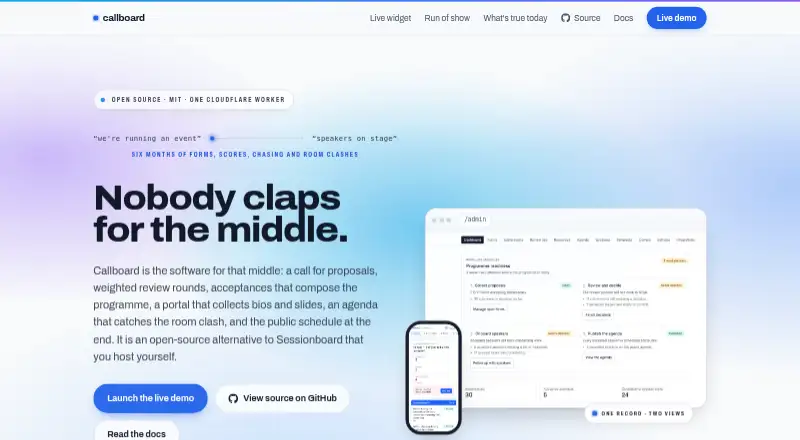
Callboard is an open-source system for managing an event’s call for proposals through schedule publication. Organizers can build submission forms with conditional questions, shared character limits, participant rules and closing dates, then route proposals to tracks. Reviewers see the proposals assigned to them, and organizers can apply weighted scores in two rounds. Accepted speakers use a portal to update session information, upload headshots and materials, complete tasks and consult event resources. For planning, organizers place sessions in rooms and time slots and can review overlaps in a dedicated conflict view. Published agendas can be embedded and provide ordered speaker names, calendar invites, CSV exports and API access. Integrations include Accelevents CSV export, optional API push, Airtable mirroring and signed webhooks, optionally delivered through Svix. Callboard is self-hosted under the MIT license, with the main application described as one Cloudflare Worker using D1 and R2. Public self-serve signup and per-organization tenancy are not available yet; deployment operators provision organizations. The demo displays email in its console rather than sending it.
Who it suits
Callboard suits event organizers managing submissions, reviews, speakers and schedules who can arrange self-hosted deployment. It also supports reviewers and accepted speakers through their respective workflows.
What it does well
- Conditional CFP questions and track routing
- Weighted proposal scoring across two rounds
- Speaker portal supports tasks and materials
- Conflict view flags overlapping sessions
- Published agendas support calendar, CSV and API
What to know first
- No public self-serve signup yet
- No per-organization tenancy yet
- Demo does not send email to recipients
Limits
The self-hosted plan is free. Public self-serve signup and per-organization tenancy are not built yet, and organizations are provisioned by the deployment operator; the demo does not send email to speakers.
Plans
| Plan | Billed and limits | Price |
|---|---|---|
| Self-hosted | Open source · MIT · Self-hosted | Free |
As callboardhq.com lists them, read 9 Oct 2026. The maker's own page has the final word.
Getting started
- Open the Callboard website and review the project documentation.
- Arrange for an organization to be provisioned by the deployment operator.
- Deploy the application for self-hosting; the main app uses a Cloudflare Worker, D1 and R2.
- Configure API keys with the required independently granted scopes.
- Set up CFP forms, reviews, speaker onboarding and the event agenda.
Callboard is an open-source system for running an event’s call for proposals, review rounds, speaker coordination and programme publishing in one workflow. It suits organizations able to operate a Cloudflare-based self-hosted deployment and wanting control of their event data. The trade-off is operational: an operator must provision each organization, so it is not a self-serve SaaS choice.
Overview
Callboard follows submissions from a public CFP through reviewers and accepted speakers to a published agenda. The MIT license and self-hosting model make it a practical option for teams that need to adapt or run the service themselves rather than buy a managed workspace. Its scope is broader than a simple abstract inbox, but adopting it also means owning deployment and administration.
Key features
CFP forms support conditional questions, shared character limits, participant rules, closing dates and routing submissions to tracks. Those controls let organizers tailor one form to different proposal types while keeping entries within useful bounds. Reviewers see only their assigned proposals, and organizers can apply weighted scoring across two rounds, providing a repeatable committee process. AI abstract triage supplies an advisory score and recommendation; it cannot write committee reviews or change a submission’s status, so final decisions remain with people.
Accepted speakers receive a portal for updating session details, uploading headshots and materials, completing tasks and reading event resources. That gives speakers a dedicated place to finish production work instead of relying solely on organizer email. Agenda tools place sessions into rooms and times and expose overlaps in a dedicated conflict view. The conflict view identifies collisions, but organizers still have to resolve them.
Published schedules can be embedded and include ordered speaker and co-speaker names. Calendar invites, CSV exports and an API make programme data portable. Documented connections include Accelevents CSV export, optional API push, an Airtable mirror and signed webhooks, with optional Svix delivery. API keys provide six independently grantable scopes—four read and two write—and scopes do not cascade, which supports tightly limited integrations. Uploads are proxied through the Worker so ownership checks apply on reads and writes; secrets are supplied through Wrangler rather than kept in the repository.
Pricing
| Plan | Price | Includes |
|---|---|---|
| Self-hosted | free | Open source, MIT license, self-hosted deployment |
There is no licence charge for the self-hosted edition. The saving is most meaningful for organizations with the people and infrastructure to run it; the cost shifts to deployment and ongoing operations. Public self-serve signup and per-organization tenancy are not built, and organizations are provisioned by the deployment operator. The demo’s mail driver prints emails to its console instead of sending them, so it cannot represent a live speaker-notification workflow.
Platforms
Callboard is offered as a web application and API, with self-hosting as its deployment model. The main application is described as one Cloudflare Worker using D1 and R2, a relatively compact architecture for teams already working in that environment.
Who it's for
It is a strong fit for conference, festival and community-event teams that need CFP forms, structured review, speaker task collection, room scheduling and publishable programme data in one system. It also suits technical organizations that value an MIT-licensed codebase, scoped API credentials and control over storage. It is a poor fit for organizers seeking instant SaaS signup, vendor-managed tenancy or a demo that sends real email without additional deployment work.
Pros and cons
Pros
- Complete proposal-to-publishing workflow: CFP controls, two-round weighted review, speaker tasks, agenda placement and exports cover the operational chain.
- Useful data connections: CSV, calendar invites, API access, Airtable mirroring and signed webhooks support downstream programme work.
- Granular integration security: Six non-cascading API scopes let administrators separate read and write access.
- No software licence fee: The MIT self-hosted plan is free and permits organizations to run the project themselves.
Cons
- Operator-dependent provisioning: Organizations cannot create their own tenant, which adds a gate before use.
- Self-hosting responsibility: Deployment, storage and maintenance remain with the adopting team.
- Demo email is non-delivery: Console-only mail makes the demonstration unsuitable for validating speaker communications.
- AI is advisory only: Triage can recommend but cannot record committee reviews or alter statuses.
Alternatives
Choose Indico instead if you want another free, self-hosted open-source event platform with Android, iOS, API and web access.
Novex Speaker Management is the better starting point for a freemium service with a free-forever Beam plan covering one event and up to 150 attendees, plus email confirmations and QR check-in.
Pick ConfTool for smaller non-commercial events that qualify for its free license, up to 150 participants and local installation.
Fourwaves suits teams wanting hosted freemium plans, including a Starter tier with 25 abstract submissions per year and unlimited registrations and events.
Use OpenCFP when a PHP-based, self-hosted conference talk submission system is all you need.
Sessionize is preferable for eligible community events that want a hosted freemium product and a free community-event plan.
Choose EasyChair for a submission-focused service with a free tier capped at 20 submissions, or paid per-submission options.
OpenConf is an alternative self-hosted/web option with a community edition for three or fewer events or journals per year.
For broader category browsing, see Speaker Management Software and Event Scheduling Software.
Verdict
Choose Callboard when your organization wants a free MIT-licensed system spanning CFP intake, review, speakers and agenda publishing, and has an operator ready to host it. Look elsewhere if self-service onboarding, managed tenancy or immediately deliverable email is a requirement.
Verdict
Callboard covers the event workflow from proposals through agenda publication, with exports and integrations for programme data. Organizations must be provisioned by a deployment operator, and the demo does not deliver email.
Questions
Is Callboard free?
Yes. Its self-hosted plan is free, and the project is open source under the MIT license.
Can I host Callboard myself?
Yes. Callboard is designed for self-hosting. Its main application is described as one Cloudflare Worker using D1 and R2.
Can organizations sign up on their own?
No. Public self-serve signup is not built yet; organizations are provisioned by the deployment operator.
What can Callboard export or publish?
Published schedules can be embedded and can feed calendar invites, CSV exports and an API. Documented integrations include Accelevents CSV export, optional API push, an Airtable mirror and signed webhooks.
Does Callboard support an API?
Yes. API keys have six independently granted scopes: four read and two write. Published programme data can be accessed through an API with per-event scoped keys.
Does the demo send email to speakers?
No. The demo routes email to its console mail driver instead of sending messages to speakers.
Facts from Callboard's own pages
- Agenda
- The agenda supports scheduling by room and time and identifies room or session conflicts. · callboardhq.com, 9 Oct 2026
- AI triage
- AI abstract triage provides an advisory score and recommendation but cannot write committee reviews or change submission status. · docs.callboardhq.com, 9 Oct 2026
- API access
- API keys have six independently grantable scopes, four read and two write, and scopes do not cascade. · docs.callboardhq.com, 4 Oct 2026
- CFP forms
- Its proposal forms support conditional questions, character limits, participant rules, close dates, and routing proposals to tracks. · callboardhq.com, 9 Oct 2026
- Demo email limitation
- The demo routes email to its console mail driver, so it does not send messages to speakers. · callboardhq.com, 9 Oct 2026
- Demo limitation
- The demo prints emails to its console instead of sending them to recipients. · callboardhq.com, 4 Oct 2026
- Deployment
- The main application is described as one Cloudflare Worker using D1 and R2. · callboardhq.com, 4 Oct 2026
- Hosting
- The documented self-hosted setup uses one Cloudflare Worker, a D1 database, and an R2 bucket; the site says no other service is required to run the workflow. · callboardhq.com, 9 Oct 2026
- Integrations
- The documentation lists an Accelevents CSV export, optional API push, an Airtable mirror, and signed webhooks with optional Svix delivery. · docs.callboardhq.com, 9 Oct 2026
- Intended users
- Callboard describes itself as speaker and CFP management for events, covering the workflow from public submissions through organizers, reviewers and speakers. · docs.callboardhq.com, 4 Oct 2026
- License
- The project is open source under the MIT license. · callboardhq.com, 4 Oct 2026
- Not available
- The site says self-serve organizations and per-organization tenancy are not built yet; organizations are provisioned by the deployment operator and organizer rights are deployment-wide. · callboardhq.com, 9 Oct 2026
- Open source
- Callboard is open source under the MIT license and can be self-hosted. · callboardhq.com, 9 Oct 2026
- Publishing
- Published schedules include ordered speaker and co-speaker names and can feed calendar invites, CSV exports and an API. · callboardhq.com, 4 Oct 2026
- Publishing and exports
- Published schedules can be embedded, and programme data can be exported as calendar invites or CSV and accessed through an API with per-event scoped keys. · callboardhq.com, 9 Oct 2026
- Purpose
- Callboard manages event proposals, reviews, speaker onboarding, agenda planning, and publishing the public schedule. · callboardhq.com, 9 Oct 2026
- Review
- Reviewers get assigned-only workspaces, weighted scoring across two rounds, and organizers can see aggregate scores and outstanding reviews. · callboardhq.com, 9 Oct 2026
- Security
- The documentation says uploads are proxied through the Worker so ownership checks apply on read and write paths, and secrets are supplied through Wrangler rather than stored in the repository. · github.com, 4 Oct 2026
- Speaker portal
- Accepted speakers can edit session details, upload headshots and materials, complete tasks, and access event resources through a portal. · callboardhq.com, 9 Oct 2026
Where Callboard stands on Freedom251
- Event Scheduling Software#3 of 34
- Speaker Management Software#4 of 28