Freedom251 › Speaker Management Software
OpenCFP
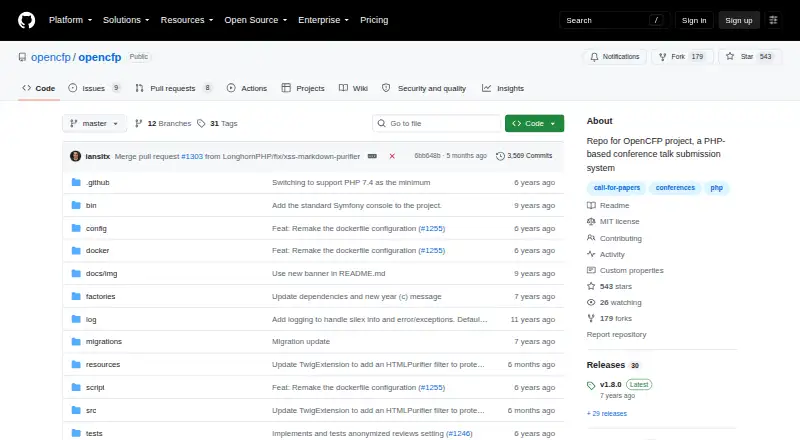
What OpenCFP is
OpenCFP is a self-hosted PHP system for collecting and reviewing conference talk proposals. Speakers can register contact information, submit proposals and manage their profiles through a dashboard. Reviewers can view and rate talks, while administrators can examine speaker information, favorite talks and select proposals. Command-line utilities support user and role administration. The application sends event notifications through configured SMTP settings; the setup guide gives Mailgun as an example. Its configuration also includes options for single sign-on through OpenCFP Central. The project provides a Docker Compose file and describes running the application in containers. The README lists PHP 7.4 and recommends Apache 2 or later with mod_rewrite and AllowOverride enabled. OpenCFP is free, with Linux and web platforms listed. The project is in maintenance mode and accepts security fixes only. Setup guidance recommends enabling secure_ssl when possible, which requires a valid SSL certificate. The project advises installers to protect collected personal information and recommends deleting database data within 15 months of accepting submissions.
Who it suits
It suits conference organizers who can self-host a PHP application and need proposal submission, review and selection workflows. Its maintenance mode is important for teams considering ongoing changes.
What it does well
- Speakers can submit talks and manage profiles.
- Reviewers can view and rate talks.
- Administrators can select proposals.
- SMTP notifications can be configured.
- Docker Compose deployment is provided.
What to know first
- Maintenance mode accepts security fixes only.
- The README lists PHP 7.4.
- Recommended secure_ssl setup requires a valid SSL certificate.
Limits
The free plan is self-hosted and PHP-based. The project is in maintenance mode and accepts security fixes only.
Plans
| Plan | Billed and limits | Price |
|---|---|---|
| OpenCFP | PHP-based conference talk submission system; self-hosted | Free |
As github.com lists them, read 5 Oct 2026. The maker's own page has the final word.
Getting started
- Download the latest marked release from the project's GitHub releases page.
- Prepare an environment with PHP 7.4 and the recommended Apache configuration.
- Use the provided Docker Compose file and container instructions to build and run the application.
- Configure SMTP for event notifications and OpenCFP Central settings if using its single sign-on.
- Enable secure_ssl when possible and ensure a valid SSL certificate is in place.
- Set up speakers, reviewers, and administrators using the application and command-line utilities.
Overview
OpenCFP is a PHP-based application for running a conference call for proposals and the subsequent selection process. It suits organizers prepared to host and administer their own service, especially those wanting a focused submission workflow rather than a full event platform. The zero-cost license is compelling, but maintenance mode makes its long-term fit dependent on your willingness to operate an aging project.
Key features
Speaker registration collects contact information, and a speaker portal lets contributors submit talk proposals and maintain their profiles. Application forms, a speaker portal, and email automation cover the core call-for-papers journey without requiring a separate intake system.
The administrative dashboard gives reviewers access to talks and rating tools, while administrators can inspect speaker information, mark favorite proposals, and make final selections. This separation is practical for committees with distinct reviewing and decision-making responsibilities. It is a submission-and-review tool, not a broader conference registration or attendee-management suite.
Command-line utilities handle user administration and reviewer or administrator groups. That provides granular operational control, but it also means routine account and role work may sit with someone comfortable using a shell. SMTP configuration sends system notifications, with Mailgun cited as an example provider. Settings for OpenCFP Central single sign-on can simplify authentication when that service is part of your setup.
Deployment can follow the supplied Docker Compose file and container instructions. The stated environment includes PHP 7.4 and recommends Apache 2 or later with mod_rewrite and AllowOverride enabled, so hosting still demands attention to server configuration. The setup guidance recommends enabling secure_ssl when possible, which requires a valid SSL certificate. Privacy-conscious operators are asked not to share collected personal information with third parties without explicit permission, and the README recommends deleting database data within 15 months of accepting submissions.
Pricing
OpenCFP has one published plan: OpenCFP costs free. It is a self-hosted PHP conference talk submission system with application forms, a speaker portal, and email automation. There is no free trial because the product is already free, and there are no paid tiers or subscription renewals to budget for. The trade-off is operational: you supply hosting, deployment, security configuration, updates, and administration yourself.
Platforms
OpenCFP runs on Linux as a self-hosted web application. Docker Compose offers a container-based route, while the documented PHP and Apache requirements provide a conventional installation path. Choose it when your organization controls suitable infrastructure; teams seeking a vendor-hosted service should look elsewhere.
Who it's for
It is a good match for conference organizers with technical staff who need speaker registration, proposal collection, reviewer ratings, and administrator selection in one focused system. It also fits organizations that prefer self-hosting and can enforce their own privacy and retention practices.
It is a weaker choice for teams expecting active feature development, managed hosting, or a polished event-management ecosystem. The project is in maintenance mode and accepts only security fixes, so new workflow requirements may remain yours to solve.
Pros and cons
Pros
- Free self-hosted plan: there is no software charge or recurring renewal.
- Complete proposal workflow: registration, profile management, submissions, ratings, and selection are covered in one application.
- Role-aware administration: reviewer and administrator capabilities support committee-based decisions.
- Deployment flexibility: Docker Compose and conventional PHP/Apache guidance accommodate different hosting teams.
- Operational integrations: SMTP notifications and OpenCFP Central single sign-on provide useful infrastructure hooks.
Cons
- Maintenance-only status: only security fixes are accepted, limiting prospects for feature growth.
- Technical ownership: self-hosting, command-line administration, SSL, and server configuration are your responsibility.
- Retention burden: operators must manage deletion of database data within the recommended 15-month period.
Alternatives
Indico is another free, open-source self-hosted option, with Android, iOS, API, and web access in addition to self-hosting; choose it when broader platform reach matters.
Novex Speaker Management offers a free-forever Beam plan for one event and up to 150 attendees, plus hosted mobile and web platforms, making it preferable when you want a managed freemium service.
ConfTool has a free license on request for smaller non-commercial events of up to 150 participants, with local installation and no support; it suits organizations within those limits.
Fourwaves provides a free Starter tier with 25 abstract submissions per year, unlimited registrations and events, and a 3% service fee, which favors hosted event operations with modest submission volume.
Sessionize offers a free Community event plan for qualifying community events, so choose it when your event meets its non-commercial eligibility rules and you want a hosted service.
Callboard is open source under the MIT license and self-hosted, giving technically minded teams another no-cost deployment choice.
EasyChair has a free plan capped at 20 submissions and no technical support, with paid per-submission tiers for higher limits; it is suited to small events that prefer a hosted web tool.
OpenConf offers a community edition for up to three events and journals per calendar year, with paid editions for organizations needing more capacity and support.
For a wider shortlist, see Speaker Management Software.
Verdict
Choose OpenCFP if you need a free, self-hosted pipeline from speaker registration through committee selection and have the technical capacity to run it. Its main advantage is concentrated functionality without licensing cost. Look elsewhere if you need active product development, hosted operations, or a broader event platform: maintenance-only status and infrastructure responsibility are significant constraints.
Verdict
OpenCFP covers speaker registration, proposal review and administration for conference submissions. It is free and self-hosted, but the project accepts only security fixes.
Questions
Is OpenCFP free?
Yes. Its listed plan is free, and the pricing model is free.
Where can OpenCFP run?
The listed platforms are Linux, self-hosted, and web. The project also provides Docker Compose instructions for running it in containers.
What does OpenCFP require?
The README lists PHP 7.4 and recommends Apache 2 or later with mod_rewrite and AllowOverride enabled.
Can reviewers and administrators have different roles?
Yes. Reviewers can view and rate talks; administrators can review speaker information, favorite talks, and make selections. Command-line utilities support user and role management.
How are notifications sent?
OpenCFP uses configured SMTP settings for event notifications. The setup guide gives Mailgun as an example provider.
Is OpenCFP actively maintained?
It is in maintenance mode and accepts only security fixes.
Facts from OpenCFP's own pages
- Administration
- Command-line utilities support system administration, including managing users and roles. · github.com, 5 Oct 2026
- Data retention
- The README recommends deleting database data within 15 months of accepting submissions. · github.com, 5 Oct 2026
- Deployment
- The project provides a Docker Compose file and describes building and running the application in containers. · github.com, 5 Oct 2026
- Download
- The README recommends downloading the latest marked release from the project’s GitHub releases page. · github.com, 5 Oct 2026
- Email configuration
- The application can send system notifications using configured SMTP settings; the README gives Mailgun as an example provider. · github.com, 5 Oct 2026
- Email integration
- The application sends event notifications through configured SMTP, and the setup guide gives Mailgun as an example provider. · github.com, 5 Oct 2026
- Maintenance
- The project is in maintenance mode and accepts only security fixes. · github.com, 5 Oct 2026
- Privacy guidance
- Installers are asked not to share users’ personal information with third parties without explicit permission, and the project recommends deleting instance data within 15 months of accepting submissions. · github.com, 5 Oct 2026
- Purpose
- OpenCFP is a PHP-based conference talk submission system. · github.com, 5 Oct 2026
- Requirements
- The README lists PHP 7.4 and recommends Apache 2 or later with mod_rewrite and AllowOverride enabled. · github.com, 5 Oct 2026
- Review dashboard
- Administrators can review submitted talks and make selections through an administrative dashboard. · github.com, 5 Oct 2026
- Review roles
- Reviewers can view talks and rate them, while administrators can review speaker information, favorite talks, and make selections. · github.com, 5 Oct 2026
- Review workflow
- An administrative dashboard lets administrators review submitted talks and make selections. · github.com, 5 Oct 2026
- Security configuration
- The setup guide says to enable secure_ssl if possible and notes that it requires a valid SSL certificate. · github.com, 5 Oct 2026
- Single sign-on
- Configuration includes settings for using OpenCFP Central for single sign-on. · github.com, 5 Oct 2026
- Speaker registration
- It provides speaker registration that gathers contact information. · github.com, 5 Oct 2026
- Speaker submissions
- Speakers can submit talk proposals and manage their profiles through a dashboard. · github.com, 5 Oct 2026
- Support
- The project README points users to its GitHub wiki for screenshots and to its contributing guide for contribution information. · github.com, 5 Oct 2026
- Talk proposals
- Speakers can submit talk proposals and manage their profiles through a dashboard. · github.com, 5 Oct 2026
- User administration
- Command-line utilities support system administration, including managing users and reviewer or administrator groups. · github.com, 5 Oct 2026
Where OpenCFP stands on Freedom251
- Speaker Management Software#8 of 28