Freedom251 › Digital Waiver Software
ClickWaiver
What ClickWaiver is
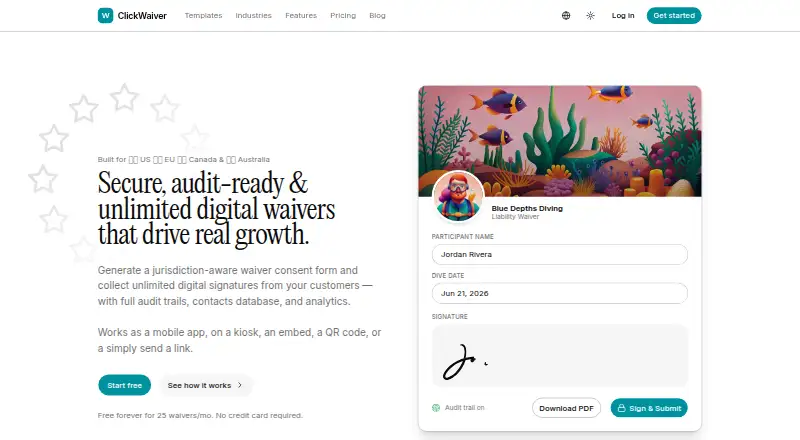
ClickWaiver helps businesses create, distribute, sign, and retain digital waivers with audit records. Its form builder offers AI-assisted drafts, multi-page forms, 17 field types, conditional logic, and jurisdiction-aware warnings. Businesses can send forms by link, QR code, email, kiosk mode, or an embeddable widget. The iPad PWA can collect signatures offline and sync them when connectivity returns. Completed waivers include an audit trail and a PDF certificate with a SHA-256 hash and public verification link. A REST API is available, and Pro and higher plans include webhooks. ClickWaiver offers a Free plan, a 14-day trial, and paid plans from $29/mo. Pro is $29 a month; Team is $99 a month. The service is positioned for businesses such as fitness, events, rentals, and beauty and wellness providers. The company says it does not currently cover Quebec Law 25-specific obligations beyond PIPEDA-equivalent terms. Its legal terms describe AI drafts and jurisdiction features as informational aids, not legal advice or assurances that a waiver is enforceable.
Who it suits
ClickWaiver is aimed at businesses that collect customer waivers, including fitness, events, rentals, and beauty and wellness providers. It may suit teams that want digital distribution, offline kiosk signing, or a verification certificate for completed forms.
What it does well
- Multiple sharing options, including QR and kiosk
- iPad kiosk can sign offline and sync later
- Completed waivers include audit trails and PDF certificates
- REST API available
- Signer waiver data is not sent to AI providers
What to know first
- Quebec Law 25-specific obligations are not supported beyond PIPEDA-equivalent terms
- AI and jurisdiction tools are not legal advice
- Full help center is still coming soon
Limits
The Free plan allows 25 waivers per month, three templates, one user, and one location. Pro includes 200 AI-generated drafts per month; Team includes unlimited AI generation.
Plans
| Plan | Billed and limits | Price |
|---|---|---|
| Pro | Unlimited waivers · Unlimited templates · 3 users · 1 location · White-label · API + webhooks · AI Generator (200/mo) · All distribution channels · Conditional logic | $29 a month |
| Team | Everything in Pro · 15 users · 5 locations · SSO (Google / Microsoft) · Role-based access · Priority support · Multi-location dashboards · AI Generator (unlimited) · EU data residency | $99 a month |
| Free | 25 waivers/month · 3 templates · 1 user · 1 location · Kiosk mode · Embed widget · Email + QR distribution · PDF + audit certificate · Powered by footer | On request |
| Enterprise | For 50+ users, on-prem, or EU data residency; contact for details | On request |
As clickwaiver.com lists them, read 28 Sept 2026. The maker's own page has the final word.
Getting started
- Visit https://clickwaiver.com/.
- Choose the Free plan, Pro at $29 a month, or Team at $99 a month; Enterprise users can contact the company for details.
- Use the web or iOS platform, or connect through the REST API with bearer-token or API-key authentication.
- Create a waiver using the builder's drafts, form fields, and conditional logic.
- Distribute the waiver by link, QR code, email, kiosk mode, or an embeddable widget.
ClickWaiver is a digital waiver service for businesses that need to create, distribute, sign, and retain customer forms. It is strongest for operators who want offline iPad kiosk signing alongside verifiable PDF records; its Quebec limitation and legal caveat matter if jurisdiction-specific compliance is central.
Overview
ClickWaiver brings waiver drafting, multiple signing routes, and recordkeeping into one service. Its useful distinction is the combination of offline kiosk signing and a PDF certificate that includes a SHA-256 hash and public verification link. Those tools can help a business capture signatures despite a temporary connection outage and later verify completed records.
There are meaningful boundaries. The company says it does not support Quebec Law 25-specific obligations beyond PIPEDA-equivalent terms, and its terms describe jurisdiction warnings and AI drafts as informational rather than legal advice or a guarantee of enforceability. Businesses with specific legal requirements should not treat either feature as a substitute for their own legal review.
Key features
Build and distribute waivers
The builder supports multi-page forms, 17 field types, conditional logic, AI-assisted drafts, and jurisdiction-aware warnings. That range suits businesses that need more than a simple signature line, although the AI and jurisdiction features are aids, not legal validation. Waivers can go out through links, QR codes, email, kiosk mode, or an embeddable widget, giving businesses several ways to collect signatures in person and online.
Offline signing and records
The iPad PWA can collect signatures offline and sync them when connectivity returns. This is a practical advantage for venues where internet access can be unreliable, but the offline workflow is specifically described for iPad. Completed waivers include an audit trail and a PDF certificate with a SHA-256 hash and public verification link, which provides a concrete way to check a document’s record.
Integrations, privacy, and support
The REST API supports bearer-token and API-key authentication; webhooks are included on Pro and higher plans. Connections use TLS 1.2 or higher, and signer form-field values receive application-layer AES-256-GCM encryption. EU storage residency can be enabled on supported plans for signed PDFs, signature images, and uploads, while account and audit metadata stay in the primary US region. ClickWaiver says it does not sell personal data or use it for behavioral advertising, and signer waiver data is never sent to AI providers. The help center directs users to email support and says its full help center is coming soon, so self-service guidance is limited.
Pricing
ClickWaiver has a free plan, a 14-day trial, and paid plans from 29 USD per month. Pro is $29 a month and includes unlimited waivers and templates, three users, one location, white-labeling, API and webhooks, all distribution channels, conditional logic, and 200 AI-generated drafts per month. It is the clearest fit for a single-location business that needs integrations and branding, but its three-user and one-location allowances may constrain a growing operation.
Team costs $99 a month. It adds 15 users, five locations, Google or Microsoft SSO, role-based access, priority support, multi-location dashboards, unlimited AI generation, and EU data residency to Pro. That makes it better suited to organizations coordinating waiver collection across several sites or teams. Enterprise has custom pricing and is aimed at organizations with 50 or more users, on-premises needs, or EU data residency.
The Free plan has custom pricing and caps use at 25 waivers per month, three templates, one user, and one location. It includes kiosk mode, an embed widget, email and QR distribution, and PDF plus audit certificates, but keeps a Powered by footer. It is a reasonable way for a small operator to start, but the waiver and template ceilings are restrictive for regular or expanding use. The paid plans remove those listed free-plan caps; Pro still limits seats, locations, and monthly AI generation.
Platforms
ClickWaiver supports web, iOS, and API access. Offline kiosk signing is provided through an iPad PWA. An API is included, while webhooks begin at Pro.
Who it's for
ClickWaiver is aimed at businesses collecting customer waivers, including fitness, events, rentals, and beauty and wellness providers. The free tier suits a low-volume, single-location operation; Pro is a stronger fit when a business needs unlimited waivers, white-labeling, or API integrations. Teams operating multiple locations or needing role controls and EU storage residency have a clearer case for Team. It is a weaker fit for Quebec businesses that need specific Law 25 support or for anyone expecting the AI draft to establish legal enforceability.
Pros and cons
Pros
- Offline iPad kiosk signing can keep signature collection moving during connectivity interruptions.
- PDF certificates pair an audit trail with a SHA-256 hash and public verification link.
- Multiple distribution channels and conditional forms accommodate different signing contexts and workflows.
- Pro includes API and webhooks, and Team adds multi-location controls and EU storage residency.
Cons
- The free plan's 25-waiver monthly cap and three-template limit may quickly require an upgrade.
- Pro is limited to three users and one location; broader access and locations require Team.
- EU residency covers signed documents, signature images, and uploads, not account and audit metadata.
- Quebec Law 25-specific obligations are not supported beyond PIPEDA-equivalent terms, and jurisdiction features and AI drafts are not legal advice.
- The full help center is still coming soon, leaving email as the stated help route.
Alternatives
For a directory-wide comparison, browse Digital Waiver Software.
- Choose WaiverFile if you want a booking plan with no monthly fee and can accommodate a 6% booking fee, rounded up to the nearest whole dollar, plus Stripe processing fees.
- Choose Survtapp if Android support matters or its free plan's three users, 100 responses per month, five MB of storage, two kiosk devices, three forms, and 120-day retention better match your needs.
- Choose WaiverDrop if you want a free starter plan with 10 waivers per month, unlimited templates, document packets, kiosk and touchless modes, and webhooks.
- Choose WaiverForever if its free starter allowance of 20 submissions per month and basic features is a better fit.
- Choose WaiverKit if a web-only service with a free allowance of 30 signed waivers per month, one template, PDF export, and WaiverKit branding suits your operation.
- Choose CleverWaiver if its BASIC plan at $9.99 a month, with 70 waivers per month, one template, and 20 cents per extra waiver, fits your volume and budget.
- Choose Wherewolf if its Launch plan at $89 a month billed annually, or $134 a month billed monthly, and one waiver type match your needs.
- Happy Waiver is another freemium option.
Verdict
ClickWaiver is a strong choice for a single-location business that needs flexible waiver distribution, offline iPad kiosk signing, and verifiable PDF records, with Pro adding API access and webhooks. Look elsewhere if Quebec Law 25-specific support is essential, if the free plan's caps are too low, or if you need more than three users or one location without moving to Team.
Verdict
ClickWaiver combines waiver creation and distribution with offline kiosk signing and verifiable PDF records. Consider its stated Quebec limitation and legal caveat before relying on jurisdiction features or AI drafts.
Questions
Is there a free plan?
Yes. The Free plan includes 25 waivers per month, three templates, one user, and one location.
How much do the paid plans cost?
Pro costs $29 a month and Team costs $99 a month. Enterprise pricing is available by contacting the company.
Is there a free trial?
Yes, a 14-day trial is listed.
What platforms does ClickWaiver support?
The listed platforms are web, iOS, and API. Its iPad PWA can collect signatures offline and sync them when internet access returns.
Does ClickWaiver provide API access and integrations?
It offers a REST API with bearer-token and API-key authentication. Webhooks are included on Pro and higher plans.
Does the service support EU data residency?
EU storage residency is available on supported plans for signed PDFs, signature images, and uploads. Account and audit metadata remain in the primary US region.
Facts from ClickWaiver's own pages
- Data residency
- EU storage residency can be enabled on supported plans for signed PDFs, signature images, and uploads; account and audit metadata remain in the primary US region. · clickwaiver.com, 28 Sept 2026
- Integrations
- The service offers a REST API with bearer-token and API-key authentication, plus webhooks on Pro and higher plans. · clickwaiver.com, 28 Sept 2026
- Intended users
- The site positions ClickWaiver for businesses that collect customer waivers, including fitness, events, rentals, and beauty and wellness providers. · clickwaiver.com, 28 Sept 2026
- Legal caveat
- The terms say jurisdiction-aware features and AI drafts are informational aids, not legal advice or a guarantee that a waiver is enforceable. · clickwaiver.com, 28 Sept 2026
- Limitations
- The company says it does not currently support Quebec Law 25-specific obligations beyond PIPEDA-equivalent terms. · clickwaiver.com, 28 Sept 2026
- Offline kiosk
- The iPad PWA can collect signatures offline and sync them when internet connectivity returns. · clickwaiver.com, 28 Sept 2026
- Privacy
- The policy says ClickWaiver does not sell personal data or use it for behavioral advertising, and signer waiver data is never sent to AI providers. · clickwaiver.com, 28 Sept 2026
- Product
- ClickWaiver helps businesses draft, distribute, sign, and store digital waivers with audit trails. · clickwaiver.com, 28 Sept 2026
- Records
- Completed waivers include an audit trail and a PDF certificate with a SHA-256 hash and public verification link. · clickwaiver.com, 28 Sept 2026
- Security
- The privacy policy says connections use TLS 1.2 or higher and signer form-field values receive application-layer AES-256-GCM encryption. · clickwaiver.com, 28 Sept 2026
- Signing and distribution
- Waivers can be shared by link, QR code, email, kiosk mode, or an embeddable widget. · clickwaiver.com, 28 Sept 2026
- Support
- The help center says its full help center is coming soon and directs users to email [email protected] for help. · clickwaiver.com, 28 Sept 2026
- Waiver creation
- The builder includes AI-assisted drafts, multi-page forms, 17 field types, conditional logic, and jurisdiction-aware warnings. · clickwaiver.com, 28 Sept 2026
Where ClickWaiver stands on Freedom251
- Digital Waiver Software#2 of 25