Freedom251 › Minecraft World Editors
Chunker
What Chunker is
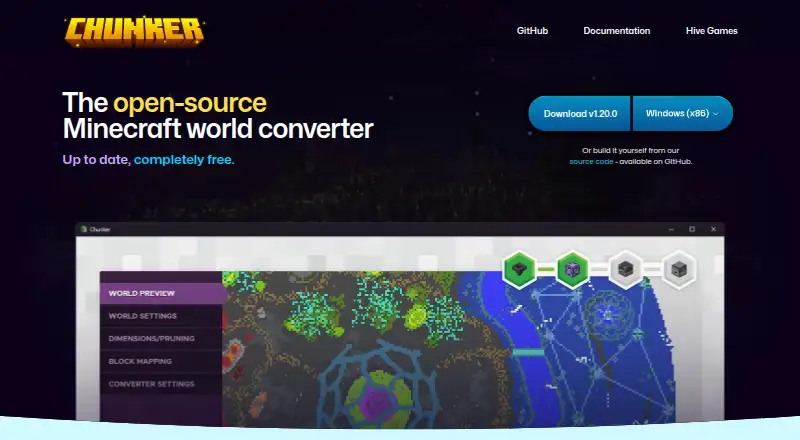
Chunker converts Minecraft worlds between Java Edition and Bedrock Edition, working with the world files locally on your machine. It can carry over level settings, blocks, biomes, tile entities, multiple dimensions, containers, items and in-game maps, and can upgrade or downgrade worlds across supported game versions. You can provide a world folder, ZIP archive or MCWORLD file, including by drag and drop. Conversion and export settings are adjustable and reusable. Chunker also offers a command-line interface for conversion and workflow integration; using it requires Java 17 or higher. It runs on Windows, macOS and Linux, and has a web interface. The app is free and open source under the MIT license. It does not convert entities or player inventories; structure data such as villages and strongholds is unsupported or limited. Supported game versions differ by edition, so check the listed compatibility before converting.
Who it suits
Chunker suits Minecraft players who need to move worlds between Java and Bedrock editions or between supported game versions. Its CLI may also suit users integrating conversion into a workflow, provided they have Java 17 or higher.
What it does well
- Converts worlds between Java and Bedrock editions
- Processes worlds locally on the user's machine
- Accepts folders, ZIP archives and MCWORLD files
- Conversion and export settings can be reused
- Free and open source under the MIT license
What to know first
- Does not convert entities or player inventories
- Some structure data is unsupported or limited
- CLI requires Java 17 or higher
Limits
Chunker does not convert entities or player inventories. Structure data such as villages and strongholds is unsupported or limited; the command-line interface requires Java 17 or higher.
Plans
| Plan | Billed and limits | Price |
|---|---|---|
| Free | Java↔Bedrock conversion · desktop app and CLI · supported Minecraft versions | Free |
As chunker.app lists them, read 19 Oct 2026. The maker's own page has the final word.
Getting started
- Choose the web interface or a Windows, macOS, or Linux option.
- Open a world folder, ZIP archive, or MCWORLD file, or drag and drop it.
- Select the conversion settings and export settings you need.
- Save export settings if you want to reuse them later.
- For command-line conversion, use Java 17 or higher.
Overview
Chunker is a free Minecraft world converter for moving between Java Edition and Bedrock Edition, as well as between supported game versions. It suits players and creators who want broad world-data conversion with local processing; its chief caveat is that some important data does not make the trip.
Key features
Edition and version conversion
Chunker handles Java-to-Bedrock and Bedrock-to-Java conversions, plus upgrades and downgrades across supported releases. Its range covers Bedrock 1.12.0–1.26.50 and Java 1.8.8–1.21.11 and 26.1–26.3. That breadth makes it useful for migration and version matching, though worlds outside those ranges are not a fit.
World data and inputs
Conversions can carry level settings, blocks, biomes, tile entities, multiple dimensions, containers, items and in-game maps. You can start from a world folder, ZIP archive or MCWORLD file, including by drag and drop. Work stays on the user's machine, a practical advantage for anyone who prefers not to upload world files.
The coverage is not complete: entities and player inventories are not converted, and structure data such as villages and strongholds is unsupported or limited. If a world depends on those elements, expect gaps and consider whether they can be replaced or handled another way.
Reusable controls and CLI
Conversion and export settings can be adjusted and saved for later use, which helps with repeat workflows. A command-line interface offers a route to automation and workflow integration, but it requires Java 17 or higher. The project is open source under the MIT license, with its code available on GitHub.
Pricing
Chunker is completely free: the Free plan costs nothing and includes Java and Bedrock world conversion. There is no paid tier or trial to weigh against it. That makes it accessible for occasional conversions and recurring workflows alike, although the free price does not remove the data-coverage limits.
Platforms
Chunker supports Windows, macOS and Linux, along with a web interface and Java CLI. This range accommodates desktop use and command-line workflows; the CLI's Java 17-or-higher requirement matters if you plan to integrate it into an existing setup. The supported world formats are Bedrock 1.12.0–1.21.130 and 1.26.0–1.26.50, and Java 1.8.8–1.21.11 and 26.1–26.3.
Who it's for
Chunker is a strong fit for Minecraft players and creators moving worlds across editions or supported versions, especially when local processing, reusable settings or a CLI matter. It is a weaker choice for worlds whose entities, player inventories or structures must be preserved, and for anyone working outside its supported version ranges.
Pros and cons
- Pros: Converts between both Minecraft editions and supports version upgrades and downgrades across a broad stated range.
- Pros: Handles several kinds of world data and accepts folders, ZIP archives and MCWORLD files, including drag-and-drop input.
- Pros: Local processing, reusable conversion settings and a CLI support privacy-conscious and repeat workflows.
- Pros: Free use and an MIT license make it accessible without a paid plan.
- Cons: Entities and player inventories are not converted, while structure data may be unsupported or limited.
- Cons: The CLI requires Java 17 or higher, an extra prerequisite for command-line users.
Alternatives
MC Version Converter is a narrower free option for Java Edition 26.x worlds that need conversion to versions 1.18.2–1.21.11; choose it when that specific range is the task. Java2Nukkit World Converter is aimed at Java Edition 1.15.2 and requires optimized worlds and Java 1.8 or higher, so it suits that more specific setup. Server to Singleplayer World Converter is a free browser-based option for Java and Bedrock conversion.
LegacyEditor, LCE2JE and Chunkoid are other free options; Chunkoid is Android-only. WorldSwitch offers free web conversions for uploaded files up to 70 MB, with paid per-conversion tiers above that size. Universal Minecraft Tool has a free Windows tier limited to editing world settings and a paid yearly plan for full access to its apps. Browse Minecraft World Converters, Game Modding Tools or Minecraft World Editors for more options.
Verdict
Choose Chunker if you need free, local conversion between Java and Bedrock or supported game versions, with flexible inputs and a CLI for repeat work. Look elsewhere if preserving entities, player inventories or structure data is essential, or if your world falls outside its supported formats.
Verdict
Chunker covers several types of world data and offers both a graphical interface and CLI. Check edition and version compatibility, and account for data it does not convert before relying on a conversion.
Questions
How much does Chunker cost?
Chunker is completely free for Java and Bedrock world conversion.
Which Minecraft editions does Chunker support?
Chunker converts between Java Edition and Bedrock Edition. Supported versions vary by edition: Bedrock formats include 1.12.0–1.21.130 and 1.26.0–1.26.50; Java formats include 1.8.8–1.21.11 and 26.1–26.3.
Which platforms can I use Chunker on?
Chunker supports Windows, macOS, Linux, and a web interface. A Java command-line interface is also available.
Is Chunker open source?
Yes. It is open source under the MIT license, and its code is available on GitHub.
What does Chunker convert?
It can convert level settings and world data including blocks, biomes, tile entities, multiple dimensions, containers, items, and in-game maps. It can also upgrade or downgrade worlds between supported versions.
What world data does Chunker not convert?
Entities and player inventories are not converted. Structure data such as villages and strongholds is unsupported or limited.
Facts from Chunker's own pages
- Advanced settings
- Users can adjust conversion settings and export settings for reuse in later conversions. · chunker.app, 3 Oct 2026
- Build requirements
- Building from source requires Git and Java 17 or newer, with Gradle optional. · github.com, 19 Oct 2026
- CLI
- Chunker includes a command-line interface that can be used for conversion and workflow integration. · github.com, 3 Oct 2026
- CLI requirement
- The CLI requires Java 17 or higher. · github.com, 3 Oct 2026
- CLI runtime
- The CLI requires Java 17 or newer. · github.com, 19 Oct 2026
- Command line
- Chunker includes ChunkerCLI for workflow integration. · chunker.app, 19 Oct 2026
- Company founding
- LinkedIn lists Hive Games as founded in 2013. · uk.linkedin.com, 19 Oct 2026
- Company size
- LinkedIn lists Hive Games as a privately held company with 11–50 employees. · uk.linkedin.com, 19 Oct 2026
- Conversion speed
- The homepage says a world can be converted in about 30 seconds. · chunker.app, 19 Oct 2026
- Converted data
- Supported conversion data includes level settings, blocks, biomes, tile entities, multiple dimensions, containers, items and in-game maps. · learn.microsoft.com, 19 Oct 2026
- Current release
- The GitHub releases page lists version 1.21.0, released October 2, 2026. · github.com, 3 Oct 2026
- Desktop platforms
- Microsoft documents standalone versions for Windows, macOS and Linux, alongside the command-line version. · learn.microsoft.com, 19 Oct 2026
- Entity limitation
- Entities and player inventories generally are not converted between editions. · learn.microsoft.com, 19 Oct 2026
- Extensibility
- CLI parameters support block, biome, dimension, world-setting, pruning and converter-mapping JSON inputs. · github.com, 19 Oct 2026
- Funding
- The repository states that Chunker receives funding from Mojang Studios. · github.com, 19 Oct 2026
- Independent review
- James A. Chambers praised the easy world and version conversion workflow but documented upload limits, queues and missing entities and inventories. · jamesachambers.com, 19 Oct 2026
- Input formats
- The application accepts a world folder, ZIP archive or MCWORLD file, including drag and drop. · learn.microsoft.com, 19 Oct 2026
- Inputs
- The app accepts world folders, ZIP archives and MCWORLD files, and can also accept drag-and-drop inputs. · learn.microsoft.com, 3 Oct 2026
- Latest release
- Version 1.21.0 was released on 2 October 2026 with Bedrock 1.26.60 support, custom-block NBT handling and reduced memory use for large worlds. · github.com, 19 Oct 2026
- Legacy web app
- The 2024 announcement said the legacy web application would be available only until the end of 2024 and encouraged migration to the open-source release. · playhive.com, 19 Oct 2026
- Legal entity
- Companies House identifies the maker as active private company HIVE GAMES LIMITED, company number 08451891, incorporated on 19 March 2013. · find-and-update.company-information.service.gov.uk, 19 Oct 2026
- License
- The repository is released under the MIT license. · github.com, 19 Oct 2026
- Limit: conversion defects
- A Reddit MinecraftHelp report described deleted slabs, lighting problems and absent mobs after conversion, alongside a file-size limit. · reddit.com, 19 Oct 2026
- Limit: large worlds
- A Reddit commenter said a roughly 3 GB world exceeded an approximately 1.5 GB limit and failed to convert. · reddit.com, 19 Oct 2026
Where Chunker stands on Freedom251
- Minecraft World Editors#1 of 35
- Game Modding Tools#1 of 25
- Minecraft World Converters#1 of 18