Freedom251 › Minecraft World Converters

Universal Minecraft Tool
What Universal Minecraft Tool is
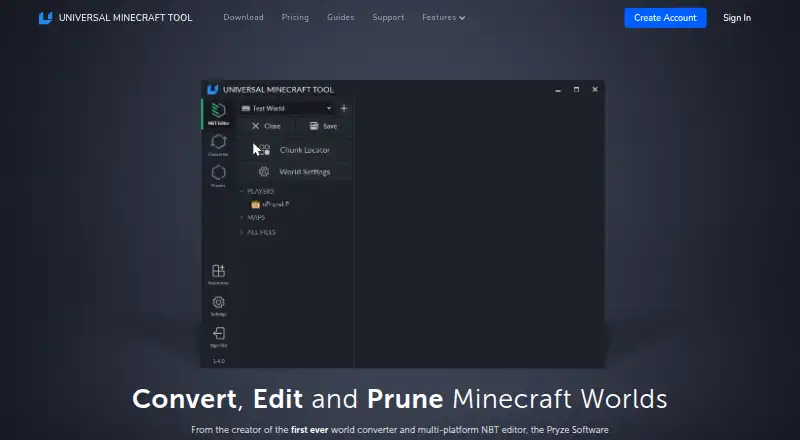
Universal Minecraft Tool combines an NBT editor, a world converter, and a world pruner for Minecraft saves. The editor changes saved world data and includes undo and redo, search, a hex editor, and a visual chunk locator. The converter handles worlds across Minecraft editions and versions, including terrain, items, containers, mobs, and biomes. The pruner selects chunks to remove from Java, Bedrock, and Legacy Console worlds, working on a copy until you save. It opens Java and Bedrock world folders, .mcworld files, and Legacy Console worlds transferred to the Windows computer running the app. Worlds are not uploaded to the company’s servers. Official and community extensions are supported, including NBT editor extensions for styling tags and processing viewed data. The free plan includes NBT editing for world settings. Full access costs $15 per month or $5 per year, billed as $60 annually, with two local sessions at once on the annual plan. Account verification needs an internet connection. Marketplace worlds cannot be opened, and conversions are designed for vanilla worlds; mods and texture packs do not convert, player data does not transfer between editions, and some structure metadata may be lost.
Who it suits
It suits Minecraft players who want to edit, convert, or prune saved worlds on a Windows computer. The free plan may suit users who only need to edit world settings.
What it does well
- Combines editing, conversion, and pruning tools.
- Editor includes undo, redo, search, and hex editing.
- Pruner works on a copy until saved.
- Worlds are not uploaded to company servers.
- Supports official and community-built extensions.
What to know first
- Runs only on Windows and requires internet verification.
- Marketplace worlds cannot be opened.
- Mods and texture packs do not convert.
- Player data does not transfer between editions.
Limits
The free plan is limited to the NBT editor and editing world settings. Conversions are designed for vanilla worlds; mods and texture packs do not convert, player data does not transfer between editions, and some invisible structure metadata does not convert.
Plans
| Plan | Billed and limits | Price |
|---|---|---|
| Free | Free · NBT Editor · Edit world settings only · No ads | Free |
| Monthly | $15 billed monthly · Full access to all apps · Cancel any time | $15 a month |
| Yearly | $60 billed annually · Full access to all apps · 2 local sessions at once · Cancel any time | $60 a year |
As universalminecrafttool.com lists them, read 3 Oct 2026. The maker's own page has the final word.
Getting started
- Visit the Universal Minecraft Tool website.
- Install and run the application on a Windows computer.
- Transfer a supported Java, Bedrock, or Legacy Console world to that computer.
- Choose the free plan for NBT editing of world settings, or select a paid plan for full access.
- Connect to the internet so the app can verify the account.
Verdict
The tool brings several world-management tasks into one Windows application. Check the marketplace and conversion restrictions before relying on it for a particular save.
Questions
Is Universal Minecraft Tool free?
It has a free plan that includes the NBT editor for editing world settings. There is no free trial.
How much do the paid plans cost?
The monthly plan costs $15 per month. The annual plan is listed at $5 per year, with $60 billed annually.
Which platforms and world types does it support?
It runs only on Windows and can open Java, Bedrock, and Legacy Console worlds transferred to the computer. Supported formats include Java world folders, Bedrock world folders, and .mcworld files.
Can it open Minecraft Marketplace worlds?
No. Minecraft Marketplace worlds cannot be opened with the tool.
Are Minecraft worlds uploaded to the company?
The home page says users’ worlds are never uploaded to the company’s servers.
What does conversion leave behind?
The converter is designed for vanilla worlds. Mods and texture packs do not convert, player data does not transfer between editions, and some invisible structure metadata does not convert.
Facts from Universal Minecraft Tool's own pages
- Conversion caveat
- The product says conversions cannot be completely perfect across editions and notes that some invisible structure metadata does not convert. · universalminecrafttool.com, 3 Oct 2026
- Conversion limit
- The converter is designed for vanilla worlds; mods and texture packs do not convert, and player data does not transfer between editions. · universalminecrafttool.com, 3 Oct 2026
- Extensions
- The tool supports official and community-built extensions, and its NBT editor extensions can style tags and process the data being viewed. · universalminecrafttool.com, 3 Oct 2026
- Marketplace restriction
- Minecraft Marketplace worlds cannot be opened with the Universal Minecraft Tool. · universalminecrafttool.com, 3 Oct 2026
- NBT editing
- The NBT editor can change saved world data and includes undo and redo, search, a hex editor, and a visual chunk locator. · universalminecrafttool.com, 3 Oct 2026
- Platform requirement
- The application runs only on Windows computers and requires an internet connection to verify the account. · universalminecrafttool.com, 3 Oct 2026
- Privacy
- The home page says users’ worlds are never uploaded to the company’s servers. · universalminecrafttool.com, 3 Oct 2026
- Pruning
- The pruner selects and removes chunks from Java, Bedrock, and Legacy Console worlds and automatically works on a copy until the user saves. · universalminecrafttool.com, 3 Oct 2026
- Purpose
- The Universal Minecraft Tool combines an NBT editor, a world converter, and a world pruner. · universalminecrafttool.com, 3 Oct 2026
- Support
- The support page offers email support and says responses are typically sent within the same day. · universalminecrafttool.com, 3 Oct 2026
- Supported worlds
- The product can open Java, Bedrock, and Legacy Console worlds, which must be transferred to the Windows computer running the app. · universalminecrafttool.com, 3 Oct 2026
- World conversion
- The converter converts worlds between Minecraft editions and versions, including terrain, items, containers, mobs, and biomes. · universalminecrafttool.com, 3 Oct 2026
Where Universal Minecraft Tool stands on Freedom251
- Minecraft World Converters#12 of 18
- Minecraft World Editors#30 of 35