Freedom251 › Minecraft World Converters
LegacyEditor
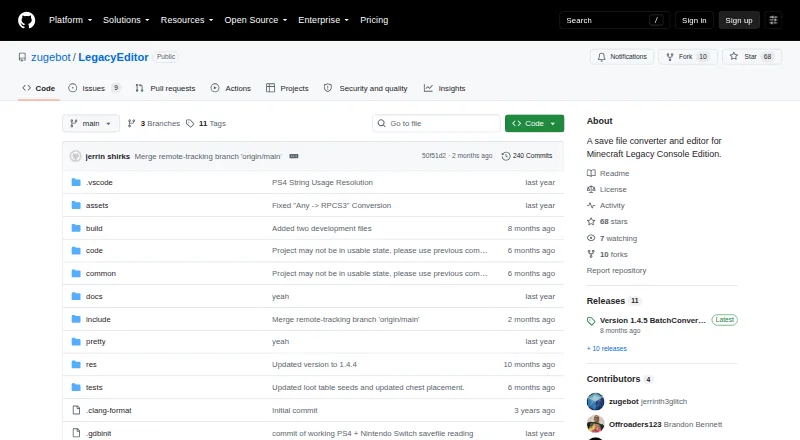
What LegacyEditor is
LegacyEditor is a free save-file converter and editor for Minecraft Legacy Console Edition. Its project aims to convert saves between supported platforms and game versions, including world and player data. The documentation also describes scripting support for block and NBT editing. The README lists read and write support for Wii U, PS Vita, Nintendo Switch, and PS4, and names emulator formats for Cemu, Vita3K, RPCS3, and ShadPS4. Support differs by console: PS3 writing is partial because LegacyEditor cannot resign PARAM.PFD; Xbox One is unsupported; and Xbox 360 and Xbox1 emulator saves are readable but not writable. Potions, Elytra, and Aquatic versions are listed for reading and writing, while several earlier versions and Village & Pillage are read-only. The project documents build scripts for Windows and Linux, notes a macOS release, and says Xbox 360 conversion does not work on macOS. BatchConverter.exe accepts the full path to save files. A conversion.json file can automate conversion and settings, though this option is disabled by default. LegacyEditor is licensed under GNU GPL version 3 or, at the user's option, a later version. The project asks users to report issues; users with saves that fail to convert can contact jerrinth on Discord.
Who it suits
LegacyEditor suits players working with Minecraft Legacy Console Edition saves who need to move them across supported platforms or versions, or edit blocks and NBT data through scripting. It is a better fit for users whose console, game version, and operating system match the project's listed support.
What it does well
- Free to use under GNU GPL version 3 or later.
- Aims to convert saves across platforms and game versions.
- World and player data are included in its conversion goals.
- Scripting support covers block and NBT editing.
- Lists read and write support for Wii U, PS Vita, Switch, and PS4.
What to know first
- Xbox One saves are unsupported.
- Xbox 360 and Xbox1 emulator saves are readable but not writable.
- PS3 writing is partial.
- Xbox 360 conversion is unsupported on macOS.
Limits
Support varies by console and game version. Xbox One is unsupported, Xbox 360 and Xbox1 emulator saves are read-only, PS3 writing is partial, and several earlier versions and Village & Pillage are read-only. On macOS, Xbox 360 conversion is unsupported.
Getting started
- Visit the LegacyEditor GitHub project.
- Use the build scripts documented for Windows or Linux, or the macOS release.
- Select a save file from a supported console or emulator format.
- For batch conversion, provide BatchConverter.exe with the full file path to each save.
- Optionally configure conversion.json to automate conversion and settings; this is off by default.
Verdict
Pick LegacyEditor if you need a free tool for Minecraft Legacy Console Edition saves and your platform and version are covered by its support list. Look elsewhere if you need Xbox One support, writable Xbox 360 saves, or full PS3 writing.
Questions
Is LegacyEditor free?
Yes. Its pricing model is free, and it is licensed under GNU GPL version 3 or, at the user's option, any later version.
Which platforms are listed?
The project lists Linux, macOS, and Windows. It documents build scripts for Windows and Linux and notes a macOS release.
Which console saves can it read and write?
The README lists read and write support for Wii U, PS Vita, Switch, and PS4. PS3 writing is partial; Xbox 360 and Xbox1 emulator saves are readable but not writable, and Xbox One is unsupported.
Can it convert between game versions?
Yes. The project aims to convert saves between Legacy Console Edition versions. Potions, Elytra, and Aquatic are listed for reading and writing, while several earlier versions and Village & Pillage are read-only.
Does it support Java or Bedrock saves?
No. Java-Bedrock conversion is listed as unsupported.
How can users get help with a failed conversion?
The README asks users to report issues. A release says users whose saves fail to convert can contact jerrinth on Discord.
Facts from LegacyEditor's own pages
- Batch conversion
- The README says BatchConverter.exe accepts the full file path of save files. · github.com, 29 Sept 2026
- Build platforms
- The project documents build scripts for Windows and Linux, and says the Linux build has not been tested by the author. · github.com, 30 Sept 2026
- Configuration
- A release says conversion.json can automate conversion and settings, and that its use is turned off by default. · github.com, 29 Sept 2026
- Console coverage
- The README lists read and write support for Wii U, PS Vita, Switch, and PS4; PS3 writing is partial because it cannot resign PARAM.PFD. · github.com, 29 Sept 2026
- Console support
- It can read and write saves for Wii U, PS Vita, Switch, and PS4, with some emulator support also listed. · github.com, 30 Sept 2026
- Conversion goal
- The project aims to convert saves between Legacy Console Edition platforms and versions, including world and player data. · github.com, 29 Sept 2026
- Conversion goals
- The project aims to convert saves across Minecraft Legacy Console Edition platforms and versions, including world and player data. · github.com, 30 Sept 2026
- Dependencies
- Listed dependencies include gulrak/filesystem, stb, tinf, LZX, and SFO. · github.com, 30 Sept 2026
- Editing
- The documentation describes scripting support for block and NBT editing. · github.com, 30 Sept 2026
- Editing and scripting
- The project describes scripting support for block and NBT editing. · github.com, 29 Sept 2026
- Emulators
- The README lists Cemu, Vita3K, RPCS3, and ShadPS4 among supported emulator save formats. · github.com, 29 Sept 2026
- License
- The program is licensed under GNU General Public License v3.0 or, at the recipient's option, any later version. · github.com, 30 Sept 2026
- Maker profile
- The GitHub profile describes its owner as doing coding and college. · github.com, 30 Sept 2026
- Operating systems
- The project documents build scripts for Windows and Linux, while a release notes macOS support and says Xbox 360 conversion is unsupported on macOS. · github.com, 29 Sept 2026
- Partial support
- PS3 writing is partial because the tool cannot resign PARAM.PFD; Xbox 360 formats are listed as read-only. · github.com, 30 Sept 2026
- Purpose
- LegacyEditor is a save file converter and editor for Minecraft Legacy Console Edition. · github.com, 30 Sept 2026
- Support
- The author asks users to report issues to help development. · github.com, 30 Sept 2026
- Unsupported consoles
- The README marks Xbox One unsupported and lists Xbox 360 and Xbox1 emulator saves as readable but not writable. · github.com, 29 Sept 2026
- Usage
- BatchConverter.exe takes the full file path of save files as input. · github.com, 30 Sept 2026
- Version coverage
- The README lists read and write support for Potions, Elytra, and Aquatic versions, with several earlier and Village & Pillage versions listed as read-only. · github.com, 29 Sept 2026
- Version limits
- The support table lists read and write support for Potions, Elytra, and Aquatic, while several earlier versions are read-only. · github.com, 30 Sept 2026
- Warranty
- The license says the program is distributed without warranty, including implied warranties of merchantability or fitness for a particular purpose. · github.com, 30 Sept 2026
Where LegacyEditor stands on Freedom251
- Minecraft World Converters#10 of 18