Freedom251 › Minecraft World Converters
Server to Singleplayer World Converter
Visit Server to Singleplayer World Converter Alternatives Pricing
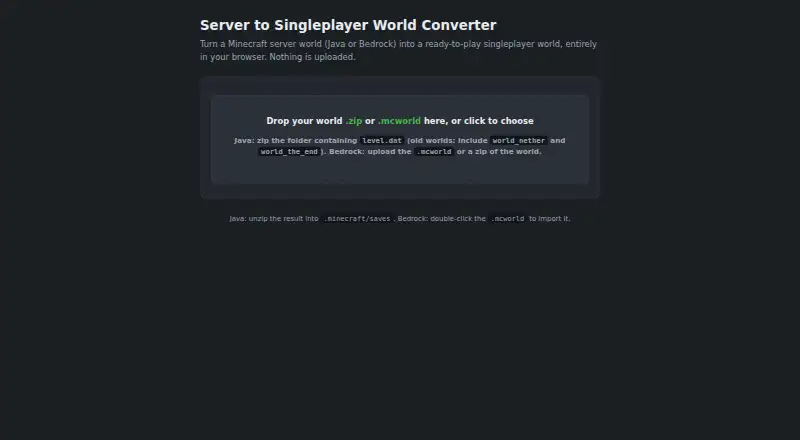
What Server to Singleplayer World Converter is
Server to Singleplayer World Converter turns Minecraft Java or Bedrock server worlds into worlds ready for singleplayer. It accepts Java world ZIPs and Bedrock .mcworld or ZIP files, identifying the edition and format automatically. You can transfer a selected player's inventory, position, and experience, or begin without player data. In multiplayer worlds, only the chosen player's data moves. The converter preserves Java regions and chunks or the full Bedrock LevelDB while updating player records. For Java worlds, it also removes Paper and Bukkit entries and related data that singleplayer does not use. The maker says conversion happens in the browser without uploads, a backend, or analytics; its single HTML file is described as usable offline. Optional Java player-name lookups connect to external services, while Bedrock conversion makes no network calls. Bedrock players are identified by XUID and shown with an inventory preview. The tool is free. Java gamerules return to defaults, some pre-1.16 Java worlds are unsupported, and the converted world should be opened in the server's Minecraft version.
Who it suits
It suits Minecraft players who want to bring a Java or Bedrock server world into singleplayer. Java and Bedrock workflows are both documented, with options to carry over one player's data or start fresh.
What it does well
- Accepts Java ZIP and Bedrock .mcworld or ZIP files.
- Detects edition and format automatically.
- Can transfer a chosen player's inventory, position, and experience.
- Maker describes browser-based conversion and offline use.
- Free to use.
What to know first
- Java server gamerules reset to defaults.
- Some pre-1.16 Java worlds are unsupported.
- Converted worlds should open in the server's Minecraft version.
- Optional Java name lookups make network calls.
Plans
| Plan | Billed and limits | Price |
|---|---|---|
| Free | Browser based · Java and Bedrock world conversion | Free |
As imsirr.github.io lists them, read 3 Oct 2026. The maker's own page has the final word.
Getting started
- Open the converter website or use its single HTML file.
- Select a Java world ZIP or a Bedrock .mcworld or ZIP file.
- Choose a player’s data to carry over, or start fresh.
- Convert the world and open it in the server’s Minecraft version.
- Reapply Java server gamerules manually if needed.
Verdict
This free tool supports both Java and Bedrock server-world conversion, with a choice about player data. Check the Java-world compatibility limits and gamerule reset before converting.
Questions
How much does the converter cost?
The Free plan costs nothing.
Does it convert both Java and Bedrock worlds?
Yes. It accepts Java world ZIP files and Bedrock .mcworld or ZIP files. The listed source and target editions include Java and Bedrock, and Java-Bedrock conversion is supported.
Does it preserve player data?
You can transfer a chosen player’s inventory, position, and experience, or start fresh. Only that selected player’s data carries over from a multiplayer world.
Does it work offline?
The maker says the single HTML file supports full offline use. Optional Java player-name lookups make network calls; Bedrock conversion makes none.
What limitations apply to Java worlds?
Java server gamerules reset to defaults and must be reapplied manually. Pre-1.16 Java worlds using flat RandomSeed without WorldGenSettings are unsupported.
What license does the project use?
The project states that it is licensed under PolyForm Noncommercial License 1.0.0.
Facts from Server to Singleplayer World Converter's own pages
- Accepted files
- Accepts Java world ZIP files and Bedrock .mcworld files or ZIP files, and detects the edition and format automatically. · github.com, 3 Oct 2026
- Audience
- The tool is for Minecraft players converting server worlds for singleplayer use, with Java and Bedrock workflows documented. · github.com, 3 Oct 2026
- Bedrock player IDs
- Bedrock players are shown by XUID with an inventory preview because the maker says there is no open gamertag lookup. · github.com, 3 Oct 2026
- Compatibility limits
- Pre-1.16 Java worlds that use flat RandomSeed without WorldGenSettings are unsupported, and the converted world should be opened in the server's Minecraft version. · github.com, 3 Oct 2026
- Game rules limitation
- Java server gamerules reset to defaults because they are not stored in the world folder and must be reapplied manually. · github.com, 3 Oct 2026
- Integrations and libraries
- The README credits NBTify, JSZip, and pako, and names PlayerDB, Crafthead, and Ashcon for optional Java name lookups. · github.com, 3 Oct 2026
- Java cleanup
- It removes Paper and Bukkit datapack entries, paper-world.yml, stale session.lock, and Bukkit or Paper-only NBT tags. · github.com, 3 Oct 2026
- Java name lookup
- Optional Java player name lookup uses PlayerDB, Crafthead, and Ashcon, and the converter can read usercache.json included in the ZIP. · github.com, 3 Oct 2026
- License
- The project states it is licensed under PolyForm Noncommercial License 1.0.0. · github.com, 3 Oct 2026
- Multiplayer worlds
- Only the selected player's data is carried over from a multiplayer world. · github.com, 3 Oct 2026
- Offline use
- The maker describes the single HTML file as supporting full offline use. · github.com, 3 Oct 2026
- Player transfer
- Can carry over a chosen player's inventory, position, and experience, or start fresh. · github.com, 3 Oct 2026
- Privacy
- The maker says conversion runs client-side with no uploads, backend, or analytics; optional Java name lookups make network calls, while Bedrock conversion makes none. · github.com, 3 Oct 2026
- Purpose
- Converts Minecraft Java or Bedrock server worlds into ready-to-play singleplayer worlds. · imsirr.github.io, 3 Oct 2026
- World preservation
- The converter preserves Java regions and chunks and the full Bedrock LevelDB, changing player-related records. · github.com, 3 Oct 2026
Where Server to Singleplayer World Converter stands on Freedom251
- Minecraft World Converters#11 of 18