Freedom251 › Minecraft World Converters
Java2Nukkit World Converter
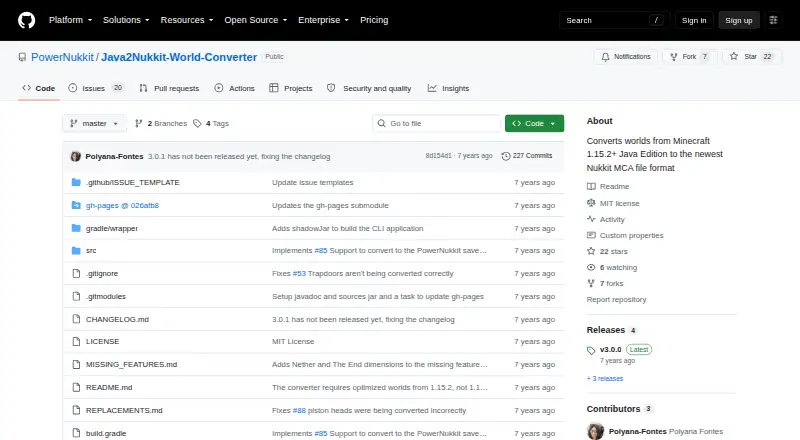
What Java2Nukkit World Converter is
Java2Nukkit World Converter changes Minecraft Java Edition 1.15.2 anvil worlds into Nukkit’s anvil world format. It runs from a terminal with a Java JAR and source and destination world directories, and requires Java 1.8 or newer. Source worlds need to be optimized using Minecraft 1.15.2; worlds from other versions or unoptimized worlds may convert incorrectly or crash. The tool can also be used as a Kotlin or Java library, though its API has no customizations. Region selection is available through the API, and leaving its filter unchanged converts everything. Conversion covers only the overworld. It does not carry over entities apart from item frames, and unsupported blocks or items may be replaced or removed because of Bedrock Edition or Nukkit limitations. Custom player heads are skipped by default, though an option can retain them as regular Steve heads. The MIT license permits use and distribution without charge, but the software is provided without warranty. It supports format conversion, not Java-to-Bedrock or version conversion.
Who it suits
This converter suits users who need to move an optimized Minecraft Java Edition 1.15.2 anvil world into Nukkit’s anvil format. It may also fit Kotlin or Java developers who want to use its library API.
What it does well
- Free and MIT-licensed
- Supports region selection through its API
- Can be used from Kotlin or Java
- Offers an option to retain custom heads as Steve heads
What to know first
- Requires Java 1.8 or newer
- Only optimized Minecraft 1.15.2 worlds are supported
- Only overworld dimensions are converted
- Entities are not converted except item frames
Limits
The free plan applies to Minecraft Java Edition 1.15.2 optimized worlds and requires Java 1.8 or newer. Conversion is limited to overworld dimensions, carries over no entities except item frames, and may replace or remove unsupported blocks and items.
Plans
| Plan | Billed and limits | Price |
|---|---|---|
| MIT-licensed software | Minecraft Java Edition 1.15.2 · optimized worlds required · Java 1.8+ | Free |
As github.com lists them, read 30 Sept 2026. The maker's own page has the final word.
Getting started
- Open the Java2Nukkit World Converter GitHub project.
- Install Java 1.8 or newer.
- Optimize the source world using Minecraft 1.15.2.
- Run the Java JAR from a terminal with the source and destination world directories.
- For library use, access it from Kotlin or Java; use the API's region selection if needed.
Java2Nukkit World Converter converts Minecraft Java Edition worlds into Nukkit’s anvil format. It is best for users moving an optimized 1.15.2 overworld who can work with Java and a terminal. Its narrow compatibility and losses make it a specialized migration tool, not a broad world-conversion solution.
Overview
The converter runs as a Java JAR with source and destination world directories, and requires Java 1.8 or newer. The source must be optimized using Minecraft 1.15.2; other versions or unoptimized worlds may convert incorrectly or crash. That constraint is central to the choice: when the input matches, the tool provides a direct route to Nukkit’s anvil format, but it is not suitable for arbitrary Java worlds or version changes.
Conversion covers only the overworld, and entities are not carried over apart from item frames, which count as blocks in Bedrock Edition. Unsupported blocks and items may be replaced or removed to fit Bedrock or Nukkit limitations. Custom player heads are omitted by default; an option can keep them as ordinary Steve heads, not preserve their custom appearance.
Key features
Terminal workflow and library API
The command-line workflow suits users comfortable running a Java application and supplying directory paths. Java and Kotlin developers can also use the converter as a library, but its API is described as having no customizations. The API does support region selection; leaving its filter unchanged converts the full world. Its dependencies are distributed through JCenter and draw on SpigotMC and the orangy Maven repository, which developers should account for in their build setup.
Compatibility and preservation
The project handles unsupported content by replacing or removing it rather than promising a faithful copy. The lack of entity conversion and the exclusion of the Nether and The End are substantial limits for players expecting a complete world transfer. The MIT license permits use, modification, distribution, and sale without charge, but the software comes as-is without warranty, and the project disclaims responsibility for damage caused by it.
Pricing
Java2Nukkit World Converter is free under its MIT license: free. There are no paid plans to weigh against that option. The practical cost is the narrow source requirement and the work of running Java from a terminal or integrating the library; the license does not include a warranty.
Platforms
The converter supports Linux, macOS, and Windows. Its Java 1.8-or-newer requirement and JAR-based workflow make Java runtime availability relevant on each system.
Who it's for
This is a good fit for Java or Kotlin developers, server administrators, and technically comfortable players who have an optimized Minecraft 1.15.2 overworld and specifically need Nukkit’s anvil format. It is a poor fit for users converting other source versions, moving Nether or End builds, or relying on entity preservation. Those expecting a graphical workflow should also look elsewhere: the stated interface is command-line or library use.
Pros and cons
- Pro: Converts a precisely supported Java 1.15.2 source into Nukkit’s anvil format at no cost.
- Pro: Region selection through the API can limit conversion to a chosen part of a world.
- Pro: MIT licensing permits modification and redistribution, including sale.
- Con: Other source versions or unoptimized worlds may fail or produce incorrect conversions.
- Con: Nether and End dimensions are excluded, and entities other than item frames are not converted.
- Con: Unsupported blocks and items may be removed or replaced, while custom heads lose their appearance if retained.
- Con: It is supplied without warranty, and the project disclaims responsibility for damage caused by use.
Alternatives
Minecraft World Converters is a useful starting point for comparing options across the category.
Chunker is another free, open-source option available on Linux, macOS, Windows, and the web; consider it if you want to compare a different converter rather than use this narrowly versioned workflow.
MC Version Converter is free and targets Java worlds from version 26.x to versions 1.18.2–1.21.11, making it the relevant alternative when the task is version conversion rather than conversion to Nukkit’s format.
Bridger is a free, open-source option for readers who want to consider another GitHub-hosted project.
Chunkoid is a free Android app; choose it if an Android platform is a requirement.
je2be is a free option with web and Windows availability; its web repository is AGPL-3.0 licensed.
LCEStudio is a free, MIT-licensed option for Windows users considering another tool.
Server to Singleplayer World Converter is browser-based and describes Java and Bedrock world conversion; it may suit someone seeking a web workflow.
WorldSwitch offers a free web conversion tier for uploaded files up to 70 MB, with paid per-conversion tiers beyond that size.
Verdict
Choose Java2Nukkit World Converter when you need to move an optimized Minecraft Java 1.15.2 overworld into Nukkit’s anvil format and accept the loss of most entities and other unsupported content. Its free MIT license and library option are useful advantages for developers, but its strict input requirement, dimension exclusions, and no-warranty terms make a broader converter the better choice for general migration.
Verdict
Java2Nukkit World Converter serves a narrow format-conversion task and requires the right source-world version and optimization. Expect dimension and entity limits, and note that the software comes without warranty.
Questions
Is Java2Nukkit World Converter free?
Yes. The listed MIT-licensed software plan costs nothing.
What worlds can it convert?
It converts Minecraft Java Edition 1.15.2 anvil worlds into Nukkit's anvil world format. Source worlds must be optimized using Minecraft 1.15.2.
What does it require to run?
It runs from a terminal with a Java JAR and source and destination world directories. Java 1.8 or newer is required.
Does it preserve entities and dimensions?
Only item frames are converted as entities. Only overworld dimensions are supported; Nether and The End are not converted.
Can it convert selected regions?
Yes. The library API supports selecting regions for conversion; leaving the filter unchanged converts everything.
Can I use it as a library?
Yes. It can be used from Kotlin or Java, though its API is described as having no customizations.
Facts from Java2Nukkit World Converter's own pages
- API maturity
- The README describes the API as very simple and says it does not currently allow customizations. · github.com, 15 Oct 2026
- Build process
- Linux users build with ./gradlew build and Windows users with gradlew.bat build; the CLI JAR is placed in build/libs. · github.com, 15 Oct 2026
- Changelog: PowerNukkit output
- The unreleased changelog lists a PowerNukkit save-format target enabled with --target powernukkit. · raw.githubusercontent.com, 15 Oct 2026
- Changelog: version 3.0.0
- The 3.0.0 release dated January 25, 2020 added mappings for Minecraft Java Edition 1.15 items and blocks. · raw.githubusercontent.com, 15 Oct 2026
- Cloudburst downloads
- The Cloudburst listing reports 11,122 downloads. · cloudburstmc.org, 15 Oct 2026
- Cloudburst listing author
- The independent Cloudburst resource listing identifies joserobjr as the author. · cloudburstmc.org, 15 Oct 2026
- Cloudburst listing date
- Cloudburst lists the resource creation date as May 26, 2019. · cloudburstmc.org, 15 Oct 2026
- Cloudburst release history
- Cloudburst lists the first release as May 26, 2019 and the last update as January 25, 2020. · cloudburstmc.org, 15 Oct 2026
- Cloudburst views
- The Cloudburst listing reports 14,800 views. · cloudburstmc.org, 15 Oct 2026
- Command line
- Runs from a terminal with a Java JAR and source and destination world directories. · github.com, 30 Sept 2026
- Command-line use
- The converter runs from a terminal with a Java JAR and source and destination world directories. · github.com, 15 Oct 2026
- Compatibility handling
- Unsupported blocks and items are replaced or removed because of Bedrock Edition or Nukkit limitations. · github.com, 30 Sept 2026
- Custom-head handling
- Custom player heads are skipped by default, with an option to convert them as ordinary Steve heads. · raw.githubusercontent.com, 15 Oct 2026
- Dependency distribution
- The library is shared through JCenter with dependencies from SpigotMC and the orangy Maven repository. · github.com, 30 Sept 2026
- Dependency publication
- Version 3.0.0 is published under the br.com.gamemods group and is shown with JCenter, Gradle, Maven and Ivy dependency examples. · github.com, 15 Oct 2026
- Dimension handling
- Only the overworld is supported; Nether and The End are excluded. · raw.githubusercontent.com, 15 Oct 2026
- Dimension limit
- Only overworld dimensions are supported; Nether and The End are not converted. · github.com, 30 Sept 2026
- Dropped-item limitation
- Converted dropped items lose their Owner and Thrower tags because Java and Bedrock accounts differ. · raw.githubusercontent.com, 15 Oct 2026
- Entity handling
- Entities are not converted except item frames, which are treated as blocks in Bedrock. · raw.githubusercontent.com, 15 Oct 2026
- Head handling
- Custom player heads are skipped by default and can be retained as regular Steve heads with the keep-custom-heads option or skipSkinHeads setting. · github.com, 30 Sept 2026
- Java requirement
- Java 1.8 or newer is required. · github.com, 15 Oct 2026
- Language support
- The library API is documented for both Kotlin and Java. · github.com, 15 Oct 2026
- Library API
- Can be used as a library from Kotlin or Java, although its API is described as having no customizations. · github.com, 30 Sept 2026
- Library use
- The converter can be embedded as a library rather than used only as a CLI. · github.com, 15 Oct 2026
Where Java2Nukkit World Converter stands on Freedom251
- Minecraft World Converters#2 of 18