Freedom251 › Minecraft World Converters
je2be
What je2be is
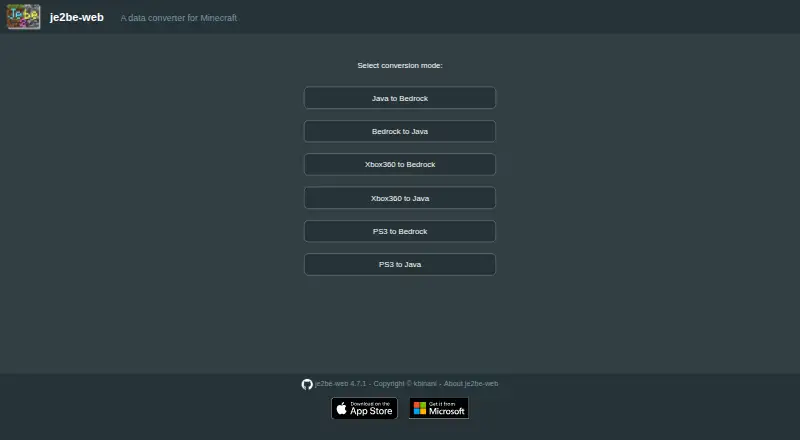
je2be converts Minecraft world data between Java, Bedrock, Xbox 360, and PS3 editions. It supports conversion in both directions between Java and Bedrock, and lets users move Xbox 360 or PS3 worlds to either Java or Bedrock. The browser app is available at je2be.app, and a desktop app is offered through the Microsoft Store. Its listed platforms are web and Windows. The tool is described as a standalone converter, with no integrations listed. The je2be-web repository is released under the AGPL-3.0 license, and the je2be-core repository is owned by the GitHub account kbinani. The Free plan costs nothing. The project does not state support channels or service commitments, and it does not identify a security certification or compliance standard.
Who it suits
je2be suits Minecraft players who need to transfer world data among Java, Bedrock, Xbox 360, and PS3 editions. It offers both a browser route and a Windows desktop app.
What it does well
- Converts worlds between Java and Bedrock
- Accepts worlds from Xbox 360 and PS3
- Available in a browser and on Windows
- Web repository uses the AGPL-3.0 license
What to know first
- No support channels or service commitments are stated
- No security certification or compliance standard is stated
- No integrations are listed
Limits
The Free plan costs nothing and converts worlds from Java, Bedrock, Xbox 360, and PS3 editions. Java and Bedrock are the listed target editions.
Plans
| Plan | Billed and limits | Price |
|---|---|---|
| Free | Java/Bedrock conversion · Xbox 360 and PS3 source worlds · web app and Windows app | Free |
As je2be.app lists them, read 15 Oct 2026. The maker's own page has the final word.
Getting started
- Open the browser app at https://je2be.app.
- Alternatively, get the desktop app through the Microsoft Store.
- Choose a supported source edition: Java, Bedrock, Xbox 360, or PS3.
- Convert the world to Java Edition or Bedrock Edition.
je2be is a Minecraft world converter for players moving saves between Java, Bedrock, Xbox 360 and PS3 editions. It suits people who need a direct route between legacy console worlds and the two current PC-oriented editions, especially when a browser tool is preferable to installing software. The lack of a fee is its clearest advantage, while its narrow focus and absence of published service commitments will matter to demanding or supported workflows.
Overview
je2be handles world-data conversion rather than serving as a broader Minecraft management suite. Its supported paths include Java to Bedrock, Bedrock to Java, and Xbox 360 or PS3 worlds to either Java or Bedrock. That gives it a useful bridge between older console editions and modern Minecraft editions, as well as a practical option for Java–Bedrock moves.
The project is offered as a web app at je2be.app and as a Windows desktop app through the Microsoft Store. The web project, je2be-web, is released under the AGPL-3.0 license. The core repository is owned by the GitHub account kbinani. No integrations, support channels or service commitments are stated, so this is best treated as a focused conversion utility rather than a managed migration service.
Key features
Four source editions
je2be accepts worlds from Java Edition, Bedrock Edition, Xbox 360 Edition and PS3 Edition. The console support is the differentiator for anyone preserving or relocating an older Xbox 360 or PS3 world; many conversion needs stop at Java and Bedrock, but je2be covers both current destinations.
Java and Bedrock destinations
Xbox 360 and PS3 worlds can be converted to either Java or Bedrock, while direct Java–Bedrock conversion works in both directions. Choose it when the destination edition is known and the task is specifically world transfer. It is not presented as an integration platform, and no additional connected services are described.
Browser and desktop access
The browser app avoids a required Windows installation and gives users a platform-neutral way to reach the converter through a web browser. The Microsoft Store desktop app is the better fit for Windows users who prefer an installed application. Having both routes is useful, but the project does not publish workflow, support or service-level details to set expectations beyond conversion itself.
Pricing
| Plan | Price | What it includes | Best for |
|---|---|---|---|
| Free | free | Converts Minecraft Java, Bedrock, Xbox 360 and PS3 worlds | Anyone needing the supported conversion paths without a software fee |
There is no paid tier or free trial, because the stated plan is free. No seat counts, conversion quotas, file-size caps, renewal terms or upgrade conditions are published. That makes the cost straightforward for occasional and personal transfers, while organizations that require contractual support or predictable capacity have no paid service option described.
Platforms
- Web: Use the browser app at je2be.app.
- Windows: A desktop app is available through the Microsoft Store.
There is no stated native Linux, macOS, Android or iOS application. Users on those systems can consider the web route, while Windows users have the additional desktop choice.
Who it's for
je2be is a strong match for Minecraft players moving a save between Java and Bedrock, or rescuing an Xbox 360 or PS3 world for use in Java or Bedrock. It is also suitable for users who want a no-cost browser option or a Windows application and do not need a support contract.
Look elsewhere if you need documented integrations, formal security or compliance assurances, stated support response commitments, or a converter aimed at a different edition-specific task. je2be's value comes from its edition coverage, not from a larger operational feature set.
Pros and cons
Pros
- Broad edition coverage: Supports Java, Bedrock, Xbox 360 and PS3 as source editions, with Java and Bedrock destinations.
- Two-way Java–Bedrock conversion: Handles moves in either direction instead of limiting users to a one-way export.
- Free access: The stated plan costs nothing, with no paid tier required for the supported conversion scope.
- Web and Windows options: Users can choose a browser app or a Microsoft Store desktop app.
- AGPL-3.0 web project: je2be-web is released under a recognized open-source license.
Cons
- No listed integrations: The project is standalone, so connected storage or platform workflows are not part of the described offering.
- Limited platform coverage: The desktop app is identified for Windows; other desktop users are directed to the web option.
- No stated operational limits: Quotas, file-size limits and other capacity terms are not provided, making large or repeat migrations harder to plan.
Alternatives
Minecraft World Converters is the broader list to consult when you want to compare several tools before choosing a conversion workflow.
Chunker is a free, open-source alternative with Linux, macOS, web and Windows support, making it a better fit when cross-platform desktop coverage or an MIT-licensed project matters.
MC Version Converter is free software for converting Java Edition 26.x worlds to versions 1.18.2–1.21.11; choose it for that version-specific Java task rather than cross-edition conversion.
Bridger is another free, open-source converter project hosted through GitHub, worth considering if that project model is preferable.
Java2Nukkit World Converter targets optimized Java Edition 1.15.2 worlds and requires Java 1.8 or newer, so it is the focused choice for that Nukkit-oriented requirement.
Chunkoid is a free Android app, suitable when conversion must happen on Android and its Android 8.0+, storage and memory requirements are acceptable.
LCEStudio is free Windows software under the MIT license, an alternative for users specifically seeking that licensing and platform combination.
Server to Singleplayer World Converter is a free browser-based option for Java and Bedrock server-to-singleplayer conversion.
WorldSwitch offers web conversions with a free Mini tier for uploaded files up to 70 MB and paid per-conversion tiers for larger files, making it the alternative when that size-based pricing structure fits.
Verdict
Choose je2be if you need a free way to move Minecraft worlds among Java, Bedrock, Xbox 360 and PS3, with both browser and Windows access. Its edition coverage and two-way Java–Bedrock support are the main reasons to pick it. Look elsewhere when you need documented limits, integrations, formal support or a specialized conversion workflow outside those destinations.
Verdict
je2be focuses on converting worlds across four Minecraft editions, with Java and Bedrock as the destinations. Its free browser app and Windows desktop app provide two ways to use it.
Questions
How much does je2be cost?
The Free plan costs nothing, with no fee stated.
Which Minecraft editions can it convert?
It accepts Java, Bedrock, Xbox 360, and PS3 worlds. Java and Bedrock are the listed targets.
Can I convert between Java and Bedrock?
Yes. It supports both Java-to-Bedrock and Bedrock-to-Java conversion.
Where can I use je2be?
There is a browser app at je2be.app and a desktop app through the Microsoft Store. Its listed platforms are web and Windows.
Is je2be open source?
The je2be-web repository is released under the AGPL-3.0 license.
Who makes je2be?
The je2be-core repository is owned by the GitHub account kbinani.
Facts from je2be's own pages
- API and SDKs
- The official site and repositories expose source code and command-line/build files but do not publish a hosted API or SDK documentation. · github.com, 15 Oct 2026
- App size
- The Apple listing reports an 11.1 MB download size. · apps.apple.com, 15 Oct 2026
- Bedrock to Java
- Bedrock worlds can be converted to Java worlds. · apps.apple.com, 15 Oct 2026
- Browser app
- The web app is available at je2be.app. · je2be.app, 4 Oct 2026
- Browser requirement
- The official web page reports that browsers without SharedArrayBuffer support cannot run the application. · je2be.app, 15 Oct 2026
- Company founding
- No founded year or incorporated legal entity is stated on the maintainer profile or project repositories. · github.com, 15 Oct 2026
- Company identity
- The GitHub maintainer profile identifies kbinani and lists Yokohama, Japan. · github.com, 15 Oct 2026
- Conversion directions
- It supports Java-to-Bedrock, Bedrock-to-Java, and Xbox 360 or PS3 worlds to either Java or Bedrock. · je2be.app, 4 Oct 2026
- Core licence
- The core repository is licensed under GPL-3.0. · github.com, 15 Oct 2026
- Data handled
- The iOS listing says conversions include terrain, tile entities, entities, tile ticks and selected gameplay metadata. · apps.apple.com, 15 Oct 2026
- Desktop app
- The project describes a desktop app available through the Microsoft Store. · github.com, 4 Oct 2026
- Documentation depth
- Public documentation consists mainly of repository README material, source files, build configuration and release notes rather than a separate help center. · github.com, 15 Oct 2026
- Google Play availability
- AppBrain reports that the Android listing was removed from Google Play on August 7, 2026. · appbrain.com, 15 Oct 2026
- Implementation
- The web repository identifies WebAssembly and Emscripten among its project topics. · github.com, 15 Oct 2026
- Integrations
- The official project pages describe a standalone converter and list no third-party integrations. · github.com, 15 Oct 2026
- iOS app
- Apple lists je2be as an iPhone and iPad utility app. · apps.apple.com, 15 Oct 2026
- Java to Bedrock
- Java worlds can be converted to Bedrock worlds. · apps.apple.com, 15 Oct 2026
- Latest web release
- Release 4.7.1 fixed conversion of custom item names and was published on November 22, 2025. · github.com, 15 Oct 2026
- Limit: Bedrock sub-chunks
- The benchmark reported notable losses for Bedrock sub-chunks containing a single block in its real-world sample. · worldswitchapp.com, 15 Oct 2026
- Limit: edition differences
- The benchmark notes that Java-only entities and blocks have no direct Bedrock counterpart and are not always transferable. · worldswitchapp.com, 15 Oct 2026
- Limit: entity conversion
- The same Reddit discussion reported that another player's tamed cats disappeared, and a commenter described entity transfer as unreliable. · reddit.com, 15 Oct 2026
- Limit: Java 26 input
- The MCCB benchmark found that tested je2be core build 8dfc4de did not read Java 26 region folders and produced Java test worlds without terrain. · worldswitchapp.com, 15 Oct 2026
- Limit: large-world testing
- The benchmark explicitly excludes very large worlds, speed and memory behavior from its evaluation. · worldswitchapp.com, 15 Oct 2026
- Maker
- The je2be-core repository is owned by the GitHub account kbinani. · github.com, 4 Oct 2026
Where je2be stands on Freedom251
- Minecraft World Converters#3 of 18