Freedom251 › AI Scheduling Assistants

Cal Autobot
What Cal Autobot is
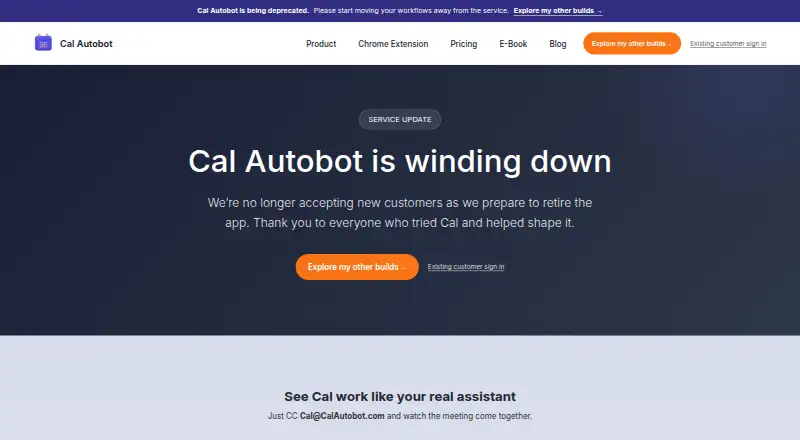
Cal Autobot is an email-based scheduling service available on the web and as a browser extension. Users can copy Cal on an email thread so it can read the conversation, propose meeting times, follow up, and send reminders. It monitors multiple calendars for conflicts and lets users select a source of truth. A branded public booking page syncs with email bookings, and the service can extract event details from emails, pictures, and itineraries to create Google Calendar events. Its free Gmail Chrome extension tracks email opens and inserts availability or a booking link with one click. The site lists Google Calendar and says AI agents can work with existing Calendly or Cal.com workflows. Cal says it is winding down: it is no longer accepting new customers, though existing customers may continue while the service remains available. The Free plan costs nothing. Power Users is listed at $12 a month, billed at $12 per user per month; custom AI instructions and related features are marked “Coming soon.” Enterprise is priced on request, billed at $10k+.
Who it suits
The service describes use by solopreneurs, small businesses, busy professionals, sales teams, and recruiters. Its email scheduling and calendar features may suit people who arrange meetings through email, but it is no longer accepting new customers.
What it does well
- Schedules meetings from email threads.
- Monitors multiple calendars for conflicts.
- Booking page syncs with email bookings.
- Extracts event details into Google Calendar.
- Free Gmail extension adds availability or booking links.
What to know first
- No longer accepts new customers.
- Continued access for existing customers depends on service availability.
- Several Power Users features are marked “Coming soon.”
Limits
Cal Autobot is no longer accepting new customers, and existing customers can continue only while the service remains available. Power Users custom AI options are marked “Coming soon.”
Plans
| Plan | Billed and limits | Price |
|---|---|---|
| Free | AI scheduler · unlimited email scheduling · event extraction · unlimited contacts, bookings, calendars, and event types · public booking page | Free |
| Enterprise | $10k+ · Everything in Power · remove branding · custom email · custom AI Agent workflow | $10,000 |
| Power Users | $12 / user / mo · Everything in Free · custom AI instructions, tone, business context, and skills; marked “Coming soon” | $12 a month |
As calautobot.com lists them, read 7 Oct 2026. The maker's own page has the final word.
Getting started
- Visit https://calautobot.com/.
- Use the web service or extension if you are an existing customer.
- The free Chrome extension for Gmail tracks opens and inserts availability or a booking link.
- Use the Free plan, or review Power Users at $12/user/mo and Enterprise at $10k+.
Cal Autobot is an email-first scheduling assistant that turns conversations, availability and incoming itineraries into calendar actions. It suits solopreneurs, recruiters, sales teams and small businesses that arrange meetings from Gmail rather than a separate booking workflow. Its strongest case is reducing back-and-forth while keeping multiple calendars aligned, but its current service direction makes it a poor foundation for a new long-term scheduling system.
Overview
You can CC Cal on an existing email thread and have it read the conversation, suggest times, follow up and send reminders. It also provides a branded public booking page that synchronizes with bookings made by email. For travel or event-heavy inboxes, Cal extracts details from messages, pictures and itineraries and creates events in Google Calendar.
Cal monitors multiple calendars for conflicts and lets you designate a source of truth. That is useful when personal and work calendars overlap, although the documented calendar support is Google Calendar. Its privacy policy says submitted text is sent to OpenAI for processing and raw text is not permanently stored. It requests only the Google permissions it needs and says it does not access, read or modify existing events that were not created through the service. Encryption in transit and at rest, secure authentication, regular assessments, access controls and monitoring are also described.
Key features
Email scheduling and booking
Email is the central interface: invitee messaging, availability proposals, follow-ups and reminders happen in the thread. The public booking page gives contacts a self-service option while preserving the same calendar connection. This is a good fit for professionals whose scheduling already starts in email; teams wanting a broad channel mix will find the documented scheduling channel narrow.
Calendar and event handling
Conflict checks across multiple calendars and a selectable source of truth can prevent double-booking. Event extraction from email, images and itineraries goes beyond meeting coordination and is particularly practical for people who receive travel confirmations or event details in mixed formats. Google Calendar is the named calendar integration. Cal also says AI agents can work with existing Calendly or Cal.com workflows, so it can complement established booking setups rather than replace them outright.
Gmail extension
The free Chrome extension for Gmail tracks email opens and adds availability or a booking link with one click. That lowers the effort of replying to prospects, though it ties this convenience to Chrome and Gmail.
Pricing
| Plan | Price | What you get |
|---|---|---|
| Free | free | AI scheduler, unlimited email scheduling, event extraction, unlimited contacts, bookings, calendars and event types, plus a public booking page. |
| Power Users | $12 a month, billed $12 / user / mo | Everything in Free, plus custom AI instructions, tone, business context and skills. These additions are marked “Coming soon.” |
| Enterprise | price on request, billed $10k+ | Everything in Power, with branding removal, custom email and a custom AI Agent workflow. |
The Free plan is unusually broad on core usage, making it the sensible choice for an individual who needs unlimited scheduling and extraction without a subscription. Power Users is aimed at people who need tailored agent behavior, but its defining controls are not yet available. Enterprise is for organizations requiring branded, customized workflows; the stated per-contact, $10k-plus pricing places it well beyond a typical small-business budget and is custom pricing in practical terms.
Platforms
Cal Autobot is offered as a web service and browser extension. The extension is specifically a free Chrome extension for Gmail, while calendar support is Google Calendar.
Who it's for
Solopreneurs and busy professionals benefit from delegating routine email coordination. Sales teams and recruiters can use proposals, reminders and booking links to keep conversations moving. Small businesses with several calendars gain conflict monitoring and a shared source of truth. It is not a strong choice for organizations that require a multi-calendar ecosystem beyond Google, a mature cross-channel scheduler, or confidence in a service intended to accept new customers.
Pros and cons
- Pros: Unlimited email scheduling, calendars, bookings and event types on the free plan.
- Pros: Extracts events from text, photos and itineraries into Google Calendar.
- Pros: Checks multiple calendars and supports a selectable source of truth.
- Pros: Gmail extension inserts availability or booking links in one click.
- Cons: New customers cannot sign up while the service winds down, limiting its usefulness for fresh deployments.
- Cons: Power-user customization is marked “Coming soon,” so the $12-per-user tier currently offers little beyond its promise.
- Cons: Documented calendar support centers on Google Calendar, and scheduling is email-led.
- Cons: Submitted text is processed by OpenAI, which may matter for sensitive correspondence despite the stated non-permanent raw-text storage.
Alternatives
For a wider shortlist, see AI Scheduling Assistants.
- Toki is a freemium option with Android, iOS, Linux, macOS, web and Windows apps, a free trial and support for up to three calendars on its free plan; choose it when device coverage matters more than Cal’s email extraction.
- Remeet offers freemium plans across Android, macOS, web and Windows, with a free trial, weekly sync time and cloud recordings; pick it when meeting coordination includes recorded sessions.
- Ari supports iOS, macOS and web, with a free allowance of 10 meetings, one Google and one Microsoft calendar, one booking page and major video links; it is preferable when Microsoft Calendar or video meeting links are essential.
- Schedly has Android, iOS, web, API and extension access. Its free tier allows one seat, service type, location and calendar connection with unlimited bookings; choose it for a defined, seat-based booking setup.
- Sidekick Scheduling is a freemium Android, iOS and web alternative with a free Hero plan; consider it when those platforms and scheduling pages fit better.
- Clara is a paid web service with a free 14-day, five-meeting plan and an $80 monthly Standard tier; choose it when a short evaluation period and concierge-style positioning suit your needs.
- DayOtter offers web and Android apps, a free-forever plan with unlimited event types and booking pages, calendar sync, reminders and group polls; pick it for polling and broader booking-page use.
- Kronologic is a web freemium service with a free booking page, Google Calendar and two meeting types, plus a $15 monthly Pro tier; choose it when straightforward meeting-type limits are acceptable.
Verdict
Choose Cal Autobot if you are an existing user or an email-driven professional who values free, unlimited scheduling, conflict checks and automatic event capture in Google Calendar. Look elsewhere for a new deployment: the winding-down service, Google-centered support and unfinished paid customization make a stable alternative a safer investment.
Verdict
Cal Autobot combines email-based scheduling, calendar conflict checks, and event extraction. Its wind-down status is important: new customers cannot sign up, and existing customers can continue only while the service remains available.
Questions
Is Cal Autobot free?
Yes. Its Free plan is listed as free and includes unlimited email scheduling, event extraction, and a public booking page.
What does the paid plan cost?
Power Users is listed at $12/user/mo. Enterprise is listed at $10k+.
Can new customers sign up?
No. Cal Autobot says it is winding down and no longer accepting new customers. Existing customers may continue while the service remains available.
What platforms does it support?
Cal Autobot is available on the web and as an extension. Its free Chrome extension is for Gmail.
Which calendars and workflows does it work with?
Google Calendar is listed. The site also says its AI agents can be used with existing Calendly or Cal.com workflows.
How does Cal process email text?
Its privacy policy says submitted text is sent to OpenAI for processing and raw text is not permanently stored.
Facts from Cal Autobot's own pages
- Booking page
- The service offers a branded public booking page that syncs with email bookings. · calautobot.com, 7 Oct 2026
- Calendar conflicts
- Cal says it monitors multiple calendars for conflicts and lets users pick a source of truth. · calautobot.com, 7 Oct 2026
- Calendar data access
- The privacy policy says Cal requests minimum necessary Google permissions and does not access, read, or modify existing events not created through the service. · calautobot.com, 7 Oct 2026
- Chrome extension
- Its free Chrome extension for Gmail tracks email opens and inserts availability or a booking link with one click. · calautobot.com, 7 Oct 2026
- Event extraction
- Cal can extract event details from emails, pictures, and itineraries and create events in Google Calendar. · calautobot.com, 7 Oct 2026
- Integrations
- The site lists Google Calendar and says AI agents can be used with existing Calendly or Cal.com workflows. · calautobot.com, 7 Oct 2026
- Intended users
- The site describes use by solopreneurs and small businesses, busy professionals, sales teams, and recruiters. · calautobot.com, 7 Oct 2026
- Privacy and AI processing
- The privacy policy says submitted text is sent to OpenAI for processing and raw text is not permanently stored. · calautobot.com, 7 Oct 2026
- Scheduling
- Users can CC Cal on an email thread so it reads the conversation, proposes meeting times, follows up, and sends reminders. · calautobot.com, 7 Oct 2026
- Security
- The privacy policy lists encryption in transit and at rest, secure authentication, regular security assessments, and access controls and monitoring. · calautobot.com, 7 Oct 2026
- Service status
- Cal Autobot says it is winding down, is no longer accepting new customers, and allows existing customers to continue while the service remains available. · calautobot.com, 7 Oct 2026
- Support
- The terms and privacy policy direct users to contact the service through its support channels for questions. · calautobot.com, 7 Oct 2026
Where Cal Autobot stands on Freedom251
- AI Scheduling Assistants#2 of 25
- Productivity Bots Software#2 of 25