Freedom251 › AI Scheduling Assistants

Ari
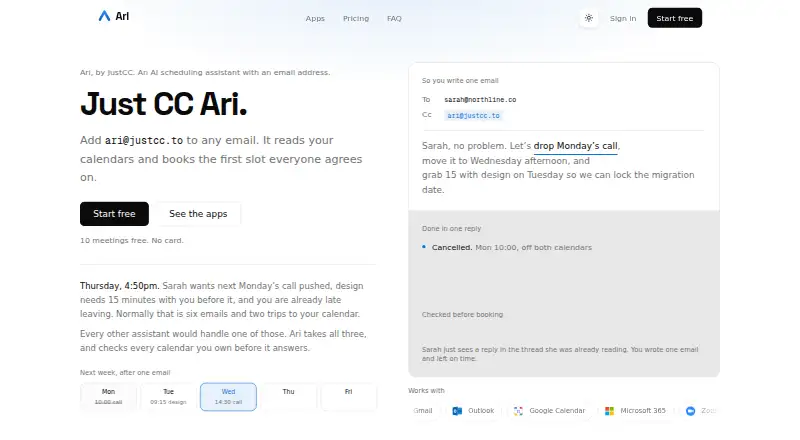
What Ari is
Ari is an AI scheduling assistant that you CC on an email thread to find mutually available times and arrange meetings. With permission, it can read Google Calendar and Microsoft 365 calendars and create, update, or cancel events. It processes email content from threads where it is copied to identify scheduling requests. Listed services include Gmail, Outlook, Google Calendar, Microsoft 365, Zoom, Google Meet, and Microsoft Teams.
Ari’s Mac and iPhone apps can record and transcribe meetings, create summaries, and help book follow-ups. Recording does not begin automatically; you must press record. On macOS, recordings and transcripts stay on-device unless cloud features are used. The Free plan includes 10 meetings total and one Google and one Microsoft calendar. Basic costs $24 a month; Premium costs $39 a month. The maker says email content goes to Anthropic’s Claude API for scheduling-intent processing and is not retained beyond what is needed to complete the request. Ari can misread intent or suggest incorrect times, so users are responsible for reviewing and confirming meetings.
Who it suits
Ari suits individuals or teams that arrange meetings by email and use Google Calendar or Microsoft 365. Its Mac and iPhone apps may also suit people who want meeting recordings, transcripts, summaries, and follow-up booking.
What it does well
- Can create, update, and cancel calendar events with permission.
- Supports email, calendar, and meeting services listed by the maker.
- Mac and iPhone apps record and transcribe meetings.
- macOS recordings and transcripts stay on-device unless cloud features are used.
What to know first
- Free plan is limited to 10 meetings total.
- Free plan includes only one Google and one Microsoft calendar.
- Users must review and confirm proposed meetings.
- Email content is sent to Anthropic’s Claude API for processing.
Limits
The Free plan includes 10 meetings total, one Google calendar, one Microsoft calendar, and one booking page. Basic costs $24 a month and includes unlimited meetings and three booking pages; Premium costs $39 a month and includes unlimited calendar accounts and booking pages.
Plans
| Plan | Billed and limits | Price |
|---|---|---|
| Free | 10 meetings total · One Google and one Microsoft calendar · One booking page · Zoom, Meet and Teams links | Free |
| Basic | $24 per month · Unlimited meetings · Three booking pages with your own URLs · Follow-up nudges · Holds on proposed times · Mac and iPhone apps | $24 a month |
| Premium | $39 per month · Unlimited calendar accounts · Unlimited booking pages with Ari branding off · Personalized writing tone and sign-off · Day summaries, block time, clear a day | $39 a month |
As justcc.to lists them, read 30 Sept 2026. The maker's own page has the final word.
Getting started
- Open https://justcc.to/.
- Choose the Free, Basic, or Premium plan.
- Use Ari by copying it on an email thread with a scheduling request.
- Grant calendar access if you want Ari to read calendars or manage events.
- Install the Mac or iPhone app to use its meeting recording and transcription features.
Overview
Ari is an AI assistant that coordinates meetings through email and adds meeting-recording tools on Mac and iPhone. It suits people who schedule in email and use Google Calendar or Microsoft 365; those who prefer a booking page as their main workflow may be better served elsewhere. Its strongest case is bringing calendar actions and meeting follow-up together, but its free allowance is limited and proposed times require a human check.
Key features
CC Ari on a thread and it processes the email to identify a scheduling request, find mutually available times, and arrange the meeting. With permission, it can read Google Calendar and Microsoft 365 calendars and create, update, or cancel events. That makes it a natural fit for email-first coordination, though less so for people who want scheduling kept out of their inbox.
Ari supports Gmail, Outlook, Google Calendar, Microsoft 365, Zoom, Google Meet, and Microsoft Teams. Invitee messaging, autonomous rescheduling, and team scheduling extend its reach beyond proposing a time. On Mac and iPhone, the apps can record and transcribe meetings, summarize them, and help book follow-ups. Recording is manual: the user must press record. The macOS app keeps recordings and transcripts on-device unless cloud features are used.
There is a meaningful accuracy caveat: Ari may misunderstand intent or suggest incorrect times, and users are responsible for reviewing and confirming meetings. The maker says data in transit uses TLS/HTTPS, OAuth tokens are encrypted at rest, and passwords are hashed. JustCC says it does not sell personal information or use email and calendar data beyond providing and improving the service. Email content is sent to Anthropic’s Claude API for scheduling-intent processing and is not retained beyond what is needed to complete the request.
Pricing
Ari has a free plan and two monthly paid plans. Free costs nothing and includes 10 meetings total, one Google and one Microsoft calendar, one booking page, and Zoom, Meet, and Teams links. It is a useful way to try the email workflow, but the 10-meeting lifetime allowance is a real constraint for regular scheduling.
Basic costs $24 a month, billed $24 per month. It removes the meeting cap and adds three booking pages with your own URLs, follow-up nudges, holds on proposed times, and the Mac and iPhone apps. It fits a frequent scheduler who wants those apps and more control over proposed slots, but not someone who needs unlimited booking pages or calendar accounts.
Premium costs $39 a month, billed $39 per month. It adds unlimited calendar accounts and booking pages with Ari branding off, personalized writing tone and sign-off, plus day summaries, block time, and clear a day. It is the better fit for users managing multiple calendars or many booking pages; Basic is the less expensive choice if those allowances and controls are not needed.
Platforms
Ari is available on iOS, macOS, and the web. The Mac and iPhone apps are particularly relevant to its recording, transcription, summary, and follow-up tools; the email scheduling workflow is centered on supported calendar and mail services.
Who it's for
Choose Ari if you routinely arrange meetings in email, use Google Calendar or Microsoft 365, and want the option of meeting notes and follow-up support on Apple devices. It is less suited to someone seeking a generous free tier, or to anyone who wants meeting proposals finalized without checking them.
Pros and cons
- Pros: Email-thread scheduling can find mutual availability and make calendar changes with permission, reducing the need to move coordination into a separate workflow.
- Pros: Mac and iPhone meeting tools cover recording through summaries and follow-up booking, with macOS recordings and transcripts kept on-device unless cloud features are used.
- Cons: Free stops after 10 meetings total, so ongoing use requires a paid plan.
- Cons: Suggested times can be wrong or misunderstand intent, so users must review and confirm before meetings are finalized.
- Cons: Email content is sent to Anthropic’s Claude API for scheduling-intent processing, a consideration for people cautious about sharing inbox content with an external service.
Alternatives
AI Scheduling Assistants is a useful next stop if you want to compare tools across the category. Choose Remeet instead if Android or Windows support matters, or if you want its free concierge onboarding and recording allowance. Clara may suit readers looking for a web-based assistant with a 14-day free tier capped at five meetings and a paid Standard plan at 30 meetings. Pick DayOtter if its free plan’s unlimited event types and booking pages, calendar sync, reminders, and group polls better match your workflow. Kronologic is another web option, with a free booking page, Google Calendar connection, and two meeting types. Sarra may suit someone comfortable with a free allowance of three meetings per month per seat, one saved meeting type, and one calendar connection. Consider CalendarBridge AI Scheduling Assistant if Android support and event syncing are priorities. Alex Coordinator has custom pricing. Sidekick Scheduling is another option with a free Hero Plan.
Verdict
Ari is a strong fit for email-first schedulers who want calendar actions plus meeting tools on Mac or iPhone. Its combination of thread-based coordination and on-device macOS recordings is the main reason to choose it. Look elsewhere if you need a more generous free allowance or expect scheduling suggestions to be reliable without personal review.
Verdict
Ari combines email-based scheduling with calendar actions and meeting tools on Mac and iPhone. Review proposed times before confirming, and check the plan limits if you expect to schedule frequently.
Questions
Is Ari free?
Yes. The Free plan costs nothing and includes 10 meetings total.
What do the paid plans cost?
Basic is $24 a month. Premium is $39 a month.
Which calendars and services does Ari support?
Ari can read Google Calendar and Microsoft 365 calendars with permission. The listed services also include Gmail, Outlook, Google Calendar, Microsoft 365, Zoom, Google Meet, and Microsoft Teams.
Which platforms are available?
Ari is available on iOS, macOS, and the web. The Mac and iPhone apps include meeting recording, transcription, summaries, and help booking follow-ups.
Does Ari record meetings automatically?
No. The user must press record to start meeting recording.
How does Ari handle email content?
Email content from threads where Ari is copied is sent to Anthropic’s Claude API for scheduling-intent processing. The privacy policy says it is not retained beyond what is needed to complete the request.
Facts from Ari's own pages
- AI limitation
- The terms say Ari may misunderstand scheduling intent or propose incorrect times, and users are responsible for reviewing and confirming meetings before they are finalized. · justcc.to, 30 Sept 2026
- AI processing
- The privacy policy says email content is sent to Anthropic’s Claude API for scheduling-intent processing and is not retained beyond what is needed to complete the request. · justcc.to, 30 Sept 2026
- Calendar actions
- With permission, Ari reads Google Calendar and Microsoft 365 calendars and can create, update, and cancel events. · justcc.to, 30 Sept 2026
- Desktop data
- The macOS app records and transcribes on the Mac, and keeps recordings and transcripts on-device unless cloud features are used. · justcc.to, 30 Sept 2026
- Email handling
- Ari processes email content from threads where it is CC’d to detect and fulfill scheduling requests. · justcc.to, 30 Sept 2026
- Free allowance
- The Free plan includes 10 meetings total and one Google and one Microsoft calendar. · justcc.to, 30 Sept 2026
- Integrations
- The site lists Gmail, Outlook, Google Calendar, Microsoft 365, Zoom, Google Meet, and Microsoft Teams as supported services. · justcc.to, 30 Sept 2026
- Meeting apps
- The Mac and iPhone apps can record meetings, transcribe them, summarize them, and help book follow-ups. · justcc.to, 30 Sept 2026
- Privacy
- JustCC says it does not sell personal information or use email and calendar data for purposes outside providing and improving the scheduling service. · justcc.to, 30 Sept 2026
- Recording controls
- Meeting recording does not start automatically; the user must press record. · justcc.to, 30 Sept 2026
- Scheduling
- Ari is an AI scheduling assistant that you CC on an email thread to find mutually available times and arrange meetings. · justcc.to, 30 Sept 2026
- Security
- The maker says data in transit uses TLS/HTTPS, OAuth tokens are encrypted at rest, and passwords are stored in hashed form. · justcc.to, 30 Sept 2026
- Support
- The maker lists [email protected] as its contact address. · justcc.to, 30 Sept 2026
Where Ari stands on Freedom251
- AI Scheduling Assistants#1 of 25