Freedom251 › GIF Maker Software

Brush Ninja
by Brush Ninja
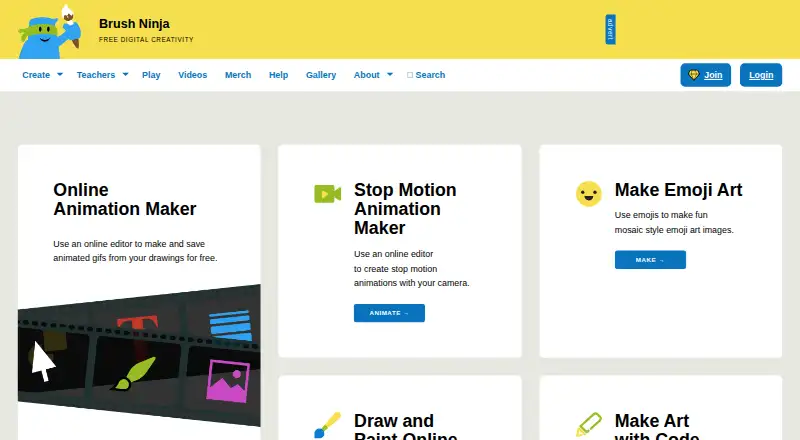
What Brush Ninja is
Brush Ninja is a 2D animation tool available in a browser and on Windows, macOS, Linux, iOS, and Android. Its free plan includes core animation tools and requires no account. Finished work can be exported as GIF, WebM, PNG, JPG, PDF, a ZIP image sequence, or a .brushninja file. Premium adds the ability to upload and animate personal images, use premium stickers and sound effects, remove adverts, and receive priority email communication. Premium monthly costs $7 a month, while Premium annual costs $48 a year; both listings say they can be cancelled any time. Brush Ninja is listed as founded in 2013 and headquartered in the United Kingdom. The listed product scope is 2D animation: 3D modeling, character rigging, motion graphics, and cloud collaboration are not included. This distinction may matter for users looking for a broader animation or collaborative production tool.
Who it suits
Brush Ninja may suit people making 2D animations who want a free option without creating an account. Paid plans add image uploads, stickers, sound effects, and advert removal.
What it does well
- Free plan includes core animation tools.
- No account is required for the free plan.
- Exports include GIF, WebM, PDF, and image sequences.
- Available on web, desktop, and mobile platforms.
- Paid plans can be cancelled any time.
What to know first
- Does not provide 3D modeling.
- Character rigging is not included.
- Motion graphics are not included.
- Cloud collaboration is not included.
Limits
The free plan provides core animation tools. Uploading and animating personal images, premium stickers, sound effects, advert removal, and priority email communication are included with Premium.
Plans
| Plan | Billed and limits | Price |
|---|---|---|
| Premium monthly | monthly · premium features · removes adverts · priority support · cancel anytime | $7 a month |
| Premium annual | annually · premium features · removes adverts · priority support · cancel anytime | $48 a year |
| Free | core tools · no account required · advertisements | Free |
As brush.ninja lists them, read 15 Oct 2026. The maker's own page has the final word.
Getting started
- Open the Brush Ninja website or use it on a supported platform.
- Start with the free plan; it does not require an account.
- Create an animation using the core animation tools.
- Export finished work in a supported format.
- Choose Premium monthly or annual if you want image uploads, premium stickers, sound effects, advert removal, or priority email communication.
Brush Ninja is a 2D animation tool for making animated drawings, with exports ranging from GIF and WebM to still images and PDFs. It suits people who want an approachable starting point for frame-based animation without signing up. Its strength is a focused, low-cost toolkit; it is not a substitute for software built around 3D, rigging, motion graphics or collaboration.
Overview
Brush Ninja is made by a UK-based maker founded in 2013. The free plan includes core animation tools and requires no account, making it easy to try the basic workflow before paying. That focus keeps the product relevant to simple 2D animation, but users working on more elaborate production pipelines will run into its boundaries: it has no 3D modeling, character rigging, motion graphics or cloud collaboration.
Compare it with other options in our Animation Software and GIF Maker Software lists.
Key features
Animation and exports
Brush Ninja’s 2D animation tools can export GIF and WebM, as well as PNG, JPG, PDF, ZIP image sequences and its native .brushninja format. That mix is useful when an animation needs to become a shareable clip, a set of image frames or a still-image/document output. The export range does not change the product’s core scope: it remains an animation tool rather than a 3D or motion-graphics package.
Premium additions
Premium adds uploading and animating your own images, premium stickers and sound effects. It also removes adverts and includes priority email communication. These additions make the paid tier the better fit for users who need those assets or want a cleaner workspace; the free plan is limited to core animation tools.
Pricing
The free plan costs nothing and includes core animation tools with no account required. It is the sensible starting point for basic animation, but does not include the premium additions. There are no published seat or usage quotas to factor into the plan choice.
- Premium monthly: $7 a month, cancel any time. Includes image upload and animation, premium stickers, sound effects, advert removal and priority email communication. It suits users who want premium features without committing to an annual term.
- Premium annual: $48 a year, cancel any time. It includes the same features as the monthly plan at a lower overall price for readers willing to pay annually.
Platforms
Brush Ninja is supported on the web, Windows, macOS, Linux, iOS and Android. That spread makes it usable across desktop and mobile systems, though the product does not offer cloud collaboration for shared work.
Who it's for
Choose Brush Ninja for accessible 2D animation, particularly if you want to start on a free plan or need several export formats. Premium makes sense when animating personal images, using premium stickers or sound effects, removing adverts, or prioritizing email support matters. Look elsewhere if your work depends on 3D modeling, rigged characters, motion graphics or collaborative editing.
Pros and cons
- Pro: The free plan includes core animation tools and needs no account, so there is little friction in getting started.
- Pro: GIF, WebM, still-image, PDF, image-sequence and native exports cover several useful output types.
- Pro: Annual Premium costs less than paying monthly for a full year while retaining the same listed additions.
- Con: No 3D modeling, rigging or motion graphics makes it a poor fit for broader animation production.
- Con: No cloud collaboration means teams should not choose it for shared editing workflows.
Alternatives
FlexClip is worth considering when video projects matter more: its free plan includes 12 online projects, a 10-minute limit per video, and one stock video and one stock audio per project. MakeAGIF is a web-based alternative with a free account limited to 10 seconds of video time; its Premium Membership raises that to 20 seconds.
Piskel is a free option available on web and desktop platforms. GIF Editor is another free choice for Windows, macOS and Linux. Gifox is a macOS alternative, with a free basic plan and a Pro option priced at $14.99 a month as a one-time purchase. GIPHY Create is a free web and mobile option. ImgPlay is a freemium choice for iOS and Android, while LICEcap is free on macOS and Windows.
Verdict
Brush Ninja is a good choice for individuals who want to make 2D animations without paying up front or creating an account. Its broad export selection and inexpensive annual Premium plan are compelling for that focused job. Choose another tool if your project needs 3D, rigging, motion graphics or collaboration.
Verdict
Brush Ninja focuses on accessible 2D animation, with a free plan and several export formats. It may not fit users who need 3D modeling, rigging, motion graphics, or collaborative work.
Questions
Does Brush Ninja have a free plan?
Yes. The Free plan costs nothing and includes core animation tools without requiring an account.
How much does Premium cost?
Premium monthly is $7 a month. Premium annual is $48 a year; both listings say cancellation is available any time.
Which platforms does Brush Ninja support?
It is available on web, Windows, macOS, Linux, iOS, and Android.
What file formats can I export?
Exports include GIF, WebM, PNG, JPG, PDF, ZIP image sequence, and .brushninja.
Does Brush Ninja support 3D modeling or character rigging?
No. 3D modeling and character rigging are listed as unavailable.
Who makes Brush Ninja?
Brush Ninja is listed as the maker, founded in 2013 and headquartered in the United Kingdom.
Facts from Brush Ninja's own pages
- Accessibility
- Listed accessibility features include keyboard navigation, screen-reader support, high-contrast modes, alternative text, an accessibility statement, and a VPAT. · brush.ninja, 15 Oct 2026
- Advertising service
- Brush Ninja says its advertisements are provided by AdMetricsPro. · brush.ninja, 15 Oct 2026
- Animated GIF maker
- The animation editor lets users draw frames, arrange them on a timeline, preview playback, and export GIFs or individual frame images. · teachersfirst.org, 15 Oct 2026
- Character rigging
- No · brush.ninja, 22 Sept 2026
- Classroom limitation
- Brush Ninja does not provide class accounts, student dashboards, assignments, central storage, or bulk-management tools. · brush.ninja, 15 Oct 2026
- Cloud collaboration
- No · brush.ninja, 22 Sept 2026
- Code Ninja
- Code Ninja is included as a tool for creating two-dimensional artwork with a simple coding language. · brush.ninja, 15 Oct 2026
- Comic Maker
- Comic Maker places eight images into a printable single-page booklet layout. · brush.ninja, 15 Oct 2026
- Documentation
- The help center contains separate guides for the animation maker, stop-motion tool, Emoji Art, Paint Ninja, Code Ninja, Mini Book, Photo Collage, Pixel Camera, and Comic Maker. · brush.ninja, 15 Oct 2026
- Embedding
- The Paint Ninja drawing app can be embedded in another website with a script from embed.brush.ninja and a custom brush-ninja-drawing element. · brush.ninja, 15 Oct 2026
- Emoji Art
- Emoji Art creates mosaic-style images from emoji characters. · brush.ninja, 15 Oct 2026
- Export formats
- GIF,WebM,PNG,JPG,PDF,ZIP image sequence,.brushninja · brush.ninja, 22 Sept 2026
- Export limitation
- Free users cannot export animations with sound; video export with sound is reserved for members. · brush.ninja, 15 Oct 2026
- Feature limitation
- The FAQ says the animation editor does not support layers, although users can reorder vector shapes. · brush.ninja, 15 Oct 2026
- Founded
- Gillbanks says he began building the first version of Brush Ninja in 2013 and released the first public version five years later. · brush.ninja, 15 Oct 2026
- Free plan
- Yes · brush.ninja, 22 Sept 2026
- Headquarters
- The teacher guide describes developer Ben Gillbanks as based in the United Kingdom. · brush.ninja, 15 Oct 2026
- Implementation stack
- The maker says Brush Ninja uses JavaScript, FabricJS, ReefJS, gif.js, FFmpeg.wasm, Jekyll, and Gulp 4. · brush.ninja, 15 Oct 2026
- Independent education review
- TeachersFirst recommends Brush Ninja for grades 4–12 and describes frame drawing, timeline reordering, exports, lesson plans, videos, and downloads. · teachersfirst.org, 15 Oct 2026
- Independent limitation: tutorials
- The EdTech Books reviewer withheld a fifth star because the site lacked a tutorial at the time of review. · edtechbooks.s3.us-west-2.amazonaws.com, 15 Oct 2026
- Integrations
- Subscriptions use Stripe, static hosting uses Firebase, membership accounts use Userbase, delivery and security use Cloudflare, and error tracking uses Sentry. · brush.ninja, 15 Oct 2026
- Licence
- AlternativeTo lists Brush Ninja as a proprietary free product rather than open source. · alternativeto.net, 15 Oct 2026
- Limit: beginner focus
- An AlternativeTo reviewer said the product is good mainly for less advanced users, indicating limited depth for advanced workflows. · alternativeto.net, 15 Oct 2026
- Maker
- Brush Ninja is built and operated by Ben Gillbanks, who says he works on it as a one-person project. · brush.ninja, 15 Oct 2026
Where Brush Ninja stands on Freedom251
- GIF Maker Software#1 of 33
- GIF makers#11 of 54
- Animation Software#33 of 106