Freedom251 › GIF Maker Software
Ezgif
What Ezgif is
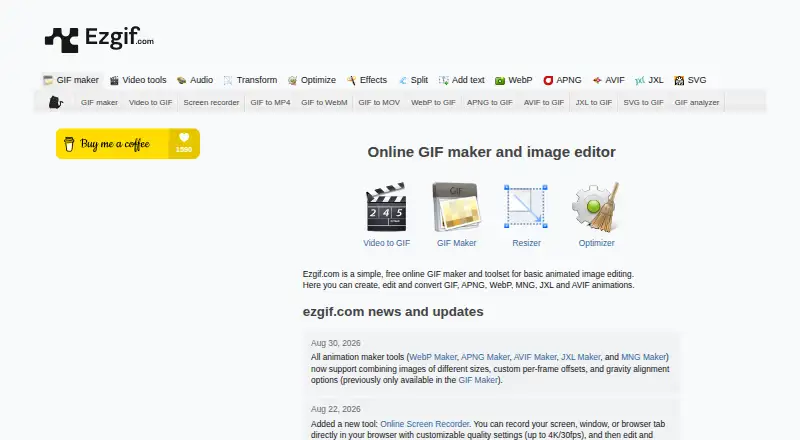
Ezgif is a free online toolset for creating and editing animated images, with basic video editing and support for other image formats. It can create, edit, and convert GIF, APNG, WebP, MNG, JXL, and AVIF animations. Popular tools include a GIF maker, a video-to-GIF converter, and an animated image resizer. ImageMagick handles many image tasks, such as resizing, optimizing, cropping, splitting, and format conversion; FFmpeg is used for video conversion and editing, and gifski for video-to-GIF conversion. Bulk GIF Optimizer compresses multiple GIFs in the browser using WebAssembly without uploads and offers ZIP downloads. The browser-based screen recorder can capture a screen, window, or tab, with quality settings up to 4K/30fps. Uploaded files remain on the site’s servers until one hour after their last use, then are automatically deleted. Ezgif allows commercial use without required attribution. It has no official supported API and recommends local tools for scripted or batch work. Open Idea develops and hosts the service, which is made in Latvia.
Who it suits
Ezgif suits people who want browser-based tools for animated images, GIF creation, or basic video conversion and editing. Its bulk optimizer and screen recorder add options for users working with multiple files or screen captures.
What it does well
- Supports several animated image formats.
- Includes GIF and video-to-GIF tools.
- Bulk optimization runs in the browser without uploads.
- Screen recorder supports quality up to 4K/30fps.
- Commercial use does not require attribution.
What to know first
- No official supported API.
- Uploaded files stay on servers until one hour after last use.
- Scripted or batch work is directed to local tools.
Limits
The Free plan costs nothing. Uploaded files are automatically deleted one hour after their last use.
Plans
| Plan | Billed and limits | Price |
|---|---|---|
| Free | Free online toolset; uploaded and generated files are automatically deleted one hour after upload or creation | Free |
As ezgif.com lists them, read 11 Oct 2026. The maker's own page has the final word.
Getting started
- Open https://ezgif.com/ in a web browser.
- Choose a tool such as GIF maker, video-to-GIF converter, animated image resizer, or screen recorder.
- Upload files for tools that process uploads, or use the Bulk GIF Optimizer for in-browser compression.
- Download the resulting file or ZIP when the tool provides an output.
Verdict
Ezgif offers a broad collection of browser tools for animation and basic video tasks. File retention and the lack of a supported API are worth noting when choosing it for a workflow.
Questions
How much does Ezgif cost?
Its Free plan costs nothing.
Is Ezgif available as a desktop or mobile app?
The listed platform is web.
Which animation formats does it support?
It supports creating, editing, and converting GIF, APNG, WebP, MNG, JXL, and AVIF animations.
Can I use Ezgif for commercial work?
Yes. Ezgif says commercial use is permitted and attribution is not required.
Does Ezgif provide an API?
It says it has no official supported API and recommends local ImageMagick, FFmpeg, or Gifsicle for scripted or batch work.
Who develops Ezgif?
Ezgif is developed and hosted by Open Idea, and is made in Latvia.
Facts from Ezgif's own pages
- API
- Ezgif says it has no official supported API and recommends local ImageMagick, FFmpeg, or Gifsicle for scripted or batch work. · ezgif.com, 11 Oct 2026
- Browser processing
- The Bulk GIF Optimizer compresses multiple GIFs in the browser using WebAssembly without uploads and offers ZIP downloads. · ezgif.com, 11 Oct 2026
- Commercial use
- The site says Ezgif may be used for commercial purposes and attribution is not required. · ezgif.com, 11 Oct 2026
- File retention
- Uploaded files are stored on the site’s servers until one hour after their last use with its tools, then automatically and securely deleted. · ezgif.com, 11 Oct 2026
- Formats
- The site supports creating, editing, and converting GIF, APNG, WebP, MNG, JXL, and AVIF animations. · ezgif.com, 11 Oct 2026
- Image editing
- ImageMagick performs most image editing tasks, including resizing, optimizing, cropping, splitting, and format conversion. · ezgif.com, 11 Oct 2026
- Maker and hosting
- The about page says Ezgif is developed and hosted by Open Idea and identifies it as made in Latvia. · ezgif.com, 11 Oct 2026
- Popular tools
- Its most popular online tools are GIF maker, Video to GIF converter, and animated image resizer. · ezgif.com, 11 Oct 2026
- Privacy
- The privacy page says the site does not knowingly collect or store personal information on its servers and uses cookies for anonymized, aggregated traffic analysis, preferences, and advertising. · ezgif.com, 11 Oct 2026
- Screen recording
- The online screen recorder records a screen, window, or browser tab in the browser, with quality settings up to 4K/30fps. · ezgif.com, 11 Oct 2026
- Support
- The maker invites questions, bug reports, and feature suggestions by email and says users can also post in the Ezgif Reddit community. · ezgif.com, 11 Oct 2026
- Video conversion
- The site uses FFmpeg for video conversions and editing, and gifski for video to GIF conversions. · ezgif.com, 11 Oct 2026
- What it does
- Ezgif is a free online toolset for creating and editing animated GIFs, with support for other image formats and basic video editing. · ezgif.com, 11 Oct 2026
Where Ezgif stands on Freedom251
- GIF Maker Software#4 of 33
- Image Converter Software#11 of 36
- GIF makers#31 of 54
- Image converters#8 of 10