Freedom251 › Minecraft Add-on Editors

bridge.
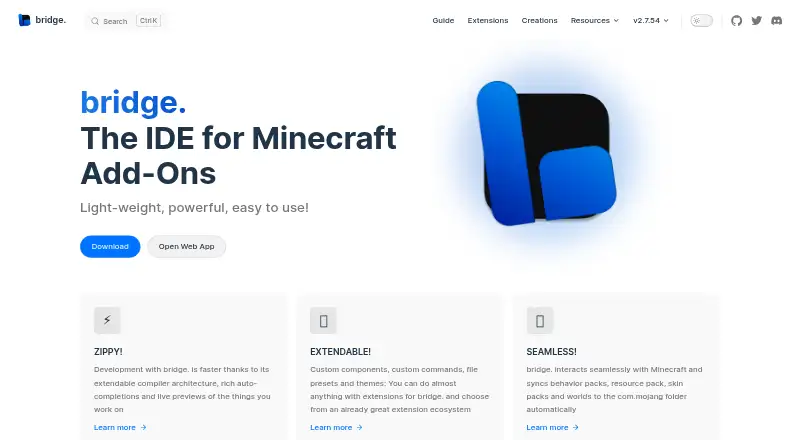
What bridge. is
bridge. is a free, open-source IDE for making Minecraft Bedrock Add-Ons, including behavior packs, resource packs, skin packs, and world templates. It creates projects with the necessary files and configuration, and supports every file type Minecraft supports for Add-Ons. Users can edit with text or tree editors; the tree editor is recommended for people with little JSON knowledge, while the text editor validates files against schemas and points out syntax errors. Editors also provide dynamic completions filtered by format version and experimental toggles. Previews show models, textures, animations, collision boxes, entity seats, and particle effects without loading Minecraft. The built-in Dash compiler supports plugins, and an extension API and store support community tools, editors, viewers, presets, themes, and compiler plugins. Projects can sync packs and worlds to Minecraft's com.mojang folder, but are stored outside it by default. The installed web app works offline. On mobile, users must download projects to fully save progress because mobile browsers lack a required API. bridge. is available on web, Windows, macOS, Linux, iOS, and Android.
Who it suits
bridge. suits Minecraft Bedrock creators who want pack creation, previews, validation, and project syncing in one IDE. Its tree editor can help users with little JSON knowledge.
What it does well
- Creates behavior, resource, skin, and world-template projects.
- Previews models, textures, animations, and particle effects.
- Offers text and tree editing with completions and validation.
- Installed web app works offline.
- Free and open source across six platform types.
What to know first
- Mobile users must download projects to fully save progress.
- Project sync targets Minecraft's com.mojang folder.
- The project is licensed under GPL-3.0.
Limits
On mobile devices, downloading the project is required to completely save progress because mobile browsers do not support a required API.
Getting started
- Open bridge. in a supported browser or install the web app
- Create a Bedrock project
- Choose a text or tree editor
- Build packs or templates and preview them
- Sync the project to Minecraft’s com.mojang folder or export it
Overview
bridge. is a Minecraft Bedrock Add-Ons IDE for creators who want a workspace dedicated to packs and worlds rather than a general-purpose code editor. Its strongest case is bringing project setup, editing, previews and in-game syncing into one tool; mobile users must download their project to fully save progress.
It creates behavior packs, resource packs, skin packs and world templates with the required files and configuration. Projects live outside Minecraft’s com.mojang folder by default, helping keep source work separate from the game’s installed content and safer if Minecraft is uninstalled. When ready, bridge. can sync supported packs and worlds to that folder.
Text and tree editing offer different routes through project data. The tree editor is suited to users with limited JSON knowledge, while the text editor supplies schema validation and syntax feedback. Dynamic completions and validation account for format versions and experimental toggles, which is useful when building for different Bedrock targets.
Key features
- Pack and world projects: Create behavior packs, resource packs, skin packs and world templates with their setup handled by the IDE, rather than assembling the basic project structure yourself.
- Text and tree editors: The tree mode can help newcomers avoid syntax errors; text editing provides schema checks and points out syntax problems for users who prefer direct file work.
- Previews without Minecraft: Inspect models, textures, animations, collision boxes, entity seats and particle effects without loading the game. That makes iteration less dependent on repeatedly opening Minecraft.
- Dash compiler and extensions: The built-in Dash compiler supports compiler plugins. An extension API and store also accommodate community tools, editors, viewers, presets and themes, giving experienced users room to tailor the workspace.
- Import, export and syncing: Import .mcaddon and .mcpack projects, and export .brproject, .mcaddon, .mcworld and .mctemplate formats. Syncing sends behavior packs, resource packs, skin packs and worlds to Minecraft’s com.mojang folder.
- GitHub-friendly projects: The project structure can be used with GitHub for collaboration and version control, a practical fit for teams or creators who want tracked changes.
- Offline web app: The maker says the installed web app works offline and behaves like a native app. On mobile, however, the browser lacks an API needed to fully save work, so users must download the project to preserve progress.
Pricing
bridge. is free and open source under the GPL-3.0 License. There is no paid tier or trial to weigh against a free-plan cap, so it suits creators who want a dedicated Bedrock workflow without a software subscription. The trade-off is practical rather than a published quota: mobile users need to download projects to completely save progress.
Platforms
bridge. is available on the web, Windows, macOS, Linux, iOS and Android. The wide platform range is useful for creators switching between desktop and mobile, though the mobile save requirement makes phones and tablets a less seamless place to do sustained project work than the platform list alone suggests.
Who it's for
Choose bridge. if you make Minecraft Bedrock Add-Ons and want project scaffolding, structured editing, previews and Minecraft syncing in a single IDE. It is particularly suitable for newer creators who may benefit from tree editing, and for more experienced makers who value compiler plugins, extensions, multiple version targets or GitHub-based collaboration. It is less suitable for mobile-first work that depends on browser saving, or for someone seeking an editor not centered on Bedrock pack and world creation.
Pros and cons
- Pro: Project setup covers four Bedrock pack and world types, reducing the initial configuration work.
- Pro: Previews span models, textures, animations, collision boxes, entity seats and particles without requiring Minecraft to be loaded.
- Pro: The tree editor offers a way to work with structured data without extensive JSON knowledge, while text mode provides validation.
- Pro: Projects stay outside the game folder by default, and can later be synced into Minecraft when ready.
- Con: Mobile users have to download projects to fully save progress, adding a manual step to the workflow.
- Con: Its focus is specifically Minecraft Bedrock Add-Ons, so it is not the right fit for unrelated software development.
Alternatives
Minecraft Add-on Editors is a useful next stop for readers comparing tools in this category.
- Blockbench is another free option across web, mobile and desktop platforms; choose it if you want an alternative rather than bridge.’s Bedrock IDE workflow.
- Minecraft Launcher is free to download, but accessing games requires ownership or a time-limited demo. Choose it to launch Minecraft, not to replace a dedicated Add-Ons IDE.
- Visual Studio Code is a free editor for web and desktop platforms. It may suit readers looking for a broader editor, while bridge. is purpose-built for Bedrock Add-On projects.
- AddonCrate Studio is a free alternative for desktop and extension platforms.
- Bedrocken is a free VS Code extension that requires VS Code ^1.87.0; choose it if you prefer working through that editor.
- Blockception Minecraft Bedrock Development is a free VS Code extension for Minecraft Bedrock Addons and Minecraft Education Edition, making it relevant if Education Edition is part of your work.
- Crafty Craft is a freemium option for Android, iOS and macOS, with a three-day free period before its Go Pro Monthly plan costs $15.99 a month. Consider it if you prefer a mobile-oriented option and are comfortable weighing a paid premium plan.
- Addons Maker for Minecraft PE offers a free ad-supported plan with core editors, templates and export, plus a trial followed by a $3.99 a month premium plan. It may fit readers seeking a mobile add-on maker with templates and an export option.
Verdict
bridge. is a strong choice for Bedrock Add-On creators who want project setup, editing, previews and syncing in one free, open-source IDE. Its breadth is the main reason to choose it; look elsewhere if mobile browser saving is central to your workflow, since completely saving progress there requires a download step.
Verdict
bridge. brings project setup, editing, previews, and Minecraft syncing together for Bedrock Add-Ons. Mobile users should account for the required download step to fully save their work.
Questions
Is bridge. free?
Yes. bridge. is free, open source, and released under the GPL-3.0 License.
Which platforms are supported?
It is available on Android, iOS, Linux, macOS, web, and Windows.
What Minecraft project types can it create?
It creates behavior packs, resource packs, skin packs, and world templates.
Can bridge. work offline?
The maker says the installed web app behaves like a native app and works offline.
Can existing projects be imported?
Documented imports include .mcaddon and .mcpack projects.
Facts from bridge.'s own pages
- Bedrock projects
- It can create behavior packs, resource packs, skin packs and world templates for Minecraft Bedrock. · bridge-core.app, 2 Oct 2026
- Compiler
- bridge. includes the Dash compiler, which can be configured with compiler plugins. · bridge-core.app, 2 Oct 2026
- Completion and validation
- The editors provide dynamic auto-completions and validate files against schemas, with suggestions filtered by format version and experimental toggles. · bridge-core.app, 1 Oct 2026
- Completions and validation
- Its editors provide dynamic auto-completions, and the text editor validates files against schemas and points out syntax errors. · bridge-core.app, 2 Oct 2026
- Editor modes
- It offers text and tree editors; the tree editor is recommended for users with little JSON knowledge because it prevents syntax errors. · bridge-core.app, 2 Oct 2026
- Extensions
- Its extension API supports themes, snippets, presets, custom UI elements and compiler plugins, and extensions can be installed globally or per project. · bridge-core.app, 2 Oct 2026
- File support
- bridge. supports every file that Minecraft supports for Add-Ons. · bridge-core.app, 1 Oct 2026
- Founded
- 2019 · bridge-core.app, 23 Sept 2026
- Import and export
- The documented export formats include .brproject, .mcaddon, .mcworld and .mctemplate; .mcaddon and .mcpack projects can be imported. · bridge-core.app, 2 Oct 2026
- License
- The website says bridge. is released under the GPL-3.0 License. · bridge-core.app, 2 Oct 2026
- Minecraft sync
- When linked to the com.mojang folder, bridge. can sync compiled projects to Minecraft’s development pack folders. · bridge-core.app, 2 Oct 2026
- Mobile limitation
- On mobile, users need to download their project to completely save progress because mobile browsers lack an API bridge. v2 requires. · bridge-core.app, 2 Oct 2026
- Offline use
- The maker says the installed web app behaves like a native app and works offline. · bridge-core.app, 2 Oct 2026
- Previews
- It previews project models, textures, animations, collision boxes, entity seat positions and particle effects without loading Minecraft. · bridge-core.app, 2 Oct 2026
- Project setup
- It creates behavior packs, resource packs, skin packs and world templates with necessary files and project configuration. · bridge-core.app, 1 Oct 2026
- Project storage
- By default, project files are stored outside the com.mojang folder, and the maker says they can be used with GitHub for collaboration and version control. · bridge-core.app, 2 Oct 2026
- Purpose
- bridge. describes itself as an IDE for Minecraft add-ons. · bridge-core.app, 2 Oct 2026
- Support
- The maker directs users to its Discord for help and says issues can also be reported through its GitHub bug tracker. · bridge-core.app, 2 Oct 2026
- Team
- The listed team includes solvedDev and Joel ant 05 as lead developers and OuterCloudStudio as lead maintainer. · bridge-core.app, 1 Oct 2026
- Version control
- The project structure can be used with GitHub for collaboration and version control. · bridge-core.app, 1 Oct 2026
Where bridge. stands on Freedom251
- Minecraft Add-on Editors#12 of 26