Freedom251 › Minecraft Add-on Editors

Bedrock JSON UI Editor
What Bedrock JSON UI Editor is
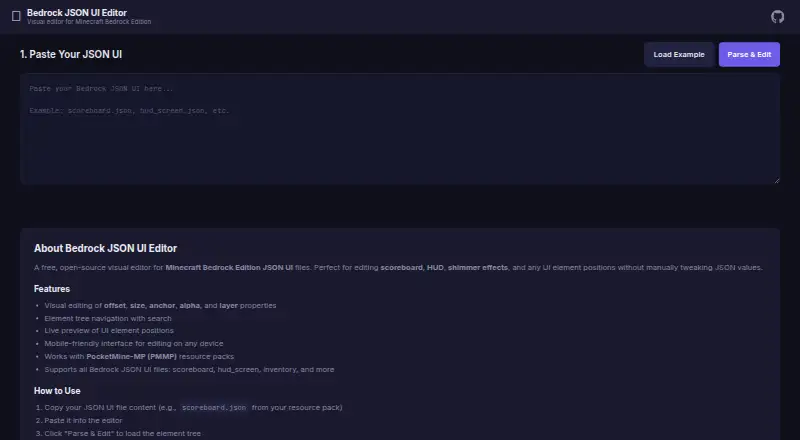
Bedrock JSON UI Editor is a free, open-source web editor for changing Minecraft Bedrock Edition JSON UI files. It supports files such as scoreboard, HUD, and inventory interfaces. Paste JSON into the editor to parse its elements, then adjust properties visually, including offsets, size, anchors, alpha, layer, visibility, enabled state, animation values, variables, and text. An element tree with search helps you find items in the file, and a live preview shows where UI elements sit. When you finish, copy or download the edited JSON. The editor runs in a browser without a backend and works offline; draft work is saved in the browser for restoration on a later visit. Its mobile-friendly interface uses tabs and is designed for phones and tablets. The project is MIT licensed. The maker says it works with PocketMine-MP resource packs and is compatible with PocketMine-MP, Nukkit, and other Bedrock servers. Minecraft Bedrock Edition is listed as compatible on Windows 10/11, Android, iOS, Xbox, PlayStation, and Nintendo Switch. Users can open an issue to suggest a feature or report a bug.
Who it suits
This editor suits Minecraft Bedrock creators who want to adjust JSON UI files visually, including scoreboard, HUD, and inventory elements. It may also suit PocketMine-MP or Nukkit server communities, and users working from a phone or tablet can use its mobile-friendly interface.
What it does well
- Free and open-source, with an MIT license.
- Works offline in the browser without a backend.
- Live preview shows UI element positions.
- Searchable element tree helps navigate files.
- Draft work is restored on a later visit.
- Mobile-friendly tab navigation supports phones and tablets.
What to know first
- The editor is available on the web platform.
- Work begins by pasting JSON UI into the editor.
Plans
| Plan | Billed and limits | Price |
|---|---|---|
| Free | Free, open-source editor | Free |
As w1zardz.github.io lists them, read 8 Oct 2026. The maker's own page has the final word.
Getting started
- Open the editor website in a web browser.
- Paste a supported Bedrock JSON UI file, such as a scoreboard, HUD, or inventory file.
- Parse the JSON and find elements in the searchable tree.
- Adjust element properties and review their positions in the live preview.
- Copy or download the modified JSON.
Verdict
Choose Bedrock JSON UI Editor if you want a free visual way to parse and adjust Minecraft Bedrock JSON UI files, with offline browser use and a live preview. It also fits mobile editing and resource packs used with PocketMine-MP. Look elsewhere if you need an editor platform other than web.
Questions
How much does Bedrock JSON UI Editor cost?
It is free. The listed free plan costs nothing.
Is it open-source?
Yes. The project README identifies it as MIT licensed.
Which platforms can I use it on?
The editor is web-based. The maker lists Minecraft Bedrock Edition on Windows 10/11, Android, iOS, Xbox, PlayStation, and Nintendo Switch as compatible.
What files can I edit?
It supports Bedrock JSON UI files such as scoreboard, hud_screen, and inventory files.
Does it work with PocketMine-MP or Nukkit?
The maker says it works with PocketMine-MP resource packs and is compatible with PocketMine-MP, Nukkit, and other Bedrock servers.
Does the editor offer a free trial?
No. The listed pricing model is free, and there is no free trial.
Facts from Bedrock JSON UI Editor's own pages
- Draft autosave
- Draft work is kept in the browser and restored on the next visit. · github.com, 8 Oct 2026
- File workflow
- Users paste JSON UI into the editor, parse and edit elements, then copy or download the modified JSON. · w1zardz.github.io, 8 Oct 2026
- Integrations and compatibility
- The maker says it works with PocketMine-MP resource packs and is compatible with PocketMine-MP, Nukkit, and other Bedrock servers. · w1zardz.github.io, 8 Oct 2026
- License
- The project README identifies the software as MIT licensed. · github.com, 8 Oct 2026
- Mobile use
- The interface is mobile-friendly and is optimized for phones and tablets with tab navigation. · github.com, 8 Oct 2026
- Navigation and preview
- The editor provides an element tree with search and a live preview of UI element positions. · w1zardz.github.io, 8 Oct 2026
- Offline and backend
- The editor runs entirely in the browser without a backend and works offline. · github.com, 8 Oct 2026
- Purpose
- A free, open-source visual editor for Minecraft Bedrock Edition JSON UI files, including scoreboard, HUD, and shimmer elements. · w1zardz.github.io, 8 Oct 2026
- Support
- The README invites users to open an issue for feature ideas or bug reports. · github.com, 8 Oct 2026
- Supported files
- The editor supports Bedrock JSON UI files such as scoreboard, hud_screen, and inventory files. · w1zardz.github.io, 8 Oct 2026
- Supported game platforms
- The maker lists Minecraft Bedrock Edition on Windows 10/11, Android, iOS, Xbox, PlayStation, and Nintendo Switch as compatible. · w1zardz.github.io, 8 Oct 2026
- Supported properties
- The README lists controls for offsets, size, anchors, alpha, layer, visibility, enabled state, animation values, variables, and text. · github.com, 8 Oct 2026
- Visual editing
- Users can visually edit properties such as offset, size, anchor, alpha, and layer. · w1zardz.github.io, 8 Oct 2026
Where Bedrock JSON UI Editor stands on Freedom251
- Minecraft Add-on Editors#11 of 26