Freedom251 › Reservations Software

Bookwhen
What Bookwhen is
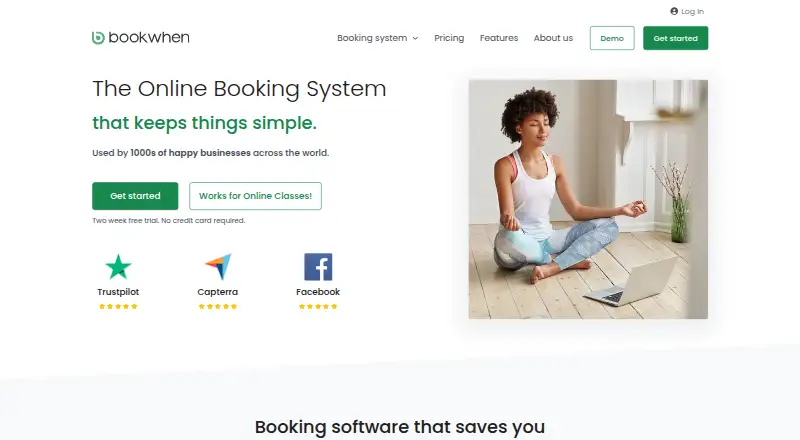
Bookwhen is an online booking system for classes, courses, events, activities, and experiences. Organizers can publish booking pages, set recurring schedules, offer multiple ticket types, and manage group bookings. Custom booking forms, waiting lists, discounts, and passes provide more ways to handle registrations. Customers can pay online through Stripe, PayPal, or WorldPay, or use offline payment options. Online payment providers charge their own processing fees; Bookwhen says free bookings and bookings marked paid offline carry no fee. Booking pages can be embedded in websites built with WordPress, Wix, or Squarespace. Bookwhen can automatically create Zoom meetings and embed YouTube or Vimeo videos on secure event pages for attendees. An API can bring event data into a website, while calendar synchronization is one-way. Bookwhen describes its web app as mobile-first and designed for mobile and tablet use. The Free plan is billed at $0 forever and allows 50 bookings per month, one team member, and one booking page, with free events only. Paid plans start with Lite at $16 per month; higher tiers raise the booking, team member, and booking page allowances. The company is based in Oxford, England, and says it serves small businesses, individuals, non-profits, and franchisors.
Who it suits
Bookwhen suits individuals and organizations that arrange bookings for classes, courses, events, activities, or experiences. Its booking pages, payment options, and staff allowances can fit small businesses and non-profits, while the company also identifies franchisors among its customers.
What it does well
- Supports recurring schedules, multiple ticket types, group bookings, and waiting lists.
- Collects online payments through Stripe, PayPal, or WorldPay.
- Booking pages can be embedded in WordPress, Wix, and Squarespace sites.
- Can create Zoom meetings automatically and embed event videos.
- Free plan includes 50 bookings per month and one team member.
- Offers one-way calendar sync and an API.
What to know first
- Free plan is limited to free events.
- Free plan allows one team member and one booking page.
- Calendar synchronization is one-way.
- Payment providers charge separate processing fees for online payments.
Limits
The Free plan is billed at $0 forever and allows 50 bookings per month, one team member, and one booking page. It is limited to free events. Paid plans start at $16 per month; Lite allows 300 bookings per month, two team members, and one booking page.
Plans
| Plan | Billed and limits | Price |
|---|---|---|
| Free | forever · 50 bookings/month · 1 team member · 1 booking page · free events only · iframe/API integration | Free |
| Lite | billed monthly · 300 bookings/month · 2 team members · 1 booking page · unlimited locations/classes · payments and discounts · ticket transfers · iframe/API website integration · online events · Zoom · online support | $16 a month |
| Standard | billed monthly · 800 bookings/month · 5 team members · 3 booking pages · memberships · reminder emails · waiting list · vouchers · passes · attendance tracking · YouTube/Vimeo · phone not included | $29 a month |
| Plus | billed monthly · 1800 bookings/month · 10 team members · 6 booking pages · memberships · reminders · waiting list · vouchers · passes · attendance tracking · YouTube/Vimeo · online and phone support | $59 a month |
| Lite | billed annually · 300 bookings/month · 2 team members · 1 booking page · unlimited locations/classes · payments and discounts · ticket transfers · iframe/API integration · online events · Zoom | $160 a year |
| Standard | billed annually · 800 bookings/month · 5 team members · 3 booking pages · memberships · reminders · waiting list · vouchers · passes · attendance tracking · YouTube/Vimeo | $290 a year |
| Plus | billed annually · 1800 bookings/month · 10 team members · 6 booking pages · memberships · reminders · waiting list · vouchers · passes · attendance tracking · YouTube/Vimeo · phone support | $590 a year |
| Enterprise | custom quote · bespoke plans · franchisor system · reseller accounts · class search portals | On request |
As bookwhen.com lists them, read 14 Oct 2026. The maker's own page has the final word.
Getting started
- Open https://bookwhen.com/ and choose a plan; a 14-day trial is offered.
- Create a booking page and set schedules, ticket types, forms, and other booking options.
- Choose online payments through Stripe, PayPal, or WorldPay, or configure offline payment options.
- Embed the booking page in a WordPress, Wix, or Squarespace site if needed.
- Use the API to integrate event data into a website, or connect the listed Zoom and video options.
Bookwhen is a booking system for classes, courses, events, activities and experiences. It suits organizers adding structured registrations to an existing website, especially those running recurring sessions with varied tickets or group places. The main attraction is flexible booking and payment handling; the main constraint is that the free tier is limited to free events and relatively small volumes.
Overview
Bookwhen combines event schedules, registration and payment collection in embeddable booking pages. You can place those pages in WordPress, Wix or Squarespace, so an organization can keep its current website while adding a booking workflow. An API is also provided for integrating event data into a website, which is useful when a standard embed is not enough.
The mobile-first web app is intended for phone and tablet use, and the listed platforms are web and API rather than native desktop or mobile applications. Calendar synchronization is one-way, so it fits teams that mainly publish Bookwhen schedules outward, not those requiring two-way updates between calendars.
Key features
Scheduling and registration
Recurring schedules handle repeating classes and courses without treating every session as a separate setup. Multiple ticket types and group bookings support different prices, categories or attendance sizes. Custom booking forms collect information beyond a name and email, while waiting lists help manage full sessions. Discounts and passes provide ways to structure repeat attendance or special offers. Automated reminders reduce manual follow-up before an event.
Payments and online events
Customers can pay through Stripe, PayPal or WorldPay, or use offline payment methods. Payment providers apply their own processing fees. Bookwhen does not charge a fee for free bookings or bookings marked as paid offline, which can matter to community groups and no-cost events. It can automatically create Zoom meetings and place YouTube or Vimeo videos on secure event pages for attendees, extending the system to online or blended activities.
Security and support
Bookwhen states that it holds ISO/IEC 27001:2022 certification and achieved Cyber Essentials Plus certification in February 2026. Support is offered by in-app chat or email during regular business hours, with the company reporting an average response time under 10 minutes. Those assurances are valuable for organizations handling attendee data, although they do not change the practical limits of the lower plans.
Pricing
A 14-day trial lets prospective customers evaluate paid functionality before committing. The Free plan costs $0 forever and allows 50 bookings per month, one team member and one booking page, but only for free events. It is appropriate for a small organizer testing the workflow or running genuinely free sessions; it cannot support paid ticket sales.
Lite costs $16 per month and raises capacity to 300 bookings per month with two team members and one booking page. It is the sensible step for a small paid-events operation, though the single-page limit remains. Standard costs $29 per month for 800 bookings, five team members and three booking pages, suiting organizations with several programs or staff. Plus costs $59 per month for 1,800 bookings, ten team members and six booking pages, aimed at larger multi-program operations.
Enterprise has custom pricing and is intended for bespoke plans, franchisor systems, reseller accounts and class-search portals. Across paid tiers, online payment providers still charge separate processing fees, so subscription cost is not the complete payment expense.
Platforms
Bookwhen runs as a mobile-first web app and offers an API. Booking pages can be embedded in WordPress, Wix and Squarespace, while Zoom, YouTube and Vimeo integrations support online event delivery. The one-way calendar sync is the principal platform limitation for teams expecting bidirectional calendar management.
Who it's for
Bookwhen is built for small businesses, individuals, non-profits and franchisors organizing classes, courses, activities or experiences. It is particularly well matched to organizers with an existing website, recurring schedules, several registration choices and a need to accept both online and offline payments. Teams needing two-way calendar synchronization, native apps or more than one booking page on the entry paid tier should assess the higher plans or other products.
Pros and cons
Pros
- Recurring schedules, ticket types, group bookings, forms, waiting lists, discounts and passes cover complex registration patterns.
- Stripe, PayPal, WorldPay and offline payments accommodate different customer preferences.
- Embeds for major website builders and an API avoid forcing a website rebuild.
- Zoom creation and secure video embeds support online sessions.
- ISO/IEC 27001:2022 and Cyber Essentials Plus certifications provide a clear security posture.
Cons
- The Free plan accepts only free events and caps usage at 50 bookings per month.
- Lite still provides only one booking page, limiting organizations with multiple brands or programs.
- Calendar synchronization is one-way rather than bidirectional.
- Online payment processing fees are charged separately by the payment providers.
Alternatives
For a broader comparison of class-focused tools, see Class Scheduling Software; appointment-led businesses can review Appointment Scheduling Software.
- Bookamat offers a free-after-trial plan for studios with 10 or fewer active clients and runs on Android, iOS, Linux, macOS, web and Windows.
- Class Manager has no monthly subscription on its free plan, with a flat service charge for online payments and tailored high-volume pricing.
- PushPress offers unlimited leads, admins, members and staff without monthly fees on Free, charging 4.99% plus $0.30 for card payments and 2.89% plus $0.30 for ACH.
- Stepsi uses annual pricing billed monthly, with Plus for up to 100 active members and Grow for up to 250.
- WellnessLiving starts at $62 per month billed annually on Starter, including one staff member and classes and appointments booking.
- CourseDeck has a free Starter plan for 25 active students, one location and one admin.
- Omnify has a Free Forever tier for two team members and 100 clients, with unlimited bookings and a 5% transaction fee.
- ClubReady is a paid platform with pricing provided through a demo.
Verdict
Choose Bookwhen if you need recurring class or event booking pages, varied registration options and online or offline payments that can slot into an existing website. Its paid tiers scale booking volume and staff access, while the API and online-event integrations add flexibility. Look elsewhere if two-way calendar sync, native applications or a free plan that supports paid events is essential.
Verdict
Choose Bookwhen if you need booking pages with recurring schedules, multiple registration options, and online or offline payment methods. The free plan covers up to 50 monthly bookings, one team member, and one page, but only for free events. Organizations needing more capacity can consider paid plans starting at $16 per month.
Questions
Is Bookwhen free?
Yes. The Free plan is billed at $0 forever and includes 50 bookings per month, one team member, and one booking page, for free events only.
How much do paid plans cost?
Lite is $16 per month, Standard is $29 per month, and Plus is $59 per month. Enterprise plans are bespoke, with no price listed.
Does Bookwhen offer a free trial?
Yes, a 14-day trial is listed.
What payment methods can customers use?
Customers can pay online through Stripe, PayPal, or WorldPay, or use offline payment options. Payment providers charge separate processing fees; free bookings and bookings marked paid offline carry no Bookwhen fee.
Which platforms does Bookwhen support?
The listed platforms are web and API. Bookwhen describes its web app as mobile-first and designed for mobile and tablet use.
What integrations does Bookwhen offer?
Booking pages can be embedded in WordPress, Wix, and Squarespace sites. Bookwhen can create Zoom meetings automatically and embed YouTube or Vimeo videos on secure attendee pages; it also provides an API and one-way calendar sync.
Facts from Bookwhen's own pages
- API
- Bookwhen provides an API to integrate event data into a website. · bookwhen.com, 7 Oct 2026
- API documentation
- API documentation covers setup, permissions, tokens and filter parameters, while Bookwhen says its support team does not debug customer code. · support.bookwhen.com, 14 Oct 2026
- Attendance
- An online class register lets organisers mark attendance and customise the fields shown to staff. · bookwhen.com, 14 Oct 2026
- Automated reminders
- Yes · bookwhen.com, 23 Sept 2026
- Booking pages
- Yes · bookwhen.com, 23 Sept 2026
- Booking tools
- It supports recurring schedules, multiple ticket types, group bookings, custom booking forms, waiting lists, discounts and passes. · bookwhen.com, 7 Oct 2026
- Browser requirements
- Supported browsers are current Chrome, Safari, Firefox and Edge releases, with limited support for the latest three versions and no Internet Explorer support. · support.bookwhen.com, 14 Oct 2026
- Calendar sync
- one-way · bookwhen.com, 23 Sept 2026
- Company facts
- LinkedIn lists Bookwhen as privately held, founded in 2014, headquartered in Oxford and employing 11–50 people. · uk.linkedin.com, 14 Oct 2026
- Company ownership
- Bookwhen says it has grown from its own revenue and has no funders. · bookwhen.com, 14 Oct 2026
- Custom forms
- Event-specific booking forms can validate responses and collect attachments, waivers and marketing consent. · bookwhen.com, 14 Oct 2026
- Documentation and support
- Support is offered through in-app chat, email, help guides and a user Facebook group; the company states an average response time below 10 minutes during business hours. · bookwhen.com, 14 Oct 2026
- Fees
- Bookwhen says online payment providers charge separate processing fees; free bookings and bookings marked paid offline carry no fee. · bookwhen.com, 7 Oct 2026
- Free plan
- Yes · bookwhen.com, 23 Sept 2026
- GDPR controls
- The service describes Google Cloud hosting in London, restricted data access, automatic retention deletion, breach procedures and customer data rights support. · support.bookwhen.com, 14 Oct 2026
- Group booking
- Yes · bookwhen.com, 23 Sept 2026
- Headquarters
- Oxford, England, United Kingdom · bookwhen.com, 28 Sept 2026
- Integration limits
- The help centre lists Zapier, Xero, HubSpot, QuickBooks, Shopify, Square, POS payments and full Mailchimp integration as unavailable; Worldpay is closed to new sign-ups. · support.bookwhen.com, 14 Oct 2026
- Integrations
- Officially available integrations include Zoom, YouTube, Vimeo, Bookwhen API, OpenActive, Stripe and PayPal, with Apple/Google Pay and Klarna available through Stripe. · support.bookwhen.com, 14 Oct 2026
- Intended customers
- Bookwhen says it serves small businesses, individuals, non-profits and franchisors organizing bookings. · bookwhen.com, 7 Oct 2026
- Licence
- Merchant terms prohibit copying, sublicensing, reverse engineering and accessing source code, indicating a proprietary hosted service rather than open-source software. · bookwhen.com, 14 Oct 2026
- Limit: booking cutoff
- A Trustpilot reviewer requested booking cutoffs by hours because the existing option was limited to one day. · trustpilot.com, 14 Oct 2026
- Limit: interface and setup
- Reviewers mention an initially text-heavy or unattractive interface, a learning curve during setup and calendar navigation that can feel clumsy. · g2.com, 14 Oct 2026
- Limit: missing integrations
- Reviewers report that Bookwhen does not connect to their accounting or mailing software, matching the official list of unavailable integrations. · getapp.com, 14 Oct 2026
Where Bookwhen stands on Freedom251
- Reservations Software#1 of 26
- Class Registration Software#2 of 24
- Class Scheduling Software#3 of 34
- Calendar Scheduling#5 of 33
- Booking Tools#5 of 33
- Business Scheduling Software#6 of 32
- Appointment Scheduling Software#27 of 138
- Availability Management#6 of 30