Freedom251 › Accessibility Testing Software
AccessLint
What AccessLint is
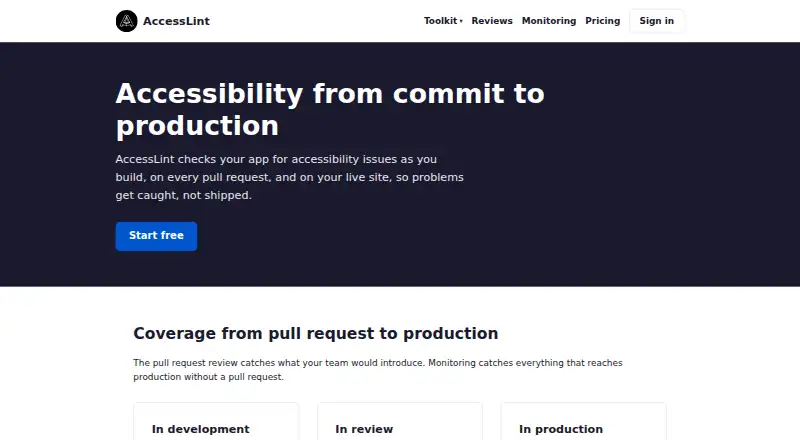
AccessLint checks accessibility during development, on pull requests, and on live sites. Its WCAG 2.2 engine has 95 rules and a stated 53ms median audit across 5,000 real-world sites. Pull-request reviews examine changed files and post inline comments naming the rule and suggesting a fix, but they do not fail builds or block merges. Deploy-triggered scans require Starter or Pro, run asynchronously, and likewise do not synchronously fail builds. Saved user journeys can run daily, with email alerts for new violations or changes from a baseline. The toolkit includes checks for Playwright, Vitest, and Storybook, while pull-request reviews use a GitHub App. Starter and Pro provide shareable, read-only evidence reports with before-and-after screenshots of affected elements. The Free plan costs nothing and includes public-repository reviews, one daily monitored flow, and violation trends. Starter costs $19 a month; Pro costs $349 a month. AccessLint cautions that automated checks do not make a site compliant. Routine passing-flow screenshots are deleted after seven days; screenshots from runs needing attention remain until the customer deletes them.
Who it suits
It suits teams that want accessibility checks during development, in pull requests, or on saved journeys on live sites. Teams needing private-repository reviews, deploy-triggered scans, or evidence reports will need a paid plan.
What it does well
- Free plan includes public-repository pull-request reviews.
- Daily monitoring for one flow on the Free plan.
- Inline comments identify rules and suggest fixes.
- Checks are available for Playwright, Vitest, and Storybook.
- Starter and Pro include shareable evidence reports.
What to know first
- Pull-request reviews do not fail builds or block merges.
- Deploy-triggered scans require Starter or Pro.
- Automated checks do not make a site compliant.
- Passing-flow screenshots are deleted after seven days.
Limits
The free plan includes public-repository pull request reviews and one monitored flow with daily runs. Starter includes one monitored flow, while Pro includes 20; deploy-triggered scans require Starter or Pro.
Plans
| Plan | Billed and limits | Price |
|---|---|---|
| Free | Public-repo pull-request reviews · 1 flow with daily runs · Violation trends | Free |
| Starter | or $190 a year (2 months free) · Private-repo pull-request reviews · Deploy-triggered scans · Shareable evidence report · 1 monitored flow with daily runs | $19 a month |
| Pro | or $3,490 a year (2 months free) · Everything in Starter · 20 monitored flows with daily runs | $349 a month |
As accesslint.com lists them, read 30 Sept 2026. The maker's own page has the final word.
Getting started
- Visit the AccessLint website.
- Choose the Free, Starter, or Pro plan.
- Connect pull request reviews through the GitHub App.
- Use the toolkit checks with Playwright, Vitest, or Storybook.
- Save user journeys for daily monitoring. The free plan includes one flow.
AccessLint is an accessibility-checking tool for development workflows and live websites. It is best suited to teams using GitHub pull requests that also want daily checks of important user journeys. Its main advantage is guidance across those stages; its main limitation is that findings do not stop a merge or build.
Overview
AccessLint applies a 95-rule, zero-dependency engine covering WCAG 2.2, with a reported median audit time of 53ms across 5,000 real-world sites. Browser-extension checks, pull-request reviews and production monitoring give teams several points at which to spot issues. That breadth can support a repeatable accessibility process, but automated findings are not a compliance determination: AccessLint says no automated tool can make a site compliant on its own.
Key features
Pull-request reviews examine changed files and post inline comments naming the rule and suggesting a fix. This puts actionable feedback near the code under review, but the reviews do not fail builds or block merges. Starter and Pro add deploy-triggered scans, which run asynchronously and likewise do not synchronously hold up a build. Teams that require a hard accessibility gate will need another control.
Saved user journeys are checked daily on live sites, with email alerts for new violations or changes from the baseline. Focusing alerts on changes can make recurring monitoring more useful than repeated notices about unchanged findings. The toolkit also provides checks for Playwright, Vitest and Storybook; pull-request reviews use a GitHub App.
Findings include before-and-after screenshots of affected elements. Starter and Pro provide shareable, read-only evidence reports, which can help teams communicate progress, though the reports should not be mistaken for proof of compliance. Screenshots from routine passing Flow runs are deleted after seven days; screenshots from runs needing attention remain until the customer deletes them.
AccessLint says it does not sell personal information or share it for advertising, and does not ask for or store site passwords. Its privacy policy says traffic uses TLS, sensitive data is encrypted at rest, and Stripe handles payment card numbers without sending them to AccessLint’s servers. Support is available by email when Help does not answer a question.
Pricing
The free plan costs nothing and includes public-repository pull-request reviews, one flow with daily runs and violation trends. It is a practical way to try the workflow, but it limits reviews to public repositories and monitoring to one flow; it does not include the shareable evidence report.
Starter costs $19 a month, billed, or $190 a year (2 months free). It adds private-repository reviews, deploy-triggered scans, a shareable evidence report and one monitored flow with daily runs. This is the clearest fit for a small team that needs private-repository feedback and evidence but can work within a single monitored journey.
Pro costs $349 a month, billed, or $3,490 a year (2 months free). It includes everything in Starter and raises the allowance to 20 monitored flows with daily runs. That increase is useful for teams tracking multiple journeys, but the steep jump from Starter makes it difficult to justify if one flow is enough. The free plan and paid plans are shown alongside a 14-day trial.
Platforms
AccessLint is available across API, browser extension, macOS and web. That range supports both developer workflows and direct browser-based checks, while its pull-request reviews specifically rely on GitHub.
Who it's for
AccessLint suits development teams that want inline guidance on changed code and daily monitoring of selected production journeys, especially when they can act on findings without making them automatic release blockers. It is less suitable for teams whose release process depends on a synchronous accessibility gate, or for anyone seeking an automated compliance certification.
Pros and cons
- Pros: Inline comments identify the rule and suggest a fix, placing feedback in the pull-request workflow.
- Pros: Daily journey monitoring and change-focused email alerts extend checks beyond development.
- Pros: Shareable evidence reports and before-and-after screenshots can help teams review and communicate findings.
- Cons: Pull-request reviews do not block merges, and deploy scans do not synchronously fail builds, so AccessLint cannot enforce a release gate.
- Cons: The free plan is limited to public repositories and one monitored flow; Starter also allows just one flow.
- Cons: Pro costs $349 a month, billed, a substantial step up for teams that need more than one flow.
Alternatives
WAVE is another freemium option with a free plan and API, extension, Linux, macOS, web and Windows platforms; its Subscription API starts at $10 a month for a 250-credit minimum purchase. Axe DevTools offers a free extension for testing one page at a time, making it an option for readers who want a limited, page-by-page starting point. Welcoming Web has a free plan with a core accessibility widget and basic features, plus a Pro plan from $19/m, for readers looking for that kind of widget rather than AccessLint’s pull-request workflow.
A11yInspect provides a free extension plan with unlimited webpage testing and bookmarklets, while Gamyata offers a free tier capped at five pages per month. AllyShield has a free web plan with three scans per month, one page per scan and one domain. Pope Tech has a free tier for 25 pages, two users, one website and one group. GitHub Accessibility Scanner is a free, MIT-licensed GitHub Action that requires GitHub Actions minutes, for readers seeking that alternative.
For broader comparisons, browse Accessibility Testing Software or Website Accessibility Tools.
Verdict
Choose AccessLint if your team wants GitHub pull-request feedback paired with daily monitoring and, on paid plans, shareable evidence reports. Its coverage across development and production is useful, but it is not a merge gate or a compliance guarantee. Teams that must block releases on accessibility findings should look elsewhere or add a separate enforcement mechanism.
Verdict
AccessLint combines pull-request feedback with daily monitoring and evidence reports on paid plans. Its checks can identify issues, but they do not block merges or establish compliance.
Questions
Is AccessLint free?
Yes. The Free plan costs 0.00 USD and includes public-repository pull request reviews, one flow with daily runs, and violation trends.
What do the paid plans cost?
Starter is $19 a month, or $190 a year. Pro is $349 a month, or $3,490 a year.
Which platforms does AccessLint support?
Its listed platforms are API, extension, macOS, and web.
Does AccessLint block merges when it finds an issue?
No. Pull request reviews post inline comments but do not fail builds or block merges. Deploy-triggered scans also do not synchronously fail builds.
Does AccessLint make a site compliant?
AccessLint says it can help demonstrate an accessibility process, but it does not make a site compliant; the maker says no automated tool can do so.
Who makes AccessLint?
The privacy policy identifies the maker as AccessLint, LLC, with an address in Albany, New York, United States.
Facts from AccessLint's own pages
- Automated scans
- Yes · accesslint.com, 22 Sept 2026
- Browser extension
- The a11y agent is a Chrome extension that audits pages in real time and gives AI-generated remediation suggestions in Chrome’s side panel. · accesslint.com, 30 Sept 2026
- CI/CD integration
- Yes · accesslint.com, 22 Sept 2026
- Compliance limitation
- AccessLint says it can help demonstrate an accessibility process but does not make a site compliant, and no automated tool can do so. · accesslint.com, 30 Sept 2026
- Core engine
- The zero-dependency WCAG engine has 95 rules and a 53ms median audit across 5,000 real-world sites. · accesslint.com, 30 Sept 2026
- Data retention
- Screenshots from routine passing Flow runs are deleted after seven days, while screenshots from runs needing attention remain until the customer deletes them. · accesslint.com, 30 Sept 2026
- Deploy triggers
- Deploy-triggered scans require Starter or Pro, run asynchronously, and do not synchronously fail builds when violations are found. · accesslint.com, 30 Sept 2026
- Free plan
- Yes · accesslint.com, 22 Sept 2026
- Integrations
- The toolkit provides accessibility checks for Playwright, Vitest, and Storybook, while pull-request reviews use a GitHub App. · accesslint.com, 30 Sept 2026
- Maker
- The privacy policy identifies the maker as AccessLint, LLC and lists its address in Albany, New York, United States. · accesslint.com, 30 Sept 2026
- Privacy
- AccessLint says it does not sell personal information or share it for advertising, and says it never asks for or stores site passwords. · accesslint.com, 30 Sept 2026
- Product
- AccessLint checks apps during development, on pull requests, and on live sites to catch accessibility issues. · accesslint.com, 30 Sept 2026
- Production monitoring
- Flows revisit saved user journeys daily and alert by email only about new violations or changes from the baseline. · accesslint.com, 30 Sept 2026
- Pull request reviews
- AccessLint reviews changed files and posts inline comments identifying the rule and suggested fix; it does not fail builds or block merges. · accesslint.com, 30 Sept 2026
- Remediation guidance
- Yes · accesslint.com, 22 Sept 2026
- Reports and evidence
- Starter and higher plans provide shareable read-only evidence reports, and findings include before-and-after screenshots of the affected element. · accesslint.com, 30 Sept 2026
- Security
- The privacy policy states that site traffic uses TLS, sensitive data is encrypted at rest, and payment card numbers are handled by Stripe and never reach AccessLint servers. · accesslint.com, 30 Sept 2026
- Paid from
- 19 · accesslint.com, 22 Sept 2026
- Support
- AccessLint directs users who cannot find an answer in Help to email [email protected]. · accesslint.com, 30 Sept 2026
- WCAG coverage
- wcag 2.2 · accesslint.com, 22 Sept 2026
Where AccessLint stands on Freedom251
- Accessibility Testing Software#5 of 169
- Website Accessibility Tools#6 of 133
- Web Accessibility Software#4 of 21