Freedom251 › Accessibility Testing Software
GitHub Accessibility Scanner
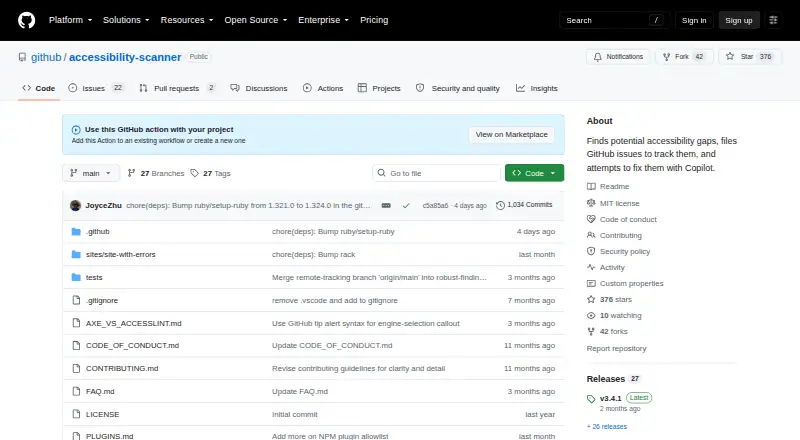
What GitHub Accessibility Scanner is
GitHub Accessibility Scanner is a free, MIT-licensed GitHub Action that scans websites, repositories, and dynamic content for accessibility barriers. It covers WCAG 2.2, uses Axe by default, and also supports AccessLint and plugins. The Action can create GitHub issues for findings, track them across runs to avoid duplicates, and close issues when a finding disappears. Copilot is optional: the scanner files issues without it, while Copilot can be assigned issues to suggest fixes and create pull requests. Configuration includes scan URLs, authentication, screenshots, issue grouping, experimental and best-practice findings, and selectors for individual URLs. It supports public and private repositories and GitHub Enterprise Cloud. Using it requires GitHub Actions and Issues to be enabled, available Actions minutes, and a fine-grained personal access token with write permissions. The project is in public preview, with ongoing feature development, and suggested fixes are not guaranteed to be fully accessible. It does not scan mobile apps, desktop applications, documents, email templates, or PDFs. Support requests and bug reports go through GitHub Issues.
Who it suits
It suits teams using GitHub Actions that want to track accessibility findings for websites, repositories, or dynamic content. Teams should be comfortable configuring repository permissions and reviewing suggested fixes, which are not guaranteed to be fully accessible.
What it does well
- Scans against WCAG 2.2.
- Tracks findings across runs and avoids duplicate issues.
- Works with public and private repositories.
- Copilot is optional.
What to know first
- Requires GitHub Actions minutes and write permissions.
- Public preview means features are still developing.
- Does not scan mobile apps, documents, or PDFs.
- Suggested fixes are not guaranteed to be fully accessible.
Limits
The free plan is a MIT-licensed GitHub Action and requires GitHub Actions minutes; Copilot is optional. The scanner does not cover mobile apps, desktop applications, documents, email templates, or PDFs, and suggested fixes are not guaranteed to be fully accessible while the project is in public preview.
Plans
| Plan | Billed and limits | Price |
|---|---|---|
| GitHub Accessibility Scanner | MIT-licensed GitHub Action · Requires GitHub Actions minutes · GitHub Copilot optional | Free |
As github.com lists them, read 7 Oct 2026. The maker's own page has the final word.
Getting started
- Open the GitHub Accessibility Scanner repository.
- Enable GitHub Actions and Issues in the repository.
- Make sure Actions minutes are available and create a fine-grained personal access token with write permissions.
- Configure scan URLs, authentication, and any desired screenshots, issue grouping, findings, or per-URL selectors.
- Run the GitHub Action; assign issues to Copilot if you want fix suggestions and pull requests.
Verdict
GitHub Accessibility Scanner connects website and repository scans to GitHub issue tracking, with optional Copilot suggestions. Its preview status, setup requirements, and excluded content types are important constraints.
Questions
How much does GitHub Accessibility Scanner cost?
The listed plan is free. It is an MIT-licensed GitHub Action and requires GitHub Actions minutes.
Does it have a free plan?
Yes. The plan is free and MIT-licensed.
What can it scan?
It scans websites, repositories, and dynamic content for accessibility barriers. It does not scan mobile apps, desktop applications, documents, email templates, or PDFs.
Which accessibility standard and engines does it support?
It covers WCAG 2.2. Axe is the default engine, and AccessLint and plugins are also supported.
Does it need Copilot?
No. It can file accessibility issues without Copilot. Copilot can optionally be assigned issues to suggest fixes and create pull requests.
What setup does it require?
GitHub Actions and Issues must be enabled, Actions minutes must be available, and the Action needs a fine-grained personal access token with write permissions.
Facts from GitHub Accessibility Scanner's own pages
- Automated scans
- Yes · github.com, 25 Sept 2026
- Browser extension
- No · github.com, 25 Sept 2026
- CI/CD integration
- Yes · github.com, 25 Sept 2026
- Copilot integration
- Copilot is optional; without it the scanner still files accessibility issues, while Copilot can be assigned issues to suggest fixes and create pull requests. · github.com, 7 Oct 2026
- Customization
- Users can configure scan URLs, authentication, screenshots, issue grouping, experimental and best-practice findings, and per-URL selectors. · github.com, 7 Oct 2026
- Detection
- Axe is the default scanning engine, and the scanner also supports AccessLint and plugins. · github.com, 7 Oct 2026
- Free plan
- Yes · github.com, 25 Sept 2026
- GitHub Enterprise
- The scanner supports GitHub Enterprise Cloud, while GitHub Enterprise Server compatibility may depend on server version and Actions availability. · github.com, 7 Oct 2026
- GitHub integration
- The Action requires GitHub Actions and Issues enabled, available Actions minutes, and a fine-grained personal access token with write permissions. · github.com, 7 Oct 2026
- Issue tracking
- The scanner tracks findings across runs to avoid duplicate issues and can close issues when a finding no longer appears. · github.com, 7 Oct 2026
- License
- The project is distributed under the MIT open source license. · github.com, 7 Oct 2026
- Limitations
- The scanner does not support scanning mobile apps, desktop applications, documents, email templates, or PDFs. · github.com, 7 Oct 2026
- Preview status
- The scanner is in public preview, feature development is ongoing, and its suggested fixes are not guaranteed to be fully accessible. · github.com, 7 Oct 2026
- Private repositories
- The Action works with public and private repositories. · github.com, 7 Oct 2026
- Purpose
- The GitHub Action scans websites, repositories, and dynamic content for accessibility barriers, creates GitHub issues, and can use Copilot to suggest fixes. · github.com, 7 Oct 2026
- Remediation guidance
- Yes · github.com, 25 Sept 2026
- Security reporting
- Security vulnerabilities in the GitHub-owned repository should be reported by email through coordinated disclosure, not in public issues, discussions, or pull requests. · github.com, 7 Oct 2026
- Support
- Support requests, usage questions, and bug reports are handled through GitHub Issues; GitHub Discussions are not enabled. · github.com, 7 Oct 2026
- WCAG coverage
- wcag 2.2 · github.com, 25 Sept 2026
Where GitHub Accessibility Scanner stands on Freedom251
- Accessibility Testing Software#16 of 169
- Website Accessibility Tools#13 of 133