Freedom251 › Accessibility Testing Software

pour
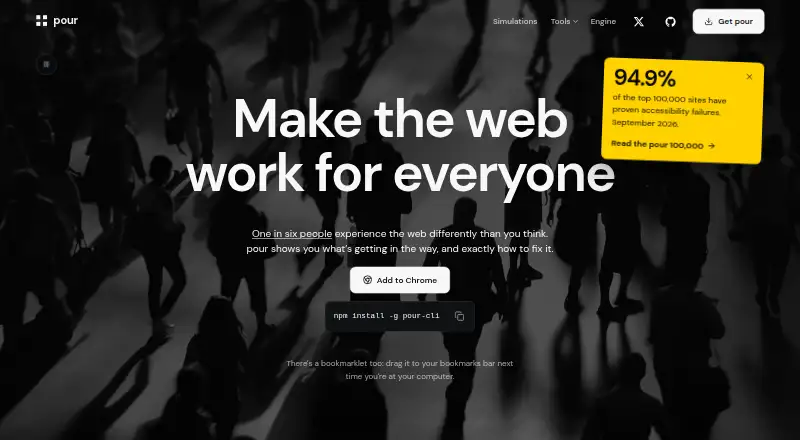
What pour is
pour is a free accessibility tool for scanning individual pages against WCAG 2.2. Its listed platforms are web and iOS, and its scan scope is page-level. The Free plan includes a browser extension, bookmarklet, command-line scanner, VS Code extension, and contrast checker, giving users several ways to access the tools across browser, command-line, and code-editor workflows.
pour also lists CI/CD integration, which can connect accessibility scanning with a development workflow. The Free plan costs nothing, requires no account, and has no subscription. No paid tiers are listed. The page-level scan scope describes individual-page checking; the listed facts do not describe a broader scan scope. Readers can choose among the extension, bookmarklet, command-line scanner, and VS Code extension according to their working setup, or use the web and iOS platforms. With page scanning, contrast checking, WCAG 2.2, and CI/CD integration in the free offering, pour is suited to people looking for an accessibility checker with multiple access formats and no signup requirement.
Who it suits
pour suits individuals and development teams who want to check individual pages against WCAG 2.2. Its browser, command-line, and VS Code options, along with CI/CD integration, fit workflows that use those tools.
What it does well
- Free plan requires no account.
- No subscription is required.
- Includes a browser extension and bookmarklet.
- Offers a command-line scanner and VS Code extension.
- Includes a contrast checker.
- Lists CI/CD integration and WCAG 2.2.
What to know first
- Scan scope is limited to pages.
- No paid tiers are listed.
- Listed platforms are web and iOS.
Limits
The Free plan's scan scope is page-level. No paid tiers are listed.
Plans
| Plan | Billed and limits | Price |
|---|---|---|
| Free | All tools · no accounts · no subscriptions · no paid tiers | Free |
As pour.dev lists them, read 11 Oct 2026. The maker's own page has the final word.
Getting started
- Visit the pour website.
- Choose the web or iOS platform.
- Use the Free plan, which requires no account or subscription.
- Access the tools through the browser extension, bookmarklet, command-line scanner, or VS Code extension.
Verdict
Choose pour if page-level WCAG 2.2 checking, a contrast checker, and multiple access formats suit your workflow. Look elsewhere if you need a scan scope beyond individual pages or a platform outside web and iOS.
Questions
How much does pour cost?
The Free plan costs nothing and has no subscription.
Do I need an account?
No. The Free plan requires no account.
What does the Free plan include?
It includes a browser extension, bookmarklet, command-line scanner, VS Code extension, and contrast checker.
Which platforms are listed?
The listed platforms are web and iOS.
What accessibility standard does pour reference?
pour lists WCAG 2.2 and page-level scan scope.
Does pour integrate with CI/CD?
Yes. CI/CD integration is listed.
Facts from pour's own pages
- AI integration
- The CLI supports the Model Context Protocol and can provide an AI agent with an audit, keyboard focus order, and screenshot. · pour.dev, 11 Oct 2026
- Browser audits
- The browser extension audits the current page, groups findings by severity, and provides affected markup and repair guidance. · pour.dev, 11 Oct 2026
- Browser extension
- Yes · pour.dev, 21 Sept 2026
- CI/CD integration
- Yes · pour.dev, 21 Sept 2026
- Command line
- The CLI runs audits in headless Chrome, can act as a CI gate, take simulation screenshots, and crawl sites to create standalone HTML reports. · pour.dev, 11 Oct 2026
- Coverage limit
- The engine assists with 51 of WCAG 2.2's 86 success criteria, and the audit includes a manual-review checklist because automated tools cannot fully test WCAG criteria. · pour.dev, 11 Oct 2026
- Editor support
- The VS Code extension checks HTML, React, Vue, Svelte, Angular, Liquid, and Nunjucks source files as you type. · pour.dev, 11 Oct 2026
- Engine package
- The pour accessibility engine can be installed directly in projects with npm install pour-engine. · pour.dev, 11 Oct 2026
- Free plan
- Yes · pour.dev, 21 Sept 2026
- Integrations
- The browser extension works with Chrome, Edge, and Firefox, and audit results can be exported as Markdown, CSV, or JSON. · pour.dev, 11 Oct 2026
- iOS support
- On iPhone and iPad, the Safari share sheet can run the pour bookmarklet as a shortcut. · pour.dev, 11 Oct 2026
- Privacy
- Pour's tools run locally and transmit no audit results, analytics, telemetry, account data, or crash reports. · pour.dev, 11 Oct 2026
- Purpose
- Pour provides tools to find website accessibility issues and explain how to fix them. · pour.dev, 11 Oct 2026
- Quest app
- The Meta Quest app supports Quest 3 and 3S, runs simulations over the headset view, and uses no network or microphone permission. · pour.dev, 11 Oct 2026
- Scan scope
- page · pour.dev, 21 Sept 2026
- Simulations
- Pour includes more than 55 accessibility simulations and lenses, including vision effects, keyboard tab order, and page structure. · pour.dev, 11 Oct 2026
- Support
- Security vulnerability reports can be emailed to [email protected], with replies aimed for within five working days; the page says there is no bounty programme. · pour.dev, 11 Oct 2026
- Trust and verification
- The engine source is public on GitHub, and the security page says extension releases are published on GitHub for inspection. · pour.dev, 11 Oct 2026
- WCAG version
- wcag 2.2 · pour.dev, 21 Sept 2026
Where pour stands on Freedom251
- Accessibility Testing Software#12 of 169
- Website Accessibility Tools#22 of 133