What’s actually slowing this PC down?
Pick the symptom - the matching free tool is one click away.
Some links on this page are affiliate links: if you buy through them we may earn a commission, at no extra cost to you.
The headline is simple: YouTube Music has reached 5 billion downloads on the Google Play Store. That’s not just a bragging right—it’s a strong signal that millions of listeners are choosing it as their daily music app, and the product is now mature enough to compete feature-for-feature.
If you’re already using YouTube Music, the milestone is a good reminder to tighten your setup. If you’re new, the fastest path is getting your library, playback preferences, and offline listening working before you explore deeper features like recommendations and playlist building.
As an Amazon Associate I earn from qualifying purchases.
This guide focuses on practical setup and troubleshooting, so you can make YouTube Music feel reliable from day one.
What it means that YouTube Music hit 5 billion Play Store downloads
Reaching 5 billion Play Store downloads generally reflects three things: long-term availability, consistent feature updates, and an ecosystem that keeps improving across Android devices and beyond. It also means YouTube Music has a large user base, which usually translates to faster bug reporting, better compatibility, and more polished playback experiences over time.
Popular on Amazon
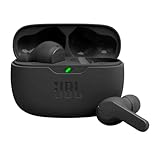
- JBL Deep Bass Sound: Get the most from your mixes with high-quality audio from secure, reliable earbuds with 8mm drivers featuring JBL Deep Bass Sound.
- Comfortable fit: The ergonomic, stick-closed design of the JBL Vibe Beam fits so comfortably you may forget you're wearing them. The closed design excludes external sounds, enhancing the bass performance.
- Up to 32 (8h + 24h) total hours of battery life with speed charging: With 8 hours of battery life in the earbuds and 24 in the case, the JBL Vibe Beam provide all-day audio. And when you need more power, you can speed charge an extra two hours in just 10 minutes.
- Stay aware of your surrounding: Go anywhere and hear everything with Smart Ambient technology. When you need to pause for a quick chat, TalkThru lets you instantly hear yourself and those around you without taking out your earbuds. Or use Ambient Aware to keep the music playing while remaining aware of your surroundings.
- Hands-free calls with VoiceAware: When you're making hands-free stereo calls on the go, VoiceAware lets you balance how much of your own voice you hear while talking with others.
For listeners, the practical outcome is straightforward: there’s a good chance the app you install today will behave predictably, with support for offline listening, playlist workflows, and cross-device playback that’s become standard across modern music services.
Prerequisites: accounts, devices, and app versions
YouTube Music runs on Android, iPhone, iPad, and the web. You’ll get the best results when you sign in with the same Google account across devices and keep the app updated.
Do these 3 things before closing this tab:
1Repair Windows errors before they cause bigger problems2Scan for outdated or missing drivers - takes under a minute3Clear out junk files and repair common Windows errors- Account: Google account for YouTube Music login.
- Android: Update via Google Play Store; then confirm you’re on the latest YouTube Music version.
- iOS/iPadOS: Update via App Store; confirm the YouTube Music app version matches the latest release.
- Web: Use a current browser; Chrome is the most predictable on many setups.
If you’re switching from another service, also make sure you’re ready to rebuild playlists and preferences—recommendations improve when the app can learn your taste quickly.
Getting started: sign in and set up your music
Most people install YouTube Music, search for a song once, and stop there. That’s fine, but it also means you miss out on features that only work well after initial setup.
- Open YouTube Music on your device.
- Sign in with your Google account when prompted.
- Choose artists or genres when the app offers a taste setup flow.
- Follow a few artists you genuinely listen to (not just “one-off” curiosity).
- Save 5–10 tracks to your library so your recommendations have data to work from.
If the app suggests playlists immediately, start playing them—even if you don’t love every track. Interaction time matters more than perfection.
Core features you should use immediately
Recommendations that actually stick
YouTube Music recommendations generally improve with consistent listening. Use the Liked songs and playlist follow features so the app learns what you repeat.
A good habit: if you skip a track, swipe past it quickly. If you let it finish, that’s a stronger signal.
Playlists and queue control
Playlists are the backbone of how most people use YouTube Music. Build one “daily driver” playlist and update it weekly.
When you’re playing, use the queue/next controls so you’re not stuck restarting playback every time your mood changes.
Search by mood, lyrics, and artists
Search is fast, and it tends to surface official releases, remixes, and live versions. Be specific: include an artist and year when you’re looking for a particular album era.
If lyrics or mood-based discovery works for you, save those results into a playlist—otherwise you’ll have to hunt again later.
Offline listening and data control
Offline is where YouTube Music becomes genuinely “daily useful,” especially on commutes or in areas with inconsistent reception.
Before you download anything, check your mobile data and storage settings so the app doesn’t fail silently due to storage limits or background data restrictions.
Also popular on Amazon

- WORLD’S BEST IN-EAR ACTIVE NOISE CANCELLATION — Removes up to 2x more unwanted noise than AirPods Pro 2* so you can stay fully immersed in the moment.*
- BREAKTHROUGH AUDIO PERFORMANCE — Experience breathtaking, three-dimensional audio with AirPods Pro 3. A new acoustic architecture delivers transformed bass, detailed clarity so you can hear every instrument, and stunningly vivid vocals.
- HEART RATE SENSING — Built-in heart rate sensing lets you track your heart rate and calories burned for up to 50 different workout types.* With iPhone, you will have access to the Move ring, step count, and the new Workout Buddy,* powered by Apple Intelligence.*
- LIVE TRANSLATION — Communicate across language barriers using Live Translation,* enabled by Apple Intelligence.*
- EXTENDED BATTERY LIFE — Get up to 8 hours of listening time with Active Noise Cancellation on a single charge. Or up to 10 hours in Transparency using the Hearing Aid feature.*
How to download music for offline listening
Offline availability depends on track licensing and your subscription status, but the workflow is similar across mobile devices.
Outdated Drivers Are Slowing You Down
One free scan finds every outdated or missing driver and matches the right update for your exact hardware.Free scan · exact hardware matchPC Slower Than It Used to Be?
A free scan shows the junk files, broken settings and background clutter dragging Windows down - then fixes them in one click.Free scan · Windows 10 & 11- Open the YouTube Music app.
- Find an album, playlist, or song.
- Look for the Download icon (often a downward arrow).
- Select Quality if the app prompts you.
- Wait for the download to finish, then confirm it shows in your Downloads area.
If downloads don’t start, verify storage space and allow background data/battery access for YouTube Music in your device settings.
Subscription options (and what you get with each)
Exact plan names and features can vary by region, promotions, and app updates. The practical approach is to match what you do most often: ad-free listening, offline downloads, and background playback.
Free tier
Free listening usually works on the app, but you may see ads and may have more limits on offline and background playback depending on your region and device behavior.
If you only listen occasionally, the free tier can be enough while you test the service.
Premium
Premium typically adds the features people care about most: ad-free listening, offline downloads, and background playback. Many users upgrade for commutes and long listening sessions.
When you upgrade, immediately test offline playback (download a playlist, toggle airplane mode, and confirm you can still play).
Premium plans that matter: Family and others
If multiple people in a household listen to music, a family plan can lower the per-user cost. The key is to confirm eligibility and setup steps so everyone can sign in properly.
Before committing, compare what you’ll use weekly: offline listening, background playback, and ad-free listening usually drive the value.
Set up playback preferences (quality, notifications, and automations)
Most “it sounds bad” or “it drains my battery” complaints come from default settings and background behavior rather than the app itself.
Playback quality and streaming behavior
- Open YouTube Music.
- Go to Settings.
- Find Stream quality or Download quality.
- Set a balanced option for your network.
If you’re on limited data, choose a lower streaming quality and keep downloads for Wi‑Fi.
Notifications you can control
Notifications are useful for new releases and personalized updates, but too many alerts can turn into noise. Review notification permissions at both the app level and the system level.
- In Android/iOS settings, ensure YouTube Music notifications are enabled only for what you actually want.
- If you use focus modes or Do Not Disturb, verify whether media notifications still come through.
Platform-specific setup and troubleshooting
Some issues are device-specific. These steps cover the most common friction points so you don’t waste time guessing.
Free tools Windows power users keep installed
One-click scans. No signup required.
Also popular on Amazon
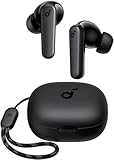
- Powerful Bass: soundcore P20i true wireless earbuds have oversized 10mm drivers that deliver powerful sound with boosted bass so you can lose yourself in your favorite songs.
- Personalized Listening Experience: Use the soundcore app to customize the controls and choose from 22 EQ presets. With "Find My Earbuds", a lost earbud can emit noise to help you locate it.
- Long Playtime, Fast Charging: Get 10 hours of battery life on a single charge with a case that extends it to 30 hours. If P20i true wireless earbuds are low on power, a quick 10-minute charge will give you 2 hours of playtime.
- Portable On-the-Go Design: soundcore P20i true wireless earbuds and the charging case are compact and lightweight with a lanyard attached. It's small enough to slip in your pocket, or clip on your bag or keys–so you never worry about space.
- AI-Enhanced Clear Calls: 2 built-in mics and an AI algorithm work together to pick up your voice so that you never have to shout over the phone.
Android (Google Play Music Library behavior, downloads, and battery settings)
Android battery optimization can interrupt background playback and downloads.
- Open Settings → Apps → YouTube Music.
- Tap Battery (or Battery usage).
- Select Unrestricted (wording may vary).
- Under Mobile data, enable data access if you need streaming outside Wi‑Fi.
- Back in YouTube Music, re-check Downloads and retry.
If your phone has aggressive “data saver” modes, temporarily disable them to test.
iPhone and iPad (iOS playback, background behavior, and downloads)
On iOS, background playback and download behavior can be impacted by background app restrictions and storage limits.
- Open Settings → General → Background App Refresh.
- Enable Background App Refresh.
- Find YouTube Music and turn it on if you see per-app controls.
- Open Settings → Cellular → YouTube Music.
- Enable Cellular Data if needed.
For offline issues, check that you have free storage. Downloads can fail when iOS is near full.
Quick wins for a faster PC:
Fix the driver behind crashes, sound loss and screen glitchesFind Drivers →Repair Windows errors before they cause bigger problemsFix Now →Web (music.youtube.com in a browser)
Web playback is usually reliable, but autoplay and cookies can affect behavior.
- Go to music.youtube.com.
- Sign in with the correct Google account.
- Allow cookies for youtube.com if playback doesn’t start.
- Disable aggressive ad blockers temporarily to test.
- Try a hard refresh (Ctrl+F5 on Windows, Cmd+Shift+R on macOS).
If the queue doesn’t update, refresh the page and verify you’re not in a signed-out state.
Smart TVs and streaming devices
Smart TV playback depends on app version and network stability more than account settings.
- Update the YouTube Music app from your TV store or update channel.
- Connect via Ethernet if Wi‑Fi is unstable.
- Restart the device and router (one at a time).
- Re-sign in if the app shows stale session errors.
- Test with a short playlist to isolate the issue.
If you use Bluetooth audio, test again using TV speakers or a wired connection to narrow down the culprit.
Recommended Free Tools
Common problems and what to try first
Downloads fail or won’t start
- Check free storage (Android/iOS can block downloads near full capacity).
- Switch networks (Wi‑Fi → cellular, or vice versa) to rule out router issues.
- Disable VPN and retry.
- Reboot the app and reattempt the download from the playlist/album page.
If a single playlist fails, download individual tracks to find whether licensing or a specific track is causing the error.
Albums won’t play correctly or track order is wrong
Sometimes what looks like a “broken album” is actually a mix of versions (remasters, live cuts, or deluxe editions).
- Verify the album title and release year.
- Try playing from the track list rather than the cover.
- Create a new queue by selecting songs manually.
- Clear cache (Android) or reinstall the app (iOS) if it keeps recurring.
Recommendations feel repetitive
This is normal early on. Your fix is to add variety and remove stale signals.
- Save a handful of tracks outside your usual lane.
- Like or dislike consistently during a listening session.
- Follow new artists you want to hear more of.
Also, don’t let the app learn from accidental plays. If you tested a song for 10 seconds and then bounced, it may still influence your feed.
The Tool Desk
Outbyte Driver Updater FREEFix the driver behind crashes, sound loss and screen glitchesFind Drivers →Outbyte PC Repair FREERepair Windows errors before they cause bigger problemsFix Now →Playback skips, buffers, or sounds distorted
Skip/buffer issues often come from network quality, audio settings, or background restrictions.
Also popular on Amazon

- REBUILT FOR COMFORT — AirPods 4 have been redesigned for exceptional all-day comfort and greater stability. With a refined contour, shorter stem, and quick-press controls for music or calls.
- ACTIVE NOISE CANCELLATION — AirPods 4 with Active Noise Cancellation help reduce outside noise before it reaches your ears, so you can immerse yourself in what you’re listening to.*
- HEAR THE WORLD AROUND YOU — The powerful H2 chip comes to AirPods 4. Adaptive Audio seamlessly blends ANC and Transparency mode — which lets you comfortably hear and interact with the world around you exactly as it sounds — to provide the best listening experience in any environment.* And when you’re speaking with someone nearby, Conversation Awareness automatically lowers the volume of what’s playing.*
- IMPROVED SOUND AND CALL QUALITY — Voice Isolation improves the quality of calls in loud conditions. Using advanced computational audio, it reduces background noise while isolating and clarifying the sound of your voice for whomever you’re speaking to.*
- MAGICAL EXPERIENCE — Just say “Siri” or “Hey Siri” to play a song, make a call, or check your schedule.* And with Siri Interactions, now you can respond to Siri by simply nodding your head yes or shaking your head no.* Pair AirPods 4 by simply placing them near your device and tapping Connect on your screen.* Easily share a song or show between two sets of AirPods.* An optical in-ear sensor knows to play audio only when you’re wearing AirPods and pauses when you take them off. And you can track down your AirPods and Charging Case with the Find My app.*
- Check signal strength and switch networks.
- Reduce streaming quality in Settings.
- Disable battery saver or data saver temporarily for testing.
- If using Bluetooth, unpair/re-pair as a last resort.
Car audio and Bluetooth issues
Car setups vary wildly. The quickest path is to test with a downloaded playlist first—if it plays smoothly offline, the issue is likely network or streaming behavior.
- Test offline playback in the car (download a playlist on Wi‑Fi first).
- If it works offline, reduce streaming quality and disable VPN.
- If it fails offline, update the phone OS and the app.
- Try a different Bluetooth audio profile or restart the head unit.
Alternatives if you’re considering switching
The 5 billion downloads milestone suggests YouTube Music is worth a serious look. Still, the best service is the one that fits your routine: discovery style, playlist behavior, and offline reliability.
Spotify
Spotify tends to be strong at discovery and playlist ecosystems. If you live inside curated playlists, it may feel more “set and forget.”
Recommended Free Tools
Switch if your biggest pain with YouTube Music is recommendation diversity or playlist structure.
Apple Music
Apple Music can be compelling if you’re deep in Apple hardware—iPhone, iPad, AirPods, and macOS integration often feels frictionless.
Switch if you want tight device-to-device continuity without extra configuration.
Amazon Music
Amazon Music works well if you’re already invested in Amazon services and smart devices.
PC Slower Than It Used to Be?
A free scan shows the junk files, broken settings and background clutter dragging Windows down - then fixes them in one click.Free scan · Windows 10 & 11Outdated Drivers Are Slowing You Down
One free scan finds every outdated or missing driver and matches the right update for your exact hardware.Free scan · exact hardware matchSwitch if your home setup favors Amazon’s ecosystem and you value voice and household integration.
FAQ: YouTube Music, downloads, and the 5 billion milestone
Is YouTube Music free?
Yes, YouTube Music offers a free tier in many regions. Availability of features like offline downloads and background playback can vary by plan and device behavior.
Do I need Premium to download music for offline listening?
Often, offline downloading is tied to Premium. If you try to download a playlist and can’t, check whether the app is restricting the feature for your account tier.
Why does YouTube Music keep asking me to sign in?
Session prompts usually happen after updates, cookie/cache issues on web, or account switching. Re-sign in and verify you’re not blocked by browser privacy settings.
The Tool Desk
Outbyte Driver Updater FREEFix the driver behind crashes, sound loss and screen glitchesFind Drivers →Outbyte PC Repair FREEClear out junk files and repair common Windows errorsFree Scan →What does 5 billion Play Store downloads mean for users?
It generally indicates broad adoption and a mature install base. In practice, it means fewer “unknown” edge cases, better compatibility across devices, and continuous improvements based on millions of real users.
How do I stop recommendations from showing tracks I don’t want?
Like tracks you want and avoid repeated accidental plays. If your feed is stubborn, add new artists and playlists that match your current taste so the algorithm has fresh signals.
Bottom Line
YouTube Music hitting 5 billion downloads on the Play Store is a strong indicator that it’s a mainstream choice, not a niche alternative. For most listeners, the real win is getting your library set up, turning on offline downloads, and tuning playback settings so it behaves the way you expect.
If something breaks—downloads, buffering, or weird playback—use the platform-specific checks above first. That approach solves the majority of issues fast, without guesswork.
Do these 3 things before closing this tab:
1Repair Windows errors before they cause bigger problems2Scan for outdated or missing drivers - takes under a minute3Clear out junk files and repair common Windows errors
