Some links on this page are affiliate links: if you buy through them we may earn a commission, at no extra cost to you.
Yes—you can charge an iPhone 12 with a range of chargers, but not all options deliver the speed or reliability you want. The “right” choice depends on whether you’re using a wired Lightning cable, MagSafe, or a Qi wireless pad.
This guide focuses on practical compatibility: the wattage limits Apple expects, the charger standards that matter (like USB-C Power Delivery), and what to do when charging is slow or refuses to start.
As an Amazon Associate I earn from qualifying purchases.
Charging basics for iPhone 12 (what it supports)
iPhone 12 uses a Lightning port for wired charging. For wireless charging, it supports both MagSafe and standard Qi charging.
| Method | Typical max charging power | What you need |
|---|---|---|
| Wired fast charge | Up to 20W | Lightning cable + USB-C Power Delivery (PD) power adapter |
| MagSafe | Up to 15W | MagSafe charger (or MagSafe-compatible charger) + alignment |
| Qi wireless | Up to 7.5W | Qi-certified wireless charger pad or stand |
When you choose the right charger type, iPhone 12 can pull power safely and consistently. When you don’t, you may still charge, but speed can drop or charging may pause.
Popular on Amazon

- [Quick charge & Sync]: When the 3ft usb c to lightning cable is paired with a 20W or higher USB-C Wall Charger that can achieve to charge your iPhone from 0 to 50% battery in just 30 minutes. It also supports data transfer speeds of up to 480Mbps to easily transfer music, photos and files between iPhone and Macbook in seconds.
- [Power Delivery Fast Charge]: USB C to Lightning cable supports PD Fast Charge 3A (max) for iPhone 14 Pro Max, 14 Pro, 14, 13 Pro Max, 13 Pro, 13, 12 Pro Max, 12 Pro, 12, 11 Pro Max, 11 Pro, 11, XS, Xs Max, XR, X, 8 Plus, 8 and iPad AirPods Pro,8th/2020,Pro 12.9" gen1/gen2,Pro 10.5",Air3 10.5", mini5 7.9",,iPod Touch 5th gen, iPod nano 7th gen,and other later models when using your USB-C PD charger (Note:You need to use 20W or above USB-C power adapter to achieve power delivery fast charge).
- [Mfi Certified]: The Lightning Cable has completed MFi certification requirements and strict quality testing ensure your Apple devices are charged safely, at their fastest possible speed (the newest C94 lightning end design).
- [Super Durability and Flexibility] : iPhone charger Designed and built with premium materials, comes with high quality TPE surface, Lasts 10× longer than other cables and proven to withstand over 20,000 bends in strict laboratory tests. It also can be apple carplay cable when use it in car.
- [What You Get] : 2Pack 3FT newly USB C to Lightning Cables (White). A Cable for Life, lifetime warranty and 24*7 friendly customer support service ensures that you have a pleasant shopping experience.
Best wired options: what to use to charge iPhone 12 fast
For the fastest wired charging, use a charger that supports USB-C Power Delivery. The exact brick matters less than the standard and wattage.
USB-C Power Delivery (recommended)
To hit the “fast” ceiling, pair your iPhone 12 with a USB-C PD adapter that can deliver at least 20W power. Many modern chargers are 20W, 30W, 45W, or higher—iPhone 12 will still negotiate the appropriate draw.
Recommended Free Tools
Look for these spec keywords on the adapter packaging:
- USB Power Delivery or USB-C PD
- 20W (minimum) and/or a PD profile such as 9V
- Compatible USB-C output ports (even if the adapter is rated higher wattage)
Example reliable setup:
- Adapter: Apple 20W USB-C Power Adapter (or any equivalent USB-C PD 20W+)
- Cable: Lightning to USB-C
- Phone: iPhone 12 Lightning port
USB-A chargers (older bricks) and what to expect
If your charger only has USB-A (the traditional rectangular port), it can still charge iPhone 12, but it usually won’t reach 20W. Many USB-A chargers top out around 5W or “fast-ish” speeds depending on the charger’s proprietary modes.
If you go this route:
- Expect slower charging than USB-C PD.
- Use a known-good USB-A adapter from a reputable brand.
- Avoid bargain chargers with missing specs or questionable certification.
Car chargers and power banks
For vehicles and travel, you’ll want either USB-C PD car chargers or USB-C PD power banks. iPhone 12 benefits most from PD because power negotiation is predictable.
Also popular on Amazon
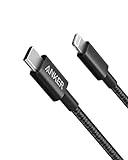
- The Anker Advantage: Join the 55 million+ powered by our leading technology.
- Built to Last: A hard-wearing nylon exterior and a bulletproof fiber core combine to create a cable that can withstand up to 12,000 bends.
- High-Speed Compatible: Pair up with an 18W or higher Power Delivery charger to power your iPhone up to 58% in just 30 minutes. (Charger not included)
- Certified Compatible: MFi Certified for flawless compatibility with virtually all Lightning devices, including iPhone 13, 13 Pro, 12, 12 Pro, 12 Pro Max, 12 mini, 11, iPhone 11 Pro, and iPhone 11 Pro Max
- What You Get: New Nylon USB-C to Lightning Cable (6 ft), welcome guide, our everlasting warranty, and friendly customer service.
- Car charger: USB-C PD car adapter (aim for 20W+). If it offers multiple outputs, ensure the port you use is the PD one.
- Power bank: choose one with USB-C PD output and 20W+ rating.
Power banks can be picky: if the battery is low, some won’t output until a threshold is reached. If your iPhone 12 doesn’t charge right away, plug the power bank in first or try a different cable.
What’s actually slowing this PC down?
Pick the symptom - the matching free tool is one click away.
Wireless options: MagSafe vs Qi
Wireless charging is convenient, and iPhone 12 supports both Apple’s MagSafe approach and standard Qi pads. The speed difference is real: MagSafe can be faster than generic Qi.
MagSafe (up to 15W)
MagSafe chargers use magnets to align, which helps iPhone 12 maintain a stable connection and higher power transfer.
- Max speed: up to 15W with a compatible MagSafe charger
- What to use: any MagSafe charger accessory designed for iPhone 12 (or Apple-compatible MagSafe accessories)
- Alignment matters: if it’s slightly off, charging may slow or pause
Qi wireless (up to 7.5W)
Qi chargers are common charging pads and stands. iPhone 12 can charge on them, but the typical maximum is lower than MagSafe.
- Max speed: up to 7.5W on Qi chargers
- What to use: Qi-certified wireless charger pad/stand
- Phone placement: you still need good contact with the coil area
What affects wireless speed
Wireless charging speed depends on more than the charger’s rating. Even with a correct device, speed can drop due to:
Do these 3 things before closing this tab:
1Repair Windows errors before they cause bigger problems2Fix the driver behind crashes, sound loss and screen glitches3Clear out junk files and repair common Windows errorsAlso popular on Amazon

- 【Apple MFi Certified】: MenoSupp Apple MFi Certified USB to lightning cable.guaranteed no pop-up warning messages, These iphone fast charger cables use the newest C94 lightning end design for fast charging, which can safely and quickly charge your iPhone device.
- 【Quick Charge & Data Sync】The iphone charging cable adopts the latest MFI C94 lightning end, which is specially designed for fast power supply, which can charge your phone fast. Its charging speed is faster ordinary lightning cables. It also supports data transfer speeds of up to 480Mbps to easily transfer music, photos and files between iPhone and Macbook in seconds
- 【Nylon Braided】: The USB C to Lightning cable is braided with nylon material for extra protection and durability. Braided nylon insulation and precision layered welded connectors make the cable more durable, stronger, and tangle-free than regular iPhone charger cables. Rigorously tested over 10,000 bends to withstand daily connection demands and long-term use
- 【Wide Compatibility & Support CarPlay】: USB C to iPhone cable supports PD fast charge, for iPhone14/14 Pro/14 Pro Max/14 Plus/iPhone 13/13 Pro/13 Pro Max/13 Mini/12/12 Pro/12 Pro Max/12 Mini/11/11 Pro/11 Pro Max/XS/ Max/XS/XR/X/8 Plus/8 and iPhone 7 Plus/7/6 Plus/6/6S Plus/6S etc. Note: You will need a USB-C port wall charger for fast charging.
- 【HIGH QUALITY, HIGH SERVICE】: MenoSupp USB C to Lightning Cable 6 feet long, convenient to charge your device in bedroom, sofa, office, travel, even if you are in the back seat of the car. If you have any questions, please feel free to contact us. Our service team will provide you with a satisfactory solution within 24 hours.
- Case thickness/material (especially thick or highly conductive materials)
- Heat (warm batteries/rooms trigger slower charging)
- Misalignment on pads/stands (more common with Qi than MagSafe)
- Low input power to the charger base (a weak adapter feeding the pad can limit performance)
MagSafe accessories and cases: compatibility checks
Most MagSafe and Qi chargers will work with iPhone 12, but cases can be the deciding factor for MagSafe performance.
Cases, magnets, and alignment
For MagSafe, a good case should allow the magnets to “grab” properly. If the case interferes, you may still charge, but you’ll see slower behavior or intermittent charging.
- Prefer MagSafe-compatible cases designed to work with iPhone 12.
- Ensure the charger magnetically attaches without excessive wobble.
Edge cases that slow charging
- Metal objects in/near the case can interfere with magnetic alignment and heat control.
- Cards in some wallets/cases can create uneven placement and reduce contact.
- Third-party chargers without published specs may under-deliver even if they claim “MagSafe 15W.”
Recommended charger specs and safe wattage ranges
To avoid guesswork, treat the charger recommendation as a spec check rather than a brand-only decision.
| Charging need | Minimum spec | Typical example |
|---|---|---|
| Fast wired charging | USB-C PD adapter rated 20W (or higher) | 20W USB-C Power Adapter + Lightning to USB-C cable |
| Wired charging (slower is fine) | Any certified USB power adapter + quality Lightning cable | USB-A 5W/10W adapter |
| Fast wireless (MagSafe) | MagSafe-compatible charger accessory | MagSafe charger with magnetic alignment |
| Wireless charging (slower is fine) | Qi-certified pad/stand | Qi wireless charging base |
Higher-wattage adapters are usually fine as long as they’re certified and the output is USB-C PD. iPhone 12 negotiates power, so you’re not “forced” to use the full rating.
Free tools Windows power users keep installed
One-click scans. No signup required.
How to charge iPhone 12 step by step
These steps are the ones most people need to solve real-world charging problems quickly.
Also popular on Amazon

- 【Power Delivery Fast Charging & SYNC】: USB-C to lightning cable supports high-speed power delivery fast Charging, can charge the iPhone 13 up to 50% in 30mins. They also support data transfer rate up to 480Mbps,which can easily transfer music, photos and files between iPhone and laptop or desktop computer in seconds.(Note:You need to use 20W or above USB-C Power Adapter to achieve Power Delivery Fast Charging.)
- 【MFi Certified Lightning Cable 2Pack】 MFi certified iPhone fast charging cable uses the newest C94 Lightning connector, which support quick charger for lightning device, C94 USB C to Lightning cord more stable, safe, faster than nomal iphone cable
- 【 Compatibility】: USB-C to iPhone cable supports PD Fast Charge 3A (max) for iPhone 14/14 Pro/14 Pro Max/14 Plus/ iPhone 13/13 Pro/13 Pro Max/13mini/iPhone 12/12 Mini/12 Pro/12 Pro Max/11/11 Pro/11 Pro Max/XS Max/XS/XR/X/8 Plus/8 and iPad 8th iPad 2020, iPad Pro 12.9" gen1/ gen2/iPad Pro 10.5"/iPad Air3 10.5"/iPad mini5 7.9"; Note: You need a USB-C port wall charger to achieve fast charging. Note: You need a USB-C port wall charger to achieve fast charging.
- [Super Durability and Flexibility]:The iphone charging cables are made of top-rated material and coated with premium TPE, which last 4X longer than other iphone charger cord and proven to withstand over 25,000 bends in strict laboratory tests.
- [What You Can Get]: 2Pack 3ft New USB-C to Lightning Cables (White),lifetime replacement, and 24*7 friendly customer support service ensures that you have a pleasant shopping experience.
Wired fast charging steps
- Connect a Lightning to USB-C cable to the iPhone 12 Lightning port.
- Plug the other end of the cable into a USB-C PD wall adapter rated 20W or higher.
- Place the adapter on a stable surface and verify the connection is fully seated.
- Lock the phone screen if you’re troubleshooting; background activity and heat can slow charging.
MagSafe charging steps
- Use a MagSafe charger (or MagSafe-compatible accessory).
- Place it on a flat surface.
- Hold the back of the iPhone 12 over the charger until you feel/see magnetic alignment.
- Wait 10–30 seconds, then check whether the charging indicator stays active.
Qi charging steps
- Use a Qi-certified wireless pad or stand.
- Remove anything that could interrupt contact (thick grips or uneven cases).
- Place iPhone 12 centered on the pad’s charging area.
- Keep it still for 10–20 seconds so the coil alignment stabilizes.
Troubleshooting: charging won’t start or is slow
If charging is inconsistent, start with the simplest checks: cable seating, power adapter output, and temperature.
Wired issues
- Try a different cable: Lightning cables fail more often than adapters. Use a trusted cable with good strain relief.
- Try a different USB port on a multi-port adapter/charger.
- Confirm the adapter is USB-C PD (for fast charging): if it’s not PD, charging may be limited to slower rates.
- Inspect the Lightning port: use a bright light. If you see lint/dust, gently clean with a non-metal tool.
Wireless issues
- Realign the phone: slide it slightly on the MagSafe or Qi pad until it feels stable.
- Remove the case temporarily to test (especially thick cases or wallet-style covers).
- Check that the charger base has a strong power adapter: some wireless stands ship with weak adapters that limit real output.
- Avoid high heat: charging slows significantly if the phone is warm from games, navigation, or sun exposure.
Clean contacts and manage temperature
Charging circuits are sensitive to resistance and heat. If your phone is hot, remove the cover, move to a cooler area, and wait a few minutes before trying again.
For wireless, keep the charging surface clean and dry. Dust and oils can reduce coil coupling.
Common mistakes to avoid
- Using the wrong cable with a fast charger: iPhone 12 still needs a Lightning connection. A USB-C to USB-C cable won’t plug in directly.
- Assuming any 30W/45W brick charges fast: it must support USB-C PD.
- Relying on “wireless charging” claims without checking Qi compatibility for wireless pads.
- Charging under a heavy load: video calls, navigation, and gaming can heat the device and reduce charging speed.
- Ignoring the adapter rating for wireless stands: some pads require their own minimum input to reach advertised speeds.
FAQ: What can I use to charge iPhone 12?
Will any USB charger charge iPhone 12?
Yes, as long as it provides a safe USB power output and you use a compatible Lightning cable. Speed depends on the adapter; USB-C PD typically gives the best results for fast charging.
Can I use a MagSafe charger to charge iPhone 12?
Yes. MagSafe is designed to work with iPhone 12, with power up to 15W when aligned and using compatible MagSafe hardware.
Also popular on Amazon

- 【Apple MFi Certified Lightning Cable】6 ft USB-C to Lightning Cable with MFi certification made for iPhone14. The latest C94 lightning connector to ensure that no warning messages pop up and is fast charging cord designed for iPhone14 pro.
- 【For iPhone14 Fast Charging Cord 】USB C to lightning cable charging your iPhone14/13/ 12 from 0% to 50% within 30 minutes. Compatible with iPhone14/iPhone14 pro/iPhone14 pro max/iPhone14 max/iPhone 13/ 13 Mini/ 13 Pro/ 13 Pro Max/ iPhone 12/ 12 Mini/ 12 Pro/ 12 Pro Max/ SE 2020/ iPhone 11/ 11 Pro/ 11 Pro Max/ XS/ XS Max/ XR/ X/ 8 Plus/ 8/ 7 Plus/ 7/ 6s Plus/ 6s/ 6 Plus.
- 【Safe & Durable iPhone Charger Cable】6ft usb type c to lightning cable fast charger was tested withstand over 20000 bends,its design makes the quick cord more durable. Each end is plastic with a soft rubber neck that helps make them grip-able as well as durable.
- 【Reliable Material 】Type c to lightning cable is features excellent pull-resistant thickened jacket, the lightning charger is more durable and sturdy. The corrosion-resistant slim connector can stand daily wear and has a long lifespan for iPhone 14.
- 【What you Get】You wiill 2 Pack 6ft usbc cable for your iphone14,iphone14 pro,iphone14 max.6ft extra long usb c to apple lightning cable.if you have any questions, please contact us ,We will reply and solve the problem for you within 24 hours.
Can I use Qi chargers with iPhone 12?
Yes. iPhone 12 supports Qi charging, typically up to 7.5W depending on the charger and placement.
What wattage charger should I buy for iPhone 12?
For the fastest wired option, choose a USB-C Power Delivery adapter rated 20W or higher. For wireless, focus on a MagSafe charger (15W target) or a Qi-certified pad (7.5W target).
Quick wins for a faster PC:
Clear out junk files and repair common Windows errorsFree Scan →Scan for outdated or missing drivers - takes under a minuteDriver Scan →Repair Windows errors before they cause bigger problemsFix Now →Why does my iPhone 12 charge slowly even with a USB-C PD adapter?
Common causes include a low-quality Lightning cable, a port/cable seating issue, battery temperature (heat slows charging), or a charger that isn’t actually providing PD negotiation on the specific output you’re using.
Why does wireless charging stop or start repeatedly?
Usually it’s misalignment, an interfering case/wallet, a dirty charging surface, or heat. Try removing the case for a test and center the phone carefully on the pad.
Final Thoughts
The best way to charge iPhone 12 depends on what you want most: speed, convenience, or flexibility. For fast wired charging, use a Lightning cable + USB-C Power Delivery (20W+) adapter. For wireless, choose MagSafe (up to 15W) or a Qi charger (up to 7.5W).
If your charging is slow, treat it like troubleshooting: swap the cable first, confirm PD on the adapter, and manage heat and alignment for wireless.

