Some links on this page are affiliate links: if you buy through them we may earn a commission, at no extra cost to you.
The VXE R1 Pro is the kind of mouse people buy for one reason: better wireless performance without paying top-tier flagship prices. The “Pro” label usually means you’re getting a modern wireless stack, responsive sensor behavior, and a configuration experience that’s meant to be fast and practical.
This review is written to be useful even if your unit’s setup differs slightly from reviews you’ve seen. Where specs can vary by batch or bundle, the article focuses on how the mouse behaves, how to test it, and what results should look like.
As an Amazon Associate I earn from qualifying purchases.
What’s actually slowing this PC down?
Pick the symptom - the matching free tool is one click away.
Use the test plans below to validate your own R1 Pro in under a weekend. If your results don’t match, you’ll know exactly what to troubleshoot.
VXE R1 Pro review: what it is and who it’s for
The VXE R1 Pro targets players who want a light, competitive-feeling wireless mouse with low friction, consistent tracking, and quick switching between setups. It’s also a good fit for office use if Bluetooth is stable in your workspace.
Popular on Amazon
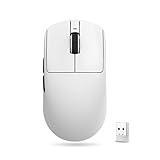
- Lightweight Design: 48g ultra-light symmetrical body, dimension 120.6mm×64.1mm×37.6mm, fits medium & small hands. Adopts smooth ice-feel coating, equipped with standard Swift PTFE mouse feet. Lightweight and silky body reduces hand fatigue during long gaming & work sessions.
- Advanced Sensor & Chip: Equipped with PAW3395 professional gaming sensor, adjustable DPI range from 10 to 26000 with 10 DPI fine stepping. Powered by Nordic 52840 chip with Smart Speed X wireless transmission technology, stable signal with ultra-low latency, ideal for office work and all esports titles. Supports polling rate from 125Hz to 4000Hz; a 4K receiver is required to activate polling rate above 1kHz.
- Dual Connection Modes: Supports Wired / 2.4G Wireless dual-mode switching, comes with standard 1K receiver with default 1K polling rate, compatible with Windows & Mac, seamless switching between multiple devices.
- Comfortable Click Switches: Adopts Huano Ice Berry Pink Dot microswitches, soft crisp rebound with outstanding durability to avoid double-click malfunction. FSWITCH E10 scroll wheel equipped, all side & main buttons fully programmable via dedicated driver software.
- Long-Lasting Battery: Built-in 250mAh rechargeable battery, up to 75 hours continuous runtime under 1000Hz polling rate. Freely adjust DPI, polling rate and other core parameters via official driver.
It’s not automatically the best choice if you’re extremely sensitive to micro-stutter, require flawless multi-device switching, or need guaranteed software parity across multiple operating systems.
Design and build quality
In-hand build quality is usually what separates “good for the price” from “actually worth it.” Start by checking the shell for flex, the main buttons for wobble, and the side switches for consistent travel.
Look at three areas during a first session: (1) main button click alignment, (2) side button stability when you press near the edge, and (3) how the cable/charging port feels if your unit uses a detachable or flex-friendly connector.
Connectivity and device pairing
Most competitive wireless mice live and die by their connection behavior. You want a dongle that stays solid at your desk distance and Bluetooth that behaves predictably when you switch devices.
2.4 GHz (dongle) performance
When using 2.4 GHz, the biggest wins are stable connection under load (high movement, long sessions) and consistent polling behavior. If your R1 Pro advertises high polling, confirm it actually stays there throughout your session.
Bluetooth performance
Bluetooth can be excellent for non-competitive work, but some setups show increased latency or occasional desync when multiple devices are active. If you rely on Bluetooth for gaming, treat it as a bonus, not a certainty.
Recommended Free Tools
Multi-device switching
Multi-device switching should feel instantaneous, without needing you to reconfigure DPI or button maps every time you swap to another device profile.
Test it with a simple routine: switch profiles, change DPI one step up, confirm it stays after switching back, and verify scroll direction behavior is consistent.
Also popular on Amazon

- Lightweight Design: 55g ultra-light symmetrical body, dimension 120.6mm×64.1mm×37.6mm, fits medium & small hands. Equipped with standard Swift PTFE mouse feet. Lightweight and smooth body reduces hand fatigue during long gaming & work sessions.
- Advanced Sensor & Chip: Equipped with PAW3395 SE gaming sensor, adjustable DPI range from 10 to 18000 with 10 DPI fine stepping. Powered by BEKEN(compx) chip with Smart Speed X wireless transmission technology, stable signal with ultra-low latency, ideal for office work and all esports titles. Supports Wired/Wireless Dual 1K polling rate.
- Triple Connection Modes: Supports Wired / 2.4G Wireless / Bluetooth three-mode switching, comes with standard 1K receiver with default 1K polling rate, compatible with Windows & Mac, seamless switching between multiple devices.
- Comfortable Click Switches: Adopts Huano Blue Glow V2 microswitches, crisp rebound with outstanding durability to avoid double-click malfunction. FSWITCH E10 scroll wheel equipped, all side & main buttons fully programmable via dedicated driver software.
- Long-Lasting Battery: Built-in 520mAh rechargeable battery, up to 70 hours continuous runtime under 1000Hz polling rate. Freely adjust DPI, polling rate and other core parameters via official driver.
Sensor, tracking, and DPI consistency
A competitive sensor isn’t only about maximum DPI; it’s about predictable tracking across common surfaces and consistent behavior when you alternate between slow micro-aim and fast flicks.
For most players, the “feel” of tracking is what matters. If you’re getting unwanted lift-off jitter, speed-related skipping, or inconsistent slope on hard flicks, the problem will show up quickly.
How to test tracking consistency (with numbers)
Run a quick, repeatable test using your mouse’s software (or onboard settings) so you can compare results over time.
- Set CPI/DPI to a value you actually play (commonly 800–1600).
- Set polling to the maximum your mouse offers and note what it is in software (you’ll need this for comparisons).
- In a training map, perform 10 identical medium flicks and 10 identical slow micro-adjustments.
- Record outcomes by rating each repetition: 0 = clean, 1 = slight deviation, 2 = obvious skip or jitter.
- Repeat on a second surface (example: a cloth mousepad and a faster glide pad).
If you see frequent “deviation” on one surface but not the other, you may be running into sensor/LOD friction or surface interaction. That’s fixable through pad choice or LOD changes (if available).
Latency, polling behavior, and feel in games
Wireless latency isn’t only about the polling rate. It’s about stability: connection quality, interference, and how consistently the mouse maintains its target polling mode.
Even if polling is high on paper, interference or software settings can make the mouse feel inconsistent in fast movement.
How to measure perceived latency (repeatable method)
You don’t need lab equipment to get useful data about “responsiveness,” just consistency.
- Pick one game mode you know well (training range works).
- Use a consistent sensitivity and FOV setup.
- Run 30 shots in burst mode: 3 bursts of 10, with a 10-second pause between bursts.
- Rate each burst on: 1) time-to-first-hit, 2) ability to correct aim after recoil or target movement.
- Repeat at two settings: maximum polling and a mid polling mode (example: if max is 1000 Hz, compare to 500 Hz).
If max polling doesn’t improve your scores (or makes correction feel worse), the issue is often interference, power settings, or a mismatch in how your system handles high-frequency updates.
Also popular on Amazon
- Lightweight Design: 48g ultra-light symmetrical body, dimension 120.6mm×64.1mm×37.6mm, fits medium & small hands. Adopts smooth ice-feel coating, equipped with standard Swift PTFE mouse feet. Lightweight and silky body reduces hand fatigue during long gaming & work sessions.
- Advanced Sensor & Chip: Equipped with PAW3395 professional gaming sensor, adjustable DPI range from 10 to 26000 with 10 DPI fine stepping. Powered by Nordic 52840 chip with Smart Speed X wireless transmission technology, stable signal with ultra-low latency, ideal for office work and all esports titles. Supports polling rate from 125Hz to 4000Hz; a 4K receiver is required to activate polling rate above 1kHz.
- Dual Connection Modes: Supports Wired / 2.4G Wireless dual-mode switching, comes with standard 1K receiver with default 1K polling rate, compatible with Windows & Mac, seamless switching between multiple devices.
- Comfortable Click Switches: Adopts Huano Ice Berry Pink Dot microswitches, soft crisp rebound with outstanding durability to avoid double-click malfunction. FSWITCH E10 scroll wheel equipped, all side & main buttons fully programmable via dedicated driver software.
- Long-Lasting Battery: Built-in 250mAh rechargeable battery, up to 75 hours continuous runtime under 1000Hz polling rate. Freely adjust DPI, polling rate and other core parameters via official driver.
When “high polling” still feels bad
- USB power saving: Windows can throttle USB devices. Disable USB selective suspend if you see irregular behavior.
- Interference: 2.4 GHz environments packed with routers and controllers can degrade stability. Try different dongle placement (closer to the mouse side).
- Frame-time spikes: Even with a great mouse, inconsistent frame pacing makes aim correction feel “late.”
Clicks, switches, and scroll behavior
Clicks are where cheap hardware can show up fast. You’re looking for a consistent actuation point, minimal mushiness, and a click that doesn’t sound harsh or inconsistent between presses.
Scroll behavior matters too. A good wheel feels predictable under fast strafes and doesn’t wobble when you roll quickly.
The Tool Desk
Outbyte PC Repair FREEClear out junk files and repair common Windows errorsFree Scan →Outbyte Driver Updater FREEFix the driver behind crashes, sound loss and screen glitchesFind Drivers →What to listen and feel for after 2–3 hours
- Pre-travel consistency: The click should feel the same early and late in a session.
- Side-button interference: Pressing left/right should not change main button behavior.
- Wheel tension: It should stay smooth, not “catch” after a few hundred wheel rolls.
Debounce and double-click risk checks
Without specialized tools, you can still spot early problems.
- Open a click test page or use a built-in test app.
- Click 200 times at a normal speed and again at a slightly faster rate.
- Watch for unintended multiple counts per click.
If you see consistent double-counting early, return/exchange while you still can.
Coating, weight balance, and ergonomics
The R1 Pro’s coating and balance determine how it moves through long aim sessions. You want traction that doesn’t turn into a slick surface when your hands warm up.
Balance matters more than absolute weight. A slightly rear-weighted mouse can feel easier for wrist aim; a front-weighted mouse can feel better for claw grip micro-corrections.
Quick wins for a faster PC:
Clear out junk files and repair common Windows errorsFree Scan →Fix the driver behind crashes, sound loss and screen glitchesFind Drivers →Repair Windows errors before they cause bigger problemsFix Now →Grip-style fit: palm, claw, fingertip
- Palm grip: You want stable contact points and minimal front shell pressure.
- Claw grip: Side shape and button placement affect comfort during bursts.
- Fingertip grip: Lighter feel and clean button contours matter most.
If the side buttons feel too recessed or too far forward for your index/middle finger reach, it can cause inconsistent aim corrections that no software tweak will fix.
Software and onboard profiles
The software should let you set DPI steps, polling rate, and button remaps without forcing you into complicated workflows. If onboard profiles exist, you should be able to use them without keeping the app running.
Also popular on Amazon
- Lightweight Design: 54g ultra-light symmetrical body, dimension 120.6mm×64.1mm×37.6mm, fits medium & small hands. Adopts smooth ice-feel coating, equipped with standard Swift PTFE mouse feet. Silky lightweight body effectively reduces hand fatigue during long gaming and work sessions.
- Advanced Sensor & Chip: Equipped with PAW3395 professional gaming sensor, adjustable DPI range from 10 to 26000 with 10 DPI fine stepping. Powered by Nordic 52840 chip with Smart Speed X wireless transmission technology, stable ultra-low latency signal, suitable for office work and all types of esports games. Supports polling rate from 125Hz to 4000Hz; a 4K receiver is required to unlock polling rate above 1kHz.
- Dual Connection Modes: Supports Wired / 2.4G Wireless dual-mode switching, comes with standard 1K receiver with default 1K polling rate, compatible with Windows & Mac, seamless switching between multiple devices.
- Comfortable Click Switches: Adopts Kailh White Blade microswitches, crisp sharp rebound with excellent durability to prevent double-click issues. FSWITCH E10 scroll wheel equipped, all main and side buttons are fully programmable via dedicated driver software.
- Long-Lasting Battery: Built-in 500mAh rechargeable battery, up to 150 hours continuous runtime under 1000Hz polling rate. Freely adjust DPI, polling rate and other core parameters via official driver.
Windows and macOS expectations
Many competitive mice ship with Windows-first software. On macOS, you may still get basic tracking and remapping, but advanced features like polling/persistent macros can be limited depending on driver support.
Before you buy (or before you commit), confirm whether the software supports your exact macOS version. If you don’t want driver issues, prioritize onboard profile support.
Do these 3 things before closing this tab:
1Repair Windows errors before they cause bigger problems2Scan for outdated or missing drivers - takes under a minute3Clear out junk files and repair common Windows errorsCommon configuration mistakes
- Forgetting LOD and lift behavior: If you lift your mouse often, LOD matters for consistent tracking.
- Over-aggressive debounce settings: Don’t chase “faster clicks” at the cost of reliability.
- Button remap mismatch: Make sure your game uses the same mapping when you switch devices.
Battery life and charging behavior
Battery life should be measured by actual usage mode, not advertised claims. Polling rate, RGB (if any), and Bluetooth vs dongle will swing results dramatically.
Charging should be convenient and predictable. If charging is slow or the mouse turns off in the middle of setup, that’s a practical downside you’ll feel quickly.
Battery test plan you can run in 48 hours
- Fully charge the mouse to 100%.
- Use maximum polling and your normal DPI for daily use.
- Record battery level every 2 hours (or every time you notice a noticeable behavior change).
- In parallel, run one competitive session (~60 minutes) using 2.4 GHz only.
- Repeat the same competitive session with Bluetooth on (if you use it daily).
You’re looking for stable runtime patterns. If battery drains fast only during Bluetooth switching, the connection method is likely causing extra power use.
Pros and cons
| Category | What to like | What to watch |
|---|---|---|
| Wireless performance | Expect strong 2.4 GHz responsiveness when signal is clean | Bluetooth may feel less consistent for competitive play depending on your environment |
| Tracking | Good sensor behavior for common aim styles | Some surfaces can expose lift-off or smoothing quirks |
| Buttons & scroll | Competitive click feel if your unit’s tolerances are consistent | Scroll feel and click consistency can vary unit-to-unit |
| Value | Strong feature set for the money | Software depth may be more limited than premium brands |
Alternatives to consider
If you’re deciding between models, don’t compare only specs—compare the type of grip, connection use case, and button preferences you already have.
Crashes, No Sound, or Screen Glitches?
Random freezes, missing sound and display glitches usually trace back to one bad driver. Find and replace yours safely.Free scan · under a minutePC Slower Than It Used to Be?
A free scan shows the junk files, broken settings and background clutter dragging Windows down - then fixes them in one click.Free scan · Windows 10 & 11If you want the closest “safe bet” shape
Compare your current main mouse’s grip width and button reach first. If the R1 Pro’s shape doesn’t match your hand geometry, a “better sensor” won’t matter much.
If you want maximum wireless flexibility
If you bounce between PC and macOS frequently, prioritize onboard profiles and confirm Bluetooth stability in your room layout. A dongle-only mouse can feel more consistent than a Bluetooth-first model.
Also popular on Amazon

- Ultra-fast LIGHTSPEED wireless technology in this wireless mouse gives you a lag-free gaming experience, delivering incredible responsiveness and reliability with 1 ms report rate for competition-level performance
- G305 wireless computer mouse boasts an incredible 250 hours of continuous gameplay on just 1 AA battery; switch to Endurance mode via Logitech G HUB software and extend battery life up to 9 months
- The durable, compact design with built-in nano receiver storage makes G305 not just a great portable desktop mouse, but also a great laptop travel companion and gaming wireless mouse. Use with a gaming laptop and play anywhere
- The next-generation optical HERO sensor in this gaming mouse delivers incredible performance and up to 10x the power efficiency over previous generations, with 400 IPS precision and up to 12,000 DPI sensitivity
- Wireless does not have to mean heavy. This gaming mouse provides high maneuverability, coming in at only 3.4 oz, thanks to an efficient, lightweight mechanical design and ultra-efficient battery usage
If you want the best switch feel for the money
If your priority is click and scroll feel, read return policies carefully. A mouse can be excellent on test day and annoying after 2 weeks if switch tolerances don’t match your preference.
Troubleshooting and edge cases
Wireless mice rarely fail in dramatic ways. More often, issues show up as stutter, drift, or “why does it feel different today?” moments.
Stutter, disconnects, or DPI jumps
- Re-seat and reposition the dongle: Try placing it closer to the mouse side and avoid USB hubs.
- Remove competing USB receivers: Some setups have overlapping 2.4 GHz devices.
- Disable USB power saving: On Windows, set USB selective suspend to off for better stability.
- Check DPI profile: Confirm you didn’t accidentally trigger a profile with a different DPI step.
Bluetooth range surprises
Bluetooth can be sensitive to walls, desk materials, and interference from Wi-Fi. Test your actual range: sit at your normal desk distance and then move 1–2 meters away to see where it falls apart.
Software doesn’t detect the mouse
- Try a different USB port.
- Close the mouse software completely and reopen it.
- Restart your PC and avoid plugging in through a hub.
- Update Windows drivers if detection remains inconsistent.
If detection still fails, don’t keep remapping. It’s usually a driver or firmware compatibility issue, not a user error.
FAQs
Is the VXE R1 Pro good for FPS games?
It’s designed for competitive play, and most buyers will be satisfied if the dongle connection stays stable and your hand shape matches the geometry. Validate latency stability using the polling comparison test (max vs mid polling) and judge feel over long sessions.
Should I use Bluetooth or 2.4 GHz for gaming?
Use 2.4 GHz for competitive sessions. Bluetooth is fine for productivity and casual play, but gaming consistency depends heavily on your environment and device pairing behavior.
Free tools Windows power users keep installed
One-click scans. No signup required.
Does DPI matter more than polling rate?
DPI affects aim sensitivity and muscle memory, while polling rate affects how often updates reach your system. For performance, aim for stability first, then tune DPI to match your real-world sensitivity preferences.
What’s the biggest reason people dislike a wireless mouse after buying?
Shape mismatch and inconsistent click/scroll feel are the most common. Second place goes to connection quirks—usually fixable by dongle placement, USB power settings, or profile cleanup.
Bottom Line
The VXE R1 Pro is a strong competitive wireless mouse candidate if you care about responsiveness, consistent tracking, and practical multi-use setup. Its value comes from the feature-to-price ratio, but your satisfaction will hinge on two things: how it fits your grip and whether your wireless environment stays stable.
If you run the 48-hour battery check and the polling comparison test, you’ll know quickly whether it’s a true upgrade or just a good spec sheet. That’s the fastest path to a decision you won’t regret.
Quick wins for a faster PC:
Repair Windows errors before they cause bigger problemsFix Now →Scan for outdated or missing drivers - takes under a minuteDriver Scan →
