The Tool Desk
Outbyte PC Repair FREEClear out junk files and repair common Windows errorsFree Scan →Outbyte Driver Updater FREEFix the driver behind crashes, sound loss and screen glitchesFind Drivers →Some links on this page are affiliate links: if you buy through them we may earn a commission, at no extra cost to you.
TeamSpeak and Discord both solve the same core problem: reliable group communication. The difference is how they solve it—TeamSpeak is built around a dedicated voice-server model, while Discord combines voice, text, and community features in one app-first platform.
If you’re choosing for a gaming clan, a small business, or a community with active moderation, the decision comes down to administration style, moderation/bot ecosystem, and how much you care about “pure voice” versus everything-in-one convenience.
As an Amazon Associate I earn from qualifying purchases.
What You’re Actually Choosing: Voice Server vs All-in-One Chat
TeamSpeak’s experience is centered on voice channels hosted on a server you control (or rent). Discord’s experience is centered on a server hosted on Discord’s infrastructure (with optional self-hosting for some components, but the day-to-day model is hosted).
That single architectural choice affects cost, permissions, moderation, reliability expectations, and how fast you can invite and onboard new members.
Popular on Amazon

- 285G LIGHTWEIGHT BUILD — Experience superior audio and game for hours without being weighed down by the headset
- TRIFORCE 40MM DRIVERS — Cutting-edge proprietary design divides the driver into 3 parts for the individual tuning of highs, mids, and lows —producing brighter, clearer audio with richer highs and more powerful lows
- HYPERCLEAR CARDIOID MIC — An improved pickup pattern ensures more voice and less noise with the sweet spot easily placed at the mouth because of the mic’s bendable design
- HYBRID FABRIC AND MEMORY FOAM EAR CUSHIONS — Wrapped in a combination of breathable fabric and plush leatherette to provide a snug fit to ensure constant comfort for prolonged gaming
- 7.1 SURROUND SOUND — Provides accurate positional audio that lets you pinpoint intuitively where every sound is coming from. *Only available on Windows 10 64-bit
Quick Verdict (By Use Case)
Pick TeamSpeak if you want a traditional voice community with stable server administration, lightweight client expectations, and a strong “voice-first” culture.
Pick Discord if you want voice plus text coordination, rich moderation tools, an enormous community ecosystem, and low-friction onboarding.
Quick wins for a faster PC:
Scan for outdated or missing drivers - takes under a minuteDriver Scan →Clear out junk files and repair common Windows errorsFree Scan →Side-by-Side Comparison: TeamSpeak vs Discord
| Category | TeamSpeak | Discord |
|---|---|---|
| Core model | Dedicated voice server (self-host or hosted) | All-in-one server (voice + text + community) |
| Setup speed | Slower if self-hosting (server admin needed) | Fast (create server, invite, configure) |
| Voice experience | Excellent for voice-centric groups | Strong voice with modern client features |
| Moderation | More admin-driven, fewer built-in community workflows | Role-based permissions + native mod tooling |
| Bots and automation | Smaller ecosystem | Massive ecosystem (integrations everywhere) |
| Text and community | Not the primary focus | Excellent channels, embeds, media, search |
| Cost shape | May incur server licensing/hosting costs | Free tier is robust; upgrades for larger needs |
Voice Quality, Latency, and Reliability
Both platforms can sound good when configured correctly—microphone gain, noise suppression, input monitoring, and channel settings matter more than marketing claims.
In practice, TeamSpeak’s reputation comes from being voice-first and historically used with careful channel and server configuration. Discord’s reputation comes from continuous client improvements and consistent operation at scale.
What usually changes the results
- Server location: Put the server closer to your members to reduce round-trip time.
- Network conditions: Packet loss and jitter hurt both, but you’ll feel it more when people speak over each other.
- Codec/transmission settings: Your audio sampling and bitrate choices affect clarity and bandwidth.
- Noise suppression: Aggressive suppression can cut quiet speakers; too little makes background noise worse.
Server Model and Administration
Administration is where the platforms feel fundamentally different. TeamSpeak assumes you (or your provider) manage a server. Discord assumes you manage a community and permissions inside Discord’s platform.
TeamSpeak
With TeamSpeak, you typically run or rent a voice server. That means you can tune settings at the server layer, but you also take on more responsibility.
- Choose a hosting route: self-host (your hardware/VPS) or a third-party provider.
- Set up server settings: name, slots, and channel structure.
- Configure permissions: groups, channel permissions, and admin roles.
- Invite users and distribute the connection details (address, port, identity/login flow).
Discord
Discord server administration is mostly configuration inside the app: roles, permissions, moderation rules, and channel setup.
Also popular on Amazon

- Enjoy expansive cinematic sound. Big 50 mm audio drivers deliver an incredible sound experience
- Hear Enemies From All Sides. DTS Headphone:X 2.0 surround sound(1) lets you hear enemies sneaking behind you, special ability cues, and immersive environments. It’s positional clarity that can make the difference between victory and defeat. Experience three-dimensional audio that goes beyond 7.1 channels to make you feel like you’re right in the middle of the action. (1) DTS Headphone:X 2.0 requires Logitech G HUB Software.
- Be Heard Loud and Clear. The big 6 mm boom mic makes sure you’re heard by gaming partners and mutes when flipped up.
- Use One Headset For Most Game Platforms. Your headphones work with your PC or Mac via USB DAC or 3.5 mm cable, mobile devices with 3.5 mm cable or with gaming consoles including PlayStationⓇ 5 and PlayStationⓇ 4 (USB wireless stereo sound only), Nintendo Switch (wireless stereo sound when docked)
- Game for Hours in Comfort. Everything about these headphones is about comfort: The deluxe lightweight leatherette ear cups and headband are made to keep pressure off your ears. Ear cups rotate up to 90 degrees for convenience.
- Create a server and pick a template that matches your community type.
- Create voice channels and text channels with role-based access.
- Assign roles (e.g., Admin, Mod, Member) and set permissions per channel.
- Set community settings: safety checks, verification requirements, and moderation defaults.
- Invite members using an invite link with an expiration or limits if needed.
Features That Matter Day to Day
Most teams don’t just need “voice.” They need predictable structure: who can speak, where announcements go, and how people coordinate between matches or meetings.
Voice channels, permissions, and roles
Discord’s role-based permissions are granular and easy to manage at scale. TeamSpeak supports strong grouping and channel permissions, but the workflow typically depends more on how your server admin sets things up.
If your group grows beyond a few dozen people, Discord’s built-in permission UX usually reduces admin friction.
Text chat and media
Discord’s text experience (channels, threads where applicable, embeds, uploads, stickers, and link previews) is a major differentiator. TeamSpeak’s text capabilities exist, but they’re not where most communities spend their time.
If your communication includes announcements, schedules, patch notes, and side conversations, Discord tends to win.
Calls, streaming, and “presence”
Discord is strong for events and “show up and talk” workflows. Presence signals and voice activities make it easier for members to understand who’s online and where conversations are happening.
TeamSpeak is more straightforward: join the right channel and communicate. It’s excellent for focused sessions but less optimized for “community discovery.”
Also popular on Amazon

- [Wide Compatibility] This professional gaming headset for PC gamers is compatible with PC (Windows 7/8/10), PS4/PS5 console, laptops, and other devices with a USB audio port.(Note: EKSA E1000 is not compatible with game controllers.)
- [Driver-free 7.1 Surround Sound] Enjoy an instant immersive gaming experience with its 7.1 surround sound. EKSA PC gaming headset has a built-in USB audio sound chip and 50mm magnetic neodymium driver that gives you a vivid surrounding sound field. No extra downloads or hassle to get the best experience, just plug and play.
- [Noise Cancelling Microphone] The EKSA gaming headset for PS5 reduces distracting background noise and guarantees loud and crystal-clear communication with its 120° adjustable high-sensitive microphone. The headset’s omnidirectional noise reduction tech allows you to enjoy quality sound when gaming or in-game chats.
- [Comfortable Ergonomic Design] Premium soft memory protein earmuffs ensure ultimate comfort even for a prolonged period. In addition, there’s absolute comfort during lengthy gaming sessions with an adjustable headband designed for balanced weight distribution and reduced clamping force. Short cables are also not your problem anymore as its 2.2m extremely durable cable allows you to enjoy your game with no boundary.
- [2 Years Warranty] EKSA gaming headsets are under strict quality inspection on each production line. We offer 24-hour customer support and a 2-year warranty. We will make our most incredible effort to take responsibility for your shopping experience.
Moderation toolset
Discord provides native moderation features: role gating, per-channel permissions, message controls in text channels, and audit-style visibility depending on server settings.
TeamSpeak moderation can be effective, but it’s more dependent on server admin discipline and how you configure groups, bans, and channel permissions.
Bots and automation
Discord’s bot ecosystem is vast (roles on reaction, event reminders, moderation automation, music, integrations, and more). TeamSpeak has bots too, but the ecosystem is smaller and often less plug-and-play.
If you want automation and workflows without developing custom tools, Discord usually saves time.
Cost and Licensing
Both platforms can be used for free at the start, but the total cost often depends on how you plan to run your community.
TeamSpeak can involve server licensing or hosting costs depending on your model. Discord offers a free tier that’s robust for most communities, with paid plans primarily for larger servers or special needs.
Security, Privacy, and Compliance
Voice and chat data are handled differently across the two services. Your risk model should include who can access voice channels, how accounts are verified, and how moderation enforces rules.
Also popular on Amazon
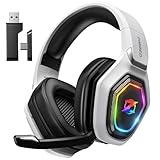
- 【Amazing Stable Connection-Quick Access to Games】Real-time gaming audio with our 2.4GHz USB & Type-C ultra-low latency wireless connection. With less than 30ms delay, you can enjoy smoother operation and stay ahead of the competition, so you can enjoy an immersive lag-free wireless gaming experience.
- 【Game Communication-Better Bass and Accuracy】The 50mm driver plus 2.4G lossless wireless transports you to the gaming world, letting you hear every critical step, reload, or vocal in Fortnite, Call of Duty, The Legend of Zelda and RPG, so you will never miss a step or shot during game playing. You will completely in awe with the range, precision, and audio quality your ears were experiencing.
- 【Flexible and Convenient Design-Effortless in Game】Ideal intuitive button layout on the headphones for user. Multi-functional button controls let you instantly crank or lower volume and mute, quickly answer phone calls, cut songs, turn on lights, etc. Ease of use and customization, are all done with passion and priority for the user.
- 【Less plug, More Play-Dual Input From 2.4GHz & Bluetooth】 Wireless gaming headset adopts high performance dual mode design. With a 2.4GHz USB dongle, which is super sturdy, lag<30ms, perfectly made for gamers. Bluetooth mode only work for phone, laptop and switch. And 3.5mm wired mode (Only support music and call).
- 【Wide Compatibility with Gaming Devices】Setup the perfect entertainment system by plugging in 2.4G USB. The convenience of dual USB work seamlessly with your PS5,PS4, PC, Mac, Laptop, Switch and saves you from swapping cables.
If you need tighter control (e.g., for internal teams), think carefully about server hosting location, admin access, and how you handle member identities and permissions.
What’s actually slowing this PC down?
Pick the symptom - the matching free tool is one click away.
Setup and Onboarding: Step-by-Step
Here are practical setup paths that match how teams typically operate. The goal is to get voice working first, then structure permissions and channels so meetings and sessions don’t devolve into chaos.
TeamSpeak setup (self-hosted, typical)
Self-hosting gives control but requires a bit more technical readiness. If you’re new to server management, consider using a provider.
- Install or provision your server on a VPS or machine with stable networking.
- Open required ports in your firewall and hosting provider security group (port details vary by configuration).
- Create a channel structure: e.g., Lobby (default), Squad/Team channels, Admin channel, and Announcements.
- Set up groups/permissions: define who can talk, who can create channels, and who can administer.
- Create server identity/logins for admins and moderators. Use consistent group membership.
- Share connection info with members: server address/port and any instructions for identity/password.
Discord setup (server creation)
Discord’s fastest route is creating a server, defining roles, then building channel structure around voice and text workflows.
- Open Discord and click Add a Server → Create My Own.
- Choose a template (or start from scratch) and name the server.
- Create channels: under Text Channels and Voice Channels, add names that reflect real use (e.g., announcements, schedule, general-voice, team-blue).
- Click Server Settings → Roles to create roles (Member, Mod, Admin). Then set permissions.
- Optional but common: configure Verification Level and invite controls to reduce spam.
- Invite members using Invite People and set limits (expiration and max uses) if you want control.
Performance and Device Compatibility
Both platforms support multiple operating systems, but the “best experience” depends on your group’s device mix.
Do these 3 things before closing this tab:
1Scan for outdated or missing drivers - takes under a minute2Clear out junk files and repair common Windows errors3Fix the driver behind crashes, sound loss and screen glitchesSupported platforms
- TeamSpeak clients commonly support Windows, macOS, Linux, and mobile variants depending on the client generation.
- Discord supports Windows, macOS, iOS, iPadOS, Android, and web browsers.
If you have heavy iPhone and iPad usage, Discord’s mobile maturity is often the deciding factor.
Typical bandwidth and hardware expectations
Voice traffic is usually modest, but overlays, screen sharing, and video can change the numbers fast. For voice-only use, both services generally remain within reasonable household bandwidth.
Also popular on Amazon

- TRIFORCE 40 MM DRIVERS — Razer patented 3-part driver design pushes out exceptional highs, mids and lows that doesn’t muddy, providing a more dynamic listening experience for deeper immersion
- RETRACTABLE HYPERCLEAR CARDIOID MIC — The improved pickup pattern in the microphone ensures more voice and less noise, while its retractable design allows for optimal positioning or protection when not in use
- 7.1 SURROUND SOUND — With our advanced 7.1 surround sound, enjoy true-to-life acoustics that optimize the game’s sound design and hear everything as if you were right in the middle of it all
- COMFORTABLE MEMORY FOAM CUSHIONS — Features hybrid fabric and leatherette cushions with close-fitting earcups that provide superior sound isolation and comfort, even during long gaming sessions
- CONVERTIBLE TYPE C & TYPE A CABLE — Enjoy immersive audio across various platforms with just a single headset; switch between PC, consoles, phones, and more with a convertible Type C and Type A cable
If members are on constrained networks, prioritize voice-only channels and avoid default screen-sharing encouragement.
Troubleshooting: When Voice Doesn’t Work
When voice fails, it’s rarely one single culprit. Expect to check your mic input, permissions, channel membership, and network stability.
Windows Errors? Fix Them Before They Spread
Repair common Windows errors and clear accumulated junk for a smoother, more stable PC - no reinstall needed.Free scan · no reinstallOutdated Drivers Are Slowing You Down
One free scan finds every outdated or missing driver and matches the right update for your exact hardware.Free scan · exact hardware matchTeamSpeak common fixes
- No one hears you: confirm you’re transmitting (push-to-talk vs voice activation), then check input device selection and channel permissions.
- Echo or feedback: disable “listen to this device” on the OS, lower input gain, and reduce sidetone issues.
- Choppy audio: test with a stable wired connection, check packet loss, and compare performance when close to the server region.
- Can’t connect: verify server address/port, firewall rules, and VPN conflicts.
Discord common fixes
- Mic not working: open Discord User Settings → Voice & Video, confirm the correct input device, and adjust Input Volume.
- Users hear you low: enable Automatic Gain Control if appropriate, and raise input volume carefully without clipping.
- Voice drops or sounds robotic: disable conflicting apps that capture the mic, try disabling experimental audio features, and check your region/settings.
- Push-to-talk confusion: confirm the keybind for Push to Talk and test it in a voice channel.
- Permission errors: check your role and whether the channel has “connect” permission for your role.
Common Mistakes That Ruin Comms
- No role plan: Discord roles (or TeamSpeak groups) should exist before you scale.
- Unstructured channel names: “General” and “Voice” eventually cause confusion during events.
- Over-aggressive noise suppression: quiet members get lost. Prefer balanced settings.
- Ignoring server region: the fastest server is the one closest to participants.
- Not training members: a 30-second onboarding post on mic settings and push-to-talk saves hours.
Alternatives Worth Considering
If neither platform fits your exact requirements, a few other tools may match better depending on your priorities.
- Slack + voice tools for small teams that need chat and lightweight voice.
- Zoom or Google Meet for scheduled meetings where screen share and recording matter more than ongoing community voice.
- Matrix/Element for open federation and chat-first communities that still need voice options via integrations.
FAQs
Is TeamSpeak better than Discord for competitive gaming?
It can be. If your group is voice-first and you maintain a well-tuned voice server, TeamSpeak may feel more focused. Many esports and competitive communities still choose Discord because it’s easier to coordinate via text and invites.
Does Discord require a powerful computer?
Discord runs on most modern systems and also supports web and mobile. If you’re on a low-spec device, you may need to reduce background effects and avoid unnecessary screen-sharing.
Can I self-host Discord like I can TeamSpeak?
Discord’s primary model is hosted by Discord. TeamSpeak’s core value is direct server control, so for “we want our own server” requirements, TeamSpeak (or other self-host voice options) fits more naturally.
Free tools Windows power users keep installed
One-click scans. No signup required.
Which is easier to manage for a community of 200+ members?
Discord usually wins for most communities because channel and role permissions are built into the platform’s UI and moderation tooling is strong. TeamSpeak can scale too, but it typically requires a more hands-on admin approach.
Which one should I choose for a small internal team (10–30 people)?
If you want minimal admin and easy onboarding, Discord is usually the fastest path. If your team already has server admin capability and prefers voice-centric workflows, TeamSpeak is a solid choice.
Bottom Line
Choose TeamSpeak when voice quality and server control are the priority, and you’re comfortable running or maintaining a server. It’s a dependable option for groups that want structured voice channels and a traditional comms culture.
Choose Discord when you need voice plus text coordination, moderation workflows, and a large ecosystem for bots and integrations. For most communities, Discord reduces admin overhead and speeds onboarding—so people actually use it.
Recommended Free Tools

