Do these 3 things before closing this tab:
1Scan for outdated or missing drivers - takes under a minute2Clear out junk files and repair common Windows errors3Fix the driver behind crashes, sound loss and screen glitchesSome links on this page are affiliate links: if you buy through them we may earn a commission, at no extra cost to you.
Spigen has released Qi2-compatible MagFit cases and accessories built for the Pixel 10 series. If you’ve been using a mix of wireless chargers and “MagSafe-like” cases, Qi2 is the shift that’s supposed to make charging more predictable—because the magnets and power negotiation follow a standardized spec.
This guide breaks down what to buy, how compatibility checks should work, how to pair cases with Qi2 chargers and mounts, and what to do when charging is finicky. You’ll also find practical installation and troubleshooting steps you can run in minutes.
As an Amazon Associate I earn from qualifying purchases.
Free tools Windows power users keep installed
One-click scans. No signup required.
What’s new with Spigen’s Qi2 Pixel 10 MagFit lineup
Spigen’s MagFit lineup is specifically aimed at phones that support magnetic wireless charging behavior consistent with Qi2. For Pixel 10 series owners, the “here” part matters because it’s not just a generic case—MagFit is engineered to keep the phone positioned so Qi2 chargers can hit the expected alignment.
In practice, you’re buying two things at once: a protective case with integrated magnet placement, and an accessory ecosystem (chargers, mounts, and wallets depending on the model) that can benefit from Qi2’s tighter charging handshake and alignment requirements.
Popular on Amazon

- Google’s Pixel Stand 1 or Pixel Stand 2 are not fully compatible with Pixel 10 series devices. For 15W+ wireless charging, use this case with Google’s new Pixelsnap charger.
- Hybrid PC and TPU structure with Air Cushion Technology to achieve a slim but durable design
- All-new revamped design with built-in kickstand for hands-free viewing.
- Raised edges for screen and camera protection Military-grade via Extreme Protection Tech
- Spigen Tough Armor MagFit Case Compatible with Google Pixel 10 Case / with Pixel 10 Pro Case (2025)
Qi2 vs older MagSafe-style accessories: what actually matters
Qi2 is built on the Qi wireless charging standard but adds a magnetic alignment requirement (the “2” in Qi2). The main benefit for consumers is consistency: chargers can assume the phone/case magnets are positioned in a predictable way.
Qi2 power and expectations
Many Qi2 chargers support up to 15W depending on the charger, power adapter, and phone support. If you’ve previously seen slow charging, you’ll typically notice fewer “almost aligned” cases and more stable power delivery.
The Tool Desk
Outbyte Driver Updater FREEFix the driver behind crashes, sound loss and screen glitchesFind Drivers →Outbyte PC Repair FREEClear out junk files and repair common Windows errorsFree Scan →Why compatibility can feel different
Not every magnetic phone accessory behaves the same. A case designed for Qi2 magnets and placement will usually align more reliably with Qi2 chargers than a case that only “looks magnetic” or relies on looser tolerance.
Compatibility checklist for Pixel 10 series cases
Before you order, confirm these items. It’s the fastest way to avoid returns.
1) Pick the correct Pixel 10 model
Spigen’s cases are model-specific. Pixel 10, Pixel 10 Pro, and any larger variants (if applicable in your region) can have different camera cutouts and button positions.
2) Confirm you’re buying MagFit for Qi2
On the product page, look for wording that explicitly ties the case to Qi2 or MagFit. If it only says “magnetic wireless charging” without Qi2 alignment language, treat it as a different category.
3) Verify accessories are meant for MagFit
Wallets, car mounts, and stands may rely on the phone’s magnet placement. Even when they’re compatible with magnetic cases in general, MagFit-designed products will typically be better matched.
How Spigen MagFit cases are designed to work with Qi2 charging
Qi2 alignment is about magnet geometry and positioning. MagFit cases aim to keep the phone in the “sweet spot” so a Qi2 charger can maintain alignment during minor movement.
What you should notice
-
More stable charging behavior when you place the phone quickly on a pad or stand.
-
Less flicker between charging and not-charging when the phone is nudged.
Quick wins for a faster PC:
Scan for outdated or missing drivers - takes under a minuteDriver Scan →Repair Windows errors before they cause bigger problemsFix Now →Fix the driver behind crashes, sound loss and screen glitchesFind Drivers →Special offer. See more information about Outbyte and uninstall instructions. Please review EULA and Privacy policy. -
Fewer cases where the charger powers on but charging stays at a low rate.
Also popular on Amazon
Sale Spigen for Pixel 10/10 Pro Case, Rugged Armor MagFit (2025) [Designed for Pixelsnap, Compatible with MagSafe Accessories] - Matte Black
- Google’s Pixel Stand 1 or Pixel Stand 2 are not fully compatible with Pixel 10 series devices. For 15W+ wireless charging, use this case with Google’s new Pixelsnap charger.
- Flexible TPU case with spider-web pattern interior
- Raised edges for screen and camera protection
- Extra corner protection infused with Extreme Protection Tech
- Spigen Rugged Armor MagFit Case Compatible with Google Pixel 10 Case / with Pixel 10 Pro Case (2025)
Which Spigen accessories to pair with your case
Spigen’s Qi2 MagFit direction is ecosystem-focused. If you already own chargers, stands, or mounts, you’ll want to make sure they’re Qi2-ready and intended for magnetic alignment.
MagFit-friendly accessory categories
-
Charging stands and car mounts that explicitly support Qi2 or magnetic Qi2 alignment.
-
Wallets designed to attach using magnets (useful if you want fewer cards).
Recommended: Crashes or Glitches? A Free Driver Scan Usually Finds the Culprit →Recommended: PC Feels Slow? A Free Scan Shows What's Dragging Windows Down →Special offer. See more information about Outbyte and uninstall instructions. Please review EULA and Privacy policy. -
Protective case variants (clear, matte, rugged, and slim styles depending on the Pixel 10 model).
-
Magnetic ring/plate systems (only if included in your exact accessory bundle).
Rule of thumb: pairing a Qi2 charger with a Qi2-designed case beats pairing a Qi charger with a loosely magnetic case when you care about consistent power.
Choosing the right Spigen case style for Pixel 10
MagFit is the “charging compatibility” layer. Your daily experience still depends on case material, thickness, grip, and drop protection.
Slim vs rugged tradeoffs
-
Slim MagFit cases reduce bulk and help with pocket comfort, but usually offer less impact resistance.
-
Rugged MagFit cases add raised edges, thicker corners, and more camera protection, but can slightly increase how far the phone sits on a stand.
Clear, matte, and finish durability
If you prefer a clear case, expect the usual realities of wear: micro-scratches and discoloration over time depending on sunlight and cleaning habits. Matte finishes often hide fingerprints better.
Step-by-step: installing a Spigen MagFit case
Installation is simple, but doing it “right” helps keep alignment consistent with MagFit accessories.
Recommended Free Tools
Also popular on Amazon

- Google’s Pixel Stand 1 or Pixel Stand 2 are not fully compatible with Google Pixel 10a Case devices. For 15W+ wireless charging, use this case with Google’s new Pixelsnap charger or other Qi2-certified chargers.
- Hybrid PC and TPU structure with Air Cushion Technology to achieve a slim but durable design
- All-new revamped design with built-in kickstand for hands-free viewing.
- Raised edges for screen and camera protection Military-grade via Extreme Protection Tech
- Spigen Tough Armor MagFit compatible with Google Pixel 10a Case
-
Power down your Pixel 10 if you want a distraction-free setup.
-
Remove any prior case or skin. Clean the back with a microfiber cloth so you don’t trap grit.
-
Align the camera cutout with the lens array and start by fitting one side edge first.
-
Press along the opposite edge until the case snaps fully into place.
Crashes, No Sound, or Screen Glitches?
Random freezes, missing sound and display glitches usually trace back to one bad driver. Find and replace yours safely.Free scan · under a minuteWindows Errors? Fix Them Before They Spread
Repair common Windows errors and clear accumulated junk for a smoother, more stable PC - no reinstall needed.Free scan · no reinstallSpecial offer. See more information about Outbyte and uninstall instructions. Please review EULA and Privacy policy. -
Check button feel and confirm the camera cutout sits flat (no wobble).
-
If you use a wallet accessory, attach it once and test that it sits securely without sliding.
Step-by-step: getting best results with Qi2 charging
Even with a Qi2 MagFit case, placement still matters. These steps reduce alignment misses.
-
Use a Qi2 charger that supports up to 15W (or your desired tier) and connect it to an appropriate power adapter.
What’s actually slowing this PC down?
Pick the symptom - the matching free tool is one click away.
Special offer. See more information about Outbyte and uninstall instructions. Please review EULA and Privacy policy. -
Place the phone on the charger gently—don’t “search” for the magnet spot by repeated lifting.
-
Let the phone settle for 1–2 seconds. Many chargers detect alignment quickly, then ramp power.
-
Keep the charger surface clean. Oils and debris can change how the phone shifts, especially with glossy or rough case textures.
Also popular on Amazon
Sale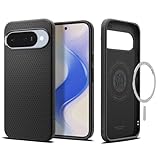 Spigen Liquid Air MagFit for Pixel 10/Pro Case, Matte Black | Qi2 Compatible, Non-slip grip, Air Cushion Tech, Military-Grade Protection, Raised Camera Protection, Compatible with MagSafe
- Google’s Pixel Stand 1 or Pixel Stand 2 are not fully compatible with Pixel 10 series devices. For 15W+ wireless charging, use this case with Google’s new Pixelsnap charger or other Qi2-certified chargers.
- Minimalistic geometric matte textured design for a non-slip grip
- TPU structure with Air Cushion Technology for durability
- Slim case with raised edges for screen and camera protection
- Spigen Liquid Air MagFit Case Compatible with Google Pixel 10 Case / with Pixel 10 Pro Case (2025)
-
If you charge on a stand, ensure the arm isn’t loose. A slightly sagging mount can reduce contact pressure.
Special offer. See more information about Outbyte and uninstall instructions. Please review EULA and Privacy policy.
Troubleshooting when Qi2 charging feels weak or inconsistent
If your charging speed drops or the phone doesn’t reliably latch, treat it like a quick diagnostic. You can usually isolate the cause within a few checks.
1) Confirm you’re using a Qi2 charger
Start here. If your charger is older Qi (non–Qi2 magnetic alignment), a MagFit case may still work, but behavior can be less consistent and power can be lower.
2) Remove the case (briefly) to compare
Test charging with and without the case. If charging works perfectly without the case, the issue is likely case placement, a damaged case edge, or a mismatch with accessory mounting.
3) Inspect for misalignment or interference
-
Check that the case is fully snapped and sits flush against the phone.
Special offer. See more information about Outbyte and uninstall instructions. Please review EULA and Privacy policy. -
If you use a wallet, ensure it’s not pulling the phone out of alignment.
-
Remove any thick third-party plates or magnetic rings that stack onto the MagFit magnets.
4) Try a different Qi2 surface
Use another Qi2 charger pad or stand if available. If the phone charges reliably on a different charger, the original charger’s magnets, cable, or adapter could be the limiting factor.
5) Check the power adapter and cable
A Qi2 charger that’s underpowered often behaves like it’s “almost charging.” Verify the adapter matches the charger’s required wattage and uses a good cable.
Do these 3 things before closing this tab:
1Repair Windows errors before they cause bigger problems2Scan for outdated or missing drivers - takes under a minute3Clear out junk files and repair common Windows errorsCommon mistakes that break MagFit alignment
-
Mixing accessories with different magnetic placement: wallet + third-party magnetic mount plates can stack tolerances.
-
Charging on uneven surfaces: cloth or soft pads under a charger can let the phone shift.
Also popular on Amazon
Sale Spigen Ultra Hybrid MagFit for Pixel 10/Pro Case, Clear White | Anti-Yellowing Resin, Air Cushion Tech, Military-Grade Drop Protection, Raised Camera Protection, Compatible with MagSafe
- Google’s Pixel Stand 1 or Pixel Stand 2 are not fully compatible with Pixel 10 series devices. For 15W+ wireless charging, use this case with Google’s new Pixelsnap charger.
- Hybrid PC and TPU structure for durable design
- Infused with blue resin for anti-yellowing, long-lasting clarity
- Military-grade drop protection via Air Cushion Technology
- Spigen Ultra Hybrid MagFit Case Compatible with Google Pixel 10 Case / with Pixel 10 Pro Case (2025)
-
Not snapping the case fully: if one side edge isn’t seated, magnet alignment can drift.
-
Dirty charger or case: oils and dust reduce the repeatability of placement.
Free tools Windows power users keep installed
One-click scans. No signup required.
Special offer. See more information about Outbyte and uninstall instructions. Please review EULA and Privacy policy.
Alternatives if you already own a case or chargers
If you already have a case, you have three practical options:
Option A: Keep your case, replace the charger
If your current case is compatible with magnetic wireless charging but not Qi2, upgrading to a Qi2 charger may still help. Expect improved alignment, but not the same level of consistency as a Qi2-designed MagFit case.
Option B: Keep your charger, replace the case
If your charger is Qi2, moving to a Qi2 MagFit case typically gives you the biggest “it just works” improvement.
Option C: Replace both for maximum reliability
For cars, desks, and night stands where you place the phone quickly, pairing Qi2 charger + Qi2 MagFit case is the lowest-friction setup.
Recommended Free Tools
FAQs
Will Spigen Qi2 MagFit cases work with non-Qi2 chargers?
Often, yes—magnetic alignment doesn’t disappear. But a non-Qi2 charger may deliver lower power and less consistent detection. For the best experience, use a Qi2 charger.
Do I need a specific Pixel 10 software setting?
Most of the time, no. Wireless charging is handled by hardware and charging negotiation. If charging is inconsistent, the cause is usually physical alignment, a charger/power adapter issue, or accessory stacking.
Can I use a MagFit wallet with a Qi2 charging stand?
You can, as long as the wallet is designed to attach securely and doesn’t shift the phone out of alignment. If charging becomes inconsistent when the wallet is attached, remove the wallet and test again.
Why does my charger sometimes show slow charging?
Common reasons include insufficient adapter wattage, a worn cable, debris on the charger surface, case mis-seat, or a charger that can’t sustain the requested output. Try a different charger and power adapter to narrow it down.
Bottom Line
Spigen’s Qi2-compatible Pixel 10 series MagFit cases and accessories are built around one goal: more reliable magnetic alignment for faster, steadier wireless charging. If you want fewer “why won’t it charge?” moments on a stand or in your car, this lineup is the right direction.
Pick the correct Pixel 10 model, confirm Qi2/MagFit compatibility, install the case fully, and pair it with a true Qi2 charger. That combination is what turns MagFit from a nice-to-have into a day-to-day upgrade.

