The Tool Desk
Outbyte PC Repair FREEClear out junk files and repair common Windows errorsFree Scan →Outbyte Driver Updater FREEFix the driver behind crashes, sound loss and screen glitchesFind Drivers →Some links on this page are affiliate links: if you buy through them we may earn a commission, at no extra cost to you.
Google’s latest moonshot concept—Project Suncatcher—centers on putting tensor processing units (TPUs) in space to run modern machine-learning workloads directly in orbit. The headline idea is simple: move inference closer to where the data is captured so you don’t have to rely entirely on Earth-ground processing and downlink bandwidth.
That’s a big shift. In space, “compute” is constrained by radiation, thermal cycling, power budgets, and communications latency. If Project Suncatcher delivers, it could change how satellites handle everything from imaging to anomaly detection—by making them smarter on-board.
As an Amazon Associate I earn from qualifying purchases.
This guide translates the mission concept into engineering reality: what TPUs would have to survive, how data and models would likely flow, what it could enable, and which failure modes teams must plan for before launch.
What Project Suncatcher is (and why Google is doing it)
Project Suncatcher is Google’s reported effort to test TPU-based compute in the space environment. The core motivation is efficiency: instead of streaming raw sensor data to Earth and waiting for analysis, an orbiting system can run inference locally and transmit only the most relevant results.
Popular on Amazon

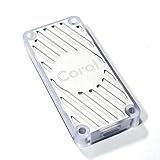
- High-Performance ML Accelerator: Integrates Edge TPU, delivering 4 TOPS (int8) peak performance for machine learning inference tasks.
- Strong Compatibility: Supports M.2 A+E key interface for easy integration into existing systems.
- Low Power Design: Provides 2 TOPS per watt, ideal for embedded and energy-efficient applications.
- Wide OS Support: Compatible with Linux (Debian 10/Ubuntu 16.04+) and Windows 10 (64-bit).
- Industrial-Grade Reliability: Operating temperature range of -20°C to +85°C, suitable for harsh environments.
That matters because downlink bandwidth and energy for communications are often the bottleneck. Even with modern links, sending every pixel of every frame is expensive in both time and power. Local inference can reduce data volume while improving responsiveness, especially for time-sensitive detections.
TPUs in space: what changes compared with Earth
On Earth, you can typically rely on stable temperature, well-characterized power delivery, and robust error handling across stable supply chains and operating conditions. Space systems are different: radiation can corrupt memory and logic state, thermal environments change drastically across orbital cycles, and components must keep working for years with minimal opportunities for repair.
Key constraints that shape the design
- Radiation effects: single-event upsets (SEUs), total ionizing dose (TID), and latch-up risks can increase with time in orbit.
- Thermal cycling: repeated heating and cooling can stress packaging, solder joints, and thermal interfaces.
- Power limits: spacecraft budgets are tight; conversion losses and peak draw during inference matter.
- Latency: round-trip time to ground can be seconds to minutes depending on orbit and mission geometry.
- Maintenance: there’s no “reboot and recover” safety net once deployed.
How a space TPU mission would likely work
Project Suncatcher-style systems are best thought of as edge AI on a spacecraft: the “front end” is sensors, the TPU is the accelerator for inference (and sometimes pre-processing), and the “back end” is telemetry and downlink to mission control.
Compute and inference pipeline
A typical pipeline for on-orbit inference looks like this: capture sensor frames, run light pre-processing, execute a trained model on the TPU, then package outputs (labels, bounding boxes, anomaly scores, confidence metrics) for transmission or storage.
Data flow and telemetry
Even if you run inference locally, you still need a data path for verification and debugging. Many missions transmit a small subset of raw frames or intermediate features, especially during early commissioning or after model updates.
Model update strategy (on-orbit vs on-ground)
In practice, most reliable strategies are hybrid: training and heavy updates happen on the ground; the spacecraft receives compact updates (new weights, config changes, threshold tuning) when bandwidth and windows allow. Fully autonomous model learning on-board is possible but adds complexity and risk.
Quick wins for a faster PC:
Scan for outdated or missing drivers - takes under a minuteDriver Scan →Repair Windows errors before they cause bigger problemsFix Now →Fix the driver behind crashes, sound loss and screen glitchesFind Drivers →Engineering prerequisites before launch
To be survivable in orbit, a TPU-backed compute module must be designed like a flight instrument, not a bench-top machine. That usually means radiation-aware memory handling, conservative thermal margins, and a power plan that respects spacecraft voltage rails.
Radiation tolerance and error handling
Radiation planning is not optional. Engineers typically combine component selection with system-level mitigations such as error-correcting code (ECC) memory, watchdog timers, and scrubbing strategies that periodically correct corrupted memory.
When radiation behavior doesn’t match the expected models, you need fallback behavior: throttling inference, reducing model size, or switching to a “safe mode” configuration that still allows the spacecraft to operate and communicate.
Thermal design for extreme cycles
TPUs can generate significant heat under sustained inference loads. In space, convection is mostly absent, so designers rely on radiation to deep space and conduction to radiators. Thermal design becomes a control problem: you may cap workload, adjust inference cadence, or dynamically select smaller models during hot orbital segments.
Do these 3 things before closing this tab:
1Scan for outdated or missing drivers - takes under a minute2Repair Windows errors before they cause bigger problems3Fix the driver behind crashes, sound loss and screen glitchesPower budgeting and efficiency
Spacecraft systems often express power budgets in watts with strict peak limits. Even if average draw fits, a burst load can trip power protection circuits. That pushes design toward predictable inference scheduling, efficient batching (when safe), and careful selection of operational modes.
Reliability, redundancy, and watchdogs
Reliability engineering is where “moonshot” ideas become “mission.” A compute module often needs redundant critical paths, robust boot procedures, and watchdog logic to detect hangs, corrupted state, or failing sensors.
For example, a system can monitor inference outputs for sanity checks (confidence ranges, bounding-box sizes, or checksum-like validations) and trigger a safe fallback if outputs look physically impossible.
Launch, orbit, and ops: realistic constraints
Even if the hardware works perfectly in a lab, launch and long-term operations introduce new conditions. Vibration, shock, outgassing, and radiation exposure are only part of the story. Operational constraints determine whether the TPU is used effectively.
Latency to ground and autonomy
If the system depends on constant ground feedback, it may be too slow for meaningful detection. As a result, on-orbit autonomy is often key: the TPU may run inference on-board and only send events or summaries requiring ground review.
Also popular on Amazon
Storage limits and bandwidth ceilings
Storing raw sensor data can be expensive in mass, power, and reliability risk. Teams often adopt an event-driven approach: store only frames around detections or “interesting” anomalies, and otherwise store compressed or downsampled products.
Testing on Earth that still predicts space behavior
Space qualification typically includes vibration/shock testing, thermal vacuum tests, and radiation characterization. The goal is not to perfectly reproduce orbit, but to bound risk so teams can plan operational mitigations.
What could it enable in practice
If Project Suncatcher succeeds, the most visible payoff is better satellite “triage”: identify relevant events immediately, reduce downlink load, and enable faster response for missions where time matters.
What’s actually slowing this PC down?
Pick the symptom - the matching free tool is one click away.
On-board Earth observation analytics
Earth observation satellites generate massive imagery streams. On-orbit TPU inference can detect features (cloud types, wildfire smoke plumes, crop anomalies, ship tracks) and transmit only annotated outputs instead of raw frames.
Deep-space navigation and detection
For deep-space or distant missions, communication delays can be long. On-board compute supports autonomous detection of navigation cues and anomaly events so the spacecraft can respond without waiting for instructions.
Science instruments that benefit from ML
Some instruments produce data where pattern recognition helps interpret measurements. Running inference on-board can accelerate the feedback loop between instrument operation and scientific analysis.
Fault detection and predictive maintenance
Spacecraft components degrade. ML-based anomaly detection can watch for drift in sensor readings or changes in power/thermal signatures, allowing ground teams to address issues earlier.
Recommended Free Tools
Security and governance considerations
When you move inference into space, the attack surface changes. The spacecraft becomes a semi-autonomous compute device that must trust its software, protect communications, and avoid unsafe behaviors.
Model integrity and supply-chain trust
Model weights and inference configs should be signed and verified. If an attacker (or corrupted update) changes weights, outputs could become unreliable—potentially causing mission harm even if the hardware remains functional.
Telemetry privacy and data retention
Telemetry may include sensitive mission data. Teams should define retention policies and ensure data pipelines handle access control appropriately once outputs reach ground systems.
Export controls and exportable compute
High-performance compute often intersects with export-control rules depending on jurisdiction, capability, and application. Missions must include compliance review for hardware and related software/tooling.
Alternatives and why TPUs specifically
TPUs aren’t the only way to get AI compute into orbit. The decision is about performance-per-watt, software ecosystem, and the feasibility of producing a flight-ready module that can survive space conditions.
GPUs, FPGAs, and ASICs: where each fits
| Compute option | Strengths | Trade-offs in space |
|---|---|---|
| GPUs | Flexible development, broad ML support | Power and thermal can be harder to manage; radiation qualification may be costly |
| FPGAs | Custom datapaths, predictable performance | Development time can be longer; model changes may require re-synthesis |
| ASICs (like TPU-style accelerators) | High efficiency for fixed workloads | Flight-ready versions require deep qualification; flexibility depends on deployment approach |
Using small edge accelerators instead of TPUs
Some missions might prefer smaller inference chips to reduce qualification risk and power draw. The trade-off is typically accuracy and throughput: a smaller accelerator can push you toward smaller models or lower frame rates.
Independent reader supportYour contribution helps us test, update, and keep practical guides available for everyone.Risks, failure modes, and troubleshooting
Space AI systems have failure modes that differ from typical cloud deployments. Troubleshooting often means recognizing symptoms early and switching to a safer operating mode while preserving mission objectives.
If the system overheats
Try workload throttling first: reduce inference frequency, shorten inference bursts, or switch to a smaller model profile. Then re-check thermal telemetry against expected radiator performance and fan-less heat transfer assumptions.
Windows Errors? Fix Them Before They Spread
Repair common Windows errors and clear accumulated junk for a smoother, more stable PC - no reinstall needed.Free scan · no reinstallCrashes, No Sound, or Screen Glitches?
Random freezes, missing sound and display glitches usually trace back to one bad driver. Find and replace yours safely.Free scan · under a minuteAlso popular on Amazon

- A USB accessory that brings machine learning inferencing to existing systems. Works with Raspberry Pi and other Linux systems
- Performs high-speed ML inferencing: the on-board edge TPU Coprocessor is capable of performing 4 trillion operations (tera-operations) per second (tops), using 0.5 watts for each tops (2 tops per watt). For example, it can execute state-of-the-art mobile vision models such as mobilenet V2 AT 400 FPS, in a power efficient manner
- Works with Debian Linux: connects to any debian-based Linux system with an included USB 3.0 Type-C cable
- Supports tensorflow Lite: no need to build models from the ground up. Tensorflow Lite models can be compiled to run on the edge TPE
- Supports automl vision edge: easily build and deploy fast, high-accuracy custom image classification models to your device with automl vision edge
If temperature keeps climbing, you may need to revisit power draw configuration or thermal throttling thresholds and ensure the compute module’s thermal interface materials didn’t degrade under thermal vacuum tests.
If radiation flips bits faster than expected
First, verify ECC coverage and error logs. If you see elevated corrected error rates, increase scrubbing frequency (if supported), trigger a compute reset, or reduce memory pressure by lowering model size or enabling inference modes that use less intermediate state.
In the worst case, systems switch to a “safe mode” configuration that runs a minimal model or bypasses TPU inference while maintaining communications and core spacecraft functions.
If power draw spikes during inference
Check inference scheduling and batch behavior. Spiky workloads can create peak currents that trip protection circuits even if average power is acceptable.
Free tools Windows power users keep installed
One-click scans. No signup required.
Mitigate by lowering concurrency, constraining input resolution, and using fixed-time-step scheduling so the power profile stays within the spacecraft’s allowable envelope.
If bandwidth starves your telemetry
Make the system event-driven rather than frame-driven. Transmit inference events, confidence-weighted summaries, and only upload raw frames when confidence crosses a threshold or when novelty detection flags a candidate.
Also validate that compression is actually working as expected and that downlink priorities are correctly configured for your link conditions.
Timeline expectations and how to interpret announcements
Moonshot announcements often mix hardware exploration with mission-ready testing. A reasonable way to interpret Project Suncatcher updates is to track three signals: hardware qualification milestones, successful on-orbit commissioning phases, and measurable improvements such as reduced downlink volume or improved detection latency.
If Google shares timelines, treat them as ranges until you see specific test results—especially thermal vacuum qualification, radiation characterization outputs, and on-orbit telemetry demonstrating stable inference over multiple orbital cycles.
Bottom Line
Putting TPUs in space via Project Suncatcher is fundamentally about shifting AI closer to sensors to reduce data transfer and improve responsiveness. The hard part isn’t only achieving fast inference—it’s making that inference reliable under radiation, thermal cycling, and power constraints.
If the program lands with strong on-orbit results, it could set a template for future spacecraft: edge AI as a standard subsystem, with models deployed and updated through disciplined ground-to-orbit workflows.
FAQs
Is Project Suncatcher a production satellite system?
It’s best understood as a mission concept and technology demonstration. Production systems usually require extensive qualification, long-duration reliability proof, and repeatable deployment workflows.
Do these 3 things before closing this tab:
1Repair Windows errors before they cause bigger problems2Scan for outdated or missing drivers - takes under a minute3Clear out junk files and repair common Windows errorsWill a TPU run fully autonomously in space?
Many designs are hybrid: the TPU performs on-board inference autonomously, while model updates and deeper retraining happen on the ground. Autonomy level depends on latency requirements and mission risk tolerance.
What’s the biggest technical risk for TPU-on-orbit?
Reliability under radiation and thermal stress is typically the top risk. Power spikes and memory corruption are also frequent culprits in early deployments, especially when workloads aren’t yet tuned to space operating modes.
How does on-board inference reduce communication costs?
Instead of downlinking raw sensor streams, the spacecraft can transmit compact outputs like labels, bounding boxes, event summaries, and confidence scores—cutting bandwidth and energy usage.
Could other AI hardware beat TPUs in space?
Possibly. The right choice depends on the target model size, power limits, qualification availability, and how often you need to change models. GPUs, FPGAs, and smaller edge accelerators may fit certain missions better than a TPU-style approach.
What’s actually slowing this PC down?
Pick the symptom - the matching free tool is one click away.

