Recommended Free Tools
Some links on this page are affiliate links: if you buy through them we may earn a commission, at no extra cost to you.
Recent reporting about an AirTag 2 leak is moving fast, with multiple outlets pointing to five improvements that—if accurate—tighten how quickly you find lost items and how reliably the device behaves in day-to-day use. Even if the exact details change before launch, the direction is consistent: better detection guidance, more useful alerts, and fewer “why didn’t it update?” moments.
This guide turns the rumored features into practical expectations. You’ll learn what each upgrade would mean, how to verify it when AirTag 2 becomes available, and whether it’s worth upgrading from the original AirTag—or just adjusting your current setup.
As an Amazon Associate I earn from qualifying purchases.
What the AirTag 2 leak is claiming
The leak centers on five improved features for a hypothetical AirTag 2 successor to Apple’s original AirTag. The claims are best treated as “likely upgrades,” not confirmed specifications, because Apple can shift hardware, software behavior, or performance targets up to release.
That said, the most valuable part of any AirTag upgrade is how it changes outcomes: faster “where is it?” moments, clearer direction while you’re searching, and fewer gaps when the tag is out of direct sight.
Popular on Amazon
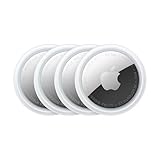
- FIND YOUR ITEMS ON FIND MY — AirTag (2nd generation) helps you keep track of what matters. Attach one to an item you want to keep track of using the Find My app.*
- EXPANDED PRECISION FINDING ON IPHONE AND APPLE WATCH — Get step-by-step directions to your lost item on iPhone and, now, Apple Watch.*
- ENHANCED SPEAKER — With a 50% louder speaker and a new, distinctive chime, it’s easier than ever to hear and find AirTag.*
- PING FROM FAR AND WIDE — Upgraded Ultra Wideband and Bluetooth chips allow you to find your items from even farther away than ever before.*
- SHARE ITEM LOCATION — Share AirTag location access temporarily and securely with trusted contacts, third parties, or over 50 airline partners if you lose something important.
Five improved features rumored for AirTag 2
Below are the five improvements that the leak reports. For each, you’ll see what it probably improves, what to expect, and how to test it without guessing once you have the device.
1) Better Precision Finding for tighter guidance
Precision Finding is the headline feature in the AirTag lineup. A rumored improvement typically points to improved sensor fusion and guidance stability—so your iPhone shows a more dependable direction and “distance” behavior while you’re walking around.
PC Slower Than It Used to Be?
A free scan shows the junk files, broken settings and background clutter dragging Windows down - then fixes them in one click.Free scan · Windows 10 & 11Crashes, No Sound, or Screen Glitches?
Random freezes, missing sound and display glitches usually trace back to one bad driver. Find and replace yours safely.Free scan · under a minuteIf AirTag 2 refines how it interacts with iPhone’s U1/UWB hardware (or improves timing/response), the practical result is less wobbling between directions and fewer “it says it’s close but it isn’t” moments.
2) A stronger speaker or more useful audible alerts
AirTag already has a built-in speaker for Find My sound alerts. The leak suggests the audible experience could be upgraded—either louder, clearer, or more consistent in real-world conditions (like inside a bag, under a car seat, or under thick fabric).
In practice, this matters when you’re in a noisy environment or the tag is partially obstructed. A better speaker won’t replace Precision Finding, but it often shortens the search once you’re within a few steps.
3) Improved battery life and/or more predictable power behavior
Battery life is one of the biggest day-to-day concerns with any tracker. The leak indicates AirTag 2 could offer better endurance and/or more predictable behavior—meaning fewer “sudden low battery” moments and potentially a longer interval between replacements.
Quick wins for a faster PC:
Clear out junk files and repair common Windows errorsFree Scan →Fix the driver behind crashes, sound loss and screen glitchesFind Drivers →Even a modest extension changes ownership cost and maintenance frequency. It also affects reliability: when battery levels are healthier, update intervals and alert behavior tend to feel steadier.
4) Broader or more robust Find My network performance
AirTag’s power comes from the Find My ecosystem and the density of nearby Apple devices. Rumored improvements could aim at more efficient communication and better handling when devices pass in and out of range.
Also popular on Amazon

- FIND YOUR ITEMS ON FIND MY — AirTag (2nd generation) helps you keep track of what matters. Attach one to an item you want to keep track of using the Find My app.*
- EXPANDED PRECISION FINDING ON IPHONE AND APPLE WATCH — Get step-by-step directions to your lost item on iPhone and, now, Apple Watch.*
- ENHANCED SPEAKER — With a 50% louder speaker and a new, distinctive chime, it’s easier than ever to hear and find AirTag.*
- PING FROM FAR AND WIDE — Upgraded Ultra Wideband and Bluetooth chips allow you to find your items from even farther away than ever before.*
- SHARE ITEM LOCATION — Share AirTag location access temporarily and securely with trusted contacts, third parties, or over 50 airline partners if you lose something important.
If this claim is accurate, you should see fewer “stale location” gaps and better refresh behavior when your item is moving through busy areas (transit, airports, downtown streets).
5) Smarter setup, pairing, and troubleshooting improvements
Leaks often include “quality of life” changes, and AirTag pairing is a familiar pain point when it goes wrong. The rumored upgrade suggests easier setup and fewer edge-case failures—like smoother pairing, clearer prompts, or more accurate device status.
For owners, this shows up as fewer manual steps and a cleaner confirmation flow in the Find My app when you register the tag, rename it, or replace a battery.
Why these upgrades matter in real life
Trackers don’t fail only in dramatic ways. Most frustration comes from small delays and uncertainty: the map looks right “kind of,” the direction seems inconsistent, or you can’t hear the sound from inside a backpack.
- Better Precision Finding reduces search time during the “last 10–30 seconds” stage.
- Improved audible alerts help when you can’t immediately see the tag or the environment is noisy.
- Battery improvements reduce maintenance frequency and lower the chance of late discoveries when a tag goes low.
- More robust network performance helps your location stay current as the item moves.
- Setup and troubleshooting lowers the chance you’ll spend 20 minutes fixing what should take 20 seconds.
What you should check before buying (or waiting)
If you’re currently using the original AirTag, the leak doesn’t automatically mean you need to upgrade. The best buying decision depends on your iPhone/iPad setup, how you lose items, and whether you rely on Precision Finding vs the audible alarm vs network updates.
Compatibility with iPhone, iPad, and iOS versions
Precision Finding and Find My behavior depend on hardware and software. Before you assume AirTag 2 features will work exactly as expected, make sure your device supports Precision Finding and has a current iOS version installed.
As a baseline, verify that your iPhone model supports UWB-based Precision Finding and that your system software is up to date (Apple typically rolls out performance improvements through iOS updates as well).
Find My behavior differences vs the original AirTag
Even if AirTag 2’s hardware is better, Find My behavior can also be shaped by app and OS logic. That means two users can see different results depending on iOS version, location services settings, and background app behavior.
Also popular on Amazon

- No App or SIM Required &Just Pair and Track:Connects directly with Apple’s Find My network—no SIM, no subscription, no app needed. Works like an Air Tracker Tag but without the extra setup.
- Long-Lasting Battery & Waterproof Design:Built-in CR2032 battery (225mAh) offers up to 365 days of standby time. Daily waterproof casing protects your luggage tag, keychain, or air tracker in any weather.
- Play Sound & Find Items Instantly:Easily locate your keys, wallet, or bags with the built-in buzzer. From over 40 meters in open space, the tracker plays a loud sound via the Find My app.
- Supports Lost Mode & Anti-Reuse Protection:Just like luggage tag, activate Lost Mode to get automatic alerts when found by others. This tracker tag cannot be paired again if lost or stolen.
- Lightweight & Portable with Keychain Lanyard:Compact and travel-ready design. Attach this tracker tag to your keychain, backpack, luggage tags or collar. Easy to carry, hard to lose.
When you test, compare the same item-lost scenario between your current AirTag (if you still have it) and the AirTag 2 unit you plan to keep.
Privacy and safety considerations
AirTag devices are designed to work within Apple’s safety framework, including anti-stalking features and notifications when an unknown AirTag is moving with you. Any upgrade should preserve those boundaries, but you should still review relevant settings after pairing a new tag.
What’s actually slowing this PC down?
Pick the symptom - the matching free tool is one click away.
Check the alerts related to tracking and make sure your Find My configuration is correct on the iPhone you’ll use to manage the device.
How to verify the features when AirTag 2 ships
Don’t trust “claimed improvements” alone. Build a small test you can run in under an hour so you know whether AirTag 2 performs better for your situation.
Test plan for Precision Finding
Pick a consistent environment (same room, similar obstruction level) and test direction guidance at a repeatable distance.
- Place the AirTag inside a backpack with one side flap open and one fully closed.
- Stand 3–5 meters away and start Precision Finding from the Find My interface.
- Walk a short arc while keeping your iPhone orientation steady.
- Note how often the direction arrow flips unexpectedly and whether the “close” indication stabilizes.
- Repeat after moving the backpack to a slightly different location (10–20 meters away).
Test plan for audible alerts
Audible performance is easy to judge if you control the environment and the tag mounting style.
- Attach the tag to a surface with similar absorption (hard plastic vs fabric).
- Start Play Sound from the Find My item details page.
- Listen from 2–3 meters away first, then 5–8 meters away.
- Repeat once with the tag inside a bag (near the outer pocket) and once deep inside.
- Record whether the sound remains clear or becomes “muffled but present.”
Battery expectations and usage logging
You can’t measure “months of battery life” in one day, but you can reduce surprises by checking current battery status promptly after setup.
- Pair AirTag 2 and open Find My for the item.
- Confirm the battery status indicator is accurate immediately after pairing.
- Turn on a realistic usage pattern (regular play sound tests once per day for 3–4 days).
- Watch battery changes over the next few days and compare to your existing AirTag’s typical drain.
Network performance checks
For network-based updates, you’ll judge by how quickly the last location refreshes after moving the item.
Also popular on Amazon

- Smart Finder:The luggage GPS tracker makes it easy to manage your valuables. Working with the Find My app(IOS ONLY), you can quickly locate your items. It comes with one case, allowing you to attach the tag to your keys, wallet, backpack etc.
- Find Nearby:Use the Find My app to ring your luggage tracker when it's within Bluetooth range,or ask your Siri to find it for you.Click the 'Play Sound' Button, the tag tracker will make a sound 'di di di'. You can according to the sound find your items
- Find Far Away: When outside of Bluetooth range, use the Find My app to view your 'Item Locator's most recent location on a map. You can use the network and GPS of millions of Apple devices to locate it anywhere in the world.Reduce the loss of your items
- Share Your Items and Privacy Protection:The item finders tag lets your family view the location of your items (a feature for iOS 17).The chip in this Bluetooth tracker is MFi certified,guaranteeing that your location data is encrypted and protected
- Water Resistant & Replaceable Battery: Designed for outdoor adventures, this tracker can withstand rain, ensuring you can use it confidently in various weather conditions. Plus, it features a replaceable CR2032 battery that lasts up to a year
- Keep the tag stationary for 15–30 minutes, then check its location timestamp.
- Move 1–2 neighborhoods away (or to a busier downtown block), then wait 10–30 minutes.
- Compare refresh speed to your existing AirTag during the same time window.
- Repeat once on a different day to account for device density variation.
Should you upgrade from AirTag (1st gen) to AirTag 2?
The most honest answer: it depends on your pain point. If your original AirTag is already “good enough,” you might squeeze more value by improving your tag placement or simply replacing the battery. If Precision Finding or audible search is failing you often, AirTag 2 could reduce those moments.
Upgrade sooner if…
- You rely on Precision Finding in challenging cases (bags, jackets, tight spaces).
- You often hear the sound late or can’t locate the tag by ear.
- You’ve had battery surprises or frequent maintenance due to your usage pattern.
- You travel through dense areas where updates are common, and you want fewer stale map moments.
Wait if…
- Your original AirTag reliably finds items for your use case.
- You mostly use network updates and rarely need direction guidance.
- You don’t want to deal with a new device during the initial release period.
- You’d rather invest in mounting accessories first (stronger holders, better attachment points, or protective cases).
Troubleshooting: what to try if an expected feature doesn’t work
Leaks can be wrong. Even if AirTag 2 launches with improvements, your results can still vary due to environment, settings, or iPhone configuration. Here’s a practical troubleshooting path.
Precision Finding feels off
- Check placement: thick metal, dense fabric, and pockets can reduce UWB signal quality.
- Confirm location services: ensure location permissions are enabled for Find My.
- Keep the phone steady: rapid movements can make direction guidance look unstable.
- Try a different iPhone: if available, compare against another supported iPhone model.
Audible alerts aren’t reliable
- Remove obstruction: test with the tag free from deep pockets first.
- Check battery: low battery can affect loudness or consistency.
- Use consistent volume: confirm your iPhone’s ringer settings and alert volume are normal.
- Re-run Play Sound: sometimes a single alert misfires; try a second run after 30–60 seconds.
Battery drain looks abnormal
- Limit alert tests: frequent Play Sound trials can inflate short-term drain.
- Check for repeated pairing events: only re-pair if you actually need to.
- Compare to baseline: run a 3–5 day comparison to your other AirTag’s normal behavior.
Find My updates feel delayed
- Move to a test area: run a comparison in a busy area vs a quiet one.
- Wait for a refresh window: updates are network-driven and can take time depending on local device density.
- Confirm your iPhone settings: background location and Find My permissions can affect how quickly you get notified.
Alternatives if you need tracking now
If you don’t want to wait for AirTag 2’s release window, you still have options. The best alternative depends on whether you need “direction now” or “location later.”
Keep using your current AirTag and refine your setup
You can often improve outcomes immediately by changing attachment and placement. Use a holder that keeps the tag from rubbing against metal or deep inside dense compartments.
Also, do a quick “sound test” once you replace a battery. If you can hear it clearly at the distance you care about, you’ll know you’re ready before a real loss scenario.
Use third-party trackers where they fit your use case
There are non-Apple Bluetooth trackers and other ecosystems, but their performance varies heavily based on local network density and phone compatibility. If your key requirement is Precision Finding-style guidance, AirTag remains a more consistent choice inside Apple’s environment.
Free tools Windows power users keep installed
One-click scans. No signup required.
If your situation is mostly “find it later,” other trackers may be enough—just be realistic about update delays.
Choose the right coverage strategy: tagging + habits
No tracker beats good habits: charging habits for the iPhone, consistent bag placement, and quick checks before leaving a venue. Tagging reduces risk, but it doesn’t replace routine.
Also popular on Amazon

- 【EASY INSTALLATION & REMOVAL】 Designed with a twist-to-open inner PC shell. To install, simply place your AirTag inside, rotate the PC shell to the "ON" position to lock it, and insert the whole piece into the silicone holder. To remove, just push it out of the silicone case, rotate to the "OFF" position, and easily take your AirTag out—no tools required, making battery replacement a breeze.
- 【IPX8 Professional Waterproof & Sweatproof】 Built to IPX8 waterproof standards and paired with the tight-seal inner shell, this case effectively blocks rain, sweat, daily splashes, and dust. Whether you are hiking outdoors, commuting in the rain, or using it on your pet's collar, you can rest assured that your AirTag stays completely dry and operates without signal interference.
- 【Sturdy Metal Keychain & Multi-Scene Application】 Equipped with a high-quality stainless steel metal ring on top, it is strong, durable, and rust-proof. Easily attach it to keychains, backpack zippers, pet collars, baby strollers, luggage, and other personal valuables. Clip it on and go—making it effortless to track your important belongings anytime, anywhere.
- 【Skin-Friendly Silicone & Long-Lasting Freshness】 The outer liquid silicone is made of eco-friendly materials, featuring a smooth, soft, and non-slip texture. It is stain-resistant, sweat-proof, scratch-resistant, and built to last. It won't turn yellow or deform after prolonged use, and it stays odor-free even in summer heat or daily friction, ensuring a comfortable and pleasant user experience.
- 【Upgraded Twist-Lock & Dual-Layer Protection】 Custom-designed for Apple AirTag 1st and 2nd Gen, the precise cutouts fit perfectly without obstructing signal transmission. Different from ordinary silicone cases, this protective cover features a detachable hard PC inner shell combined with a soft silicone outer layer. The unique rotating lock (Twist-Lock) design on the inner shell firmly secures your AirTag, completely preventing it from slipping out or getting lost. The high-elastic silicone outer layer provides strong cushioning against accidental bumps and drops, offering ultimate peace of mind for your tracker. (Note: AirTag is NOT included.)
For frequent movers, consider using multiple tags for different items rather than relying on a single “most important” tracker.
Bottom Line
The AirTag 2 leak’s five rumored improvements—better Precision Finding, a more useful speaker, improved battery behavior, stronger Find My network performance, and smoother setup—map directly to the real pain points owners complain about: search speed, certainty, and fewer misses.
The Tool Desk
Outbyte PC Repair FREERepair Windows errors before they cause bigger problemsFix Now →Outbyte Driver Updater FREEFix the driver behind crashes, sound loss and screen glitchesFind Drivers →If your original AirTag already works well, you may prefer to wait. If you regularly struggle to locate an item quickly or you’re tired of ambiguous results, AirTag 2 looks like a meaningful upgrade worth planning for.
FAQs about AirTag 2 leak rumors
Is the AirTag 2 leak confirmed?
No. Treat the five-feature leak as unverified reporting until Apple publishes official specifications or release details. Performance can also change with iOS updates.
Will AirTag 2 work with my iPhone?
AirTag devices generally work with Find My on supported Apple devices. Precision Finding specifically depends on iPhone hardware capabilities, so check that your iPhone model supports UWB-based Precision Finding.
Should I buy an AirTag 2 if I already own an AirTag?
If your current AirTag finds items reliably, you can wait. If your biggest frustration is direction accuracy, audible search, or maintenance frequency, AirTag 2 could be worth it.
Do these 3 things before closing this tab:
1Repair Windows errors before they cause bigger problems2Scan for outdated or missing drivers - takes under a minute3Clear out junk files and repair common Windows errorsWill AirTag 2 improve Find My updates in rural areas?
Network performance depends on nearby Apple devices. In low-density areas, improvements may be less noticeable than in busy urban environments, but efficiency gains could still help.
Will AirTag 2 require special setup?
AirTag setup is typically straightforward. The leak suggests smarter setup and troubleshooting, but you should still expect normal pairing through the Find My app.

