Some links on this page are affiliate links: if you buy through them we may earn a commission, at no extra cost to you.
The Lexar NQ100 is a budget SATA SSD aimed at users who want a simple, affordable upgrade for an older desktop or laptop. It is not designed to compete with high-end NVMe drives, but it promises a clear improvement over mechanical hard drives in boot times, app loading, responsiveness, and everyday file handling.
This review looks at the NQ100 from a practical perspective: its core specifications, 2.5-inch design, compatibility, real-world performance, endurance, warranty coverage, and current value against other low-cost SSDs. For anyone refreshing a basic PC, extending the life of a laptop, or replacing a slow hard drive on a tight budget, the key question is whether the NQ100 delivers enough speed and reliability for the price.
As an Amazon Associate I earn from qualifying purchases.
Lexar NQ100 Specs and Features
The Lexar NQ100 is a basic 2.5-inch SATA SSD designed for affordable storage upgrades rather than high-end performance. It uses the SATA III 6Gb/s interface, which makes it compatible with a wide range of older desktops, budget PCs, and laptops that accept a standard 2.5-inch drive. For systems still running a mechanical hard drive, the NQ100’s biggest feature is not peak benchmark speed, but the move to solid-state storage: faster booting, quicker application launches, lower noise, and better resistance to vibration.
Lexar has offered the NQ100 in several capacities, commonly including 240GB, 480GB, and 960GB models, with availability varying by region and retailer. Sequential read speeds are advertised at up to 550MB/s, which is close to the practical ceiling of the SATA interface. Write performance is typically lower and can vary by capacity, workload, and how full the drive is. Like many entry-level SATA SSDs, the NQ100 focuses on everyday responsiveness instead of sustained heavy write performance for tasks such as large video exports or constant data capture.
Popular on Amazon

- Experience up to **550MB/s read speeds** for faster boot times, faster app launches, and seamless file transfers.
- Compatible with most laptops and desktops. No complicated setup - just install and enjoy instant speed increases.
- This SSD is shockproof, vibration proof and energy efficient, providing cooler and quieter performance than traditional hard drives.
- Reliable storage for personal files, multimedia and large applications - perfect for everyday computing needs.
- Shock resistant up to **1500 G** and vibration resistant across all axles. Designed for durability and long-term reliability.
| Feature | Lexar NQ100 |
|---|---|
| Form factor | 2.5-inch internal SSD |
| Interface | SATA III 6Gb/s |
| Common capacities | 240GB, 480GB, 960GB |
| Advertised read speed | Up to 550MB/s |
| Drive type | Entry-level consumer SATA SSD |
| Best use case | Replacing an HDD in a budget PC or laptop |
Feature-wise, the NQ100 keeps things simple. It does not target enthusiast users with DRAM cache specifications, hardware encryption features, or advanced management extras. Depending on the production batch and capacity, it may use different NAND and controller configurations, which is common in budget SSD lines. In practical terms, buyers should view it as a straightforward SATA replacement drive rather than a premium model with guaranteed high sustained write behavior across every workload.
The 2.5-inch format is one of the NQ100’s main strengths. It can slot into many older laptops with a SATA bay, desktop cases with 2.5-inch mounting points, or 3.5-inch bays using an adapter bracket. Its low power draw also suits laptops where battery life, reduced heat, and silent operation matter. Since it has no moving parts, it is a safer everyday choice than a hard drive for a machine that gets carried around, bumped, or used on the go.
Recommended Free Tools
For buyers comparing specifications, the NQ100 sits below NVMe SSDs and more advanced SATA models, but that does not make it a poor fit for its intended role. A SATA SSD cannot match the multi-gigabyte-per-second speeds of modern M.2 NVMe drives, yet many older systems do not support NVMe boot drives at all. In those machines, the Lexar NQ100 offers a simple path to a much more responsive computer without replacing the motherboard, processor, or laptop entirely.
Design, Build Quality, and Compatibility
The Lexar NQ100 uses the familiar 2.5-inch SATA SSD format, which makes it an easy drop-in upgrade for many older desktops and laptops still running a mechanical hard drive. Its 7mm thickness is especially useful for books, small-form-factor PCs, and all-in-one systems that require a slim drive. In most desktop towers, it can be installed in a 2.5-inch bay or mounted into a 3.5-inch bracket if the case does not provide native SSD mounting points.
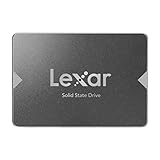
Externally, the NQ100 has a simple, lightweight enclosure with a plain gray finish and Lexar branding on the top label. It does not try to look premium, but that is expected for a budget SATA drive. The casing feels basic rather than rugged, and the low weight suggests a no-frills construction inside. For a drive that will spend its life mounted inside a laptop or desktop, this is not a real drawback. There are no moving parts, so it is still far more resistant to bumps and vibration than a traditional hard drive.
Physical fit and system support
Compatibility is one of the NQ100’s strongest practical advantages. It uses a standard SATA III 6Gb/s interface and is backward compatible with SATA II ports, so it can work in a wide range of older systems. On a SATA II machine, speeds will be capped by the older interface, but the upgrade from an HDD can still feel dramatic because access times and random responsiveness improve significantly. It is also suitable for replacing a failed laptop hard drive, extending the usable life of an office PC, or adding inexpensive secondary storage to a desktop.
Do these 3 things before closing this tab:
1Clear out junk files and repair common Windows errors2Scan for outdated or missing drivers - takes under a minute3Repair Windows errors before they cause bigger problems- Form factor: 2.5-inch, 7mm height for broad laptop and desktop compatibility.
- Interface: SATA III 6Gb/s, with backward compatibility for older SATA ports.
- Installation: Works with standard SATA data and power connectors.
- Use cases: OS drive for budget systems, HDD replacement, or low-cost secondary storage.
Installation is straightforward, but what you need depends on the target machine. A desktop typically requires a SATA data cable and an available SATA power connector from the power supply. Some cases may also need a 2.5-inch-to-3.5-inch adapter bracket. In a laptop, the NQ100 usually slides into the existing drive bay, though certain older models use a spacer, caddy, or proprietary mounting rails that must be transferred from the original hard drive. Users upgrading from an HDD should also plan how they will move their data, either by cloning the old drive or performing a fresh operating system installation.
The NQ100 is not intended for modern systems that support M.2 NVMe drives, where even entry-level NVMe SSDs can be much faster. Its best match is hardware limited to SATA storage or users who specifically need a 2.5-inch drive. For that role, its design is sensible: compact, widely compatible, quiet, cool-running, and simple to install. The build quality is modest, but it is adequate for the budget category and appropriate for everyday home, school, and office PCs.
Also popular on Amazon

- Enjoy up to **550MB/s read speed for faster boot times, faster app launches, and smooth file transfers.
- Compatible with most laptops and desktop computers. No complicated configuration, just install and enjoy instant speed increases.
- With no moving parts**, this SSD is shockproof, vibration-proof and energy-saving, providing cooler and quieter performance than traditional hard drives.
- Reliable storage for personal files, multimedia and large applications, perfect for everyday computer needs.
- Shock resistant up to **1500G** and vibration resistant on all axles. Designed for long term durability and reliability.
Benchmark and Real-World Performance
The Lexar NQ100 is a budget SATA SSD, so its performance should be judged against hard drives and other entry-level 2.5-inch SATA drives rather than modern NVMe SSDs. In typical sequential benchmarks, the NQ100 usually lands close to the practical ceiling of the SATA III interface for reads, with advertised read speeds up to 550MB/s depending on capacity. Write performance is more variable and can be lower than higher-end SATA models, especially during longer transfers where the drive’s cache behavior becomes more noticeable.
In synthetic tests such as CrystalDiskMark or AS SSD, the NQ100 tends to deliver strong sequential read results and respectable short-burst write numbers for its class. This is exactly the kind of workload that makes an old laptop or desktop feel dramatically faster after replacing a mechanical hard drive. Random read and write performance also improves by a wide margin compared with HDDs, which matters more for everyday responsiveness than peak sequential throughput.
| Workload | Expected NQ100 Behavior | Practical Impact |
|---|---|---|
| Sequential reads | Often near 500-550MB/s | Fast game loading, quick file access, smooth media playback |
| Sequential writes | Good for short transfers, slower on sustained writes | Fine for documents and photos; large video dumps may take longer |
| Random reads | Much faster than a hard drive | Snappier Windows boot, faster app launches, less waiting |
| Heavy multitasking | Adequate but not workstation-class | Best suited to light productivity and general home use |
Real-world performance is where the NQ100 makes the most sense. A system that previously booted Windows from a 5400RPM laptop drive can feel completely different after the upgrade. Startup becomes shorter, desktop icons appear faster, and background tasks such as antivirus scans or Windows updates no longer make the machine feel as sluggish. Opening browsers, office apps, PDF readers, and lightweight creative tools is also much quicker because the SSD can access many small files without the seek delays of a spinning disk.
The main limitation appears during large sustained writes. Copying a few gigabytes of photos, installing common applications, or moving school and office files is generally smooth. However, transferring very large folders, raw video footage, or full drive backups can expose the NQ100’s budget nature. Once any write cache is saturated, speeds may drop noticeably compared with stronger SATA SSDs that use better controllers, DRAM cache, or more consistent flash configurations. For casual users, this may be a rare inconvenience; for frequent content creators, it is a meaningful drawback.
Compared with NVMe drives, the NQ100 is clearly slower on paper and in heavy workloads, but that does not make it ineffective. Many older PCs and laptops only support 2.5-inch SATA storage, and in those systems the NQ100 can still deliver the most visible upgrade available. It is not built for high-end gaming rigs, 4K editing stations, or write-heavy professional use, but for web browsing, office work, media playback, school tasks, and reviving older hardware, its performance is more than adequate.
Everyday Use: Boot Times, App Loading, and File Transfers
In day-to-day use, the Lexar NQ100 delivers the kind of upgrade most people expect when moving from a mechanical hard drive to a SATA SSD: a much more responsive system. Windows feels quicker from the moment the login screen appears, folders open without the familiar hard drive delay, and background tasks such as antivirus scans or update checks cause less obvious slowdown. It does not make an older budget laptop feel like a modern high-end machine, but it removes one of the biggest bottlenecks in basic PCs.
Boot times are one of the clearest improvements. A desktop or laptop that previously took a minute or more to reach a usable Windows desktop with a 2.5-inch hard drive can often drop to roughly 15 to 30 seconds with the NQ100, depending on the processor, RAM, startup apps, and Windows installation. Wake-from-sleep and restart behavior also feels smoother because the drive can access small system files far faster than a spinning disk. Compared with faster NVMe SSDs, the NQ100 is not a standout, but for machines limited to SATA, the practical difference during startup is still substantial.
App loading is similarly improved, especially with everyday software. Web browsers, Microsoft Office apps, PDF readers, media players, and messaging clients open with far less waiting. Chrome or Edge with several extensions still depends heavily on CPU and memory, but the initial launch and profile loading are noticeably faster than on a hard drive. Lightweight creative tools and older games also benefit from shorter load screens, although the NQ100 is not aimed at heavy workstation use where large project files, scratch disks, or sustained writes are part of the workflow.
Also popular on Amazon

- Upgrade your laptop or desktop computer for faster startups, data transfers, and application loads
- Sequential read speeds of up to 550MB/s
- Faster performance and more reliable than traditional hard drives
- Shock and vibration resistant with no moving parts
- [512GB] 240TBW
File transfer behavior in daily tasks
For typical file management, the NQ100 performs well enough for a budget SATA SSD. Copying photos, documents, installers, compressed archives, and music libraries feels snappy, particularly when moving many small files that would make a hard drive struggle. Transferring data from a USB 3.0 flash drive, downloading large game files, or extracting compressed folders is generally smooth, though performance can vary once the drive is dealing with very large sustained writes.
Because the NQ100 is an entry-level DRAM-less SATA SSD, it is best judged by realistic consumer workloads rather than professional transfer marathons. Short and medium-sized copies are responsive, but very large files or repeated heavy writes may slow once the cache is exhausted. That means moving a few gigabytes of photos or installing common applications is fine, while dumping hundreds of gigabytes of video footage in one session is not its ideal use case.
What’s actually slowing this PC down?
Pick the symptom - the matching free tool is one click away.
- Best suited for: Windows boot drives, office PCs, school laptops, web browsing machines, and basic media storage.
- Noticeable gains: faster startup, quicker app launches, smoother multitasking, and reduced system stutter versus a hard drive.
- Less ideal for: frequent 4K video editing, large game library shuffling, heavy scratch-disk use, or constant bulk write workloads.
The overall experience is what makes the Lexar NQ100 appealing: it turns an otherwise sluggish computer into something that feels usable again. If the system already has an NVMe slot, an NVMe drive is the better performance choice. But for older laptops and desktops with only a 2.5-inch SATA bay, the NQ100 offers a simple, low-cost improvement that is easy to feel in normal use.
Endurance, Reliability, and Warranty
The Lexar NQ100 is a budget SATA SSD, so its endurance expectations should be judged against everyday home and office workloads rather than heavy workstation use. It is well suited to operating system duties, web browsing, document editing, media playback, light photo storage, and general application loading. These are mostly read-heavy tasks, which are easy on NAND flash and fit the NQ100’s role as a low-cost replacement for an aging hard drive.
Lexar has sold the NQ100 in several capacities, commonly including 240GB, 480GB, and 960GB versions, though availability can vary by region. Endurance ratings also vary by capacity, as larger drives usually have more NAND available for wear leveling. For a typical budget PC, even the lower-capacity models should handle years of modest daily use, provided the drive is not constantly filled to the limit or used for large, repeated write jobs such as video capture, scratch-disk editing, or frequent multi-hundred-gigabyte game installs.
Reliability in daily use
The NQ100 uses the standard 2.5-inch SATA form factor and has no moving parts, which gives it an immediate durability advantage over a mechanical hard drive in laptops and compact desktops. It is less vulnerable to vibration, bumps, and transport damage, making it a sensible choice for older books that are still carried around. Like most entry-level SATA SSDs, it is designed around basic consumer reliability rather than enterprise-grade sustained write performance.
PC Slower Than It Used to Be?
A free scan shows the junk files, broken settings and background clutter dragging Windows down - then fixes them in one click.Free scan · Windows 10 & 11Outdated Drivers Are Slowing You Down
One free scan finds every outdated or missing driver and matches the right update for your exact hardware.Free scan · exact hardware match- Best fit: boot drive for Windows or Linux, office PCs, school laptops, media machines, and older systems being revived.
- Acceptable use: storing games, photos, music, and general files, especially when paired with another backup drive.
- Less ideal: continuous write-heavy workloads, professional editing caches, surveillance recording, or database use.
As with any low-cost SSD, maintaining some free space helps long-term consistency. Leaving around 10-20% of the drive unused gives the controller more room for background maintenance and wear leveling. It is also worth checking that TRIM is enabled in the operating system, since TRIM helps the SSD manage deleted data more efficiently over time. For most modern Windows, macOS, and Linux installations, this is handled automatically when the drive is connected normally over SATA.
Warranty coverage
The Lexar NQ100 is typically backed by a limited three-year warranty, though the exact terms can depend on the market and retailer. Warranty coverage is generally limited by time and, where specified, total bytes written. Buyers should keep the purchase receipt and confirm the warranty details for the exact capacity being purchased, especially when buying from marketplace sellers or clearance listings.
Also popular on Amazon
- - High capacity memory: 512GB of reliable SSD space, perfect for work, media or video games
The warranty is reasonable for an entry-level SATA SSD, but it should not be treated as a substitute for backups. SSDs can fail without the warning signs associated with old hard drives, and accidental deletion, malware, power issues, or file corruption are not solved by warranty service. The safest setup is still a simple backup routine: keep personal files synced to cloud storage, copied to an external drive, or mirrored to another system. With that in place, the NQ100’s endurance and reliability are more than adequate for the budget upgrade role it is meant to fill.
Price, Value, and Best Alternatives
The Lexar NQ100 is positioned as a low-cost SATA SSD, so its value depends heavily on street pricing. It is commonly sold in entry-level capacities such as 240GB, 480GB, and 960GB, with the smaller models aimed at reviving older laptops and office desktops rather than serving as high-end storage. When priced aggressively, the NQ100 makes sense as a boot-drive replacement for a slow 2.5-inch hard drive, especially in systems limited to SATA speeds where a faster NVMe drive is not an option.
The Tool Desk
Outbyte Driver Updater FREEScan for outdated or missing drivers - takes under a minuteDriver Scan →Outbyte PC Repair FREERepair Windows errors before they cause bigger problemsFix Now →For budget buyers, the main appeal is simple: the NQ100 can deliver the biggest day-to-day upgrade for the least money. Moving Windows, everyday applications, and a few frequently used files from a mechanical hard drive to this SSD can make an old PC feel much more responsive. The value is strongest when the 480GB or 960GB version costs only slightly more than the smallest capacity, since modern Windows installations, browser caches, productivity apps, and game launchers can quickly consume a 240GB drive.
How the Lexar NQ100 compares on value
| Drive | Interface | Best for | Value angle |
|---|---|---|---|
| Lexar NQ100 | SATA 2.5-inch | Basic PC and laptop upgrades | Often one of the cheaper branded SATA SSD options |
| Crucial BX500 | SATA 2.5-inch | Budget home and office systems | Strong availability and frequent discounts |
| Kingston A400 | SATA 2.5-inch | Older machines and light workloads | Very common low-cost alternative |
| Samsung 870 EVO | SATA 2.5-inch | Heavier SATA workloads | Costs more, but has stronger reputation and endurance |
| WD Blue SA510 | SATA 2.5-inch | Mainstream upgrades | Good balance when priced close to budget models |
The closest alternatives are the Crucial BX500 and Kingston A400. Both target the same upgrade market: inexpensive SATA storage for everyday use. If all three are priced similarly, the choice often comes down to capacity, local warranty support, and current promotions. The Samsung 870 EVO is a better SATA SSD overall, but it usually costs more; it is easier to justify for users who write large amounts of data, keep a PC for many years, or want a more proven drive for a primary workstation. The WD Blue SA510 can also be a sensible middle-ground option if it is discounted near the NQ100’s price.
Buyers should also check whether their system supports M.2 NVMe storage before choosing the NQ100. In many newer desktops and laptops, an entry-level NVMe SSD can cost about the same while offering far higher sequential speeds and better headroom for future use. However, for machines with only a 2.5-inch SATA bay, the NQ100 remains practical. It is also useful when upgrading a family PC, school laptop, point-of-sale system, or secondary desktop where the workload is mostly browsing, documents, streaming, and light file storage.
The best way to judge the Lexar NQ100 is not by chasing top benchmark numbers, but by comparing its price per gigabyte against other reputable SATA drives on the same day. Choose the NQ100 if it is clearly cheaper than comparable branded models or if it offers a higher capacity for the same budget. If the price gap is small, a better-known alternative such as the Crucial BX500, WD Blue SA510, or Samsung 870 EVO may be worth the small extra spend, particularly for a main PC that will see years of regular use.
Free tools Windows power users keep installed
One-click scans. No signup required.
Verdict: Who Should Buy the Lexar NQ100?
The Lexar NQ100 is best understood as a low-cost SATA SSD for making an older PC or laptop feel usable again. It is not built to challenge high-end SATA drives, and it is far behind NVMe SSDs in peak throughput, but that is not the role it is trying to fill. Its strongest use case is replacing a slow 2.5-inch hard drive in a budget desktop, office tower, school laptop, or family PC where basic responsiveness matters more than heavy sustained write performance.
For everyday tasks, the upgrade can be dramatic if you are coming from a mechanical drive. Windows boot times become shorter, the desktop becomes responsive sooner after login, browsers open faster, and common apps such as Microsoft Office, Zoom, Spotify, and lightweight photo tools feel much less sluggish. In that context, the NQ100 delivers the core benefit people expect from an SSD: reduced waiting. It is also simple to install in systems with a standard 2.5-inch SATA bay, and its 7mm thickness makes it suitable for many older laptops.
Also popular on Amazon
- Upgrade your laptop or desktop computer for faster startups, data transfers, and application loads
- Sequential read speeds of up to 520MB/s
- Faster performance and more reliable than traditional hard drives
- Shock and vibration resistant with no moving parts
- [256GB] 120TBW
Best fit for these users
- Older laptop owners: If your machine still uses a 2.5-inch hard drive, the NQ100 is a sensible way to extend its useful life without spending much.
- Budget desktop upgrades: It works well as a boot drive for office PCs, home computers, and entry-level systems used for web browsing, documents, streaming, and light multitasking.
- Secondary storage buyers: It can serve as an inexpensive drive for games, media, project files, or general storage where top-tier write endurance is not required.
- Users who value simplicity: SATA compatibility makes it easier to use in older systems that do not support M.2 NVMe drives.
The NQ100 is less attractive for power users. If you edit large 4K video files, move hundreds of gigabytes frequently, run virtual machines, or need consistently high write speeds, a stronger SATA SSD with DRAM or an NVMe drive is a better purchase. It is also not the ideal choice for a new performance-focused PC, since even affordable NVMe models offer much higher bandwidth when the motherboard supports them. Buyers who want a main drive for demanding workloads should compare it against options such as the Crucial MX500, Samsung 870 EVO, WD Blue SA510, or entry-level NVMe drives like the WD Blue SN580 and Crucial P3 Plus.
For the right system, though, the Lexar NQ100 makes sense. Its value depends heavily on price: if it is among the cheapest reputable SATA SSDs in your region, it is a worthwhile pick for basic computing and hard drive replacement. If it costs close to better-equipped SATA models, spending a little more may be smarter. In short, buy the Lexar NQ100 if you need an affordable, no-fuss SSD for everyday use; skip it if you need premium endurance, sustained write performance, or the speed of NVMe storage.
Frequently Asked Questions
Is the Lexar NQ100 good enough to replace an old laptop hard drive?
Yes, the Lexar NQ100 is a worthwhile upgrade for an older laptop that still uses a 2.5-inch SATA hard drive. You should see much faster boot times, quicker app launches, and a more responsive desktop, even though it is not as fast as an NVMe SSD.
Does the Lexar NQ100 work in any desktop or laptop?
The Lexar NQ100 uses the standard 2.5-inch SATA form factor, so it works in most desktops and many older or budget laptops with a 2.5-inch drive bay. Before buying, check whether your system has a SATA connector and enough physical space for a 7mm-thick 2.5-inch SSD.
Is the Lexar NQ100 fast enough for gaming?
The Lexar NQ100 can reduce game loading times compared with a hard drive, especially in older or budget systems. It will not increase frame rates, and large modern games may benefit more from a higher-end SATA SSD or NVMe drive if your PC supports one.
How reliable is the Lexar NQ100 for daily use?
The Lexar NQ100 is suitable for everyday tasks such as web browsing, office work, media playback, and light file storage. It is a budget DRAM-less SATA SSD, so it is not the best choice for heavy write workloads like constant video editing, large scratch disks, or workstation use.
Quick wins for a faster PC:
Clear out junk files and repair common Windows errorsFree Scan →Scan for outdated or missing drivers - takes under a minuteDriver Scan →Repair Windows errors before they cause bigger problemsFix Now →Should I buy the Lexar NQ100 or spend more on another SSD?
Buy the Lexar NQ100 if it is significantly cheaper than better-known SATA options and you mainly want to revive an older PC or laptop. If the price is close to models such as the Crucial MX500, Samsung 870 EVO, or WD Blue SA510, those alternatives may offer stronger performance consistency, endurance, or software support.
Bottom Line
The Lexar NQ100 is a simple, affordable SATA SSD that makes the most sense as an upgrade for older desktops and laptops still using a hard drive. It is not built for heavy write workloads or enthusiast performance, but for everyday booting, browsing, office work, and light media use, it delivers a clear speed improvement at a budget-friendly price.
If you need a low-cost drive for basic storage or a system refresh, the NQ100 is worth considering when priced below stronger SATA alternatives. For gaming rigs, content creation, or mission-critical data, spend a little more on a higher-end SSD with better endurance ratings, longer warranty coverage, and stronger sustained performance.

