Do these 3 things before closing this tab:
1Fix the driver behind crashes, sound loss and screen glitches2Repair Windows errors before they cause bigger problems3Scan for outdated or missing drivers - takes under a minuteSome links on this page are affiliate links: if you buy through them we may earn a commission, at no extra cost to you.
Yes—provided your work is mainly browser-based. The ASUS Chromebook CM32 Detachable (CM3206) combines a sharp 12.1-inch 120Hz touchscreen, a detachable keyboard, USI 2.0 stylus support and quiet ChromeOS performance in a tablet that starts at about 0.61kg. It is particularly well suited to schoolwork, Google Workspace, video calls, reading and streaming. The 8GB/128GB configuration is the sensible choice for long-term use; the 4GB/64GB version becomes restrictive as tabs and files accumulate.
This is not a Windows or macOS replacement for specialist software, serious video editing or demanding development. Its single USB-C port, unstable lap kickstand and limited Android-app scaling also matter. For students and mobile workers who value a light tablet that can become a compact laptop, however, the CM32 gets the fundamentals right.
As an Amazon Associate I earn from qualifying purchases.
Crashes, No Sound, or Screen Glitches?
Random freezes, missing sound and display glitches usually trace back to one bad driver. Find and replace yours safely.Free scan · under a minuteWindows Errors? Fix Them Before They Spread
Repair common Windows errors and clear accumulated junk for a smoother, more stable PC - no reinstall needed.Free scan · no reinstallWhat is the ASUS Chromebook CM32 Detachable (CM3206)?
The CM32 is a ChromeOS 2-in-1 built around a detachable tablet. The display, processor, battery and cameras are in the tablet portion; a removable keyboard turns it into a small notebook for typing. ASUS targets education, healthcare and business users, with optional ChromeOS Education and Enterprise upgrades for organizations that need centralized administration.
ChromeOS makes the CM32 most useful when your work lives in a browser or in Google services. Gmail, Calendar, Google Drive, Docs, web messaging, Zoom, Meet, Netflix and YouTube all ran smoothly in the Indian Express review. The tablet can also run Android apps, although some apps designed for phones still appear as enlarged or poorly optimized interfaces on its 12.1-inch screen.
#1 Best Overall
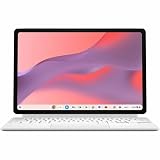
- Combined Processor Core: Octa-core
- Processor Manufacturer: ARM
- Processor Type: Cortex A78
- Processor Core: Dual-core (2 Core)
- Processor Speed: 2.60 GHz
The design is closer to a large, lightweight tablet with a productivity accessory than to a conventional clamshell laptop. That distinction explains both its portability and its compromises.
What are the CM32’s specifications?
The core hardware is consistent across configurations, while memory and storage vary by market. ASUS lists the following equipment:
Free tools Windows power users keep installed
One-click scans. No signup required.
| Component | ASUS Chromebook CM32 Detachable specification |
|---|---|
| Processor | MediaTek Kompanio 540, eight cores; 2.0GHz base frequency and up to 2.6GHz |
| Graphics | Integrated ARM Mali-G57 MC2 |
| Display | 12.1-inch 16:10 touchscreen, 2560×1600 resolution, 600 nits, 120Hz, Corning Gorilla Glass and stylus support |
| Memory | 4GB or 8GB LPDDR5X |
| Storage | 64GB, 128GB or 256GB eMMC, depending on market and configuration |
| Battery | 42Wh |
| Charger | 45W USB-C charger |
| Wireless | Wi-Fi 7 and Bluetooth 5.4 |
| Ports | One USB-C port and a 3.5mm audio combo jack |
| Cameras | Dual 5MP cameras |
| Tablet weight | Starting at approximately 0.61kg |
| Durability and sustainability | US MIL-STD 810H testing claim, EPEAT Gold and TCO certifications |
Storage is eMMC rather than a faster solid-state drive. That is normal for an affordable Chromebook, but it reinforces the case for buying more memory and capacity up front because the tablet is not designed as an upgradeable laptop.
Is the CM32 display good for school and media?
Yes. The screen is one of the CM32’s strongest features: 2560×1600 resolution keeps text sharp, the 16:10 shape gives documents and web pages more vertical space than a typical 16:9 panel, and ASUS rates brightness at 600 nits. The 120Hz refresh rate makes scrolling through long pages and documents feel smoother than on basic 60Hz Chromebooks.
Corning Gorilla Glass adds protection for a device likely to move between classrooms and bags. The panel also supports USI 2.0 styluses, so students can annotate documents, mark up screenshots or write notes. Stylus support is a capability, not proof that every regional package includes a pen; check the exact listing before assuming one is in the box.
High brightness helps in bright classrooms and makes video more enjoyable, but it does not turn the CM32 into a professional color-grading monitor. The practical benefit is readability and smooth interaction, not creator-grade color calibration.
Rank #2

- [Superior Display] - This Renewed product is tested and certified to look and work like new, with limited to no signs of wear. The refurbishing process includes functionality testing, inspection, and repackaging. The product comes with 90-day warranty
- [Versatile 2‑in‑1 and Lightweight Design] – Seamlessly Switch between tablet and laptop modes with a detachable keyboard and adjustable stand. Weighing under 2.2 lbs, it’s easy to carry anywhere, making it ideal for school, work, or travel on the go.
- [All‑Day Battery Life & Fast Connectivity] – Enjoy up to 12 hours of battery life with WiFi 6 support for fast, stable connections whether you're working, learning, or streaming.
- [Smooth Everyday Performance] – Powered by MediaTek Kompanio 520 with 8GB RAM and 128GB storage for efficient multitasking, browsing, and productivity tasks.
- [Stylus‑Ready & Lightweight Design] – Auto-charging stylus for note-taking and creativity, plus military-grade toughness (MIL‑STD 810H) for long-lasting reliability.
How fast is the CM32 for everyday work?
For ordinary ChromeOS tasks, it feels responsive. The Indian Express reviewer used Gmail, Calendar, WhatsApp Web, Google Drive, Docs, Zoom, Meet, Netflix and YouTube without finding the system sluggish. Fan noise is not a concern in this passively oriented tablet-style design, and ChromeOS keeps the interface simple.
The limit appears when multitasking grows. Opening dozens of browser tabs exposed the performance ceiling in the same two-week review. Memory pressure is more likely to become noticeable on the 4GB model, particularly with video calls, web apps and several document tabs open together. The Kompanio 540 is appropriate for school research and office work, not sustained compiling, 3D work or heavy creative production.
No independent benchmark dataset was available for this model, so specifications should not be converted into an exact performance score. The reliable takeaway is workload-based: browser productivity is comfortable, while sustained or highly concurrent workloads call for a faster, more conventional computer.
How long does the CM32 battery last?
ASUS claims up to 12 hours from the 42Wh battery. That figure should be treated as a light-use or laboratory ceiling rather than a guaranteed classroom day. Digit’s reviewer reported roughly 8–9 hours of daily use, while actual runtime will vary with brightness, 120Hz mode, Wi-Fi activity, video calls and Android apps.
The supplied 45W USB-C charger is compact enough for a school bag. Because the CM32 has only one USB-C port, charging occupies the same connector you may need for a dock, external drive or wired accessory. A USB-C hub with power pass-through can solve that problem, but it adds another item to carry and should be checked for ChromeOS compatibility.
Does the keyboard and kickstand make it a real laptop?
The detachable keyboard is good enough for essays, email and note-taking, and the review praised its solid feel. Reattach the tablet and ChromeOS shifts naturally between touch and keyboard input. Removing the keyboard leaves a much lighter device for reading or drawing.
Rank #3

- VERSATILE 2-IN-1 DESIGN: Easily switch between laptop and tablet modes with the detachable keyboard and magnetic stand cover, perfect for studying, working, or entertainment on the go.
- LONG BATTERY LIFE: Enjoy up to 12 hours of uninterrupted use, so you can stay productive or entertained all day without worrying about frequent charging.
- MILITARY-GRADE DURABILITY: Built to withstand daily wear and tear, meeting the rigorous US MIL-STD 810H standard for toughness and reliability.
- FAST AND SMOOTH PERFORMANCE: Powered by a MediaTek Kompanio 520 processor with 4GB RAM and 64GB storage for seamless multitasking and quick app loading.
- STYLUS SUPPORT & TOUCHSCREEN: Take notes, sketch, or navigate effortlessly with the optional USI 2.0 stylus and a vibrant 10.5-inch Full HD touch display.
The cover and kickstand are less convincing on a lap. The review found limited angle adjustment, instability when typing without a firm table and a cover that flops when laid flat. This is a desk-first keyboard arrangement: excellent on a classroom desk, library table or airplane tray, but not as dependable as a rigid hinge on a traditional laptop.
USI 2.0 support expands the tablet’s usefulness for handwritten work. If the stylus is not included with your regional bundle, budget for a compatible USI 2.0 Chromebook stylus and verify compatibility before purchase.
What’s actually slowing this PC down?
Pick the symptom - the matching free tool is one click away.
Is the CM32 good for school?
For browser-centered schoolwork, it is a strong fit. Students can research in multiple tabs, write in Docs, attend Meet sessions, manage Gmail and Calendar, annotate material with a stylus and use the tablet form for reading. The bright, high-resolution display is particularly helpful for dense worksheets and split-screen reading.
Teachers and administrators may also value ChromeOS management. ASUS offers optional ChromeOS Education and Enterprise upgrades, and schools can administer fleets through Google Admin console tools. Availability and commercial terms depend on the program and region, so institutions should confirm those details with the seller or Google before placing a deployment order.
School buyers should choose storage based on how files are handled. If work is kept in Google Drive and streaming is common, 128GB is comfortable. Students who download videos, use large Android apps or keep substantial offline files should consider the 256GB configuration where it is sold.
Should you buy the 4GB/64GB or 8GB/128GB CM32?
Choose 8GB/128GB if you can afford it. The extra memory leaves more room for simultaneous tabs and video calls, while doubling storage gives ChromeOS and offline files more breathing space. The 4GB/64GB version only makes sense when the lowest price is decisive and your use will remain light.
Recommended Free Tools
Rank #4

- FREE GOOGLE ONE AI PREMIUM PLAN — Get Gemini Advanced, 2TB of cloud storage, and more for 3 months at no cost*
- SMOOTH MULTITASKING — Powered by the Intel Celeron N4500 Processor, enabling decent multitasking experience
- TOUCHSCREEN VERSATILITY — 14-inch FHD 1920x1080 NanoEdge 360-degree flippable touchscreen display
- WORK AND PLAY FROM ANY ANGLE — Convertible 2-in-1 design with four different work modes: traditional clamshell, tent, stand, tablet mode
- LIGHTWEIGHT YET DURABLE — Durable and built to US Military Grade standard MIL- STD 810H weighing just 3.59 lbs
| Configuration | Best for | What to consider |
|---|---|---|
| 4GB RAM / 64GB eMMC | Basic browsing, single-document work, streaming and tightly managed school fleets | More restrictive for many tabs, offline files and long-term use |
| 8GB RAM / 128GB eMMC | Students, writers, researchers and workers who multitask | Recommended balance of memory and storage |
| 8GB RAM / 256GB eMMC | Users keeping more Android apps or offline media | Availability varies by market |
In India, the Indian Express review lists Rs 37,990 for the 4GB/64GB model and Rs 48,999 for the 8GB/128GB review unit. Those are regional prices from that review, not a universal current price; check the listing for your country and date.
Can the CM32 replace an iPad or Windows laptop?
It can replace a basic tablet and a lightweight school laptop for people whose work is mostly web-based, but it is not a universal substitute for either category.
Compared with a tablet
The CM32 offers a more productive typing setup than a touchscreen-only tablet and gives you a full Chrome browser with desktop-style tabs. Its 16:10 display, kickstand and optional pen make it comfortable for documents and research. A conventional tablet may have a broader selection of polished large-screen creative and entertainment apps, while the CM32’s Android compatibility can feel inconsistent.
Compared with a Windows or macOS laptop
ChromeOS starts quickly and avoids the maintenance burden of a traditional desktop operating system, but it cannot run specialist Windows or macOS software natively. Serious video editing, advanced audio production, professional desktop publishing, engineering tools and demanding development environments require another platform or a carefully tested cloud workflow. The single USB-C port also makes the CM32 less convenient for multi-peripheral desk setups.
Quick wins for a faster PC:
Repair Windows errors before they cause bigger problemsFix Now →Fix the driver behind crashes, sound loss and screen glitchesFind Drivers →What are the CM32’s main drawbacks?
- One USB-C port: charging and accessories compete for the same connector.
- No fingerprint reader: sign-in relies on the available ChromeOS authentication methods rather than a biometric sensor.
- Unstable lap use: the detachable cover and kickstand work best on a hard, flat surface.
- Android app scaling: some phone-focused apps look stretched or leave excessive empty space.
- Limited headroom: dozens of tabs and sustained heavy workloads reveal the Kompanio 540’s limits.
- Entry configuration: 4GB of RAM and 64GB of storage are poor choices for buyers planning to keep the device for years.
Is the CM32 durable and portable enough for shared use?
The tablet starts at approximately 0.61kg, making it easier to carry than most conventional laptops. ASUS lists US MIL-STD 810H testing, plus EPEAT Gold and TCO certifications. Those are design, testing and sustainability claims rather than a promise that the detachable cover is indestructible, so a protective sleeve remains sensible for school fleets and daily commuting.
Wi-Fi 7 and Bluetooth 5.4 give the CM32 current wireless standards, although the benefit depends on the network and accessories you connect. The dual 5MP cameras are better equipped than many budget Chromebooks for video calls and document capture, according to the review.
Best Value

- VERSATILE DESIGN: 10.5-inch touchscreen Chromebook transforms seamlessly between laptop and tablet modes with detachable keyboard for maximum flexibility
Who should buy the ASUS Chromebook CM32?
Buy it if you want a compact ChromeOS computer for school, writing, web research, Google Workspace, video meetings, streaming and light travel, and you value switching between keyboard and tablet modes. Select 8GB/128GB whenever the price difference is manageable.
Choose another type of computer if you need Windows or macOS desktop applications, sustained heavy processing, a rigid lap-friendly hinge, multiple built-in ports or a fingerprint reader. The CM32 is a productive detachable Chromebook, not a high-performance laptop disguised as a tablet.
What does ASUS say about the CM32’s purpose?
ASUS North America General Manager Shawn Chang described the device as one intended to support educators, streamline workflows and improve customer engagement across changing work environments. In practical terms, the hardware matches that positioning when the organization already relies on browser services and centralized ChromeOS administration.
Frequently Asked Questions
Does the ASUS Chromebook CM32 include a stylus in every box?
The CM32 supports USI 2.0 stylus input, but bundle contents can differ by market and configuration. Confirm the exact regional listing; otherwise purchase a compatible USI 2.0 Chromebook stylus separately.
Can I connect an external monitor and charge the CM32 at the same time?
The tablet has one USB-C port, so simultaneous charging and peripherals require a compatible USB-C hub or dock with power pass-through. Check that the hub supports ChromeOS and the display connection you need.
Is the CM32 suitable for a school Chromebook fleet?
It can fit a browser-centered fleet because ChromeOS supports centralized administration and ASUS offers optional Education and Enterprise upgrades. Schools should verify program availability, licensing and commercial terms for their region before ordering.
The Tool Desk
Outbyte PC Repair FREEClear out junk files and repair common Windows errorsFree Scan →Outbyte Driver Updater FREEScan for outdated or missing drivers - takes under a minuteDriver Scan →Does the CM32 have cellular mobile broadband?
The listed connectivity includes Wi-Fi 7 and Bluetooth 5.4; the supplied specifications do not list a cellular modem. Plan to use Wi-Fi or a phone hotspot when away from a network.
Quick Recap
Product prices and availability are accurate as of the date/time indicated and are subject to change. Any price and availability information displayed on Amazon at the time of purchase will apply.

