Some links on this page are affiliate links: if you buy through them we may earn a commission, at no extra cost to you.
An iPhone that won’t charge can be anything from a dirty Lightning/USB-C port to a damaged cable—or a charging controller issue. The goal is to narrow it down fast, without guessing and without causing extra damage.
This guide walks you through 6 practical solutions for iPhone not charging, with clear steps, exact button sequences, and troubleshooting when the first fix doesn’t work.
As an Amazon Associate I earn from qualifying purchases.
What’s actually slowing this PC down?
Pick the symptom - the matching free tool is one click away.
If you see warnings like “Liquid detected” or “Charging paused”, don’t skip the indicators section—those messages often tell you what’s wrong.
Why an iPhone won’t charge (common causes)
Most charging failures fall into a handful of buckets. Knowing which one you’re in saves time and avoids unnecessary repairs.
Popular on Amazon

- 【Apple MFi Certified Lightning Cable】6 ft USB-C to Lightning Cable with MFi certification made for iPhone14. The latest C94 lightning connector to ensure that no warning messages pop up and is fast charging cord designed for iPhone14 pro.
- 【For iPhone14 Fast Charging Cord 】USB C to lightning cable charging your iPhone14/13/ 12 from 0% to 50% within 30 minutes. Compatible with iPhone14/iPhone14 pro/iPhone14 pro max/iPhone14 max/iPhone 13/ 13 Mini/ 13 Pro/ 13 Pro Max/ iPhone 12/ 12 Mini/ 12 Pro/ 12 Pro Max/ SE 2020/ iPhone 11/ 11 Pro/ 11 Pro Max/ XS/ XS Max/ XR/ X/ 8 Plus/ 8/ 7 Plus/ 7/ 6s Plus/ 6s/ 6 Plus.
- 【Safe & Durable iPhone Charger Cable】6ft usb type c to lightning cable fast charger was tested withstand over 20000 bends,its design makes the quick cord more durable. Each end is plastic with a soft rubber neck that helps make them grip-able as well as durable.
- 【Reliable Material 】Type c to lightning cable is features excellent pull-resistant thickened jacket, the lightning charger is more durable and sturdy. The corrosion-resistant slim connector can stand daily wear and has a long lifespan for iPhone 14.
- 【What you Get】You wiill 2 Pack 6ft usbc cable for your iphone14,iphone14 pro,iphone14 max.6ft extra long usb c to apple lightning cable.if you have any questions, please contact us ,We will reply and solve the problem for you within 24 hours.
| Likely cause | What you’ll notice | Typical fix |
|---|---|---|
| Damaged or low-quality cable | Intermittent connection, “Accessory not supported,” or no charge icon at all | Swap cable and test with a known-good charger |
| Dirty/worn charging port | Loose fit, charging stops when cable is moved | Clean the port carefully |
| Wrong power adapter or insufficient wattage | iPhone stays at the same percentage or charges very slowly | Use a proper USB power adapter (or USB-C PD charger) |
| Software/charging state stuck | Charging icon appears briefly, then stops; battery percentage won’t change | Force restart; check charging-related settings |
| Liquid exposure or moisture | Message about liquid detected; device won’t charge | Dry properly and wait before retrying |
| Hardware failure (charging port, battery, controller) | No charging across known-good accessories; port feels damaged | Service/testing through Apple or a qualified shop |
Before you start: what to check safely
Do these checks first so you don’t waste time or risk damage.
- Look for visible damage on the cable ends (fraying, bent metal, loose strain relief).
- Check the environment: don’t charge if the phone is wet or you see an active liquid warning.
- Avoid heat guns and sprays: no compressed air inside the port, no metal needles, no aggressive scraping.
- Use known-good power: ideally, test with another charger you trust (not just another cable).
6 solutions for iPhone not charging
Work through these in order. Each solution is designed to eliminate a different cause category.
1) Verify the basics: cable, power source, and charging accessories
Start with the simplest variables: the cable and the USB power path. Plug the charger into a wall outlet (not a weak USB hub), then connect the iPhone firmly.
Look for any of these signals: a charging icon, the battery percentage increasing, or even a brief change in the display state after connecting. If absolutely nothing happens, continue to the next solutions.
2) Clean the iPhone charging port (carefully)
Lint and pocket debris are one of the most common reasons an iPhone won’t charge. If the cable feels slightly loose or stops charging when you tilt it, the port may be obstructed.
Also popular on Amazon

- ●【Quality Service】: If you have any questions about the product, please feel free to contact us. Our service team will provide you with a satisfactory solution within 24 hours.
- ●【iPhone Charger Fast Charging】: iPhone charger cable is made of high purity copper core and intelligent smart chip with overcharge protection, current stabilization protection, automatic switching and battery protection, which can support up to 2.4A fast charging and 480 Mbps transmission speed.
- ●【Apple MFi Certification】: Apple MFi certified Lightning Cable is guaranteed not to pop up warning messages, ensuring your Lightning devices load and charge safely and quickly at the fastest possible speed.
- ●【iPhone Cable Nylon Braided Layer】: The iPhone charging cable is designed with a reinforced connector that has been tested to over 10,000 bends for extra protection and durability. The braided nylon insulation and precision layered welded connectors make this cable more durable and stronger than regular iPhone charger cables, while being flexible and tangle-free. Withstands daily connection needs and long-term use.
- ● 【iPhone Perfect Compatibility】: iPhone charger cable MFi certified with iPhone 13/12/11/11 Pro/11 Pro Max/XS/XS Max/XR/X/8 Plus/8/7 Plus/7/Sync 6s Plus/6s/6 Plus/6/5s/5c/5/Air 2/ mini/mini 2/mini 4 etc. compatible. 3 iPhone charging cables, extra long 10 feet, convenient to charge your device in bedroom, couch, office, back seat of car, travel
Use a soft, non-metal method: a wooden or plastic toothpick-like tool is safer than metal. Lightly clear visible debris at the port opening. If you have an ESD-safe anti-static brush, it can help with surface lint.
- Power off the iPhone before cleaning.
- Do not poke aggressively inside the port.
- If the port looks bent, damaged, or misaligned, stop and move to hardware troubleshooting.
3) Try a different adapter, cable, and USB power path
Charging problems often trace back to one component: a cable that’s electrically “half working,” a charger with insufficient wattage, or a USB port that can’t deliver stable power.
Test a complete charging set:
- Use a different cable (preferably Apple-branded or a certified MFi cable).
- Use a different USB power adapter (wall plug). If you have an iPhone 15 or later, a USB-C Power Delivery (PD) adapter is usually a safer bet for full-speed charging.
- If you’re using a computer USB port, try a wall outlet. USB ports on some laptops limit power or shut down when idle.
If the iPhone charges with the new set, you’ve found the root cause—stop there.
4) Force restart the iPhone
If the charging icon appears briefly but the battery percentage doesn’t move, a stuck software state can be the issue. A force restart resets the device’s hardware/software handshake logic.
Use the correct sequence for your model:
- iPhone 8, iPhone 8 Plus, iPhone X, iPhone XS, iPhone XR, iPhone 11, iPhone 12, iPhone 13, iPhone 14, iPhone 15, and iPhone 16 series: Press and quickly release Volume Up, then press and quickly release Volume Down, then press and hold Side button until you see the Apple logo.
- iPhone 7 and iPhone 7 Plus: Press and hold Volume Down and Sleep/Wake (Side) button together until the Apple logo appears.
- iPhone 6s and earlier, including iPhone SE (1st generation): Press and hold Home and Sleep/Wake (Top/Side) until the Apple logo appears.
After restart, plug it in again and check whether the battery percentage changes within 5–10 minutes.
The Tool Desk
Outbyte PC Repair FREERepair Windows errors before they cause bigger problemsFix Now →Outbyte Driver Updater FREEScan for outdated or missing drivers - takes under a minuteDriver Scan →Also popular on Amazon
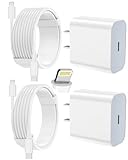
- 【Compatibility】This product is not compatible with all iPhone 15 and iPhone 16 models., Works With foriPhone 14,iPhone 14 Pro,iPhone 14 Pro Max,iPhone 14 Plus,iPhone 13,iPhone13 Pro,iPhone13 Pro Max,iPhone13 mini,iPhone 12 Pro Max,iPhone 12 Pro,iPhone 12,iPhone 12 mini,iPhone 11 Pro Max,iPhone 11 Pro,iPhone 11,iphone x,iphone xr
- 【MFi Certified Cable】Each cable contains a unique, verified serial number and an authorization chip issued by iphone to ensure 100% compatibility with any Lightning device.USB C to Lightning Cord fully supports the iOS version and all future updates.Please note that this charger does not work with iPhone 15 and iPhone 16 models.
- 【3X Fast Charging】The 12W 5V 3A USB-C port PD fast adapter wall charger and 6FT&10FT usb c to lightning fast charging cords,That is,it will charge your iPhone up to 50% power in just 30 minutes,and only takes 1.8 hours to charge your iPhone fully to save 1.5hrs more time for you!
- 【Superior Safety Fast Charging】FEEL2NICE lightning charger has multipotent safety system ensures complete protection for your lightning devices. The ETL certified wall charger built-in over-voltage protection, features a stable voltage. the lightning cable built-in smart chip to match the current required by devices automatically.
- 【What You Get 】2 pack of USB-C iPhone charger and 2 pack of 6FT&10FT USB-C to Lightning charging cable are packed in a box,1 year worry-free refund and replacement guarantee. If you have any questions, don't hesitate to contact us! We promise to solve your problems within 24 Hours!
5) Check Settings and charging behavior (software side)
Most charging failures aren’t caused by settings, but a few behaviors can look like a charging problem—especially when the battery is near full or the system is managing thermals.
Check these items:
- Battery charging messages: if you see “Charging paused,” “Liquid detected,” or similar, follow that specific guidance in the indicators section below.
- Low Power Mode: go to Settings > Battery. Low Power Mode won’t usually prevent charging, but it can change how quickly your phone recovers from low battery.
- Software update: go to Settings > General > Software Update and install any available update (major iOS updates can improve battery/charging behavior).
If the phone is hot, let it cool before retrying. Heat can trigger charging throttling.
6) Test with diagnostics and, if needed, service mode steps
If you’ve tried multiple cables, adapters, and a force restart—and the iPhone still won’t charge—assume hardware. At that point, the goal is to confirm what component is failing.
Try these practical tests:
- Observe port behavior: does the connection feel stable at all, or does it require constant holding/positioning?
- Try wireless charging (if supported): if the iPhone charges via MagSafe/Qi but not via cable, the charging port/cable interface is the likely culprit.
- Check battery health: if the iPhone turns on enough to use it, go to Settings > Battery > Battery Health & Charging. Look at Maximum Capacity and any “Service” recommendations.
- Use official support: schedule a diagnostic with Apple or an authorized service provider when cable/wireless tests disagree.
If the phone is under warranty or covered by AppleCare+, you’ll usually get the fastest and safest fix.
What the charging indicators mean (and what to do)
iOS charging warnings are specific for a reason. Here’s how to interpret the most common ones.
Also popular on Amazon

- [Power Delivery Fast Charging Compatibility]: The USB C to lightning cables support power delivery fast charging for iPhone 14,14 Plus,14 Pro,14 Pro Max ,13, 13 Mini, 13 Pro, 13 Pro Max iPhone 12, 12 Mini, 12 Pro, 12 Pro Max, 11, 11 Pro, 11 Pro Max, SE, X, XS, XR, XS Max, 8, 8 Plus,and iPad AirPods Pro,8th/2020,Pro 12.9" gen1/gen2,Pro 10.5",Air3 10.5", mini5 7.9",,iPod Touch 5th gen, iPod nano 7th gen,and other later models when using your USB-C PD charger.
- [Mfi-Certified Lighing Cable]:RCTech iPhone charger cords have completed MFi certification requirements,Which can be found on the official site of Mfi-Certified.These i phone charger cables use the newest C94 lightning end design for fast charging, which can safely and quickly charge your iPhone/iPad device.
- [Super Durability and Flexibility]:The iphone charging cables are made of top-rated material and coated with premium TPE, which last 4X longer than other usbc lightning cables and proven to withstand over 20,000 bends in strict laboratory tests.
- [Standard Charge Compatibility]:These iphone charger cables also support the standard charge (5V/2.4A max) for iPhone 7 Plus/7/6 Plus/6/6S Plus/6S/5S/5C/5/iPad Mini 4/3/2, iPad Air 2/1, iPad 6/5 etc.
- [What You Can Get]: 3Pack 6ft New USB-C to Lightning Cables (White),lifetime replacement, and 24*7 friendly customer support service ensures that you have a pleasant shopping experience.
- “Liquid detected in Lightning connector” (or similar USB-C message): Unplug immediately. Keep the port dry. Don’t use compressed air. Wait for moisture to evaporate naturally and try again later.
- “Charging paused”: Often triggered by temperature. Move the iPhone to a cooler, dry area and keep it out of direct sun.
- Battery icon stays the same: If it doesn’t move after 10–30 minutes with known-good accessories, it usually points to a port, battery, or charging controller issue.
- No charging icon at all: Most commonly a connection problem (cable/port) or a power adapter issue.
Common mistakes that make iPhone not charging worse
These are the things people do that commonly turn a small problem into a bigger one.
- Using metal tools (paperclips, needles, pins). This can scratch contacts or bend internal components.
- Blowing with high-pressure air. Pressure can push lint deeper into the port.
- Reusing a compromised cable. Even if it sometimes charges, an unstable cable can wear the port over time.
- Charging a wet device against warnings. That can damage the port and internal electronics.
- Ignoring adapter specs. If you’re using a very low-power USB port, the iPhone may not charge or may only trickle.
When to suspect hardware failure (and what to try first)
Hardware failure isn’t the most common cause, but you should watch for a pattern. The key is consistency across known-good accessories.
Suspect a hardware issue if:
- The iPhone won’t charge with multiple certified cables and multiple known-good adapters.
- Wireless charging works but wired charging doesn’t (port interface likely failed).
- The port is physically damaged, loose, or the connection requires constant pressure/angle.
- Battery Health shows serious wear (for example, a low Maximum Capacity percentage) and charging is unstable.
Before service, try one last round: clean the port gently, force restart, then test with a wall adapter and a second cable.
Windows Errors? Fix Them Before They Spread
Repair common Windows errors and clear accumulated junk for a smoother, more stable PC - no reinstall needed.Free scan · no reinstallCrashes, No Sound, or Screen Glitches?
Random freezes, missing sound and display glitches usually trace back to one bad driver. Find and replace yours safely.Free scan · under a minuteFAQs about iPhone not charging
Why does my iPhone only charge when I move the cable?
That usually means the charging port connection is unstable—often due to debris buildup or a worn/damaged port. Clean the port gently and try a different cable; if it still requires movement, hardware service is likely.
Can I charge my iPhone if it shows liquid detected?
No—unplug it and follow the on-screen guidance. Charging while moisture is present can corrode contacts. Wait until the message clears, then retry with a clean, dry port.
Also popular on Amazon

- Durable Design: Reinforced nylon exterior and a robust core ensure this cable withstands up to 5,000 bends, outlasting other brands
- Fast Charging: Supports Power Delivery for up to 60W high-speed charging when paired with a USB-C charger
- Versatile Compatibility: Works with virtually all USB-C devices, including phones, tablets, and laptops
- High-Speed Data Transfer: Transfer files quickly with 480Mbps data transfer speeds
- Included Accessories: Comes with a hook-and-loop cable tie for easy organization and a welcome guide for hassle-free setup
Does Low Power Mode prevent charging?
Low Power Mode doesn’t typically block charging. However, battery behavior may look “slower” because background activity is reduced and iOS manages power differently.
What if my iPhone gets warm but still won’t charge?
Heat can indicate power draw without proper charging handshake—often a cable/adapter/port issue. Stop and cool the device. Then retest with known-good accessories. If it persists, hardware diagnostics are warranted.
Do these 3 things before closing this tab:
1Scan for outdated or missing drivers - takes under a minute2Repair Windows errors before they cause bigger problems3Fix the driver behind crashes, sound loss and screen glitchesIs it safe to clean the charging port myself?
Light, careful debris removal is generally safe if you avoid metal tools and don’t poke inside aggressively. If you see bent contacts or physical damage, stop and use service.
Bottom Line
Most iPhone not charging cases are solved by simple troubleshooting: confirm the power path, clean the port carefully, test with a different adapter and cable, and force restart if the charging state is stuck.
If your iPhone still won’t charge after known-good accessories and the port looks stable, treat it as a likely hardware issue—test wireless charging (if available) and get a diagnostic from Apple or an authorized repair provider.

