Some links on this page are affiliate links: if you buy through them we may earn a commission, at no extra cost to you.
An audio effect preset is a saved set of settings—not a guarantee that the sound will suit every recording or mix. Keep it as-is when it makes the source work better in context; adjust it when you can hear a specific problem, such as excess boom, uneven dynamics, or too much reverb. Compare the processed sound with the effect bypassed, then change the control most closely related to that problem.
What is an audio effect preset?
An audio effect changes some characteristic of sound: its frequency balance, loudness and dynamics, pitch, timing, or perceived space. A preset is a saved configuration of an effect’s parameters. Loading one gives you a repeatable starting point; it does not establish that the settings are right for your particular voice, instrument, recording, or mix.
As an Amazon Associate I earn from qualifying purchases.
Do these 3 things before closing this tab:
1Fix the driver behind crashes, sound loss and screen glitches2Repair Windows errors before they cause bigger problems3Scan for outdated or missing drivers - takes under a minuteThink of a preset as a prepared combination of controls. For a reverb, that might involve settings related to room size, decay, or the balance of dry and wet sound. For a compressor, it might involve controls such as threshold, ratio, attack, and release. Those controls and their behavior depend on the effect and the software. Documentation for applications such as Adobe Premiere, Ableton Live 12, and Godot describes different implementations; a setting or instruction from one is not a universal audio rule.
Presets can save time and make a result easier to recreate. They can also help you explore what an effect does: load one, listen, and inspect the parameters that changed. But the preset only describes settings. Whether it helps is something you judge by listening to the processed source in the context where it will be used.
#1 Best Overall

- Dual-Channel Precision – Full Control Over Every Sound Source: Equipped with advanced Overeasy compression and Auto attack/release settings, this dual-channel compressor offers smooth, natural dynamics control for vocals, guitars, drums, and more. Ideal for recording, live streaming, or on-stage use.
- Studio-Grade Connectivity – Seamless Integration: Designed with premium XLR and 1/4" TRS inputs and outputs, the unit effortlessly fits into any professional or live sound setup, ensuring clean signal paths and flexible routing options.
- Enhanced Vocal Presence – Classic VCA Circuitry: Engineered for clarity, the classic VCA circuit enhances vocal warmth and detail. Bring vocals to the front of the mix with a rich, natural tone that stands out in any performance environment.
- Visual Monitoring – Precision LED Display & Noise Gate: Features independent LED indicators for gain reduction, compression, and gate thresholds. Fine-tune settings with confidence while reducing unwanted background noise using the built-in noise gate function.
- Side Chain Capability – Targeted Frequency Control: Includes a side chain insert for effective frequency ducking—ideal for tightening low-end instruments like bass or kick drums. Offers adjustable attack and release for responsive, natural-sounding compression across dynamic sources.
Should I use an audio effect preset as-is, or adjust it?
Use it as-is if it gives you the sound you need without creating a new problem in the mix. Adjust it if you can identify what is wrong, and focus on the control that addresses that audible mismatch rather than changing several unrelated settings at once.
A preset can sound impressive on its own and still be unhelpful in a full mix. A long reverb tail might add space to a soloed sound but blur a busy arrangement. A bright EQ curve might help one recording cut through, but make a naturally sharp source harsh. Conversely, a setting that sounds subtle in isolation can be exactly what a sound needs among other parts. Judge the result against the purpose of the track, not against the preset’s name or a general idea of what an effect should sound like.
What’s actually slowing this PC down?
Pick the symptom - the matching free tool is one click away.
- Keep the preset when the effect supports the intended sound and does not distract from other elements.
- Adjust it when the effect is useful but too strong, too weak, or shaping the wrong quality.
- Bypass or remove it when comparison shows that the effect is not helping the source or the mix.
There is no universal “best” preset independent of the source and context. The useful comparison is between the sound goal, how audible the processing is, the source itself, and the other processing around it.
How can I tell which part of a preset needs changing?
Start by describing what you hear in plain language. Then choose a type of control that is relevant to that problem. Effect manuals explain what their controls do, but they do not provide a universal formula for choosing settings by ear.
If the tone is too boomy, thin, dull, or sharp
Consider EQ or a filter. EQ changes the gain of frequency bands; a filter controls frequencies around a cutoff. These are ways to address an unwanted balance in the lows, mids, or highs, rather than a reason to turn every available control. Audacity’s effect documentation groups EQ and filters among tools for changing frequency balance, while Godot’s documentation describes EQ and filter behavior in more detail.
Listen for whether the problem is actually in the source or is introduced by the effect. If the preset makes a sound dull, for instance, reducing or changing the relevant EQ treatment may help more than adding an unrelated effect. Make a small change, compare, and stop when the sound serves its role.
Rank #2
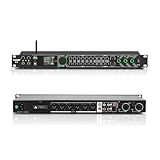
- All-metal KTV preamp reverb effector: Newly upgraded anti-howling digital mixer reverb, using high-definition LCD color digital screen, always grasp the working status. Built-in effect smart chip, sensitive big knob and metal shell.
- Computer Control Adjust The Parameters: The panel is equipped with a USB interface, Easily connected to a computer via a data cable. Can be directly in the software to adjust parameters, very convenient
- Supports 6 inputs: DVD audio input, AUX audio input, optical and coaxial input, USB and Bluetooth input. 4 microphone inputs. Supports subwoofer output, center speaker output, front left and right channel output, surround left and right channel output. Note: If using an optical connection, the purchaser's audio output device must have an optical output connector in order to be used
- Real Dual-ECHO Adjustment:Music/ Microphone/ Sub/ Reverb/ Echo/ EQ. Adjusts to the characteristics of the music/singer/usage scenario to dial in a more balanced and appropriate tone
- Intelligent anti-whistling: adopts multi-point frequency shifting technology to eliminate whistling in the sound reinforcement system, bringing a more comfortable experience. Also prevents damage to microphone and speakers
If loud and quiet parts feel too uneven
Consider compression. A compressor attenuates input above a threshold; the ratio determines how strongly the signal above that threshold is reduced. Attack and release shape how quickly the compressor responds and lets go. Godot’s audio-effects guide describes threshold and ratio, and Ableton Live 12’s reference explains threshold, ratio, attack, and release.
Compression is not simply a “make it better” switch. Too much gain reduction can substantially alter the sound and its dynamics; Ableton’s documentation cautions that heavier gain reduction can damage dynamic structure. If a preset makes a performance feel unnaturally flattened or less punchy, listen to whether a lighter treatment fits better rather than assuming the compressor needs more.
If a sound feels too dry or too distant
Consider reverb, delay, or the balance between processed and unprocessed sound. Dry/wet controls, delay and feedback settings, and reverb parameters such as room size and decay affect how much space or repetition is audible. Adobe’s Premiere audio-effects library documents these types of controls.
Delay produces repeated taps; reverb tends to create a more blended or blurred sense of space, as Godot’s audio-effects guide explains. If an effect is making a sound seem too far away, reducing the amount of wet signal or adjusting the relevant space settings may be more appropriate than changing an unrelated tone control.
If the sound loses punch or becomes harsh
First identify whether the change comes from dynamics processing, distortion, or a combination of effects. Godot warns that distortion can become harsh and loud; Ableton notes the potential impact of heavy gain reduction on dynamics. Reduce the processing or revisit the setting related to the unwanted change. Do not assume that louder, denser, or more obviously processed means better.
How should I compare a preset with the effect turned off?
Use the effect’s bypass control when available, then compare the processed and unprocessed sound in both solo and the complete mix. Keep playback levels reasonably matched: if the effect makes the sound louder, louder alone can be mistaken for better.
Rank #3

- 24 Bit Signal Processing: Features high-precision 24 bit digital audio processing that delivers clear, detailed sound reproduction with minimal noise, ensuring every nuance of your audio signal is preserved during live performances and studio recordings
- 199 Preset Effects: Boasts 199 pre-programmed effect modes including reverb, delay, chorus, pitch shift and multi-effect combinations, allowing you to quickly select the perfect sound for vocals, instruments, and different music styles with just a few adjustments
- Dual Channel Design: Supports dual channel parallel processing for flexible audio routing, enabling you to apply different effects to separate audio sources simultaneously or combine effects for complex sound setups
- Rackmount Build: Comes in a standard 19 inch rackmount chassis that fits seamlessly into most professional audio racks, with a sturdy metal construction designed to withstand the rigors of live touring and studio use
- Adjustable Controls: Features dedicated knobs for input, mix and output levels, plus two edit controls for fine-tuning effect parameters, allowing you to customise reverb decay, delay time, depth and other settings to suit your exact requirements
- Listen to the sound in context. Decide what role it has and what, if anything, needs improvement.
- Use bypass to compare. In Suno Studio, the documented workflow includes bypassing an effect to compare it and expanding it to adjust parameters. The same controls are not necessarily found in the same place in other applications. See Suno Studio’s audio-effects documentation.
- Match listening levels as closely as practical. This is a useful comparison habit, not a procedure prescribed by the cited product manuals.
- Change one relevant control at a time. That makes it easier to hear what each adjustment actually does.
- Listen again in the full mix. A change that sounds appealing on a solo track may not improve the combined result.
If bypassing the effect makes the sound work better, you do not have to keep the preset just because it was designed for a particular style. If the effect is helping but overdoing one quality, adjust the relevant control and repeat the comparison.
Why can the same preset sound different on another track or in another app?
A preset is not independent of its context. The source audio matters; so do the other effects in the chain, their order, and the software’s implementation. A preset that works on one recording may produce a different result on another because the signal entering the effect is different.
Free tools Windows power users keep installed
One-click scans. No signup required.
Effects in a chain process audio in sequence. An effect later in the chain receives the result of the preceding effect, so moving devices can change the output. Suno Studio documents that its signal passes through devices in order and that reordering them changes the result. Unity likewise documents mixer effects as an ordered processing sequence in its Unity 6.0 audio-effects reference.
Software-specific behavior matters too. Adobe After Effects, for example, documents compressor controls such as threshold, ratio, attack, and release for its own effect. Those details describe that implementation, not general settings to copy into another program. See Adobe’s After Effects audio-effects documentation. When giving or following exact instructions, use the documentation for the application and effect actually in use.
Independent reader supportYour contribution helps us test, update, and keep practical guides available for everyone.Does applying a preset permanently change the audio?
That depends on the application and workflow, not on the word “preset.” Some effects are rendered into the selected audio; others run in real time during playback. Check which kind of workflow you are using before treating an effect as a permanent edit.
Audacity distinguishes effects applied from its Effect menu, which rewrite the selected audio, from realtime track effects, which run during playback without altering the audio. Its effects manual describes this difference. The practical implication is that saving or loading a preset and committing an edit are separate concerns: learn whether the particular effect is realtime or rendered in your application, and use the workflow appropriate to whether you want a reversible processing choice or an edited audio result.
PC Slower Than It Used to Be?
A free scan shows the junk files, broken settings and background clutter dragging Windows down - then fixes them in one click.Free scan · Windows 10 & 11Outdated Drivers Are Slowing You Down
One free scan finds every outdated or missing driver and matches the right update for your exact hardware.Free scan · exact hardware matchRank #4

- Professional DSP Audio Processing with 4-Level FBX Suppression: Built-in professional DSP sound engine delivers clearer vocals, richer music detail, and more immersive audio. The 4-level FBX feedback suppression system eliminates feedback instantly, allowing stable and distortion-free microphone performance in any environment.
- Infrared Remote Control & High-Resolution LCD Display: Operate your audio system with ease using the infrared remote, offering fast access to key functions. The high-resolution LCD color screen provides real-time monitoring and intuitive parameter visibility, ensuring precise control during karaoke, performances, and home entertainment.
- Flexible Input Options & Wireless Streaming: Supports multiple audio sources including Bluetooth, USB, Optical, Coaxial, AUX1, and AUX2. Stream music wirelessly via Bluetooth, or switch input modes instantly through the control panel—ideal for home karaoke, media playback, parties, and PA sound setups.
- Precision Mic & Tone Adjustment for Enhanced Sound: Fine-tune vocals and music with comprehensive mic and tone parameter adjustment. Benefit from professional vocal processing for clearer, fuller microphone performance, and precise EQ control for balanced, immersive sound. Perfect for singers, hosts, and home karaoke enthusiasts.
- Flexible Output Connectivity: Features RCA stereo OUTPUT, SUB OUT, and four XLR outputs (L/R + SUB1/SUB2) for seamless integration with amplifiers, powered speakers, mixers, and a wide range of home or professional audio systems. Designed to support versatile setup configurations with stable, high-quality signal output.
What should I check before keeping a preset?
Use a short decision check rather than treating the preset label as a verdict. The goal is not to make every effect audible; it is to decide whether its contribution belongs in the finished sound.
- Purpose: What quality should this effect change—tone, dynamics, space, motion, or distortion?
- Audible result: Does it solve the issue you heard, or does it introduce boom, harshness, excessive blur, or lost punch?
- Mix fit: Does the sound work alongside the other elements, not only in solo?
- Processing amount: Is the effect present at a useful level, or is it dominating the source?
- Chain position: Could another device before or after it be changing what reaches it or what it outputs?
- Workflow: Is the effect realtime or rendered in the application, and does that match how you intend to work?
If the preset passes those checks, there is no need to change it simply because presets are often described as starting points. “Starting point” means adjustable, not automatically inadequate. If it fails one, make the smallest focused change that addresses the failure and compare again.
Frequently Asked Questions
Can I save my own audio effect preset after adjusting one?
Many audio applications support saving and loading presets, but the exact controls and whether a particular effect can be saved vary by program. Consult that effect’s application documentation for its preset-saving workflow.
Does a preset name tell me what the audio will sound like?
It can suggest an intended use, but a name does not specify how the settings will interact with your source, processing chain, or mix. Listen to the result rather than treating the label as a reliable description of the outcome.
Can I use an audio preset in a video or game project?
Audio effects are used in a range of software contexts: the cited documentation includes video-editing effects in Premiere and mixer effects in Unity. The available effects and their controls depend on the application and version.
Quick Recap
Product prices and availability are accurate as of the date/time indicated and are subject to change. Any price and availability information displayed on Amazon at the time of purchase will apply.

