Free tools Windows power users keep installed
One-click scans. No signup required.
Some links on this page are affiliate links: if you buy through them we may earn a commission, at no extra cost to you.
AI wearables turn spoken conversations into notes by combining a microphone, a recording control, a companion phone or computer app, and cloud or on-device language processing. The system captures audio, transcribes it, then produces a summary, searchable memory, suggested tasks, or reminders. A wearable makes starting that process quicker and less conspicuous than opening a phone, but the software—not the pendant or clip—determines how useful and accurate the result is.
In practice, these products are best treated as capture-and-drafting tools. You still need to tell participants when recording is active where required, review names and deadlines, and confirm any task before it reaches your calendar or task manager.
As an Amazon Associate I earn from qualifying purchases.
Do these 3 things before closing this tab:
1Repair Windows errors before they cause bigger problems2Fix the driver behind crashes, sound loss and screen glitches3Clear out junk files and repair common Windows errorsWhat is an AI wearable conversation note taker?
An AI wearable conversation note taker is a small recorder worn as a pendant, pin, clip, card or similar accessory. Its microphone captures nearby speech; a companion app stores or synchronizes the audio; speech-recognition software creates a transcript; and a language model turns that transcript into structured information.
The useful distinction is between capture and processing. Hardware controls determine whether you can start recording quickly, how long the device lasts and whether a visible indicator shows that it is active. The app or cloud service determines transcription languages, summaries, templates, search, task extraction and integrations. A high-capacity recorder without good software remains an audio file, while capable software can often work from a phone microphone without dedicated hardware.
#1 Best Overall

- Plaud Intelligence: Capture conversations in 112 languages and generate accurate transcripts with the Plaud App and Web. Plaud Intelligence uses leading models like GPT-5.5, Claude Sonnet 4.6, and Gemini 3.1 Pro to transform raw audio into structured insights. Choose from over 10,000 professional templates to generate mind maps and to-do lists, turning hours of discussion into immediate clarity
- Multiple Ways To Wear With Included Accessories: Adapt Plaud NotePin S to any workflow instantly with four included accessories. Wear your device effortlessly as a necklace, wristband, clip, or pin. Plaud NotePin S features a dedicated physical record button for precise, tactile control. Stay professional and keep your intelligence within reach all day
- Enterprise-grade Privacy: Built to the highest standards with ISO 27001/27701, SOC 2, HIPAA, GDPR, and EN18031 compliance. Every conversation is secure and protected. It is the trusted choice for creative, medical, and business professionals handling sensitive info
- Multimodal Input & Multidimensional Summaries: Capture audio, type notes, add images, and press/tap to highlight for richer context with multimodal input. Press the record button to mark key moments in real time. Plaud transforms a single conversation into multiple perspectives, providing faster, clearer insights, and unifies these inputs to deliver role-specific summaries that reflect your intent and priorities
- Lightweight Power and Peace of Mind: Weighing only 0.61 oz, Plaud NotePin S delivers 20 hours of continuous recording and 40 days of standby time. Store up to 64GB of audio locally, ensuring you capture every insight even without an internet connection
Vendors use different names, including AI note taker, memory pendant and wearable voice recorder. Those labels describe a category rather than a universal feature set, so check exactly which conversations a model can capture and what happens to the audio afterward.
How does the capture-to-reminder workflow work?
Most systems follow four stages. Understanding each stage helps you find where a missed note or incorrect reminder originated.
PC Slower Than It Used to Be?
A free scan shows the junk files, broken settings and background clutter dragging Windows down - then fixes them in one click.Free scan · Windows 10 & 11Outdated Drivers Are Slowing You Down
One free scan finds every outdated or missing driver and matches the right update for your exact hardware.Free scan · exact hardware match1. Start and monitor recording
You press a button, use an app control or enable a hands-free mode. Plaud says NotePin starts and stops with a long press and confirms activity with vibration and a red light. That combination matters: a tactile and visual signal lets you check that recording has actually begun and gives nearby people a chance to notice it.
2. Store or synchronize the audio
The device may keep audio locally until a phone connection is available, or stream it to an app. Omi says its device can record offline and synchronize later. Offline capture is useful in meetings, travel or places with unreliable service, but you still need enough battery and storage for the entire session.
3. Transcribe and organize
The companion service converts speech into text and attaches it to a session, contact, project or date. Plaud describes transcription in more than 112 languages, along with templates for different note formats. That is a manufacturer feature claim, not an independent accuracy benchmark; accents, overlapping speakers, room noise and specialist terminology can all require corrections.
4. Generate summaries, tasks and reminders
The service extracts decisions, key points and possible follow-up actions. Omi describes summaries, tasks and searchable memories, with synchronization to task managers and other connected tools. The Bee FAQ similarly says its system stores transcripts, summaries and personal insights and uses them for recommendations, suggested to-dos and timely reminders. Treat each output as a draft: verify who owns an action, its due date and whether the wording reflects what was actually agreed.
Rank #2

- Plaud Intelligence: Capture conversations in 112 languages and generate accurate transcripts with the Plaud App and Web. Plaud Intelligence uses leading models like GPT-5.5, Claude Sonnet 4.6, and Gemini 3.1 Pro to transform raw audio into structured insights. Choose from over 10,000 professional templates to generate mind maps and to-do lists, turning hours of discussion into immediate clarity
- Multiple Ways To Wear With Included Accessories: Adapt Plaud NotePin S to any workflow instantly with four included accessories. Wear your device effortlessly as a necklace, wristband, clip, or pin. Plaud NotePin S features a dedicated physical record button for precise, tactile control. Stay professional and keep your intelligence within reach all day
- Enterprise-grade Privacy: Built to the highest standards with ISO 27001/27701, SOC 2, HIPAA, GDPR, and EN18031 compliance. Every conversation is secure and protected. It is the trusted choice for creative, medical, and business professionals handling sensitive info
- Multimodal Input & Multidimensional Summaries: Capture audio, type notes, add images, and press/tap to highlight for richer context with multimodal input. Press the record button to mark key moments in real time. Plaud transforms a single conversation into multiple perspectives, providing faster, clearer insights, and unifies these inputs to deliver role-specific summaries that reflect your intent and priorities
- Lightweight Power and Peace of Mind: Weighing only 0.61 oz, Plaud NotePin S delivers 20 hours of continuous recording and 40 days of standby time. Store up to 64GB of audio locally, ensuring you capture every insight even without an internet connection
Which kinds of conversations can different devices capture?
Conversation compatibility is one of the biggest practical differences between models. A device designed for face-to-face speech may not have a way to capture both sides of a telephone call.
| Device or workflow | Conversation coverage documented by the manufacturer | Important qualification |
|---|---|---|
| Plaud NotePin | In-person conversations | Plaud Support says it does not record phone calls. |
| Plaud Note | In-person use and phone-call recording | Plaud describes the card-sized Note separately from NotePin; do not assume the two models behave the same way. |
| Omi wearable | Wearable conversation capture | Omi also documents phone and computer workflows, so the wearable is not the only capture option. |
| Omi phone-only or Mac app | In-person meetings, online meetings and speakerphone calls | Omi’s January 6, 2026 help documentation tells users to follow local law and obtain consent where required. |
| Bee | Spoken thoughts and conversations | The Bee FAQ describes transcripts, summaries, insights, suggested to-dos and reminders, but the supplied information does not establish a complete call-recording matrix or marketplace availability. |
What can the software produce besides a transcript?
A transcript is the source record; higher-level outputs are convenience layers built from it. Typical outputs include a short meeting summary, bullet-point decisions, a list of open questions, a searchable memory and proposed action items. Templates can format the same conversation as meeting minutes, a briefing or a task list, depending on the service.
Integrations are not interchangeable. Omi says it can synchronize tasks with task managers and other connected tools. Plaud lists connectors and some integrations as preview features. Before relying on an integration, check whether it creates a task, appends text to an existing project, or merely exports a suggestion. Confirm that the destination account has permission to receive data and that you know how to revoke that permission.
Do not interpret a generated reminder as proof that the service understood the conversation. Read the source transcript around every important name, number, assignment and deadline. For regulated, contractual or safety-critical work, keep the original recording or an approved human-written record according to your organization’s policy rather than treating an AI summary as the sole evidence.
Do you need a wearable to try this workflow?
No. Omi’s help documentation describes recording through its phone app and on a Mac, including in-person meetings, online meetings and speakerphone calls. Phone-only capture removes the cost, charging routine and compatibility questions of another device, and it is a sensible way to test whether automatic notes fit your habits.
A wearable can still be worthwhile when starting a recording from a pocketed phone is awkward, when you want a dedicated physical control, or when you need the device to remain available throughout a day. The trade-off is another battery, storage capacity, firmware and privacy indicator to manage. Compare how often you record with the convenience you gain rather than assuming dedicated hardware is automatically more accurate.
Rank #3

- Plaud Intelligence: Capture conversations in 112 languages and generate accurate transcripts with the Plaud App and Web. Plaud Intelligence uses leading models like GPT-5.5, Claude Sonnet 4.6, and Gemini 3.1 Pro to transform raw audio into structured insights. Choose from over 10,000 professional templates to generate mind maps and to-do lists, turning hours of discussion into immediate clarity
- Multiple Ways To Wear With Included Accessories: Adapt Plaud NotePin S to any workflow instantly with four included accessories. Wear your device effortlessly as a necklace, wristband, clip, or pin. Plaud NotePin S features a dedicated physical record button for precise, tactile control. Stay professional and keep your intelligence within reach all day
- Enterprise-grade Privacy: Built to the highest standards with ISO 27001/27701, SOC 2, HIPAA, GDPR, and EN18031 compliance. Every conversation is secure and protected. It is the trusted choice for creative, medical, and business professionals handling sensitive info
- Multimodal Input & Multidimensional Summaries: Capture audio, type notes, add images, and press/tap to highlight for richer context with multimodal input. Press the record button to mark key moments in real time. Plaud transforms a single conversation into multiple perspectives, providing faster, clearer insights, and unifies these inputs to deliver role-specific summaries that reflect your intent and priorities
- Lightweight Power and Peace of Mind: Weighing only 0.61 oz, Plaud NotePin S delivers 20 hours of continuous recording and 40 days of standby time. Store up to 64GB of audio locally, ensuring you capture every insight even without an internet connection
What are the documented prices, limits and hardware specifications?
The following figures were listed on manufacturers’ pages accessed in 2026. Prices, discounts, plans and specifications can change, so verify them at purchase. They are vendor claims, not independent tests.
| Product | Listed price or plan | Battery or recording claim | Storage or transcription limit | Other stated features |
|---|---|---|---|---|
| Plaud NotePin | $159 listed price; Starter Plan includes 300 transcription minutes per month | Up to 20 hours of continuous recording | 64 GB storage | Transcription in 112+ languages; summaries and templates |
| Plaud NotePin S | $179 listed price | Not stated in the supplied product comparison | Not stated separately | Wearable NotePin variant; verify current plan and specifications |
| Omi | $129 offer and $179 stated regular price at the time of research; free plan plus optional Pro plan | 10–14 hour battery estimate | Not stated | Summaries, tasks, searchable memories and phone/computer workflows |
| Bee | Not stated | Not stated | Not stated | FAQ describes transcripts, summaries, personal insights, recommendations, suggested to-dos and reminders |
A low upfront price does not reveal the long-term cost. Estimate how many hours you will transcribe each month, whether the free allowance covers that use, and what happens when you exceed it. Also check whether a subscription is required for search, summaries, integrations or export rather than only for basic recording.
What’s actually slowing this PC down?
Pick the symptom - the matching free tool is one click away.
How should you choose an AI wearable?
Start with the conversation you actually need to capture, then evaluate the workflow around it.
- Conversation type: choose a model that explicitly supports face-to-face meetings, phone calls, online meetings or speakerphone use as required.
- Recording control: look for a physical control that is easy to operate and an unmistakable light, vibration or on-screen status indicator.
- Wearable versus phone-only: occasional users may prefer an app; frequent meeting participants may value a dedicated control and all-day availability.
- Battery, storage and offline behavior: match the device to your longest session and decide whether it can hold audio when the phone or network is unavailable.
- Output quality: distinguish plain transcripts from summaries, templates, searchable memory and task extraction.
- Integrations: confirm that your calendar, task manager or note system is supported and identify whether the connection is a preview feature.
- Data controls: read retention, deletion, export, account-sharing and training policies before recording sensitive conversations.
- Plan limits: calculate recurring transcription minutes and paid features, not just the hardware price.
How do you set up and use one responsibly?
- Define the use case. Decide whether you need meeting notes, personal memory, phone calls, online sessions or follow-up tasks. This determines which capture methods are acceptable.
- Install the companion app and review permissions. Check microphone, Bluetooth, notifications, storage and connected-account permissions. Use a separate work account if your organization requires it.
- Test the recording indicator. Start a short session, confirm the light, vibration or app status, stop it, and verify that the audio and transcript appear where expected.
- Tell participants before recording. Explain what is being recorded and how notes will be used. Obtain consent whenever local law or workplace policy requires it.
- Record with enough battery and storage. For offline sessions, leave room for the complete conversation and plan when the device can synchronize afterward.
- Review the transcript first. Correct names, figures, dates and speaker context before accepting any summary or task.
- Approve actions manually. Assign each task to the right person, set a realistic due date and confirm that the destination task or calendar service received the intended information.
- Delete or export according to policy. Remove recordings that are no longer needed, or retain the approved record in your organization’s designated system.
What privacy and consent issues should you consider?
These devices can record people who are not wearing them. Recording laws differ by jurisdiction: some places require one participant’s consent, while others require everyone involved to agree. Workplace rules, professional confidentiality obligations and contracts can impose stricter requirements than local law. Omi’s Help Center explicitly says to follow local laws and get consent from participants where required; that is guidance, not universal legal advice.
Make the active-recording indicator visible, avoid recording private conversations without a clear reason, and tell participants where audio and transcripts will be stored. Before deployment, ask the vendor how data is encrypted, how long it is retained, where processing occurs, whether human reviewers can access it, how deletion works and whether customer data is used to improve models. Vendor security or compliance claims have not been independently audited in the information available here, so a certification or marketing statement should not be treated as a blanket approval for every use case.
What can go wrong, and how do you fix it?
The recording never started
Check the physical control sequence, the indicator and the app’s connection status with a short test. If a long press is required, a quick tap may do nothing; confirm the exact gesture in the model’s support documentation.
Quick wins for a faster PC:
Scan for outdated or missing drivers - takes under a minuteDriver Scan →Clear out junk files and repair common Windows errorsFree Scan →Fix the driver behind crashes, sound loss and screen glitchesFind Drivers →Rank #4

- Stop Taking Notes, Start Getting Results: Built for sales reps, consultants, and business professionals, Anker soundcore Work captures meetings and interviews, then creates AI summaries with key points and action items in minutes. Walk away from every conversation knowing exactly what was said, what was decided, and what comes next.
- AI Transcription Plans: Your device includes 300 free minutes of audio transcription each month. Need more capacity and advanced AI features? Easily scale up in the app with optional plans: Pro ($15.99/mo or $99.99/yr) or Unlimited ($239.99/yr). No mandatory commitment required. Note: Upgrading replaces the included 300-min base plan. Benefits do not stack across multiple devices.
- Small as a Coin, Built for All-Day Wear: At just 0.35 oz, Anker soundcore Work AI voice recorder is so light you'll forget it's there. Clip it to your collar, wear it as a necklace, or attach it to your phone-three flexible ways to bring it along for meetings, classes, interviews, and commutes. Press once to record, and double-tap to instantly highlight key moments.
- Never Miss What Was Said or Promised: Up to 97% accuracy and speaker identification mean every commitment, every detail, every name is captured-evenin in noisy environments. Supports 150+ languages including English, Spanish, French, Chinese, and Japanese.
- Your AI Insight Studio with Instant Structured Summaries: Create structured meeting summaries with key points, decisions, and follow-ups in minutes. Manage workflows on the go via the soundcore app (iOS/Android), or use the web portal to ask Anka anything-extract key insights, decisions, and get answers from any recording in seconds.
A phone call is missing
Verify model compatibility before troubleshooting. Plaud says NotePin does not support phone calls, while Plaud describes the separate Note as supporting them. For Omi, use the documented phone or computer workflow when the wearable is not the right capture path.
The transcript contains wrong names or deadlines
Review the source audio and correct the transcript before sharing the summary. Reduce background noise, position the microphone closer to the main speakers and spell unusual names in the conversation when practical. There is no independent accuracy statistic in the available documentation that would justify assuming error-free output.
A task did not reach the task manager
Check that the integration is enabled, the destination account is authorized and the feature is not marked preview. If synchronization fails, copy the reviewed task manually and keep the transcript reference until the connection is reliable.
The device runs out of power or storage
Charge before long sessions, end recordings when the conversation is over and synchronize regularly. For field work, choose a model whose documented battery and storage exceed your longest expected session rather than relying on an optimistic estimate.
Recommended Free Tools
How reliable are AI-generated notes and reminders?
They are useful first drafts, not authoritative minutes. The available product descriptions document features and manufacturer-listed limits, but no independent study or measured transcript-accuracy statistic was found for quotation. A September 14, 2025 TechRadar review is a dated subjective account and should not be read as a universal performance benchmark.
Use AI output for speed, then apply human judgment for commitments. The more consequential the conversation, the more important it is to preserve the original audio or a verified transcript, document corrections and obtain approval from the people responsible for the resulting work.
Best Value
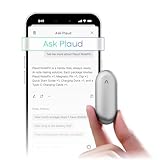
- Plaud Intelligence: Capture conversations in 112 languages and generate accurate transcripts with the Plaud App and Web. Plaud Intelligence uses leading models like GPT-5.5, Claude Sonnet 4.6, and Gemini 3.1 Pro to transform raw audio into structured insights. Choose from over 10,000 professional templates to generate mind maps and to-do lists, turning hours of discussion into immediate clarity
- Global Security Privacy: Built to the highest standards with ISO 27001/27701, SOC 2, HIPAA, GDPR, and EN18031 compliance. Every conversation is secure and protected. It is the trusted choice for creative, medical, and business professionals handling sensitive info
- Wearable Design for Hands-free Capture: Wear your device effortlessly with the 0.59 oz thumb-sized design. Plaud NotePin offers a versatile wearing options as necklace, wristband, clip, or pin, so you can capture ideas and meetings naturally. Plaud NotePin delivers up to 20 hours of continuous recording, 40 days of standby, and 64GB local storage
- Multimodal Input & AI Summary: Capture audio, type notes, add images, and tap to highlight in app for richer context with multimodal input. Plaud transforms a single conversation into multiple perspectives, providing faster, clearer insights, and unifies these inputs to deliver role-specific summaries that reflect your intent and priorities
- Always Ready & Everything Included: Locate your device easily with Apple Find My. Your box includes a Plaud NotePin device (Not S version), a magnetic pin, a clip, a charging dock, and a USB-C charging cable
Frequently Asked Questions
What is an AI memory pendant?
It is a wearable form factor for an AI voice recorder, usually worn on clothing or around the neck. The term describes how the microphone is carried; it does not guarantee a particular transcription language, call-recording ability, subscription or privacy policy.
Can an AI wearable tell which person said each sentence?
Speaker identification and speaker labels vary by service and are not established by the product facts here. If attribution matters, test the feature with several voices and correct labels before distributing the notes.
How can I delete an old recording or transcript?
Use the companion app’s recording, storage or account settings and verify whether deletion removes both the audio and derived transcript. If the controls are unclear, request the vendor’s retention and deletion procedure before storing confidential material.
Will a suggested reminder automatically appear on my calendar?
Not necessarily. A service may create a task, offer an integration, or require you to approve and transfer the reminder yourself; check the destination app and permissions after every connection.
Are AI wearables appropriate for confidential meetings?
Only after your legal, security and workplace requirements are satisfied. Obtain the required consent, understand where audio is processed and retained, and use an approved recording system when policy prohibits personal devices.
Quick Recap
Product prices and availability are accurate as of the date/time indicated and are subject to change. Any price and availability information displayed on Amazon at the time of purchase will apply.
The Tool Desk
Outbyte PC Repair FREERepair Windows errors before they cause bigger problemsFix Now →Outbyte Driver Updater FREEFix the driver behind crashes, sound loss and screen glitchesFind Drivers →
