The Tool Desk
Outbyte PC Repair FREEClear out junk files and repair common Windows errorsFree Scan →Outbyte Driver Updater FREEScan for outdated or missing drivers - takes under a minuteDriver Scan →Some links on this page are affiliate links: if you buy through them we may earn a commission, at no extra cost to you.
When a program like Chromebook Plus gets a second wave of new laptops, it usually means Google is widening availability while keeping the same baseline for performance and AI-ready features. For buyers, that’s good news: more models, more price points, and more opportunities to match specs to your workflow.
That said, “Chromebook Plus” can still be misunderstood. Some shoppers treat it like a marketing label, while others assume every Plus model is identical. This guide focuses on what matters in practice—how to verify eligibility, what to prioritize, and what to do when the features don’t appear as expected.
As an Amazon Associate I earn from qualifying purchases.
Recommended Free Tools
What Chromebook Plus is and why Google is expanding it
Chromebook Plus is Google’s program for certain Chromebooks that meet a defined baseline for modern performance and on-device/assistant-driven experiences. The point isn’t just speed—it’s a consistent experience across models, including capabilities tied to AI features that work better when hardware and OS support are aligned.
As Google ships platform updates and refines eligibility requirements, the company tends to roll the program into additional laptop designs. A second wave generally means more vendors and configurations are ready, not that the goalposts changed overnight.
Popular on Amazon
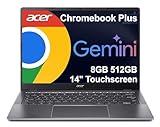
- THIN & DURABLE DESIGN - Boasting a thin and light design, the Acer Chromebook Plus 514 is designed to keep you productive and entertained from anywhere. It weighs only 3.09 lbs and meets MIL-STD 810H military standards for reliable performance in harsh conditions. With long battery life and fast charge technology, it lets you work, study, watch, and stay connected without interruptions. It is perfect for commuting, travel, or working on the go
- AI-POWERED CREATIVITY - The laptop has AI-powered Google and Adobe tools to turn inspiration into reality faster. Its Gemini AI simplifies organizing creative drafts and optimizing materials. The dedicated Quick Insert key creates high-resolution images and offers writing assistance for seamless creativity. Unlock Google AI Pro for 12 months with this Chromebook Plus purchase. Experience Gemini Advanced, NotebookLM, 5TB of cloud storage, and boost productivity with Gemini integrated into Gmail, Docs, and more
- POWERFUL PERFORMANCE - Powered by the 8-Core Intel Core i3-N355 Processor with Intel Graphics, it ensures smooth performance for everyday tasks. It features 8GB LPDDR5X RAM for fast, efficient multitasking and 512GB SSD, offering ample space for files, apps, media, and more, delivering fast storage access and reduced load times
- EXCELLENT VISUAL - Featuring a 14" WUXGA (1920x1200) IPS touchscreen with 300-nit brightness, this device delivers vibrant visuals and responsive touch functionality. It supports expanding the workspace with 3 external monitors via HDMI (max 4K@30Hz) or USB Type-C (max 4K@60Hz), without a docking station. Plus, a 1080p webcam with a privacy shutter to prevent unauthorized viewing meets daily video chat or conference needs
- RICH CONNECTIVITY OPTIONS - Equipped with 2x USB-C 3.2 Gen 1, 2x USB-A 3.2 Gen 1, HDMI 1.4, and a headphone/microphone combo jack. It features Wi-Fi 6E and Bluetooth 5.3 for blazing-fast wireless speeds and seamless device pairing, plus a white backlit keyboard that lets you work comfortably in any lighting
What a second wave of Chromebook Plus laptops usually signals
In most launches, early models arrive first, then follow-on products widen coverage across form factors and price tiers. In practical terms, the second wave typically helps you find one of these wins:
- More selection: different screen sizes (often 13–15 inches), weights, and ports.
- Better value: configurations that hit the Plus requirements with less “premium tax.”
- Fewer compromises: more devices with sufficient memory and solid storage for Chrome OS multitasking.
- More availability: easier to find in stock through big retail channels.
Manufacturers such as HP, Lenovo, Acer, and ASUS commonly participate in these waves, so you’ll often see the program appear across multiple product lines rather than one single series.
Chromebook Plus requirements to look for (the practical checklist)
Google doesn’t just brand the laptops—it expects specific capabilities. Because the exact published requirements can vary by generation, treat this checklist as the buyer-facing version: what you should verify before you commit.
Minimum hardware expectations
Most Chromebook Plus devices are designed to feel “snappy” with heavier web apps and AI-assisted experiences. Common hardware targets include:
- Memory (RAM): expect higher-than-entry levels (often 8GB or more, and frequently 16GB in models positioned for premium experiences).
- Storage: enough space for offline files and modern app caching; many buyers should prefer 256GB to avoid constant cleanup.
- CPU/GPU performance: modern multi-core performance matters more than raw marketing.
- Display: most Plus-leaning models are at least 1080p for better readability and split-screen work.
If you’re comparing models with close prices, RAM and storage usually create the biggest quality-of-life difference over time.
Software and AI feature expectations
Chromebook Plus is also about features behaving reliably. That typically means you should expect:
Free tools Windows power users keep installed
One-click scans. No signup required.
- Current Chrome OS builds on day one, with predictable update delivery.
- AI features that rely on system integration (permissions, account linkage, and compatible hardware/software readiness).
- Better multitasking when you have multiple tabs, Android apps, and document workflows running together.
Even if you don’t plan to use AI features immediately, the same hardware discipline often improves general performance and responsiveness.
Also popular on Amazon

- THE BETTER WAY TO LAPTOP – Imagine a Chromebook that’s as flexible as your day: thin and lightweight with built-in Google apps and stress-free security.
- TAKE HITS KEEP MOVING – Sleek, light, and built to last- the Chromebook 2-in-1 is just 0.69” thick and 3.3lbs. Enjoy long-lasting battery life, fast charging, and military-grade durability for nonstop productivity wherever life takes you.
- PERFORMANCE THAT MATCHES YOUR HUSTLE – Fuel your ideas with an Intel Core processor and 128GB storage. Boot up in under 10 seconds to start the day powerfully efficient.
- FLEX YOUR CREATIVITY ANYWHERE, ANYTIME – Create, work, or unwind your way with a versatile 2-in-1 design. Flip easily between laptop, tent, and tablet modes with a responsive touchscreen built for flexibility.
- BRILLIANT VIEWS AND IMMERSIVE AUDIO – See, hear, and create with awesome clarity. The WUXGA display brings rich detail to your work and play, while audio tuned by Waves MaxxAudio provides immersive, balanced sound.
How to confirm a laptop is truly Chromebook Plus
Don’t rely on assumptions from a thumbnail or an out-of-date blog. Use a two-step verification: confirm eligibility before purchase, then verify inside Chrome OS after setup.
Check the product page and model packaging
Before you buy, verify the listing explicitly mentions Chromebook Plus and includes key specs. If the page is vague, look for:
- Clear branding: “Chromebook Plus” as a program name, not just a generic performance tier.
- Exact memory and storage: avoid listings that only say “fast” or “premium.”
- Update policy info: modern listings often include an “Auto Update Expiration” date.
- Region/model numbers: some retailers list variants; you want the one the specs match.
Verify in Chrome OS after you buy
Once you power on, you can confirm your device is up-to-date and ready for features:
Do these 3 things before closing this tab:
1Repair Windows errors before they cause bigger problems2Scan for outdated or missing drivers - takes under a minute3Clear out junk files and repair common Windows errors- Sign in to your Google account.
- Open Settings.
- Go to About ChromeOS.
- Check Chrome OS version.
- In About ChromeOS, look for Auto Update Expiration (the date your device stops receiving updates).
If you can’t find the expected update timeline, it’s a red flag that the device could be an older model in disguise or from a variant with fewer assurances.
Buying guide: how to choose the right Chromebook Plus
Chromebook Plus doesn’t mean you should buy the most expensive one. It means you should buy the one that matches your workload while still meeting the program’s baseline.
Pick by performance needs
If you’re doing more than email and browsing—think Google Docs with heavy files, spreadsheets, multiple tabs, Android apps, or video calls—lean toward:
- 16GB RAM if you want the smoothest experience over the next few years.
- 256GB storage minimum for offline files, downloads, and cached web content.
If the price difference is small, “more now” tends to prevent slowdowns later.
Windows Errors? Fix Them Before They Spread
Repair common Windows errors and clear accumulated junk for a smoother, more stable PC - no reinstall needed.Free scan · no reinstallOutdated Drivers Are Slowing You Down
One free scan finds every outdated or missing driver and matches the right update for your exact hardware.Free scan · exact hardware matchAlso popular on Amazon

- Processor Manufacturer: Intel
- Processor Type: Core i3
- Processor Generation: 12th Gen
- Processor Model: i3-1215U
- Processor Core: Hexa-core (6 Core)
Pick by battery and portability
Battery life claims vary by test method and brightness settings. Instead of chasing a single number, verify:
- Weight: lighter models are more comfortable for commuting and campus use.
- Charger type: confirm you can replace it easily if needed.
- Display brightness: brighter screens reduce battery faster; if you work outdoors, prioritize screen quality.
Pick by your workflow (school, work, creative, gaming)
Here’s how to match Chromebook Plus to common use cases:
| Workflow | What to prioritize | Why it matters |
|---|---|---|
| School & note-taking | Good keyboard, 1080p screen, 8GB+ RAM | Better typing speed and readability for long sessions |
| Office work & spreadsheets | 16GB RAM, 256GB storage, fast Wi‑Fi | Helps with large Sheets files and many concurrent tabs |
| Video calls & teaching | Reliable webcam, stable microphone, headroom CPU | Reduces lag and improves consistency in calls |
| Creative tasks | RAM + display quality, compatible Android apps | More memory reduces stutter with heavier editors |
If a model’s storage is low and RAM is minimal, you may feel it sooner than you expect—especially with media-heavy workloads.
Quick comparisons: Chromebook Plus vs. other Chromebooks
Think of Chromebook Plus as a “floor,” not a “ceiling.” Regular Chromebooks can still be great, but Plus models are more likely to deliver consistent performance and smoother AI-assisted workflows.
- Entry Chromebooks: often cheaper, but you may see more slowdown with multiple tabs or heavier web apps.
- Mid-range Chromebooks: can feel fast enough for everyday work, but AI feature behavior may be less consistent.
- Chromebook Plus: targets a more reliable experience that holds up longer under modern usage.
When the price gap is small, Plus tends to be the better “buy once, keep longer” choice.
Setup and first-week checks after unboxing
After you get your new Plus laptop, the first week is where you decide whether it will feel fast and stable—or annoying.
Update Chrome OS immediately
Even if the box looks fresh, updates can arrive quickly after production. Do this before you install lots of apps:
Also popular on Amazon
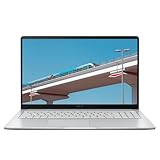
- Intel Celeron Processor Up to 2.79GHz, 4GB Ram, 128GB SSD
- 15.6" FHD IPS, Intel UHD Graphics
- 1x USB Type C, 1 x USB Type A, 1x Headphone/Microphone Combo Jack, HDMI
- Super-Fast WiFi 6 and Bluetooth, HD Webcam
- Chrome OS, AC Charger Included, Star Silver
- Open Settings.
- Go to About ChromeOS.
- Click Check for updates.
- Restart when prompted.
Turn on the right permissions for AI features
AI features depend on permissions and account setup. If you don’t see options you expected:
Quick wins for a faster PC:
Clear out junk files and repair common Windows errorsFree Scan →Scan for outdated or missing drivers - takes under a minuteDriver Scan →Repair Windows errors before they cause bigger problemsFix Now →- Check Settings > Privacy & security permissions relevant to your feature.
- Verify you’re signed into the correct Google account.
- Confirm the feature’s app or surface is enabled (some experiences show only after you update and accept prompts).
Confirm offline and cross-device features
Chromebooks shine when you mix online and offline work. Make sure:
- Google Drive offline is enabled for Docs/Sheets/Slides workflows.
- Your key files sync properly so you’re not stuck waiting for reconnection.
- Bluetooth peripherals (keyboard, mouse, headphones) pair cleanly and stay connected.
Troubleshooting when Chromebook Plus features don’t show up
Feature availability problems are common—usually it’s an update lag, regional rollout, or an account/permission mismatch. Treat this as a checklist.
Feature missing after update
- Confirm your Chrome OS version in About ChromeOS.
- Restart the device after updates (some prompts don’t finalize until reboot).
- Check Settings > Apps for the relevant app surface (some AI features live inside a specific Google app).
- Log out and log back into your Google account.
If it still doesn’t appear, try waiting 24–72 hours. Some features roll out gradually even when your device meets the baseline.
Performance feels sluggish
Plus hardware should stay responsive, but you can still hit slowdowns. First, isolate whether it’s software pressure or system state:
- Close the most memory-heavy tabs and Android apps, then reassess.
- Reboot the Chromebook to clear temporary states.
- Check storage usage so downloads and cached files aren’t filling the drive.
If the problem persists, consider testing with a minimal Chrome profile (new user) to rule out extensions.
Battery drains faster than expected
Battery behavior often improves once your Chromebook finishes background tasks (syncing and indexing). If drain is immediate:
Also popular on Amazon
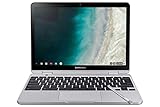
- TWEIGHT 2-in-1 DESIGN At just under 3 pounds, the Chromebook Plus is incredibly lightweight. You can easily fold it into tablet mode for comfortable viewing and browsing
- BUILT-IN PEN Experience the power of the incredibly precise built-in pen that never needs charging. It's always ready to write, sketch, edit, magnify and even take screenshots
- DUAL CAMERA Fold your laptop into tablet mode to capture clear shots and even zoom in for a closer look with the revolutionary 13MP world-facing camera with autofocus
- CHROME OS AND GOOGLE PLAY STORE Create, explore and browse on a bigger screen with the tools you use every day —all on the secure Chrome OS
- POWER AND PERFORMANCE Tackle anything with a long-lasting battery and Intel Celeron processor. Store more with 64GB of built-in memory and add up to 400GB with a microSD card.Bluetooth v4.0
- Look for high background activity and remove unused Android apps.
- Reduce brightness and disable radios you don’t need (Wi‑Fi/Bluetooth) during testing.
- Check whether a large download or upload is running.
Common mistakes to avoid
- Buying based on the word Plus only: always verify RAM, storage, and update expiration.
- Choosing minimal storage: 64GB/128GB configurations can become painful once you download offline files.
- Skipping update checks: features and stability improvements often land via Chrome OS updates.
- Assuming all Plus models feel identical: performance can vary based on CPU generation and RAM.
FAQ
Do Chromebook Plus laptops get guaranteed access to every AI feature?
Not always. Even when hardware meets the baseline, feature availability can depend on rollout timing, account eligibility, and specific app surfaces. The best way to confirm is to update Chrome OS and check the feature’s settings inside the relevant Google app.
How can I tell how long my Chromebook Plus will keep getting updates?
Open Settings > About ChromeOS and look for Auto Update Expiration. That date is your clearest indicator of long-term support.
Is Chromebook Plus worth it if I only use web apps?
Often yes, if the price gap isn’t large. Plus models are usually built to handle modern browser workloads smoothly—especially when you have many tabs or run Android apps.
Can I buy a used Chromebook Plus?
You can, but you should prioritize the update expiration date and verify the exact model specs. If updates are near expiry, the device can become less useful for newer web and AI-integrated experiences.
Bottom Line
A second wave of Chromebook Plus laptops is best read as increased choice with a consistent goal: deliver a reliable, modern Chromebook experience across more manufacturers and configurations. That means your job is to verify specs, confirm update support, and buy the configuration that fits your workload.
If you focus on RAM, storage, and Auto Update Expiration, Chromebook Plus can be a “buy once, keep longer” purchase instead of a short-term upgrade.
What’s actually slowing this PC down?
Pick the symptom - the matching free tool is one click away.

