Some links on this page are affiliate links: if you buy through them we may earn a commission, at no extra cost to you.
The Blue Yeti can capture stereo, but it is not locked to stereo: its physical pattern selector offers Stereo, Cardioid, Omnidirectional and Bidirectional. Choose Stereo when you want a left-and-right spatial image; for a solo podcast, voiceover or stream, Cardioid is usually the practical starting point. The operating-system name “Yeti Stereo Microphone” identifies the USB audio device, not the pattern you have selected.
Is the Blue Yeti mono or stereo?
It can be used for either kind of recording, depending on the selected pickup pattern and the recording you want. Stereo is one of four hardware patterns, alongside Cardioid, Omnidirectional and Bidirectional. That makes the Yeti a switchable multi-pattern USB microphone rather than a microphone that is permanently stereo-only.
As an Amazon Associate I earn from qualifying purchases.
Quick wins for a faster PC:
Repair Windows errors before they cause bigger problemsFix Now →Fix the driver behind crashes, sound loss and screen glitchesFind Drivers →Two related ideas can be easy to confuse: the microphone’s pickup pattern describes where it captures sound from, while mono or stereo describes how audio is represented across channels. The Yeti’s Stereo pattern uses left and right channels to create a wider image. The other patterns are designed around different directions of pickup. A front-focused Cardioid setup, for example, is the usual choice for one speaker, but the pattern name alone does not tell you what every recording application will do with its input channels or saved file.
The manufacturer’s specification lists a mono/stereo sound-field field, as well as USB digital output. The practical answer is therefore not simply “mono” or “stereo”: the Yeti offers several pickup patterns, and Stereo is the one intended to provide a left-and-right image.
#1 Best Overall

- Custom three-capsule array: This professional USB mic produces clear, powerful, broadcast-quality sound for YouTube videos, Twitch game streaming, podcasting, Zoom meetings, music recording and more
- Blue VO!CE software: Elevate your streamings and recordings with clear broadcast vocal sound and entertain your audience with enhanced effects, advanced modulation and HD audio samples
- Four pickup patterns: Flexible cardioid, omni, bidirectional, and stereo pickup patterns allow you to record in ways that would normally require multiple mics, for vocals, instruments and podcasts
- Onboard audio controls: Headphone volume, pattern selection, instant mute, and mic gain put you in charge of every level of the audio recording and streaming process
- Positionable design: Pivot the mic in relation to the sound source to optimize your sound quality thanks to the adjustable desktop stand and track your voice in real time with no-latency monitoring
What does each Blue Yeti pattern capture?
Choose a pattern based on how many sound sources you need and where they are in relation to the microphone. The four options serve different recording situations.
| Pattern | Pickup and channel behavior | Useful for |
|---|---|---|
| Stereo | Uses left and right channels for a wider, realistic stereo image. | Instruments, acoustic guitar, choir and ambience. |
| Cardioid | Front-focused capture, with rejection toward the rear and sides. | One speaker: podcasts, voiceovers, solo vocals and game streams. |
| Omnidirectional | Captures sound around the microphone. | Group conversation, conferences and room ambience. |
| Bidirectional | Captures from the front and rear. | A two-person interview or duet with speakers on opposite sides. |
Stereo: a spatial image, not just a device name
Stereo is the pattern to try when the relative width or position of the sound matters—for example, recording an acoustic performance or room ambience. Instead of treating the microphone as a single front-facing pickup for one speaker, this mode uses left and right channels to convey a wider image. Blue Microphones’ manual describes it this way: “The Stereo mode is great for capturing a realistic stereo image.”
That width is useful only if it serves the recording. A solo voice usually needs to be clear and prominent, not spread across a sound field. For that reason, a stereo pattern is not automatically the best choice for speech simply because it uses two channels.
Cardioid: the solo-speaker starting point
Cardioid is the practical default for one person speaking into the microphone. Its front-focused pickup is suited to a podcast, voiceover, solo vocal or stream, and it rejects sound toward the rear and sides. That directionality helps prioritize the speaker in front of the microphone over sound coming from elsewhere.
Rank #2

- Custom three-capsule array: This professional USB mic produces clear, powerful, broadcast-quality sound for YouTube videos, Twitch game streaming, podcasting, Zoom meetings, music recording and more
- Blue VO!CE software: Elevate your streamings and recordings with clear broadcast vocal sound and entertain your audience with enhanced effects, advanced modulation and HD audio samples
- Four pickup patterns: Flexible cardioid, omni, bidirectional, and stereo pickup patterns allow you to record in ways that would normally require multiple mics, for vocals, instruments and podcasts
- Onboard audio controls: Headphone volume, pattern selection, instant mute, and mic gain put you in charge of every level of the audio recording and streaming process
- Positionable design: Pivot the mic in relation to the sound source to optimize your sound quality thanks to the adjustable desktop stand and track your voice in real time with no-latency monitoring
Cardioid does not make a room silent, nor does the pattern description promise a particular degree of noise reduction. It is a choice about pickup direction: point the microphone toward the intended speaker and use this mode when the desired source is in front.
Omnidirectional: sound from around the microphone
Omnidirectional is for situations where sound around the microphone matters, such as a group conversation, conference or room ambience. It is a poor match when the goal is to favor one speaker and reduce capture from other directions, because it is intended to pick up sound all around.
Bidirectional: two sides of the microphone
Bidirectional is suited to a two-person interview or duet when one participant is in front and the other behind the microphone. Unlike Cardioid, which focuses on the front, Bidirectional is intended to capture from both the front and rear. Arrange the two sound sources around those pickup directions rather than expecting it to behave like an all-around group microphone.
Which Blue Yeti setting is best for podcasting or streaming?
For a podcast, voiceover, solo vocal or game stream with one person speaking, start with Cardioid. It focuses on sound from the front and rejects toward the sides and rear, which makes it a more suitable starting point for a single voice than a pattern meant to capture a room or a left-and-right musical image.
Rank #3

- Custom three-capsule array: This professional USB mic produces clear, powerful, broadcast-quality sound for YouTube videos, Twitch game streaming, podcasting, Zoom meetings, music recording and more
- Blue VO!CE software: Elevate your streamings and recordings with clear broadcast vocal sound and entertain your audience with enhanced effects, advanced modulation and HD audio samples
- Four pickup patterns: Flexible cardioid, omni, bidirectional, and stereo pickup patterns allow you to record in ways that would normally require multiple mics, for vocals, instruments and podcasts
- Onboard audio controls: Headphone volume, pattern selection, instant mute, and mic gain put you in charge of every level of the audio recording and streaming process
- Positionable design: Pivot the mic in relation to the sound source to optimize your sound quality thanks to the adjustable desktop stand and track your voice in real time with no-latency monitoring
Use a different setting when the recording itself calls for it:
- One person speaking: Cardioid, with the speaker in front of the microphone.
- Two people facing opposite sides of the microphone: Bidirectional.
- A group arranged around the microphone: Omnidirectional.
- Music, an ensemble or ambience where width is desired: Stereo.
These are starting choices, not guarantees about the final sound. The room, the arrangement of speakers or instruments, and the recording application all matter. The useful decision is whether you want to favor a source in front, capture sources from particular opposing directions, hear around the microphone, or preserve a wider stereo image.
Free tools Windows power users keep installed
One-click scans. No signup required.
Why does my computer say “Yeti Stereo Microphone”?
That label identifies the USB audio device in the computer’s input or output settings. It does not mean the microphone is using its Stereo pickup pattern at all times. The selected hardware pattern still determines whether it captures a stereo image, focuses on the front, picks up around the microphone, or captures front and rear.
So, seeing “Yeti Stereo Microphone” is not by itself evidence that a recording is stereo. The device name and the physical pattern selector answer different questions. Check the pattern on the microphone for the pickup choice, and check the recording application’s input and channel settings when you need to know how a particular recording is being captured or saved.
Rank #4
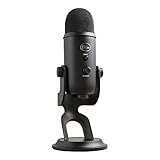
- Custom Three-capsule Array
- Four Pickup Patterns
- Onboard Audio Controls
- Positionable Design
- Plug 'n Play: for Mac or PC
How do I get left and right audio from a Blue Yeti?
Select Stereo on the microphone’s physical pattern selector, then select the Yeti as the input device in the recording application. If the application provides an input-channel choice, use its stereo input option for a stereo recording; application labels and controls vary, so the exact menu path depends on the software.
- Set the Yeti’s physical pattern selector to Stereo.
- In the recording application, choose the Yeti as the microphone or input device.
- If the application lets you choose between mono and stereo input, choose stereo when you want both left and right channels.
- Make a short test recording and check that the application is receiving both channels before recording the full session.
The hardware pattern and the application’s input configuration both matter to the result. Selecting Stereo tells the microphone which pattern to use; choosing a stereo input in software, where that option is available, tells the application to record the input as two channels. Do not infer the channel layout of a saved file from the name shown in the computer’s device list.
What’s actually slowing this PC down?
Pick the symptom - the matching free tool is one click away.
What are the Blue Yeti’s audio specifications?
The cited specification lists three proprietary 14 mm condenser capsules, 16-bit/48 kHz digital conversion, a frequency response of 20 Hz–20 kHz, USB digital output and a mono/stereo sound-field field. These details describe the microphone’s documented hardware and digital-audio characteristics; they do not replace the practical choice of pickup pattern for a particular recording.
The key distinction for setup is between the available patterns and the device’s technical specification. The capsule count and conversion figures do not mean every pattern should be treated as a stereo recording, and the stated frequency-response range does not determine whether a voice is best captured in Cardioid or another pattern.
Best Value

- Perfect for podcasting, game streaming, Skype calls, YouTube or music
- No-latency headphone output, headphone volume and mic mute
- Standard threading for Radius III Shock Mount and/or Compass Boom Arm
- Plug ‘N play-Mac and PC compatible
- Cardioid and Omni pickup patterns; supports sample rates up to 24-bit/48Khz
How should I choose between the patterns?
Start with the sources you need to record, not with the word “stereo” in the computer’s device label. Decide whether the microphone should prioritize one speaker, take in sound from around the room, capture two opposing sides, or produce a wider left-and-right image.
- If one voice is the main source, choose Cardioid.
- If participants are positioned in front of and behind the microphone, choose Bidirectional.
- If several people or room sound are distributed around the microphone, choose Omnidirectional.
- If width and spatial placement matter for music or ambience, choose Stereo.
When the best option is not obvious, record a brief sample in the intended setup and listen before proceeding. Keep the speaker or performers in the directions appropriate to the selected pattern, and verify the recording in the application rather than relying on the operating-system device name.
The Tool Desk
Outbyte PC Repair FREERepair Windows errors before they cause bigger problemsFix Now →Outbyte Driver Updater FREEFix the driver behind crashes, sound loss and screen glitchesFind Drivers →Frequently Asked Questions
Can I make a Blue Yeti recording mono in editing software?
A recording application or editor may offer channel or export controls, but the supplied specifications do not establish the exact controls or procedure for any particular program. Check the application’s own audio settings and documentation for its mono-conversion options.
Does the Yeti’s 16-bit/48 kHz specification mean every recording is stereo?
No. Those figures describe digital conversion, not the pickup pattern selected for a recording. Stereo capture is a separate choice from the listed bit depth and sample rate.
Can I use the Blue Yeti for a duet?
Yes. Bidirectional is identified as a suitable pattern for a duet when the performers are positioned at the microphone’s front and rear. For performers arranged around it instead, Omnidirectional may fit better.
Does Cardioid eliminate background noise?
No pattern is described as eliminating noise. Cardioid is front-focused and rejects toward the rear and sides, but sounds in a room can still be captured.
Quick Recap
Product prices and availability are accurate as of the date/time indicated and are subject to change. Any price and availability information displayed on Amazon at the time of purchase will apply.

