Quick wins for a faster PC:
Scan for outdated or missing drivers - takes under a minuteDriver Scan →Repair Windows errors before they cause bigger problemsFix Now →Some links on this page are affiliate links: if you buy through them we may earn a commission, at no extra cost to you.
Android music production has matured far beyond quick sketches and voice memos. In 2025, the best Android DAW apps can handle multitrack recording, MIDI sequencing, beatmaking, mixing, automation, effects, and export workflows that are good enough for demos, social releases, podcasts, live sets, and even full productions.
The right choice depends on how you make music. A beatmaker may care most about pads, loops, piano roll editing, and sample chopping, while a singer-songwriter needs stable audio recording, low-latency monitoring, and clean export options. Producers working on larger sessions should also consider plugin support, track limits, automation depth, file management, and how well the app performs on their specific phone or tablet.
As an Amazon Associate I earn from qualifying purchases.
This guide compares the strongest Android DAWs for beginners, mobile musicians, producers, and budget-conscious creators, with practical guidance on matching each app to your device performance, production style, and workflow expectations.
What to Look for in an Android DAW in 2025
Choosing an Android DAW in 2025 is less about finding the app with the longest feature list and more about matching the software to your phone or tablet, your workflow, and the kind of music you make. Android music production has improved significantly, but device performance, audio latency, storage speed, and app optimization still vary widely. A DAW that feels smooth on a flagship Samsung Galaxy Tab or Pixel phone may struggle on an older budget device once you add mulle tracks, virtual instruments, effects, and automation.
Popular on Amazon

- High Sound Quality: Mini audio interface sound card, 24bit/48KHz high quality internal recording sound card, connects to smartphones, laptops and electric guitars and basses for live streaming. Compatible with most live streaming apps
- Perfect Sync: Low latency digital audio processing solution can be synchronized with video. Output original audio directly to your smartphone with low latency, low interference and high fidelity recording. Only recording, without edit or mix function. This is the simple audio interface for beginners. Plug & play without batteries
- Excellent Compatibility: Type-C USB for Android smartphone or laptop. Comes with lightning to Type-C adapter for iPad iPhone. The 1/4" 6.35mm jack to connect electric guitar bass and the 1/8" 3.5mm headphone output supports monitoring
- Easy to Adjust: This mobile sound card has volume buttons to adjust monitor volume. Indicator light to show the monitor volume, green means normal, red means the volume is too high and distortion
- Compact Designs: Back clip design, pocket storage, flexible and convenient, recording or live streaming anytime and anywhere. Please feel free to contact us if you have any question about it, we'd be happy to solve it for you.
The first thing to check is the core workflow. Some Android DAWs are built around linear multitrack recording, which suits vocals, guitars, podcasts, and full-song arrangements. Others focus on clips, loops, drum pads, step sequencing, and pattern-based beatmaking. If you produce hip-hop, EDM, trap, or lo-fi beats, fast sample chopping, MIDI sequencing, swing, quantization, and drum programming matter more than traditional tape-style recording. If you record vocals or instruments, prioritize low-latency monitoring, stable audio input support, clean editing tools, and reliable take management.
Core features that matter most
- Audio recording quality: Look for support for external USB audio interfaces, adjustable sample rates, proper gain handling, and stable recording over long takes.
- MIDI tools: A good Android DAW should offer piano roll editing, MIDI controller support, quantization, velocity editing, automation, and usable virtual instruments.
- Mixing controls: Volume, pan, EQ, compression, reverb, delay, sends, buses, and automation are essential if you want to finish tracks without exporting to desktop.
- Plugin and instrument support: Android does not have the same universal plugin ecosystem as desktop DAWs, so built-in effects, bundled synths, AUv3-style alternatives, or app-specific add-ons are especially important.
- Export options: Check for WAV, MP3, MIDI, stems, project backup, cloud sharing, and compatibility with desktop workflows if you plan to finish songs elsewhere.
Latency is one of the biggest practical issues on Android. For beatmaking with internal instruments, latency may be less noticeable, but for singing, guitar, keys, or live MIDI performance, it can make or break the experience. The best results usually come from a recent device, wired headphones, and a class-compliant USB-C audio interface. Bluetooth headphones are convenient for casual listening, but they are usually unsuitable for live recording because of delay.
Budget also plays a major role. Some Android DAWs are free with limited tracks or in-app purchases, while others require a one-time purchase or paid sound packs. Beginners may prefer an app with a quick learning curve, built-in sounds, and simple export. More advanced producers should look for automation depth, stem export, tempo and time-signature flexibility, sample editing, and project organization. Before committing, test a demo or free version with the kind of session you actually plan to run: several audio tracks, a few MIDI instruments, effects on each channel, and a full-length export. That real-world test will reveal more than a feature checklist.
Best Overall Android DAW Apps
The best overall Android DAW apps in 2025 are the ones that balance multitrack recording, MIDI sequencing, mixing tools, export options, and a workflow that does not collapse on a phone screen. Android still varies heavily by device, audio driver, chipset, RAM, and storage speed, so the strongest choices are not always the most feature-packed on paper. For most users, the top picks are FL Studio Mobile, BandLab, n-Track Studio, Audio Evolution Mobile Studio, and Caustic 3, each serving a slightly different type of producer.
FL Studio Mobile
FL Studio Mobile is the safest all-around choice for beatmakers, electronic producers, and songwriters who want a polished mobile DAW with strong MIDI tools. Its piano roll is one of the best on Android, with practical editing for drums, basslines, chords, and melodies. The app includes instruments, drum kits, effects, automation, step sequencing, audio tracks, and project export to the desktop version of FL Studio. It is especially good for building full arrangements from loops, synth parts, and programmed drums. The tradeoff is that vocal and live instrument recording are not as deep as in more recording-focused apps, and users coming from traditional desktop DAWs may need time to adapt to its pattern-based workflow.
BandLab
BandLab is the best overall option for beginners and collaborative creators because it is free, cloud-based, and easy to understand. It supports multitrack audio and MIDI, built-in loops, virtual instruments, vocal effects, guitar and bass presets, mastering, and social collaboration. Singers, rappers, podcasters, and casual producers can start quickly without buying sound packs or configuring complex routing. Its cloud workflow is a major advantage if you move between phone, tablet, and browser. The downside is that it depends more on an internet-connected ecosystem than a traditional offline DAW, and advanced mixing, plugin-style expansion, and precision editing are more limited than in paid apps.
n-Track Studio
n-Track Studio is a strong pick for users who want a more conventional DAW layout on Android. It handles audio recording, MIDI tracks, built-in instruments, effects, automation, and mixing in a way that feels closer to desktop software. It is useful for singer-songwriters, guitarists, and producers who want to layer vocals, instruments, drum parts, and synths in one project. The subscription model unlocks more features, so it is worth checking which tier fits your needs before committing. On a capable Android tablet, n-Track can feel like one of the most complete mobile production environments, while on low-end phones it may require smaller projects and careful effect use.
Audio Evolution Mobile Studio
Audio Evolution Mobile Studio is one of the best Android DAWs for serious audio recording. It supports multitrack recording, USB audio interfaces, MIDI sequencing, automation, non-destructive editing, effects, and detailed mixing. It is a practical choice for recording vocals, acoustic guitar, keyboards, podcasts, rehearsals, and live sessions with an external interface. Compared with FL Studio Mobile, it feels less like a beatmaking groovebox and more like a compact recording studio. Producers who rely heavily on virtual instruments and loop-based creation may prefer another app, but musicians focused on clean recording and editing should put it near the top of the list.
Caustic 3
Caustic 3 remains relevant for electronic music producers who like rack-style instruments, step sequencing, synth programming, and fast idea generation. It includes mulle machine types, such as subtractive synths, drum machines, samplers, bass synths, and effects, arranged in a compact studio rack. It is not the most modern-looking Android DAW, and it is less suitable for vocal-heavy productions, but it is efficient, stable, and inspiring for techno, hip-hop, ambient, chiptune, and experimental sketches.
Also popular on Amazon

- DIRECT MONITORING AUDIO INTERFACE — LOW-LATENCY GUITAR RECORDING: The MOMIX CAB is a direct monitoring audio interface—your guitar's clean signal is passed straight to the headphone output with zero latency while simultaneously sending to phone for recording. This means you'll always hear your unprocessed guitar in the headphones alongside any app audio. It's ideal for recording dry guitar tracks, practicing with backing tracks, or live streaming your playing. Important: The dry signal cannot be muted—this interface is not designed for real-time software amp sims or effects processing.
- PLUG & PLAY — NO CHARGING, NO DRIVERS, NO SOFTWARE: Just connect the MOMIX CAB to your phone's USB-C or Lightning port, plug in your guitar (6.35mm jack) and headphones (3.5mm jack), and start recording. No batteries, no charging, no driver installations. The signal indicator light glows green for clean signal, and turns red if your input is too hot—turn down your guitar volume to avoid distortion.
- POCKET-SIZED PORTABILITY — BACK CLIP DESIGN: Smaller than a key, the MOMIX CAB clips securely to your pocket, belt, or guitar strap for truly mobile recording. Record song ideas at the rehearsal space, capture practice sessions on video, or go live on social media—anywhere inspiration strikes. The included USB-C cable and Lightning adapter ensure wide device compatibility right out of the box.
- IMPORTANT USAGE NOTES — PLEASE READ BEFORE BUYING: (1) Use only the included USB-C cable—third-party cables may not work. (2) On Android, enable OTG in your phone settings and use the built-in Recorder app or a compatible recording app. (3) The headphone output carries both your guitar's direct signal and phone audio—this is ideal for zero-latency monitoring during recording. (4) Device compatibility varies—tested with iPhone (iOS), Google Pixel, and Samsung. Not guaranteed with all Android models.
- JOYO QUALITY & AFTER-SALES CONFIDENCE: Backed by JOYO's decade-plus reputation for crafting budget-friendly gear. Each MOMIX CAB is tested before shipping. Should you encounter connection issues, first ensure you're using the original cable and OTG is enabled on Android. For persistent problems—such as buzzing, no signal, or intermittent connection—our support team is ready to assist through your Amazon order page.
| App | Best For | Main Strength | Main Limitation |
|---|---|---|---|
| FL Studio Mobile | Beatmakers and producers | Excellent MIDI and pattern workflow | Less ideal for advanced audio recording |
| BandLab | Beginners and collaborators | Free cloud-based production | Limited advanced mixing depth |
| n-Track Studio | All-round mobile production | Desktop-style multitrack workflow | Best features require paid tiers |
| Audio Evolution Mobile Studio | Vocal and instrument recording | Strong USB interface and audio tools | Less beat-focused than groovebox apps |
| Caustic 3 | Electronic music sketches | Fast synth and drum programming | Older workflow and limited audio focus |
Best Android DAWs for Beatmaking and Loop-Based Production
For beatmaking on Android, the best DAW is usually the one that lets you move quickly: build drum patterns, chop samples, trigger loops, tweak synth sounds, and export stems without fighting the touchscreen. In 2025, FL Studio Mobile, Groovebox-style apps, Roland Zenbeats, and BandLab are among the strongest choices for hip-hop, trap, EDM, lo-fi, pop, and loop-based production. They are not all built the same way: some feel like compact desktop DAWs, while others are closer to sketchpads for fast ideas.
What’s actually slowing this PC down?
Pick the symptom - the matching free tool is one click away.
FL Studio Mobile: best for pattern-based beatmaking
FL Studio Mobile remains one of the most practical Android DAWs for producers who think in patterns, drum sequences, piano-roll melodies, and layered arrangements. Its step sequencer is ideal for programming kicks, snares, hi-hats, 808s, and percussion, while the piano roll gives enough control for bass lines, chord progressions, and lead melodies. It includes built-in instruments, drum kits, effects, automation, and audio recording, making it suitable for complete beats rather than only sketches.
The workflow is especially strong for trap, drill, EDM, and pop producers who want a mobile version of the classic FL-style pattern approach. MIDI editing is more detailed than many beginner-focused apps, and exporting WAV, MP3, MIDI, and project files gives producers flexibility when moving ideas to a desktop setup. The main tradeoff is that the interface can feel dense on smaller phones, so it works best on a large Android phone, tablet, or Chromebook with a touchscreen.
Roland Zenbeats: best for loop-based electronic production
Roland Zenbeats is a strong option for loop-based music, especially if you like building tracks from clips, drum machines, and electronic instruments. It includes a clip-launching workflow alongside a more traditional timeline, which makes it useful for testing arrangements before committing to a full song structure. The included sounds lean into Roland’s electronic music heritage, so it suits house, techno, synth-pop, ambient, and beat-driven genres.
Zenbeats is also appealing because it scales well: beginners can start with loops and presets, while more experienced producers can use MIDI, automation, effects, and cross-platform project support. Its in-app purchases can add up depending on which sound packs and features you want, but the base experience is capable enough for sketching beats and arranging loop-based ideas. On mid-range Android devices, keeping projects lean with fewer effects and frozen or bounced audio parts helps maintain smooth playback.
Free tools Windows power users keep installed
One-click scans. No signup required.
BandLab: best free beatmaking sketchpad
BandLab is not the most advanced Android DAW for deep MIDI editing or complex mixing, but it is one of the easiest ways to start making beats for free. Its loop library, virtual instruments, drum patterns, vocal recording, collaboration tools, and cloud storage make it excellent for beginners, songwriters, rappers, and social-first creators. If your goal is to quickly assemble a beat, record a hook, and share it with collaborators, BandLab is hard to beat.
The biggest strength is accessibility: you can start a project on Android, continue in a browser, and invite others without managing files manually. The limitation is control. Producers who want precise sample chopping, advanced automation, detailed routing, or plugin-style expansion may outgrow it. Still, for loop-based beatmaking, demo production, and collaborative writing, it is one of the most useful free Android music apps available.
- Choose FL Studio Mobile if you want strong drum programming, piano-roll editing, and full beat arrangements.
- Choose Roland Zenbeats if you prefer clips, loops, electronic sounds, and flexible arrangement building.
- Choose BandLab if you want a free, cloud-based beatmaking and collaboration workflow.
- Use a tablet when possible for easier editing, mixing, and arranging, especially with MIDI-heavy projects.
Best Android DAWs for Recording Vocals and Instruments
For recording vocals, guitars, bass, keys, podcasts, or live instruments on Android, the best DAW is usually the one with stable low-latency audio, reliable external interface support, clean editing tools, and enough mixing features to finish a track without moving immediately to a desktop. In 2025, n-Track Studio, Audio Evolution Mobile Studio, BandLab, and FL Studio Mobile are among the strongest choices, but they suit different recording workflows.
Audio Evolution Mobile Studio
Audio Evolution Mobile Studio is one of the most capable Android DAWs for traditional multitrack recording. It is especially strong if you plan to connect a USB audio interface and record vocals, acoustic instruments, electric guitar through an interface, or hardware synths. It supports multitrack audio recording, non-destructive editing, automation, MIDI sequencing, tempo and pitch tools, and a practical mixer layout that feels closer to a desktop DAW than many mobile-first apps.
The Tool Desk
Outbyte PC Repair FREERepair Windows errors before they cause bigger problemsFix Now →Outbyte Driver Updater FREEScan for outdated or missing drivers - takes under a minuteDriver Scan →Also popular on Amazon

- Plug and Play Guitar Interface for live streaming:No driver needed. Only recording, without editing or mixing. Not compatible with all apps as it is just a simple audio interface to record for guitar beginners. please turn on OTG if you are using an android smartphone.
- Compatible with Iphones, Ipads and Android phones with USB-C cable and Lightning converter included. (𝐍𝐨𝐭𝐞: 𝐀𝐮𝐝𝐢𝐨 𝐈𝐧𝐭𝐞𝐫𝐟𝐚𝐜𝐞 𝐧𝐨𝐭 𝐜𝐨𝐦𝐩𝐚𝐭𝐢𝐛𝐥𝐞 𝐰𝐢𝐭𝐡 𝐆𝐚𝐫𝐚𝐠𝐞𝐁𝐚𝐧𝐝.)
- Portable and Compact:The audio interface for guitar comes in very compact size and easy to carry around in pocket. No charging is required.
- Internal Recording: Easily record high quality audio right into your mobile devices, and sync audio and video. The indicator light turns from green to red when the volume is too high so as to result in distortion.
- Headphone Monitoring:You can also monitor what you are recording through a headphone via the 3.5mm jack.
Its biggest strength is serious audio handling. The app has long been known for good USB audio support on Android, making it a smart pick for musicians who want to use external microphones, instrument inputs, or studio monitors. It also offers useful in-app purchases, including effects and instrument expansions, so the base app can grow into a more complete production setup. The tradeoff is that the interface can feel technical for absolute beginners, and getting the best results may require some setup around buffer size, interface compatibility, and gain staging.
n-Track Studio
n-Track Studio is a strong all-rounder for singers, songwriters, guitarists, and producers who need audio recording plus MIDI and mixing in one app. It supports audio and MIDI tracks, built-in effects, virtual instruments, step sequencing, loop tools, and cloud-friendly project handling. For vocal and instrument recording, it offers a more approachable workflow than some deeper apps while still providing enough control for layered arrangements.
n-Track is a good choice if you want to record a vocal, add harmonies, track guitar, program drums, and mix the song in the same environment. Its effects selection is practical for mobile production, with tools such as EQ, compression, reverb, delay, and amp-style processing depending on your version and add-ons. It is also more flexible than a pure loop app because it handles linear recording well. On midrange Android phones, however, large sessions with many effects can become demanding, so freezing, bouncing, or keeping track counts moderate can help maintain smooth playback.
BandLab
BandLab is the easiest recommendation for beginners who want to record vocals or instruments without paying upfront. It is free, cloud-based, and built around quick song creation, collaboration, and sharing. You can record audio tracks, use built-in effects, add loops, program instruments, and work across Android and the web. For vocalists, rappers, and songwriters, BandLab’s presets and simple recording flow make it one of the fastest ways to capture ideas and turn them into complete demos.
BandLab is less suited to users who want deep offline control, advanced routing, or a fully professional mixing environment, but it is excellent for sketching songs, recording toplines, making demos, and collaborating remotely. If you are using only a phone microphone or a basic USB-C mic, BandLab keeps the process simple. If you need precise editing, advanced comping, or dependable interface-based multitrack sessions, Audio Evolution Mobile Studio or n-Track Studio will usually be a better fit.
FL Studio Mobile for recorded parts
FL Studio Mobile is better known for beatmaking, but it can still work well for recording vocals, hooks, guitar parts, and short instrument layers into a production. Its clean interface, strong sequencing tools, built-in instruments, and export compatibility with the wider FL Studio ecosystem make it useful for producers who combine programmed beats with recorded audio. It is not the most recording-focused Android DAW, but it is a practical option if your workflow starts with drums, synths, and loops, then adds vocals or live parts later.
| DAW | Best for recording | Main strength | Best user |
|---|---|---|---|
| Audio Evolution Mobile Studio | Vocals, guitars, hardware inputs, multitrack sessions | USB interface support and detailed audio editing | Musicians who want a desktop-style Android recorder |
| n-Track Studio | Songwriting, vocals, guitar, MIDI-backed arrangements | Balanced recording, MIDI, mixing, and effects workflow | Singer-songwriters and mobile producers |
| BandLab | Quick vocals, demos, collaboration, simple instrument tracking | Free cloud-based recording and sharing | Beginners, rappers, vocalists, and collaborators |
| FL Studio Mobile | Vocal hooks and instrument layers over beats | Beat-first workflow with solid audio track support | Beatmakers adding recorded parts |
For the cleanest recordings on Android, pair your DAW with a class-compliant USB audio interface, a decent microphone, closed-back headphones, and a phone or tablet with enough RAM to handle low buffer sizes. If recording is your main priority, start with Audio Evolution Mobile Studio or n-Track Studio. If you want free, fast, and collaborative recording, choose BandLab. If your songs are beat-driven and recording is secondary, FL Studio Mobile is usually the smoother fit.
Best Free and Budget-Friendly Android DAW Options
Android has several capable DAWs that let you start producing without paying desktop-level prices. The main trade-off is usually not sound quality, but limits on track count, export options, bundled instruments, effects, audio recording, or project saving. For beginners, students, beatmakers, and mobile musicians testing a workflow, these apps can be more than enough to sketch songs, build beats, record demos, and learn arrangement basics before upgrading.
Best low-cost picks for getting started
- BandLab: One of the strongest free choices for Android if you want cloud projects, multitrack audio recording, loops, vocal effects, collaboration, and quick sharing. It is especially useful for rappers, singers, podcasters, and songwriters who want to record ideas fast without dealing with complicated setup menus.
- Walk Band: A simple budget-friendly option for beginners who want virtual instruments such as piano, drums, guitar, and bass. It is not as polished as premium DAWs for mixing or arranging, but it works well for practicing parts, making basic MIDI ideas, and learning song structure.
- n-Track Studio: A flexible entry-level DAW with a free version and paid upgrade path. It supports audio and MIDI recording, effects, mixing, and song arrangement, making it a practical choice if you want something closer to a traditional multitrack studio without paying everything upfront.
- FL Studio Mobile: Not free, but often one of the best value purchases for Android beatmakers. It includes step sequencing, piano roll editing, instruments, effects, automation, and export tools in a compact workflow that suits hip-hop, trap, EDM, pop, and loop-based production.
- Caustic 3: An older but still affordable synth-and-groovebox-style app that appeals to electronic producers. Its rack-based workflow, drum machines, bass synths, modular-style tools, and pattern sequencing make it a good low-cost playground for sound design and beat construction.
If you need a completely free Android DAW, BandLab is usually the easiest recommendation because it covers recording, loops, basic mixing, effects, mastering-style tools, and cloud backup in one place. It is also less demanding than some full production environments, so it can run acceptably on many midrange phones. The downside is that it depends heavily on an account-based, cloud-connected workflow, which may not appeal to users who want fully offline production and local project control.
Also popular on Amazon
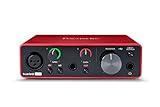
- Pro performance with great pre-amps - Achieve a brighter recording thanks to the high performing mic pre-amps of the Scarlett 3rd Gen. A switchable Air mode will add extra clarity to your acoustic instruments when recording with your Solo 3rd Gen
- Get the perfect guitar and vocal take with - With two high-headroom instrument inputs to plug in your guitar or bass so that they shine through. Capture your voice and instruments without any unwanted clipping or distortion thanks to our Gain Halos
- Studio quality recording for your music & podcasts - Achieve pro sounding recordings with Scarlett 3rd Gen’s high-performance converters enabling you to record and mix at up to 24-bit/192kHz. Your recordings will retain all of their sonic qualities
- Low-noise for crystal clear listening - 2 low-noise balanced outputs provide clean audio playback with 3rd Gen. Hear all the nuances of your tracks or music from Spotify, Apple & Amazon Music. Plug-in headphones for private listening in high-fidelity
- Everything in the box: Includes Pro Tools Intro+, Ableton Live Lite, Cubase LE, and Hitmaker Expansion: a suite of essential effects, powerful software instruments, and easy-to-use mastering tools
For users who can spend a small amount, FL Studio Mobile offers better long-term value for beatmaking because it feels more like a self-contained production workstation. You get stronger MIDI editing, more predictable offline use, and a workflow designed around patterns, instruments, and song arrangement. It is not the deepest Android option for recording live bands or managing complex vocal sessions, but for producers making beats on a phone or tablet, it gives a lot of capability for the price.
Choosing a budget DAW by production style
| Use Case | Best Budget Choice | What It Does Well |
|---|---|---|
| Free vocal recording and collaboration | BandLab | Cloud projects, loops, vocal effects, sharing, simple multitrack recording |
| Low-cost beatmaking | FL Studio Mobile | Step sequencing, piano roll, instruments, automation, offline production |
| Traditional multitrack recording on a budget | n-Track Studio | Audio tracks, MIDI, effects, mixer-style workflow, scalable upgrades |
| Learning instruments and simple MIDI ideas | Walk Band | Virtual instruments, quick sketches, beginner-friendly controls |
| Electronic synth patterns and groovebox production | Caustic 3 | Synth racks, drum machines, pattern sequencing, sound design |
Before choosing the cheapest option, check what the free version actually allows. Some apps let you record and arrange but restrict high-quality export, project saving, effects, or the number of usable tracks. Also consider your Android device: a budget phone with limited RAM may handle loop-based apps smoothly but struggle with large projects, heavy effects, and mulle live audio tracks. If you plan to record vocals or instruments, prioritize low-latency monitoring, USB audio interface support, WAV export, and stable project saving over having the largest sound library.
Independent reader supportYour contribution helps us test, update, and keep practical guides available for everyone.Android DAW Feature Comparison
Android DAWs in 2025 vary widely in how they handle multitrack recording, MIDI editing, plugin support, export formats, and performance on midrange phones or tablets. Some apps feel closer to a desktop studio, while others are faster for sketching loops, programming drums, or recording a quick vocal idea. The best choice depends less on which app has the longest feature list and more on whether its workflow fits the way you actually make music.
Recommended Free Tools
| Android DAW | Best For | Recording | MIDI and Beatmaking | Mixing and Effects | Export Options |
|---|---|---|---|---|---|
| FL Studio Mobile | Beatmakers, electronic producers, loop-based writing | Audio recording available, but not its strongest area | Strong piano roll, step sequencing, drums, synths, automation | Good built-in effects and mixer for mobile production | WAV, MP3, MIDI, FLM project support |
| BandLab | Beginners, singers, collaborators, quick song demos | Simple vocal and instrument recording with cloud projects | Loop library, virtual instruments, basic MIDI tools | Preset-driven mixing, mastering, vocal effects | Cloud sharing, audio export, social publishing |
| n-Track Studio | Multitrack recording, songwriters, mobile mixing | Strong multitrack audio recording with external interface support | MIDI tracks, piano roll, drum sequencing | Capable mixer, EQ, compression, sends, effects | WAV, MP3, stems, project export options |
| Audio Evolution Mobile Studio | Serious audio recording, USB audio interface users | One of the strongest Android options for low-latency recording | MIDI sequencing and instrument support available | Good editing, automation, effects, and optional add-ons | WAV, stems, project backup, mixdown options |
| Caustic 3 | Synth-based production, drum machines, retro electronic music | Limited compared with full multitrack DAWs | Pattern-based machines, synths, samplers, sequencer | Rack-style effects and mixer | WAV, OGG, MIDI, stems |
For recording vocals and instruments, Audio Evolution Mobile Studio and n-Track Studio are usually the most practical choices because they focus on audio tracks, editing, and USB audio interface support. If you plan to connect a microphone, guitar interface, or class-compliant USB mixer, prioritize stable monitoring, buffer settings, and track management over flashy sound packs. BandLab is easier for quick vocal takes, especially if you want automatic cloud backup and simple sharing, but it gives you less detailed control over session structure and offline studio-style mixing.
For MIDI production and beatmaking, FL Studio Mobile remains one of the strongest Android DAWs because of its piano roll, step sequencing, drum programming, automation, and built-in instruments. It works well for trap, EDM, hip-hop, pop sketches, and melodic loop creation. Caustic 3 is older in feel but still useful for producers who like self-contained synth machines and pattern-based composition. BandLab also works for beginners who want loops and virtual instruments without needing to build a full production setup from scratch.
Plugin support is one of the biggest differences between Android DAWs and desktop DAWs. Android does not have the same mature VST ecosystem as Windows or macOS, so most mobile workflows depend heavily on built-in instruments, bundled effects, in-app purchases, or app-specific add-ons. This makes the stock sound library and native effects more significant than they might be on a laptop. If you need advanced third-party plugins, desktop production is still stronger; if you mainly need sketching, arranging, tracking, and basic mixing, modern Android DAWs are capable enough for finished demos and even release-ready music with careful gain staging and arrangement choices.
Export workflow also matters. Beatmakers should look for stem export, MIDI export, and high-quality WAV rendering so projects can move into a desktop DAW later. Vocalists and songwriters may care more about fast MP3 sharing, cloud collaboration, and easy project recall. Producers working across phone, tablet, and computer should choose an app that makes backup and transfer painless, because a powerful mobile DAW becomes frustrating if sessions are hard to move, archive, or reopen months later.
Outdated Drivers Are Slowing You Down
One free scan finds every outdated or missing driver and matches the right update for your exact hardware.Free scan · exact hardware matchPC Slower Than It Used to Be?
A free scan shows the junk files, broken settings and background clutter dragging Windows down - then fixes them in one click.Free scan · Windows 10 & 11How to Choose the Right DAW for Your Android Setup
Choosing the right Android DAW starts with matching the app to your phone or tablet, not just picking the longest feature list. A newer Snapdragon 8-series, Tensor, or MediaTek Dimensity flagship can handle multitrack audio, virtual instruments, time-stretching, and heavier effects more comfortably than an entry-level device with limited RAM. If your Android device has 4 GB of RAM or less, prioritize lightweight apps with simple audio recording, loop sequencing, and efficient export options. If you have 8 GB of RAM or more, you can be more ambitious with larger projects, higher track counts, MIDI instruments, automation, and more complex mixing chains.
Your production style matters just as much as device power. Beatmakers should look closely at drum pads, step sequencers, piano rolls, sample chopping, loop launching, swing controls, and quick pattern duplication. Vocalists and instrumentalists should focus on low-latency recording, reliable audio interface support, punch-in recording, track comping, monitoring options, and clean WAV export. Producers who want to finish complete songs on Android need a stronger mixer, automation, send effects, EQ, compression, mastering tools, and project organization that does not become frustrating after ten or twenty tracks.
Also popular on Amazon

- ✔️[High-fidelity sound quality, accurate sampling] The Synido 2x2 audio interface uses a high-quality independent audio chip to reduce recording latency, support 24-bit depth and 48kHz sampling rate, and ensure every detail is restored. Whether it is recording or live broadcasting, it can provide a clear and natural sound quality experience
- ✔️[Three monitoring modes, easy to switch] The audio interface provides three monitoring modes to meet different needs. In Stereo mode, independent left and right channels present the original input (such as a microphone or instrument), which is suitable for accurate recording. Mix mode can mix input audio and computer audio in real-time, which is suitable for live broadcast or recording, and is easy to adjust instantly. USB mode only monitors computer audio, which is suitable for post-editing or audio processing. Whether it is recording, live broadcast, or post-production, the three modes can be easily switched to make audio creation more efficient and professional
- ✔️[User-friendly design] The audio interface is intuitively designed, and equipped with three independent control areas, and the XLR interface supports 6.35mm and XLR microphones, which are compatible with various devices. The green, orange, and red LED lights display the volume level, helping you to grasp the volume status at any time and avoid distortion. Supports easy switching between Line In and instrument input, adapts to different devices, reduces interference and distortion, and does not need to adjust gain frequently, improving efficiency
- ✔️[Professional 48V phantom power] Synido audio interface is equipped with 48V phantom power switch and supports 48V dynamic microphone with excellent noise reduction performance, provides a highly sensitive recording experience, accurately picks up sound, and effectively reduces noise interference, ensuring clear and stable sound quality output
- ✔️[Lightweight and portable, plug and play, create at any time] The USB audio interface weighs only 300g and measures 14 x 11.5x 4.5 cm. It is compact and portable and can be taken anywhere anytime. Equipped with a 3.5mm to 6.35mm adapter and a USB-C to USB-A data cable, you can easily use it by directly connecting to your mobile phone or computer
Match the DAW to your workflow
- For fast beat ideas: choose a pattern-based app with drum programming, sample import, and a responsive piano roll.
- For vocals and guitar: choose a DAW with stable audio recording, external USB interface support, and straightforward editing.
- For full productions: choose an app with multitrack arrangement, automation, mixing tools, MIDI editing, and high-quality export.
- For beginners: choose a DAW with templates, built-in sounds, clear menus, and minimal setup before recording.
- For experienced producers: choose the app with the best balance of routing, plugins, MIDI control, and file management.
Budget should also guide the decision. Free Android DAWs are useful for learning, sketching, and basic recording, but many restrict track counts, export quality, sound libraries, or advanced editing. A low-cost paid app can be better value than a free app that requires several upgrades to become practical. Before buying expansions, check whether the core app supports the features you will use every week: audio tracks, MIDI tracks, sample import, automation, mixdown formats, cloud backup, and project export. If you collaborate with desktop users, look for easy WAV stem export or project transfer options rather than relying only on a closed mobile project format.
Also consider the accessories in your Android setup. A USB-C audio interface can improve recording quality and reduce latency for vocals, guitar, bass, and hardware synths. A small MIDI keyboard or pad controller can make programming melodies and drums faster than tapping everything on glass. Wired headphones are still preferable for recording because Bluetooth latency can make timing feel delayed. Storage is another practical factor: sample packs, recorded takes, and exported WAV files can fill a phone quickly, so a device with plenty of internal storage or reliable cloud backup will make mobile production smoother.
Do these 3 things before closing this tab:
1Fix the driver behind crashes, sound loss and screen glitches2Repair Windows errors before they cause bigger problems3Scan for outdated or missing drivers - takes under a minuteThe best approach is to test one focused project before committing. Create a short beat, record a vocal or instrument, add a few effects, automate a volume change, and export the result. If the app feels stable, responsive, and easy to navigate during that process, it is a strong fit. If you keep fighting latency, hidden menus, limited exports, or crashes, choose a simpler or more optimized DAW for your Android hardware.
Frequently Asked Questions
Can I make a full song on an Android DAW, or do I still need a desktop DAW?
Yes, you can make a complete song on Android if the app supports multitrack recording, MIDI sequencing, mixing, automation, and high-quality export. Apps like FL Studio Mobile, Cubasis, BandLab, n-Track Studio, and Audio Evolution Mobile can handle full productions, although large sessions with many effects may be easier to finish on a desktop. For best results, use a recent phone or tablet with enough RAM, low-latency audio support, and external storage if you work with lots of audio files.
Which Android DAW is best for beginners in 2025?
BandLab is one of the easiest starting points because it is free, cloud-based, and includes loops, virtual instruments, vocal recording, and collaboration tools. FL Studio Mobile is also beginner-friendly if you want a more self-contained beatmaking and production workflow. If you plan to record guitars, vocals, or external instruments often, Audio Evolution Mobile or n-Track Studio may be a better long-term choice.
What is the best Android DAW for making beats?
FL Studio Mobile is a strong pick for beatmakers because it has a fast step sequencer, piano roll, drum kits, synths, and pattern-based arrangement. Koala Sampler is excellent for sample-based beats, chopping, and quick ideas, especially if you like an MPC-style workflow. For loop-based production with simple sharing, BandLab is a good free option with a large sound library.
The Tool Desk
Outbyte Driver Updater FREEFix the driver behind crashes, sound loss and screen glitchesFind Drivers →Outbyte PC Repair FREERepair Windows errors before they cause bigger problemsFix Now →Do Android DAWs support plugins like VST or AU?
Most Android DAWs do not support desktop plugin formats such as VST, VST3, or AU. Instead, they usually include built-in instruments and effects, with some apps offering in-app purchases or limited third-party integration. If plugin support is central to your workflow, check the app’s current compatibility before buying, since Android music production is still more closed than desktop production in this area.
What specs should my Android phone or tablet have for music production?
A modern midrange or flagship Android device with at least 6GB of RAM is a good baseline, while 8GB or more is better for larger sessions. Look for strong CPU performance, plenty of storage, USB-C audio interface support, and stable low-latency audio performance. If you record vocals or instruments, an external USB audio interface and wired monitoring will usually give better results than the built-in mic or Bluetooth headphones.
Bottom Line
The best Android DAW in 2025 depends on how you make music: FL Studio Mobile and Caustic-style groove workflows suit beatmakers, Cubasis-style multitrack tools fit songwriters and producers, while simpler recording apps are better for capturing vocals, guitars, and ideas fast. Prioritize low-latency performance, MIDI support, export options, and how comfortable the workflow feels on your screen size.
If you are just starting, choose an affordable app with a clean interface and room to grow; if you already produce seriously, invest in the DAW with the strongest mixing, plugin, and stem export features your device can handle. Test free versions or demos where available, then build your mobile setup around the app that lets you finish tracks—not just start them.
Do these 3 things before closing this tab:
1Scan for outdated or missing drivers - takes under a minute2Repair Windows errors before they cause bigger problems3Fix the driver behind crashes, sound loss and screen glitches
