Quick wins for a faster PC:
Repair Windows errors before they cause bigger problemsFix Now →Fix the driver behind crashes, sound loss and screen glitchesFind Drivers →Some links on this page are affiliate links: if you buy through them we may earn a commission, at no extra cost to you.
Belkin’s newer Qi2 wireless chargers are getting attention because Qi2 fixes several pain points people hit with older Qi pads: weaker alignment, more frequent “charging, but slowly,” and more misses when the phone shifts by even a few millimeters.
If you’re looking at Pixel 10, the practical question isn’t whether the charger is “wireless”—it’s whether it reliably reaches your phone’s supported wireless power and does it without annoying drop-offs. Qi2 helps, and Belkin’s products are designed around that standard.
As an Amazon Associate I earn from qualifying purchases.
This guide breaks down what Qi2 actually changes, how to confirm Pixel 10 compatibility and wattage, and what to try when the charging behavior isn’t what you expect.
What Qi2 changes vs older Qi charging
Qi2 is a wireless charging standard intended to improve consistency. The big user-facing upgrade is alignment behavior.
Popular on Amazon

- Qi2 Wireless Charger
- The Pixelsnap Charger magnetically snaps to your phone with ease, and efficiently charges your phone at speeds up to 25W[1]
- Built with Qi2 magnetic technology, the Pixelsnap Charger works with thousands of Qi2 devices – just snap it on and power up, and when you’re ready to go, easily pop it off[2]
- Compatible with Pixelsnap Cases
- Please refer to the product description section below for all applicable legal disclaimers denoted by the bracketed numbers in the preceding bullet points (e.g., [1], [2], etc.)
Qi2’s magnet-guided alignment
Qi2 chargers use magnets in a way that’s functionally similar to Apple’s MagSafe ecosystem: they help “snap” the phone into the best charging position. That matters because wireless power transfer is very sensitive to positioning and coil alignment.
Real-world power delivery: aim for the phone’s max, not the pad’s label
Wireless chargers often advertise higher wattage than the phone can accept. With Qi2, you still need the charger to support the mode your Pixel 10 uses; otherwise you’ll cap out at a lower rate.
The Tool Desk
Outbyte Driver Updater FREEFix the driver behind crashes, sound loss and screen glitchesFind Drivers →Outbyte PC Repair FREEClear out junk files and repair common Windows errorsFree Scan →Efficiency and thermal behavior
Better alignment typically means less wasted energy. When the phone isn’t perfectly aligned, you can end up with more heat and more frequent power throttling—especially in warm rooms, thick cases, or while the screen is on.
Why a Belkin Qi2 charger tends to fit Pixel 10 better
The claim that Belkin’s Qi2 charger is better for Pixel 10 than older Qi chargers usually comes down to reliability: consistent placement and fewer “it’s charging… maybe” moments.
More consistent alignment reduces drop-offs
On older Qi pads, you often have to “hunt” for the sweet spot. Qi2’s magnetic alignment guidance tends to make that sweet spot easier to hit and easier to keep—especially if you pick up and set down your phone multiple times a day.
Better odds of reaching Pixel 10’s supported wireless wattage
Even when a phone supports fast wireless charging, it may only do so when the charger and positioning meet the right conditions. Qi2 helps because it improves the conditions the phone’s receiver coil needs.
Do these 3 things before closing this tab:
1Scan for outdated or missing drivers - takes under a minute2Clear out junk files and repair common Windows errors3Fix the driver behind crashes, sound loss and screen glitchesAlso popular on Amazon

- Qi2.2-Certified 25W Magnetic Charger for Pixelsnap: Certified for the full 25W wireless power path, allowing compatible Google Pixel devices to charge up to 40% faster than standard wireless chargers. (Compatible with Pixelsnap)
- Pixel-Optimized Magnetic Alignment: Precision engineered to maintain full coil-to-coil magnetic alignment on supported Pixel devices, reducing heat buildup and minimizing efficiency losses to sustain higher wattage without the early power throttling common on non-Qi2.2 wireless chargers.
- Up to 25W Output for Pixel 10 Pro XL: Designed to deliver stable, high-wattage power when paired with a 30W USB-C power source (sold separately), enabling high-performance Pixel devices to fully utilize advanced wireless charging capability (model dependent).
- Reinforced 6-Foot Braided USB-C Cable: Integrated braided cable is designed for repeated flexing, with reinforced strain relief at both ends to resist fatigue over time.
- Secure Magnetic Retention: Built to resist lateral slip during everyday use, preventing the charger from shifting or separating.
Belkin’s focus on mainstream compatibility
Belkin chargers are generally built for broad device compatibility (standards compliance, clear power delivery behavior, and predictable charging surfaces). That’s the difference between a charger that works “sometimes” and one that behaves like an appliance.
Compatibility checklist for Pixel 10 owners
Before buying (or after switching chargers), use this checklist. It prevents the most common mismatch: a charger that supports Qi2 in theory but doesn’t deliver the mode your Pixel 10 expects in practice.
- Confirm Pixel 10 wireless power support: Check your phone’s specifications or Wireless charging settings (if your Pixel model exposes charging info).
- Confirm the charger is Qi2 (not just “wireless”): Look for explicit Qi2 branding on the box or product page.
- Watch for case thickness and materials: Very thick, metal-heavy, or highly reflective cases can interfere with alignment or power transfer.
- Use the correct accessories: If your phone uses a case-less or thinner setup, the magnet alignment may be more reliable. If you use a rugged case, test it.
- Know your environment: If you frequently charge in a warm room, even a good charger may throttle.
| What to verify | Why it matters | What to do |
|---|---|---|
| Qi2 support | Older Qi chargers can require more precise placement | Choose a charger labeled Qi2 and rated for your region |
| Supported wattage on Pixel 10 | Charger label ≠ phone max | Test with the phone at rest and the screen off/on |
| Case fit | Coil alignment and magnet effect can change | Try without the case (if safe) or with your regular case |
| Heat build-up | Thermal throttling can reduce charging speed | Charge on a cool, ventilated surface |
How to set up and verify charging wattage on Pixel 10
Qi2 makes alignment easier, but you still want to confirm you’re actually getting the speed you paid for. Pixel 10 may show charging details differently depending on software version and carrier settings.
Step-by-step setup
- Plug the Belkin Qi2 charger into a wall adapter that meets the charger’s input requirements (use the included adapter if provided).
- Place the charger on a flat, non-metal surface with some breathing room around it.
- Attach or place your Pixel 10 so it naturally “snaps” into the Qi2 alignment point (don’t press down hard).
- Lock the phone and turn the screen off if you want a clean baseline test.
- Observe the charge behavior for 5–10 minutes before judging speed.
Verify behavior, not just the icon
Even if the UI shows charging, speed can vary. A quick sanity check: if the battery percentage barely changes while the phone is warm, you may be power-limited by temperature, case thickness, or misalignment.
Test with controlled variables
- Run one test with the screen off.
- Run one test with the screen on (or in-use) and compare the charging pace.
- Repeat with the same orientation each time (straight-on vs slightly off angle).
Where Belkin’s Qi2 design usually matters in daily use
Qi2 improves the “feel” of wireless charging, not just the spec sheet. Here are the areas people notice first.
Fewer alignment corrections
You’re less likely to have to slide the phone around to make the charger “catch.” That’s especially helpful on bedside stands and desks.
Also popular on Amazon

- Qi2.2-Certified 25W Magnetic Charger for Pixelsnap: Certified for the full 25W wireless power path, allowing compatible Google Pixel devices to charge up to 40% faster than standard wireless chargers. (Compatible with Pixelsnap)
- Pixel-Optimized Magnetic Alignment: Precision engineered to maintain full coil-to-coil magnetic alignment on supported Pixel devices, reducing heat buildup and minimizing efficiency losses to sustain higher wattage without the early power throttling common on non-Qi2.2 wireless chargers.
- Up to 25W Fast Wireless Charging (PPS Required): Delivers maximum 25W output when paired with a 30W+ USB-C PPS wall adapter (sold separately). Standard PD chargers are supported but will charge at reduced speeds and cannot reach full 25W performance.
- Reinforced 6-Foot Braided USB-C Cable: Integrated braided cable is designed for repeated flexing, with reinforced strain relief at both ends to resist fatigue over time.
- Secure Magnetic Retention: Built to resist lateral slip during everyday use, preventing the charger from shifting or separating.
More reliable nighttime charging
Most chargers aren’t tested for the “I bumped the phone in my sleep” scenario. With magnetic alignment, your phone is less likely to drift out of position.
Better odds when you use vertical vs horizontal mounting
Some Qi2 setups keep the phone better centered whether you position it for portrait or landscape use. That can be the difference between steady charging and periodic hiccups.
What’s actually slowing this PC down?
Pick the symptom - the matching free tool is one click away.
Best practices to get consistent charging (and avoid heat)
Wireless charging is convenient, but it’s also more sensitive to physics than cable charging. These habits protect performance.
- Use a proper power adapter: If the charger’s input is, for example, 15W-class and you use a weaker supply, you can get slower output.
- Avoid charging under a blanket: Heat retention is real. Warm chargers and warm phones throttle faster.
- Keep the charging surface clean: Dust, lint, and cases with soft coatings can affect contact and alignment.
- Remove magnetic accessories: Popsockets, metal rings, and other magnets can interfere with the alignment system.
- Charge at lower “friction” times: If you’re doing heavy gaming or navigation, let the phone cool first.
Troubleshooting: what to do when Qi2 charging underperforms
If your Pixel 10 charges slower than expected, don’t assume the charger is defective. Wireless charging failures are often alignment, case, or power-adapter related.
Problem: It charges intermittently (on/off)
Intermittent charging usually means coil alignment isn’t stable or the phone is shifting. Remove the case to test if your setup is case-related. Also try charging in portrait and keep the phone centered without sliding.
Problem: Charging icon shows, but the battery barely increases
This often comes from heat or from using a power mode your phone can’t sustain. Turn off the screen, stop heavy background activity, and move the charger to a cooler surface.
Recommended Free Tools
Also popular on Amazon

- 【Universal Compatibility】15W output for Google Pixel 11, 11 Pro, 11 Pro XL, 11 Pro Fold, 10, 10 Pro, 10 Pro XL, 10 Pro Fold, other pixel phones do not have the magnetic function, it should work with magnetic case, like 10a, 9, 9 Pro, 9 Pro XL, 8, 8 Pro, 7, 7 Pro, 6, 6 Pro
- 【Notes】In the current market, wireless charging is generally slower than traditional wired charging due to lower energy conversion in current tech; Situation that a little warm is normal, because part of the electricity will be converted into heat energy and released when wireless charging; Fast Charging only mean 15W max fast output, not mean that all phone will shows "fast charging” when charge; Power Adapter not included, compatible with USB A or USB C Adapter
- 【Charging hints】It only work with phones with magnetic suction function, or with magsafe case, if not, wireless charger cannot be aligned with the phone charging area, Note: cases made of metal, cases with attachments such as metal ring, magnets, pop socket, cards, grips will obstruct charging
- 【Safe Charge】Intelligent circuit design provide short circuiting protection, over-heating protection, over-currents protection, and over-charging protection. Design of charging stops when battery is full, provide safe night charging for you
- 【Package Included】1Pack 4FT length of wireless charger (power adapter not included), and 1-years w arranty, If there is any problem, please feel free to contact with us
Problem: It never seems to reach fast wireless speeds
Wireless fast charging is conditional. Confirm that you’re using the included adapter (or one that matches the charger’s required input). Also test with your phone case removed if possible (for a quick diagnostic only).
Problem: Qi2 works with one phone, not another
Qi standards are similar but not identical in behavior across devices. Pixel 10’s receiver and software may request different negotiated power levels. If your Belkin Qi2 charger supports multiple modes, still expect Pixel-specific limits.
Quick reset checklist
- Unplug the charger for 10 seconds.
- Re-seat the phone and wait 30–60 seconds.
- Check for case interference (try without the case).
- Try a different wall outlet.
- Try a different USB-C cable (if applicable) and confirm the adapter is rated for the charger input.
Alternatives if you don’t want Belkin
If you’re comparing options, prioritize Qi2 over generic Qi for the same reason Belkin’s charger is a better fit for Pixel 10: alignment consistency.
Qi2 from other accessory brands
Choose chargers explicitly labeled Qi2 and from reputable manufacturers that list supported power levels and include clear adapter guidance. The best alternative is usually another Qi2 unit with a similar physical design (flat pad vs stand vs magnetic puck).
Windows Errors? Fix Them Before They Spread
Repair common Windows errors and clear accumulated junk for a smoother, more stable PC - no reinstall needed.Free scan · no reinstallOutdated Drivers Are Slowing You Down
One free scan finds every outdated or missing driver and matches the right update for your exact hardware.Free scan · exact hardware matchOlder Qi chargers
They can still work, but expect more sensitivity to placement. If your Pixel 10 supports fast wireless charging, an older Qi pad may not hold the alignment needed for consistent throughput.
Magnetic phone mounts and MagSafe-style accessories
Some MagSafe-compatible ecosystems can improve alignment too, but compatibility varies across cases and adapters. If you go this route, confirm Qi2 charging compatibility rather than relying only on “magnet attachment” marketing.
Also popular on Amazon
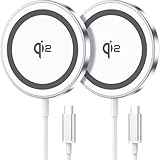
- 💎【𝐐𝐈𝟐 𝐂𝐄𝐑𝐓𝐈𝐅𝐈𝐄𝐃 𝟏𝟓𝐖 𝐅𝐀𝐒𝐓 𝐂𝐇𝐀𝐑𝐆𝐈𝐍𝐆】The Qi2 certified magnetic charger for iphone delivers up to 15W fast charging—2x faster than standard 7.5W chargers. It charges to 22% in just 20 minutes and fully charges in 2 hours, so your phone stays powered and ready for use. ⚠️Note: Please use a 20W or higher USB-C power adapter for optimal performance (⚠️adapter not included).
- 💎【𝐒𝐓𝐑𝐎𝐍𝐆 𝐌𝐀𝐆𝐍𝐄𝐓𝐈𝐂 𝐀𝐋𝐈𝐆𝐍𝐌𝐄𝐍𝐓】This Qi2 for mag safe. charger utilizes powerful magnetic technology to automatically align and secure your phone in the optimal charging position—at night, simply place your phone down for effortless charging. The for iphone charger fast charging provides strong magnetic force that keeps your device securely aligned, ensuring stable charging without shifting—even during calls, texts, or vibrations.
- 💎【𝐖𝐈𝐃𝐄 𝐂𝐎𝐌𝐏𝐀𝐓𝐈𝐁𝐈𝐋𝐈𝐓𝐘】The magnetic phone charger is compatible with iPhone 17/17 Pro/17 Pro Max/Air, 16/16 Plus/16 Pro/16 Pro Max, 15/15 Plus/15 Pro/15 Pro Max, 14/14 Plus/14 Pro/14 Pro Max, 13/13 Mini/13 Pro/13 Pro Max, and 12/12 Mini/12 Pro/12 Pro Max, for AirPods 4 3 2 Pro, for Pixel 10/10 Pro/ 10 Pro XL(charges up to 41% in 37 min). ⚠️Note: For best results, use a case that is compatible with mag safe.
- 💎【𝟓𝐅𝐓 𝐄𝐗𝐓𝐑𝐀-𝐋𝐎𝐍𝐆 𝐂𝐀𝐁𝐋𝐄】This for iphone wireless charger fast charging with cable includes a 5-foot (1.5-meter) cord that combines flexibility with durability. The for iphone charging pad extended cable lets you charge freely at your desk, bedside or sofa.
- 💎【𝟐 𝐏𝐀𝐂𝐊 𝐕𝐀𝐋𝐔𝐄 & 𝐏𝐎𝐑𝐓𝐀𝐁𝐋𝐄 𝐃𝐄𝐒𝐈𝐆𝐍】The wireless phone charger comes as a 2-pack for diverse charging needs. Keep one at home, one at the office—no more moving qi2 for mag safe charger around. Makes a great gift for family and friends too. The compatible with iphone magnetic charger features a slim, lightweight design that fits easily in pockets or bags, perfect for travel and daily use. Charge your devices anytime, anywhere.
FAQs
Is a Qi2 Belkin charger actually compatible with Pixel 10?
If Pixel 10 supports Qi2 (or supports Qi-based wireless charging that maps cleanly to Qi2 negotiation), a Qi2 charger should work. The safest way to confirm is checking Pixel 10’s wireless charging spec and the charger’s Qi2 labeling.
Will I get the charger’s max wattage on Pixel 10?
Usually you’ll get less than the charger’s maximum label. Wireless power delivery depends on the phone’s supported power level and negotiation, plus alignment and temperature.
Do I need to remove my case for best performance?
Not always, but thicker or metal-adjacent cases can reduce charging efficiency or stability. If you notice slow or intermittent charging, a quick no-case test is the fastest diagnostic.
Why does charging get slower when the phone is warm?
Most phones throttle wireless charging to manage temperature. Qi2 helps with alignment, but it can’t override thermal limits if the phone and charger are already hot.
What’s the biggest upgrade from older Qi?
Consistency. Qi2’s magnet-guided alignment reduces the “sweet spot” hunting that older Qi pads often require.
Bottom Line
Belkin’s Qi2 charger is typically a better match for Pixel 10 than older Qi chargers because Qi2 improves magnetic alignment and makes fast, steady charging easier to maintain. That translates into fewer interruptions and more consistent charging behavior in everyday use.
If you buy Qi2, verify Pixel 10’s supported wattage, test with your real case, and use the right adapter. When charging slows or drops, start with alignment stability and temperature before assuming hardware failure.

