Quick wins for a faster PC:
Clear out junk files and repair common Windows errorsFree Scan →Fix the driver behind crashes, sound loss and screen glitchesFind Drivers →Repair Windows errors before they cause bigger problemsFix Now →Some links on this page are affiliate links: if you buy through them we may earn a commission, at no extra cost to you.
The ASUS ROG Swift OLED PG32UCDMR is worth buying for enthusiasts who want a flat 31.5-inch 4K QD-OLED display with 240Hz refresh, DisplayPort 2.1, USB-C charging, and KVM switching. It is less compelling for bright rooms, static desktop-heavy workloads, midrange graphics cards, or buyers who can pay a similar price for ASUS’s newer PG32UCDM Gen 3.
Its strengths are excellent OLED contrast, vivid QD-OLED color, extremely fast pixel response, and unusually capable connectivity. Its compromises are the high price, demanding GPU requirements, possible VRR flicker, raised QD-OLED blacks under ambient light, and the continuing possibility of OLED burn-in.
As an Amazon Associate I earn from qualifying purchases.
The Tool Desk
Outbyte PC Repair FREEClear out junk files and repair common Windows errorsFree Scan →Outbyte Driver Updater FREEScan for outdated or missing drivers - takes under a minuteDriver Scan →What is the PG32UCDMR?
The ASUS ROG Swift OLED PG32UCDMR is a premium flat gaming monitor built around a 31.5-inch-viewable 4K QD-OLED panel. ASUS’s naming breaks down as follows:
- ROG Swift: ASUS’s high-end gaming-monitor family.
- OLED: Self-emissive pixels that can switch off individually for effectively perfect dark-room blacks.
- PG32: The 32-inch product class; the actual specified viewable area is approximately 31.5 inches.
- UCDMR: The 4K/240Hz QD-OLED family, with the “R” model distinguished primarily by its DisplayPort 2.1a UHBR20 connection and refreshed feature set.
It should not be confused with the original PG32UCDM or the newer PG32UCDM Gen 3. The PG32UCDMR is best viewed as a connectivity and feature refresh of the original model, while Gen 3 is a later panel generation.
Popular on Amazon

- Immersive 4K QD-OLED Display: 32-inch 4K (3840 x 2160) QD-OLED gaming monitor with 240 Hz refresh rate and 0.03 ms (GTG) response time for immersive gaming
- Advanced Heat Management System: Highly efficient custom heatsink, advanced airflow design, and graphene film for better heat management to reduce the risk of burn-in
- Exceptional HDR Performance: VESA DisplayHDR 400 True Black compliance, 99% DCI-P3 gamut, true 10-bit, and Delta E < 2 color difference for astonishing HDR performance
- Uniform Brightness Setting: Optional uniform brightness setting ensures consistent luminance levels across the entire display
- Convenient Monitor Control: DisplayWidget Center allows users to access OLED Care functions, as well as adjust monitor settings with a mouse
ASUS PG32UCDMR specifications
The figures below are manufacturer-listed specifications unless otherwise noted. The rated 0.03ms figure is a GTG response-time claim, not a universal measurement of total system latency.
| Specification | PG32UCDMR |
|---|---|
| Viewable size | 31.5 inches |
| Resolution | 3840 × 2160 |
| Panel | QD-OLED |
| Refresh rate | 240Hz |
| Rated response time | 0.03ms GTG |
| Color gamut | 99% DCI-P3 |
| Color depth | True 10-bit listed in product documentation |
| HDR | VESA DisplayHDR 400 True Black |
| Variable refresh | G-SYNC compatible; behavior depends on input and GPU |
| DisplayPort | DisplayPort 2.1a UHBR20, up to 80Gbps full bandwidth |
| HDMI | HDMI 2.1 |
| USB-C | DisplayPort Alt Mode and up to 90W power delivery |
| USB hub | Three USB-A downstream ports and USB-B upstream connection |
| Stand | Height, tilt, and swivel adjustment; no pivot |
| VESA mount | 100 × 100mm |
| Speakers | No built-in speakers listed |
The manual specifies roughly 80mm of height adjustment, tilt from -5° to 20°, and ±15° of swivel. Its width is approximately 718.7mm, with total height varying according to stand position. See the PG32UCDMR manual for connection and adjustment details.
Free tools Windows power users keep installed
One-click scans. No signup required.
Why 4K at 240Hz matters
At 31.5 inches, 3840 × 2160 delivers a sharp, dense image for games and desktop work. The 240Hz refresh rate can make camera movement, aiming, and scrolling look smoother than 120Hz or 144Hz, while reducing the time between displayed frames.
However, 240Hz is a capability rather than a guarantee. A game must render close to 240 frames per second to take full advantage of it. Competitive shooters and other well-optimized esports titles are the most likely to reach that level. Demanding single-player games will often require reduced settings, upscaling, or frame generation, even with a powerful GPU.
For current consoles, HDMI 2.1 is the important feature, but buyers should generally expect 4K gaming at up to 120Hz rather than 240Hz. The monitor’s full refresh-rate potential is primarily a high-end PC feature.
DisplayPort 2.1: the main upgrade over PG32UCDM
The original PG32UCDM uses DisplayPort 1.4 with Display Stream Compression (DSC). The PG32UCDMR adds DisplayPort 2.1a UHBR20, which ASUS specifies at up to 80Gbps full bandwidth. This can reduce reliance on DSC for high-refresh 4K operation, depending on the source device, cable, selected mode, and software.
Recommended Free Tools
Also popular on Amazon

- World's First 1440P 480Hz OLED Gaming Monitor: Experience unprecedented gaming performance with the industry's first 1440P resolution OLED display running at an incredible 480Hz refresh rate
- Ultra-Fast Response Time and High Refresh Rate: 26.5-inch QHD 480Hz WOLED gaming monitor delivers 0.03ms response time for sharp and ultra-fast gaming visuals without motion blur
- Exclusive Gaming AI Assistant: Advanced AI technology helps you better navigate your gaming experience with intelligent features and optimizations
- ROG OLED Anti-Flicker Technology: Exclusive technology helps reduce the flicker during refresh rate fluctuations for more comfortable extended gaming sessions
- Superior Color Accuracy and HDR Performance: 99% DCI-P3 color gamut coverage and Delta E <2 color difference deliver astonishing HDR performance with true-to-life colors
DisplayPort 2.1 on the monitor does not upgrade a graphics card that only has DisplayPort 1.4. To use the highest-bandwidth path, the GPU must support the required DisplayPort standard, and the cable must be suitable and certified for the intended bandwidth. Docks, adapters, KVM devices, and inexpensive cables can also become bottlenecks.
Gaming performance and image quality
Fast OLED response
OLED pixels change state extremely quickly, so motion should remain clear without the long response smearing common on slower LCD panels. ASUS’s 0.03ms GTG rating is a manufacturer figure; real buying evidence should include measured response consistency, input lag, refresh-rate behavior, and VRR performance.
Independent testing of the closely related original PG32UCDM found near-instantaneous pixel response, low input lag at maximum refresh, excellent color, and strong black levels. Those results are useful family-level evidence, but they are not direct measurements of the PG32UCDMR. RTINGS tested the PG32UCDM, not the “R” model.
VRR behavior
Variable refresh can smooth uneven frame rates, but the original model showed noticeable VRR flicker when frame rates changed. The effect can be most visible in menus, loading screens, or games with unstable frame pacing. Capping the frame rate, improving frame-time consistency, changing adaptive-sync settings, or disabling VRR for a particular title may help. None of these is a guaranteed cure.
QD-OLED contrast and HDR
QD-OLED combines pixel-level light control with a wide, saturated color range. In a dim room, dark scenes look exceptionally deep, and bright objects do not produce the LCD-style blooming caused by a backlight zone illuminating nearby pixels.
HDR highlights can look highly impactful, especially against a dark background. But DisplayHDR 400 True Black certification should not be interpreted as sustained high full-screen brightness. Large bright HDR areas are typically less bright than small highlights, and this monitor is not a substitute for a high-output LCD in every bright HDR scene.
Also popular on Amazon

- Dual-Mode High-Performance Display: 26.5-inch QHD OLED gaming monitor with versatile dual mode (QHD @ 540Hz or HD @ 720Hz) and 0.02ms response time
- Advanced Tandem OLED Technology: New Tandem OLED technology delivers 15% higher peak brightness, 25% larger color volume, and 60% longer OLED lifespan versus previous-generation WOLED panels
- TrueBlack Glossy Panel: New TrueBlack Glossy panel provides a zero-haze surface and exceptionally sharp imagery
- OLED Care Pro with Neo Proximity Sensor: ASUS OLED Care Pro with Neo Proximity Sensor precisely detects when the user is away and switches to a black screen to reduce the risk of burn-in
- Exceptional HDR Performance: VESA DisplayHDR 500 True Black compliance, 99.5% DCI-P3 gamut, true 10-bit color, and Delta E<2 color difference for astonishing HDR performance
Ambient light is a more significant concern. QD-OLED blacks can appear raised, gray, or purple when light hits the panel. That is why the PG32UCDMR is a better fit for a dim or controlled room than a desk facing a bright window.
Text and desktop use
4K makes this 32-inch class monitor considerably sharper than lower-resolution OLED alternatives. Even so, the panel’s OLED subpixel layout can produce color fringing or less-than-LCD-perfect text edges for some users. If the monitor will be used primarily for reading small text, spreadsheets, and application interfaces, compare it in person or prioritize independent text-clarity testing.
Windows Errors? Fix Them Before They Spread
Repair common Windows errors and clear accumulated junk for a smoother, more stable PC - no reinstall needed.Free scan · no reinstallOutdated Drivers Are Slowing You Down
One free scan finds every outdated or missing driver and matches the right update for your exact hardware.Free scan · exact hardware matchUSB-C, KVM, and hybrid setups
USB-C carries DisplayPort Alt Mode video and can supply up to 90W to a connected laptop. The integrated KVM lets one keyboard and mouse control multiple connected systems, making the PG32UCDMR more practical for a gaming desktop plus work laptop than a monitor designed only for one PC.
There are limits. The laptop must support USB-C video output; USB-C charging alone does not guarantee DisplayPort Alt Mode. Also, 90W may be enough for many laptops but may not fully power a high-performance gaming laptop during sustained heavy use. Check the monitor’s USB upstream and downstream connections when configuring KVM switching.
OLED Care and burn-in risk
OLED pixels can suffer permanent image retention, commonly called burn-in, after prolonged exposure to static elements. Fixed taskbars, browser controls, spreadsheets, application chrome, and channel logos are more relevant risks than varied gaming content.
ASUS includes OLED Care Pro and related maintenance routines intended to reduce panel wear. Use automatic screen-off behavior, vary static content when practical, and allow pixel-refresh procedures to finish. Do not unplug the display during maintenance. These features reduce risk; they do not make burn-in impossible.
Also popular on Amazon
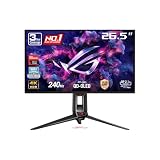
- High-Performance Display Specifications: 26.5-inch 4K (3840 x 2160) QD-OLED gaming monitor with 240Hz refresh rate and 0.03ms response time
- Advanced QD-OLED Technology: Latest 4th-gen QD-OLED technology delivers sharper imagery and crystal-clear text, a longer lifespan over previous-gen OLEDs
- Enhanced Viewing Comfort: OLED Anti-Flicker 2.0 technology includes a new luminance compensation algorithm that reduces flicker by 20% compared to previous-gen panels, ensuring comfortable viewing
- Intelligent Burn-In Protection: New ASUS OLED Care Pro functions with Neo Proximity Sensor that precisely detects when the user is away, switching to a black screen to reduce the risk of burn-in
- Comprehensive Connectivity Options: Extensive connectivity options include DisplayPort 2.1a UHBR20 with full 80Gbps bandwidth, USB-C (90W PD), HDMI 2.1, and a tripod socket
Warranty coverage for burn-in and other OLED issues varies by country, date, and exact SKU. Read the regional warranty terms before buying rather than assuming a universal coverage period. ASUS’s product information and the manual are the best starting points for model-specific features: ASUS ROG listings.
PG32UCDMR vs. PG32UCDM vs. PG32UCDM Gen 3
| Model | What it offers | What to watch |
|---|---|---|
| PG32UCDMR | Flat 4K/240Hz QD-OLED, DisplayPort 2.1a UHBR20, USB-C up to 90W, KVM, OLED Care Pro | Still has QD-OLED ambient-light limitations and OLED maintenance requirements |
| Original PG32UCDM | Similar flat 4K/240Hz QD-OLED experience | DisplayPort 1.4 with DSC; buy only when substantially cheaper |
| PG32UCDM Gen 3 | Newer Tandem QD-OLED panel, BlackShield film, OLED Care Pro, and DisplayHDR 500 True Black | Higher-generation hardware may cost more; confirm regional price and availability |
ASUS describes Gen 3 as the 2026 evolution of the family, with BlackShield intended to improve performance in ambient light. It should not be casually treated as the same monitor as the PG32UCDMR. ASUS’s comparison article explains the family differences.
Alternatives by use case
- ASUS ROG Swift OLED PG32UCDM Gen 3: Choose it when the price gap is modest, you use the monitor in a brighter room, or you want the newest panel generation.
- Original ASUS PG32UCDM: Consider it as a clearance option if its DisplayPort 1.4/DSC connection is acceptable and the discount is substantial.
- Dell Alienware AW3225QF: A similar 4K/240Hz QD-OLED class option with a curved screen and potentially better console latency. The PG32UCDMR is the better fit if you specifically want a flat panel, KVM, and USB-C charging.
- MSI MPG 321URX QD-OLED: Another similar 32-inch 4K/240Hz QD-OLED option that may appeal to buyers concerned about VRR flicker. Compare current regional pricing and firmware support.
- ASUS ROG Swift OLED PG32UCDP: Better for buyers who value 1080p/480Hz operation, bright-room usability, or stronger productivity characteristics, but it offers less vivid HDR color than the QD-OLED family.
- ASUS ROG Strix OLED XG32UCWMG: Better suited to competitive players who want 4K/240Hz plus a 1080p/480Hz dual mode. Its different WOLED approach gives up some QD-OLED color advantages.
Common problems and fixes
4K/240Hz is unavailable
- Confirm that the GPU supports the required DisplayPort output.
- Select the correct monitor input.
- Check Windows or macOS display settings and the GPU control panel.
- Use a suitable high-bandwidth cable.
- Check DSC or other high-bandwidth options where required.
- Temporarily remove docks, adapters, receivers, and third-party KVM devices to identify signal-path limits.
VRR flicker appears
Stabilize frame rates with a suitable cap, improve frame pacing, test different adaptive-sync settings, and disable VRR in games where flicker remains distracting.
Blacks look purple or gray
Reduce direct light on the panel, reposition the display, control reflections, or consider a newer panel with improved ambient-light handling or a different display technology.
Who should buy the PG32UCDMR?
Buy it if you want a flat 4K/240Hz OLED gaming monitor, own or plan to buy a high-end GPU, value DisplayPort 2.1, need USB-C video and up to 90W charging, or want KVM switching between a desktop and laptop. It is especially attractive in a dim or moderately controlled gaming room.
Choose something else if you spend most of the day in static desktop applications, work in a bright room, are sensitive to VRR flicker, cannot approach high frame rates at 4K, or want a 480Hz competitive mode. A non-OLED display may also be the safer long-term choice for an always-on office workload.
Also popular on Amazon

- Dual-Mode High-Performance Display: 26.5-inch QHD OLED gaming monitor with versatile dual mode (QHD @ 540Hz or HD @ 720Hz) and 0.02ms response time
- Advanced Tandem OLED Technology: New Tandem OLED technology delivers 15% higher peak brightness, 25% larger color volume, and 60% longer OLED lifespan versus previous-generation WOLED panels
- TrueBlack Glossy Panel: New TrueBlack Glossy panel provides a zero-haze surface and exceptionally sharp imagery
- OLED Care Pro with Neo Proximity Sensor: ASUS OLED Care Pro with Neo Proximity Sensor precisely detects when the user is away and switches to a black screen to reduce the risk of burn-in
- Exceptional HDR Performance: VESA DisplayHDR 500 True Black compliance, 99.5% DCI-P3 gamut, true 10-bit color, and Delta E<2 color difference for astonishing HDR performance
Price and final verdict
ASUS’s U.S. Store listing showed a price of $1,299 during the August 16–18, 2026 research window. Treat that as a dated price reference: retailer pricing, promotions, stock, included accessories, and warranty terms can vary by region and over time.
At that price, the PG32UCDMR is a strong specialist purchase rather than an automatic recommendation. Its combination of flat 4K/240Hz QD-OLED, DisplayPort 2.1a UHBR20, USB-C 90W, and KVM is compelling for a high-end PC gaming and hybrid-work setup. Buy it when those features matter and it is meaningfully cheaper than Gen 3. If Gen 3 costs only slightly more, its newer Tandem QD-OLED panel and BlackShield film make it the more forward-looking choice, particularly for bright-room use.
Do these 3 things before closing this tab:
1Repair Windows errors before they cause bigger problems2Fix the driver behind crashes, sound loss and screen glitches3Clear out junk files and repair common Windows errorsFrequently Asked Questions
Can the PG32UCDMR run 4K at 240Hz from any gaming PC?
No. The monitor supports the mode, but the GPU, cable, driver, operating system, and complete signal path must support the required bandwidth. Rendering games at 240 frames per second also requires substantial graphics performance.
Is the PG32UCDMR the same as the PG32UCDM Gen 3?
No. The Gen 3 is a newer panel generation with Tandem QD-OLED and BlackShield film, while the PG32UCDMR is primarily a refreshed version of the original PG32UCDM with DisplayPort 2.1 and related features.
Does OLED Care eliminate burn-in?
No. OLED Care Pro and maintenance routines reduce risk, but static content can still cause permanent image retention over time.

