Freedom251 › Social Media Management Tools

Zoho Social
by Zoho Social
What Zoho Social is
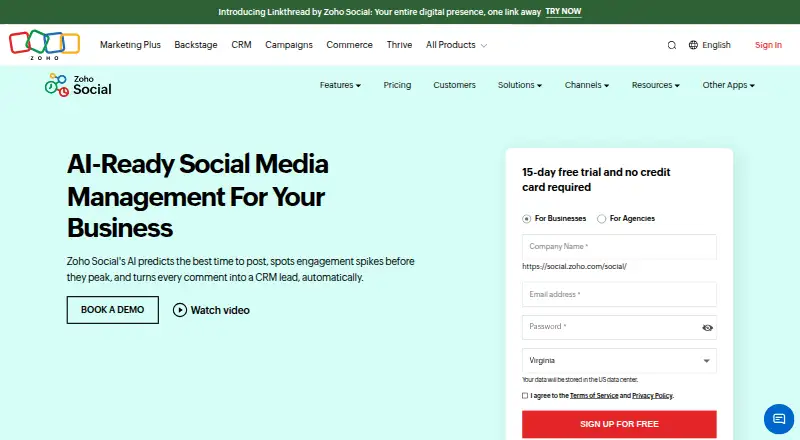
Zoho Social helps individuals, teams, and agencies schedule posts, monitor social activity, and review analytics. It supports X, Instagram, Facebook, Google Business Profile, LinkedIn, TikTok, Pinterest, Mastodon, YouTube, Threads, and Bluesky. A publishing calendar organizes posts, while SmartQ predicts when an audience is active and Custom Queues let users set publishing times for each day of the week. Monitoring columns support real-time listening and engagement. Reports include pre-built options and custom reports based on selected statistics. Instagram tools cover publishing, hashtag monitoring, and reposting user-generated content. Teams can edit posts, approve drafts, and share copy ideas; agencies can create branded dashboards and invite clients. Integrations include Zoho CRM, Zoho Desk, and Canva. The Free plan costs nothing and includes one brand, six social channels, and one team member. A 15-day free trial does not require a credit card. The service is available on web, iOS, and Android, and subscriptions can be canceled at any time.
Who it suits
Zoho Social is designed for individuals, teams, and agencies managing social content and activity. Its agency dashboards and client invitations may suit digital agencies handling multiple clients.
What it does well
- Supports 11 listed social networks.
- SmartQ predicts the best time to post.
- Reports include pre-built and custom options.
- A 15-day trial requires no credit card.
What to know first
- The free plan includes one team member.
- The free plan includes six social channels.
- Social inbox is listed as unavailable.
- Approval workflow is listed as unavailable.
Limits
The free plan includes one brand, six social channels, and one team member. Its analytics are basic, and it does not include a social inbox or approval workflow.
Plans
| Plan | Billed and limits | Price |
|---|---|---|
| Free | 1 brand · 6 social channels · 1 team member | Free |
| Standard | 1 brand · 12 social channels · 1 team member | On request |
| Professional | 1 brand · 12 social channels · 1 team member | On request |
| Premium | 1 brand · 14 social channels · 3 team members | On request |
| Agency | 10 clients · 140 social channels · 5 team members | On request |
| Agency Plus | 20 clients · 280 social channels · 5 team members | On request |
As zoho.com lists them, read 22 Sept 2026. The maker's own page has the final word.
Getting started
- Open the Zoho Social website.
- Choose the free plan or start the 15-day trial without a credit card.
- Use the web service or install the iOS or Android app.
- Connect social accounts within the plan's brand and channel allowance.
- Organize posts in the publishing calendar and set SmartQ predictions or Custom Queues.
Zoho Social is a social media management platform for organizing posts, monitoring activity and reporting across a wide range of networks. It is best suited to individuals and organizations that want scheduling flexibility or ties to Zoho’s CRM and support tools. Its broad reach is useful, but basic analytics and the free plan’s single-user cap make it a less complete choice for teams that need collaboration.
Overview
A publishing calendar, predicted posting times and custom weekly queues give users several ways to plan content. SmartQ forecasts when an audience is active, while Custom Queues allow distinct publishing slots for each day. That combination suits a consistent publishing routine, though it does not remove the need to decide what content to post.
Monitoring columns support real-time listening and engagement. Reporting includes pre-built and custom reports, but analytics are basic, so users seeking deeper performance analysis may need another tool. Zoho CRM integration connects social activity with lead generation, and Zoho Desk can turn updates into support tickets. Canva supports visual design creation and editing.
Key features
- Publishing: Schedule posts around SmartQ predictions or set a custom schedule, then organize them in the content calendar. This is useful for individuals and teams coordinating a regular queue.
- Monitoring and Instagram: Listening columns support ongoing monitoring; Instagram capabilities include publishing, hashtag monitoring and reposting user-generated content.
- Agency tools: Agencies can create a branded dashboard and invite clients, a practical fit for client-facing work.
- Collaboration: Team members can edit posts, approve drafts and share copy ideas. However, the product’s stated approval workflow is No, so it should not be chosen where a formal approval workflow is essential.
- Integrations: Zoho CRM, Zoho Desk and Canva connect social work with sales, support and design tasks.
Pricing
The Free plan costs nothing and includes one brand, six social channels and one team member. It offers a way for an individual to start, but the one-seat ceiling excludes shared team use, and the product has no social inbox.
Standard and Professional are available by monthly or yearly subscription, with custom pricing. Each covers one brand, 12 social channels and one team member; the listed limits do not distinguish their capabilities, so buyers should compare their offered features before choosing. Premium is also custom pricing and raises capacity to 14 channels and three team members for one brand, making it the listed option for a small team that needs more seats.
Agency is custom pricing for 10 clients, 140 social channels and five team members. Agency Plus is custom pricing for 20 clients, 280 channels and five team members. These tiers are aimed at agencies managing multiple clients; the larger tier doubles client and channel capacity without increasing the listed team size. A 15-day free trial requires no credit card, and subscriptions can be canceled at any time.
Platforms
Zoho Social is available on web, iOS and Android. It supports X, Instagram, Facebook, Google Business Profile, LinkedIn, TikTok, Pinterest, Mastodon, YouTube, Threads and Bluesky, giving users a broad range of channels from one service.
Who it's for
Solo operators can use the free plan to manage one brand across six channels, while small teams may find Premium’s three seats more appropriate. Agencies have dedicated client-oriented tiers and a branded dashboard. Zoho Social is less suitable for teams that depend on a social inbox, a formal approval workflow or more than basic analytics.
Pros and cons
- Pro: SmartQ predictions and custom weekly queues offer flexible ways to plan publishing.
- Pro: CRM, Desk and Canva integrations connect publishing with sales, support and design work.
- Pro: Agency plans specify substantial client and channel capacity, with client dashboard branding.
- Con: Free is limited to one team member, so it is not a shared-workspace starting point.
- Con: There is no social inbox or approval workflow, which rules it out for workflows requiring either.
- Con: Basic analytics may not meet the needs of users looking for deeper performance reporting.
Alternatives
Buffer is worth considering for a simpler free-tier comparison: its free plan is forever and supports up to three channels, while Zoho Social’s free plan supports six channels for one brand. Later may suit users who want its calendar-focused offering; its free plan has no free-plan availability, while its Starter plan is $18.75 a month billed yearly. Agorapulse offers a free plan for one user and three profiles with 10 scheduled posts, a smaller profile limit than Zoho Social’s six free channels.
Planable is another free option, with a 50-total-post cap; it may suit users whose priority is a defined post allowance. Metricool offers a free plan for one brand and 20 posts per month, a useful alternative when a monthly post quota is the relevant constraint. Publer’s free plan allows one user, one workspace and three social accounts, with 10 scheduled posts per account.
Social Champ has a free plan for three accounts, one user and 15 scheduled posts per profile. Iconosquare offers a free plan for one user, 10 posts per month per profile and one month of analytics history, which may be preferable when that reporting-history allowance fits the need. Readers comparing more options can browse social media management tools or social media scheduling software.
Verdict
Zoho Social is a strong fit for individuals, small teams and agencies that value broad network support, flexible scheduling and Zoho integrations. Choose it for the combination of publishing, monitoring and client-facing agency capacity; look elsewhere if a social inbox, formal approval workflow or more than basic analytics is central to your work.
Verdict
Zoho Social combines scheduling, monitoring, analytics, and integrations across web and mobile. Review the free plan's team and channel limits, as well as the listed lack of a social inbox and approval workflow.
Questions
Is Zoho Social free?
Yes. The Free plan costs nothing and includes one brand, six social channels, and one team member.
Is there a free trial?
Yes. Zoho Social offers a 15-day free trial, and no credit card is required.
Which platforms can I use it on?
Zoho Social is available on the web, iOS, and Android.
Which social networks does it support?
The listed networks are X, Instagram, Facebook, Google Business Profile, LinkedIn, TikTok, Pinterest, Mastodon, YouTube, Threads, and Bluesky.
Can I cancel a subscription?
Yes. Subscriptions can be canceled at any time.
What integrations are listed?
Zoho Social integrates with Zoho CRM, Zoho Desk, and Canva.
Facts from Zoho Social's own pages
- Agency Dashboard
- Agencies can create an agency-branded dashboard and invite clients. · zoho.com, 28 Sept 2026
- Analytics level
- basic · zoho.com, 22 Sept 2026
- Approval workflow
- No · zoho.com, 22 Sept 2026
- Intended Users
- Designed for individuals, small and large teams, and agencies. · zoho.com, 28 Sept 2026
- Canva Integration
- Integrates with Canva for creating and editing visual designs. · zoho.com, 28 Sept 2026
- Content Calendar
- Provides a publishing calendar for organizing posts across time. · zoho.com, 28 Sept 2026
- CRM Integration
- Integrates with Zoho CRM to help generate leads and close deals. · zoho.com, 28 Sept 2026
- Custom Queues
- Custom Queues provide unique publishing time slots for each day of the week. · zoho.com, 28 Sept 2026
- Desk Integration
- Integrates with Zoho Desk to convert social updates into support tickets. · zoho.com, 28 Sept 2026
- Founded
- 1996 · zoho.com, 28 Sept 2026
- Free plan
- Yes · zoho.com, 22 Sept 2026
- Free Trial
- 15-day free trial with no credit card required. · zoho.com, 28 Sept 2026
- Headquarters
- Chennai, India · zoho.com, 28 Sept 2026
- Instagram Features
- Supports Instagram publishing, hashtag monitoring, and reposting user-generated content. · zoho.com, 28 Sept 2026
- Mobile Apps
- Available through the App Store and Google Play. · zoho.com, 28 Sept 2026
- SmartQ Predictions
- SmartQ predicts the best time to post when the audience is active. · zoho.com, 28 Sept 2026
- Social accounts
- 12 · zoho.com, 22 Sept 2026
- Social Analytics
- Offers pre-built reports and custom reports based on selected statistics. · zoho.com, 28 Sept 2026
- Social inbox
- No · zoho.com, 22 Sept 2026
- Social Monitoring
- Uses multiple listening columns for real-time monitoring and engagement. · zoho.com, 28 Sept 2026
- Post Scheduling
- Schedules posts using best-time predictions or a custom publishing schedule. · zoho.com, 28 Sept 2026
- Cancellation Policy
- Subscriptions can be canceled at any time. · zoho.com, 28 Sept 2026
- Supported networks
- X,Instagram,Facebook,Google Business Profile,LinkedIn,TikTok,Pinterest,Mastodon,YouTube,Threads,Bluesky · zoho.com, 22 Sept 2026
- Supported Platforms
- Supports X, Instagram, Facebook, Google My Business, LinkedIn, YouTube, Pinterest, Mastodon, and TikTok. · zoho.com, 28 Sept 2026
Where Zoho Social stands on Freedom251
- Social Media Management Tools#7 of 145
- Social media schedulers#2 of 26
- Social Media Management - Enterprise Software#5 of 23
- Social Media Marketing#9 of 33
- Social Media Management - Midmarket Software#10 of 32
- Social Tools#11 of 34
- Social CRM Tools#6 of 14
- Social Media Scheduling Software#20 of 43
- Social Scheduling#13 of 27