Freedom251 › Podcast Advertising Platforms

Zencastr
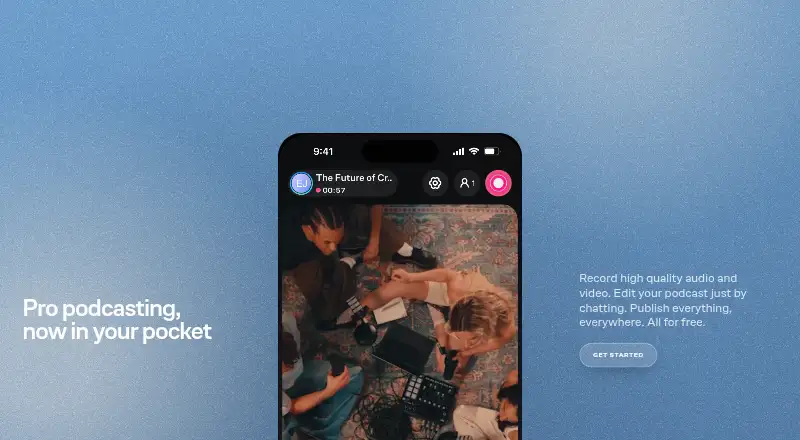
What Zencastr is
Zencastr is a creator platform for recording, editing, distributing, and monetizing audio and video. It records participants on separate tracks, supports video up to 4K and 16-bit 48 kHz WAV audio, and places no time limit on recording sessions. The free plan supports up to six participants, unlimited recording and downloads, unlimited track storage, and five podcast shows. Guests can join from a link without creating an account or downloading computer software. Editing tools include AI filler-word removal, video layouts, soundboards, background-noise reduction, and loudness adjustment. Zencastr automatically transcribes its recordings and can also transcribe uploaded audio or video. It provides free podcast hosting and unlimited distribution to major podcast platforms, with episode publishing to Spotify, Apple Podcasts, YouTube, and others. Recordings upload to the cloud during sessions, and local and cloud backups are available if a computer crashes. The platform can sync recordings to Dropbox and Google Drive. It runs on web and iOS, and offers a Help Center and email support. The free plan is listed as free.
Who it suits
Zencastr suits creators and teams recording audio or video with guests or multiple participants. Its collaboration tools include shared workspaces and role-based permissions, while distribution and hosting features serve podcasters.
What it does well
- Separate tracks for each participant
- Free sessions support up to six participants
- Guests can join by link without registration
- Automatic transcription and editing tools
- Free hosting with unlimited podcast distribution
What to know first
- Free plan is limited to six participants
- Free plan includes five podcast shows
Limits
The Vibecastr Free plan supports up to six participants and five podcast shows. The Enterprise plan uses custom participant and recording, editing, hosting, streaming, and support limits.
Plans
| Plan | Billed and limits | Price |
|---|---|---|
| Vibecastr Free | 6 participants · unlimited recording/download · up to 4K video · unlimited track storage · 5 podcast shows | Free |
| Enterprise | custom participants · custom recording, editing, hosting, streaming and support limits | On request |
As zencastr.com lists them, read 1 Oct 2026. The maker's own page has the final word.
Getting started
- Visit the Zencastr website and use its browser-based recording platform.
- Start a recording session and invite guests with a link.
- Use the Vibecastr Free plan, which supports up to six participants.
- Record audio or video, then use editing, transcription, hosting, or distribution tools as needed.
- For a team, use the shared workspace and role-based permissions.
Zencastr is a browser-based creator platform for recording, editing, transcribing, hosting and monetizing audio and video. It is best suited to podcasters and video-podcast teams that need remote guests and a production workflow in one place. The free tier is unusually generous for long, multi-person sessions, although larger operations will need a custom Enterprise arrangement.
Overview
Zencastr combines capture and post-production rather than stopping at a remote recording room. Sessions can run without a time limit, and the free tier allows up to six participants. That makes it a practical fit for interviews, panels and other extended conversations where shorter session quotas would interrupt the work.
Guests join from a link without registering or installing computer software, which removes a common obstacle for occasional contributors. Recording is browser-based, with local recording and cloud uploads occurring while a session runs. If a computer fails, local and cloud backups provide recovery options. Automatic synchronization to Dropbox and Google Drive is useful for teams that already organize files in those services.
Key features
Every participant receives a separate audio track, so editors can adjust voices independently instead of repairing one mixed file. Audio recording reaches 16-bit, 48 kHz WAV quality, while video can reach 4K. WAV and MP3 export cover both editing-oriented and distribution-oriented workflows.
Editing tools include AI filler-word removal, AI video layouts, soundboards, background-noise reduction and loudness adjustment. These functions can shorten routine cleanup and help standardize an episode, but they do not replace editorial judgment about pacing, content or final mix decisions.
Automatic transcription applies to Zencastr recordings and to uploaded audio or video made elsewhere. That makes the service useful even when recording happens in another tool. Teams can work in a shared workspace with role-based permissions, giving administrators a way to separate editing and recording responsibilities.
For publishing, Zencastr supplies free podcast hosting and unlimited distribution to major podcast platforms. It can publish episodes to Spotify, Apple Podcasts, YouTube and other listening services, allowing a creator to move from finished file to audience distribution without another hosting product.
Pricing
Vibecastr Free
Vibecastr Free costs nothing. It includes six participants, unlimited recording and downloads, up to 4K video, unlimited track storage and five podcast shows. This is the strongest fit for independent creators and small teams: the absence of a recording-time ceiling matters more than a nominally free badge, and five shows can cover several active projects. The six-person ceiling is the practical constraint for larger panels.
Enterprise
Enterprise uses custom pricing and custom limits for participants, recording, editing, hosting, streaming and support. It is intended for organizations that need capacity or service terms beyond the fixed free allowance. Buyers should expect a tailored agreement rather than a predictable self-serve bill.
Platforms
Zencastr records in a browser and is offered on web and iOS. Guests can participate from a computer link without downloading software, while the iOS availability gives mobile users an additional access route.
Who it's for
Choose Zencastr for a podcast or video show with remote contributors, separate-track editing and a desire to host and distribute episodes from the same platform. It also suits teams that need shared permissions, cloud-plus-local backup options or transcription of material recorded outside the service.
Look elsewhere if your sessions routinely exceed six participants and you do not want an Enterprise discussion, or if your workflow requires a platform beyond web and iOS. Creators wanting only a lightweight recorder may find its editing, transcription and publishing scope more than they need.
Pros and cons
- Pro: Unlimited session time on the free plan supports long interviews and panels.
- Pro: Six free participants and separate tracks make multi-guest production viable without a paid subscription.
- Pro: Up to 4K video and 16-bit, 48 kHz WAV capture provide solid source files for editing.
- Pro: Link-based guest access avoids account creation and desktop installation for contributors.
- Pro: Hosting, unlimited distribution, transcription and publishing reduce the number of services in a release workflow.
- Con: Free use stops at six participants and five podcast shows.
- Con: Enterprise pricing and limits are custom, so costs are harder to forecast for expanding teams.
- Con: Browser and iOS availability may not suit teams seeking broader native-platform coverage.
Alternatives
Cleanfeed is the better pick when you need broad device and desktop operating-system coverage and a simpler audio-focused setup; its free Lite plan supports two guests, unlimited recording time, one local audio source and mono remote audio.
Riverside is worth choosing if a two-hour free multi-track allowance, up to 720p video and 44.1 kHz audio match your production better, despite its free-plan watermark.
Spreaker fits creators prioritizing podcast hosting and audience tools: its Free Speech plan supports one podcast and unlimited episodes, with statistics for six months.
Iris.fm is an alternative for browser-based guest recording where a free plan with no credit card requirement is the priority.
Async suits workflows centered on AI-assisted media chat, with ten lifetime AI credits, a one-hour lifetime AI-upload allowance, 720p export and 2 GB storage on its free plan.
Adobe Podcast is preferable for web-based enhancement and studio work when its free limits, including 30-minute and 500 MB Enhance Speech files, are sufficient.
Alitu is a paid alternative for creators who want a defined monthly production allowance, including ten recording hours and twelve transcription hours for $38 a month.
Boomcaster is another recording option, with a free-forever plan and a 20.00 USD-per-month Starter tier offering five hours of studio-quality recording and livestreaming.
For broader comparisons, see Podcast Recording Software, Podcast Advertising Platforms, AI Podcast Editing Software and Video Podcast Software.
Verdict
Zencastr is a strong choice for creators who want long, multi-guest recordings, isolated tracks and an end-to-end publishing workflow without paying at the outset. Its main reason to choose it is the breadth of the free allowance; its main reason to look elsewhere is the six-participant ceiling and custom-only path for larger productions.
Verdict
Zencastr combines recording, editing, transcription, and podcast publishing in one creator platform. Its free plan includes substantial recording and storage allowances, with a six-participant cap.
Questions
Is Zencastr free?
Yes. The Vibecastr Free plan is billed at no cost and includes unlimited recording and downloads, unlimited track storage, and five podcast shows.
How many people can join a free recording?
The free plan supports up to six participants. Recording sessions have no time limit.
Do guests need an account or computer software?
Guests can join from a link without registering for an account or downloading software on a computer.
What recording formats and quality does it support?
Zencastr supports up to 4K video and 16-bit 48 kHz WAV audio. Each participant is recorded on a separate track.
Can Zencastr publish podcasts?
It provides free podcast hosting and unlimited distribution to major podcast platforms. It can publish episodes to Spotify, Apple Podcasts, YouTube, and other listening platforms.
Who makes Zencastr?
Its terms identify the legal entity as Zencastr, Inc. Founder Josh Nielsen describes the company as founded in 2015.
Facts from Zencastr's own pages
- Backup
- Files upload to the cloud while recording, with local and cloud backups available if a computer crashes. · zencastr.com, 1 Oct 2026
- Company
- Zencastr's terms identify the legal entity as Zencastr, Inc. · zencastr.com, 1 Oct 2026
- Distribution
- The platform provides free podcast hosting and unlimited distribution to major podcast platforms. · zencastr.com, 1 Oct 2026
- Editing
- Editing includes AI filler-word removal, AI video layouts, soundboards, background-noise reduction and loudness adjustment. · zencastr.com, 1 Oct 2026
- Founded
- Zencastr founder Josh Nielsen describes the company as founded in 2015. · zencastr.com, 1 Oct 2026
- Guest access
- Guests can join from a link without registering for an account or downloading software on a computer. · zencastr.com, 1 Oct 2026
- Headquarters
- San Francisco, California, United States · zencastr.com, 28 Sept 2026
- Integrations
- Recordings can sync automatically to Dropbox and Google Drive. · zencastr.com, 1 Oct 2026
- Publishing
- Zencastr publishes episodes to Spotify, Apple Podcasts, YouTube and other listening platforms. · zencastr.com, 1 Oct 2026
- Purpose
- Zencastr is a creator platform for recording, editing, distributing and monetizing audio and video content. · zencastr.com, 1 Oct 2026
- Recording limit
- Recording sessions have no time limit and support up to six participants on the free plan. · zencastr.com, 1 Oct 2026
- Recording quality
- The platform supports up to 4K video and 16-bit 48 kHz WAV audio recording. · zencastr.com, 1 Oct 2026
- Security
- Zencastr says it uses industry-standard organizational, technical, administrative and technological measures to protect information. · zencastr.com, 1 Oct 2026
- Separate tracks
- Each participant is recorded on a separate track. · zencastr.com, 1 Oct 2026
- Support
- Zencastr provides a Help Center and lists [email protected] for support questions. · support.zencastr.com, 1 Oct 2026
- Team collaboration
- Teams can use role-based permissions and a shared workspace for recording and editing. · zencastr.com, 1 Oct 2026
- Transcription
- Zencastr automatically transcribes its recordings and can transcribe uploaded audio or video recorded elsewhere. · zencastr.com, 1 Oct 2026
Where Zencastr stands on Freedom251
- Podcast Advertising Platforms#10 of 24
- AI Podcast Editing Software#17 of 26
- Video Podcast Software#27 of 39
- Virtual Recording Studio Software#13 of 18
- Podcast Recording Software#17 of 22