Freedom251 › Podcast Recording Software

Cleanfeed
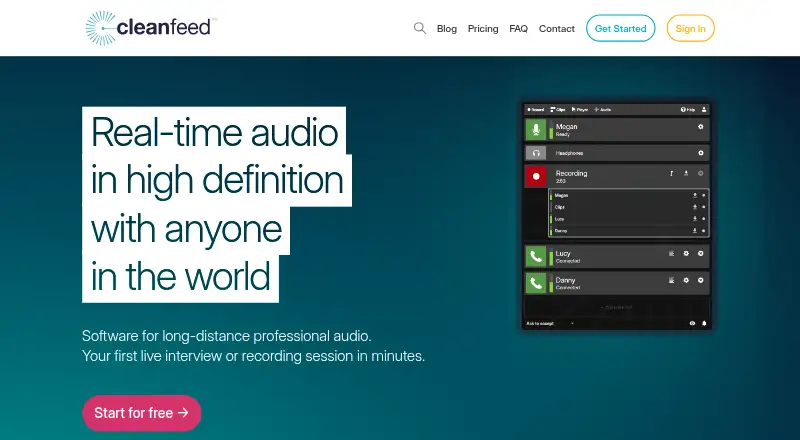
What Cleanfeed is
Cleanfeed is browser-based software for real-time high-definition audio in long-distance interviews and recording sessions. All versions offer unlimited recording time, and audio is recorded live rather than synced later. The free Lite plan supports two guests, one local audio source, and mono remote audio. Pro supports up to 32 guests, multitrack recording, stereo remote audio, four local sources, and email support; its multitrack limit is 32 tracks or 16 stereo tracks. Pro also adds privacy controls, markers and notes, studio playback, live audio repair, and auxiliary outputs for routing guest audio to another application. Cinema is listed at $2,500 a year for the first seat and includes up to 16 guests, DCI 2K 60fps centre-stage video, Gallery, and dedicated server capacity. Chrome on Mac and Windows and Chromium on Linux are preferred; Firefox and Safari are for guests, and iPhone and iPad Safari hosting is not supported. Audio export is WAV. Cleanfeed says it uses end-to-end encryption for audio and does not retain media copies on its servers.
Who it suits
Cleanfeed is aimed at podcasting, radio and broadcast, voice artists, film and television, and commercial production. It suits teams recording remotely who want live browser-based sessions and, on Pro, separate participant tracks.
What it does well
- Unlimited recording time on all versions
- Pro records up to 32 tracks or 16 stereo tracks
- WAV audio export
- Pro includes live audio repair and studio playback tools
- Audio uses end-to-end encryption, according to Cleanfeed
What to know first
- Lite supports only two guests
- Local recording is not available
- Mobile Safari hosting is not supported
- Firefox and Safari are supported for guests only
Limits
Lite allows two guests, one local audio source, and mono remote audio. Pro supports up to 32 guests and a maximum of 32 tracks or 16 stereo tracks. Fair use terms restrict disproportionate bandwidth or resource consumption, including many streams or constant long-term use.
Plans
| Plan | Billed and limits | Price |
|---|---|---|
| Cleanfeed Lite | 2 guests · unlimited recording time · 1 local audio source · mono remote audio · basic features | Free |
| Cleanfeed Pro | $12 monthly; $36 monthly for businesses; yearly renewal gives an additional 20% discount · 32 guests · multitrack recording · stereo remote audio · 4 local audio sources · email support | $12 a month |
| Cleanfeed Cinema | $2,500 yearly for the first seat · 16 guests · DCI 2K 60fps centre-stage video · Gallery · dedicated server capacity tailored to you | $2,500 a year |
| Cleanfeed Pro Enterprise | Contact for information · Available for organizations requiring 5 or more seats over the year · custom branding · payment options | On request |
As cleanfeed.net lists them, read 7 Oct 2026. The maker's own page has the final word.
Getting started
- Open the Cleanfeed website in a browser.
- Use Chrome on Mac or Windows, or Chromium on Linux, as the preferred studio browser.
- Choose Lite, Pro, or Cinema according to the session and production requirements.
- For Pro, use its auxiliary outputs to route guest audio to another application if needed.
- Guests can join using Firefox or Safari; iPhone and iPad Safari guest access is in beta.
Cleanfeed is a browser studio for live, long-distance audio recording, aimed at podcasters, broadcasters, voice artists and production teams. Its strongest case is straightforward: recording runs live for as long as a session needs, with isolated guest tracks and production tools on Pro. It is less suitable when local recording is essential or when hosts need to run sessions from a phone or tablet.
Overview
Cleanfeed handles interviews and recording sessions in the browser, with support for up to 32 people and WAV audio export. The browser-based workflow is a practical fit for distributed audio work; Chrome on Mac and Windows and Chromium on Linux are the preferred studio platforms. Firefox and Safari are guest-only, with studio support on a best-efforts basis, so they are not dependable hosting choices.
All versions record during the session rather than syncing recordings afterward, and all include unlimited recording time. That suits long interviews and production sessions, subject to a fair-use policy against disproportionate bandwidth or resource consumption, including large numbers of streams or constant long-term use. Cleanfeed does not offer local recording, a meaningful drawback for anyone whose workflow depends on a local backup or capture.
Key features
Pro records each guest on an isolated track, with a limit of 32 tracks or 16 stereo tracks. Stereo remote audio and up to four local audio sources make it more capable for multitrack work than Lite, which is limited to mono remote audio and one local source. Pro also adds privacy controls, markers and notes, studio playback tools, live audio repair and auxiliary outputs. Those outputs can route guest audio to another application; Cleanfeed provides guides for Adobe Audition and virtual audio devices on Windows and macOS.
Cleanfeed says it retains no media copies on its servers and uses end-to-end encryption to send and receive audio. Some Cinema video features use point-to-point encryption. The company identifies itself as UK-based, follows GDPR standards and says personal data is exchanged using TLS encryption.
Cleanfeed supports video recording, while Cinema adds DCI 2K 60fps centre-stage video and Gallery. Safari on iPhone and iPad is in beta for guests only; hosting from those devices is not supported. Paid Pro and Cinema plans include email support. For technical requests, Cleanfeed asks users to provide account details, with examples or screenshots as helpful context.
Pricing
Cleanfeed is freemium, with plans for solo or small sessions, regular production and larger organizations:
- Cleanfeed Lite: free. It includes two guests, unlimited recording time, one local audio source, mono remote audio and basic features. It is a sensible starting point for occasional, small audio sessions, but not for multitrack production.
- Cleanfeed Pro: $12 a month, billed $12 monthly; businesses pay $36 monthly. Yearly renewal gives an additional 20% discount. It supports 32 guests, multitrack recording, stereo remote audio, four local audio sources and email support. This is the plan for regular production where separate guest tracks and the added studio tools justify paying; it still does not provide local recording.
- Cleanfeed Cinema: $2,500 a year, billed $2,500 yearly for the first seat. It supports 16 guests and includes DCI 2K 60fps centre-stage video, Gallery and dedicated server capacity tailored to you. It is aimed at productions that need those video capabilities and tailored capacity, rather than ordinary audio-only sessions.
- Cleanfeed Pro Enterprise: custom pricing. It is for organizations requiring five or more seats over the year and includes custom branding and payment options.
Platforms
Cleanfeed lists Android, iOS, Linux, macOS, web and Windows. In practice, studio hosting is browser-based and the maker prefers Chrome on Mac and Windows or Chromium on Linux. Firefox and Safari are guest-only, and iPhone and iPad Safari access remains guest-only beta, so the platform list should not be read as equal hosting support across devices.
Who it's for
Cleanfeed is best suited to audio-first interviews, podcasting, radio and broadcast, voice work, and commercial or film and television production where guests need to connect remotely. Lite suits small, basic sessions; Pro is the more appropriate choice for editors and teams that need isolated guest tracks and live production controls. Look elsewhere if local recording is a requirement, or if mobile hosting is central to the workflow.
Pros and cons
- Pro: Unlimited live recording time across plans suits long sessions without a fixed recording-duration cap, although fair-use limits still apply.
- Pro: Pro's isolated guest tracks, up to 32 tracks, and auxiliary routing serve multitrack editing and audio production workflows.
- Pro: Cleanfeed says it does not retain media copies on its servers and uses end-to-end encryption for audio transfer.
- Con: There is no local recording, so Cleanfeed is a poor fit for workflows that require a local capture.
- Con: Hosting support is narrower than the platform list suggests: Firefox and Safari are guest-only, and iPhone and iPad hosting is not supported.
- Con: Lite's two-guest cap, mono remote audio and single local source make it a limited option for more involved production.
Alternatives
For a broader set of podcast recording options, browse Podcast Recording Software. Riverside is worth comparing if video matters alongside multitrack recording: its free plan includes two hours of multitrack recordings, video up to 720p and 44.1 kHz audio, while Cleanfeed's strongest distinctions are unlimited recording time and Pro's audio production tools.
Spreaker is a more relevant alternative for publishing podcasts: its free plan includes one podcast, unlimited episodes, six months of statistics and a Supporters Club with a 20% fee. Iris.fm offers browser-based guest joining on its free plan and a $9 per month Starter plan with two hours of recording, making it a lower-priced option for shorter sessions.
Async is an alternative for AI-assisted media workflows, with its free plan including 10 lifetime AI credits, one hour of media upload to AI chat, exports up to 720p and 2 GB storage. Zencastr may suit video-led podcasting: its free plan supports six participants, unlimited recording and downloads, video up to 4K, unlimited track storage and five podcast shows.
Adobe Podcast is a web-based option for speech enhancement and studio downloads, with its free plan limiting Enhance Speech to audio files up to 30 minutes and 500 MB, one hour per day. Alitu is a paid alternative with a free trial; its monthly plan costs $38 a month and includes 10 recording hours per month under its fair-use policy.
Verdict
Choose Cleanfeed if you need a browser-based audio studio for long remote sessions and Pro's separate guest tracks and production controls fit your workflow. Its live recording and audio-focused tools are the main reasons to choose it; the lack of local recording and restricted mobile hosting are the clearest reasons to look elsewhere.
Verdict
Cleanfeed offers a free entry plan and Pro tools for larger multitrack sessions. Check browser roles and the lack of local recording against your workflow before choosing it.
Questions
Is there a free plan?
Yes. Cleanfeed Lite is free and includes two guests, unlimited recording time, one local audio source, and mono remote audio.
How much does Cleanfeed Pro cost?
Pro is $12 per month, billed monthly. The listed business price is $36 monthly; yearly renewal gives an additional 20% discount.
Which browsers are preferred for the studio?
Cleanfeed lists Chrome on Mac and Windows and Chromium on Linux as preferred. Firefox and Safari are for guests, with studio support on a best-efforts basis.
Can it record separate participant tracks?
Pro records each guest on an isolated track, with a limit of 32 tracks or 16 stereo tracks.
Does Cleanfeed keep copies of media on its servers?
Cleanfeed says it does not retain media copies on its servers and uses end-to-end encryption to send and receive audio.
Can I host a session from an iPhone or iPad?
No. Safari access on iPhone and iPad is in beta for guests; hosting from those devices is unsupported.
Facts from Cleanfeed's own pages
- Audio routing
- Pro auxiliary outputs can route guest audio to another application, with maker guides showing Adobe Audition and virtual audio devices on Windows and macOS. · cleanfeed.net, 7 Oct 2026
- Browser limits
- Firefox and Safari are supported for guests only; the maker maintains studio support for them on a best-efforts basis. · cleanfeed.net, 7 Oct 2026
- Browser workflow
- The studio runs in a browser, and the maker lists Chrome on Mac and Windows and Chromium on Linux as preferred platforms. · cleanfeed.net, 7 Oct 2026
- Data protection
- Cleanfeed identifies itself as a UK company that follows GDPR standards and says personal data is exchanged using TLS encryption. · cleanfeed.net, 7 Oct 2026
- Intended audience
- The maker presents Cleanfeed for podcasting, radio and broadcast, voice artists, film and television, and commercial production. · cleanfeed.net, 7 Oct 2026
- Mobile access
- Safari on iPhone and iPad is in beta for guests only; hosting from those devices is not supported yet. · cleanfeed.net, 7 Oct 2026
- Privacy and encryption
- Cleanfeed says it does not retain copies of media on its servers and uses end-to-end encryption for sending and receiving audio; some Cinema video features use point-to-point encryption. · cleanfeed.net, 7 Oct 2026
- Production features
- Pro includes privacy controls, markers and notes, studio playback tools, live audio repair, and auxiliary outputs. · cleanfeed.net, 7 Oct 2026
- Purpose
- Cleanfeed provides real-time high-definition audio software for long-distance professional audio, including interviews and recording sessions. · cleanfeed.net, 7 Oct 2026
- Recording
- All versions include unlimited recording time, and recordings are made live rather than synced later. · cleanfeed.net, 7 Oct 2026
- Separate tracks
- Cleanfeed Pro records each guest on an isolated track, and its multitrack limit is 32 tracks or 16 stereo tracks. · cleanfeed.net, 7 Oct 2026
- Support
- Paid Pro and Cinema plans include email support, and the contact page accepts technical support requests with account details and examples or screenshots requested as helpful context. · cleanfeed.net, 7 Oct 2026
- Usage limit
- The terms apply a fair-use policy against disproportionate bandwidth or resource consumption, including large numbers of streams or constant long-term use. · cleanfeed.net, 7 Oct 2026
Where Cleanfeed stands on Freedom251
- Podcast Recording Software#1 of 22
- Virtual Recording Studio Software#1 of 18